fxDreema

    • Register
    • Login
    • Search
    • Back to the main page
    • Categories
    • Recent
    • Tags
    • Popular
    • Search

    Draw line

    Questions & Answers
    4
    20
    572
    Loading More Posts
    • Oldest to Newest
    • Newest to Oldest
    • Most Votes
    Reply
    • Reply as topic
    Log in to reply
    This topic has been deleted. Only users with topic management privileges can see it.
    • M
      Manuel M last edited by

      Hello:
      Is there any condition to delete "draw line" at a certain time?
      For example: I want the line to disappear from the chart at 13:00 PM.
      Regards

      1 Reply Last reply Reply Quote 0
      • Ho3ein.sh
        Ho3ein.sh last edited by Ho3ein.sh

        Hello my friend,
        There are different methods. You can use the "Once a day" block, set the time inside this block, and then use the "Delete Object" block afterward.
        Important Note: When drawing the line, make sure the drawn line has a "name" or a "prefix".

        For more information, follow my free channel on Telegram.

        https://t.me/HoseinRobotFx

        ──────────────────────────────
        👨‍💻 Hossein — fxdreema Instructor (3 years experience)

        📌 Delivered dozens of projects
        for clients and applicants

        📢 Telegram Channel: https://t.me/HoseinRobotFx
        ▶️ YouTube: @HosseinRobot
        ──────────────────────────────

        1 Reply Last reply Reply Quote 0
        • M
          Manuel M last edited by

          OK thanks

          1 Reply Last reply Reply Quote 0
          • M
            Manuel M last edited by

            Hello:
            The line was not removed from the chart.
            Any suggestions?
            https://fxdreema.com/shared/oVo8k2Bve
            Regards

            1 Reply Last reply Reply Quote 0
            • jstap
              jstap last edited by

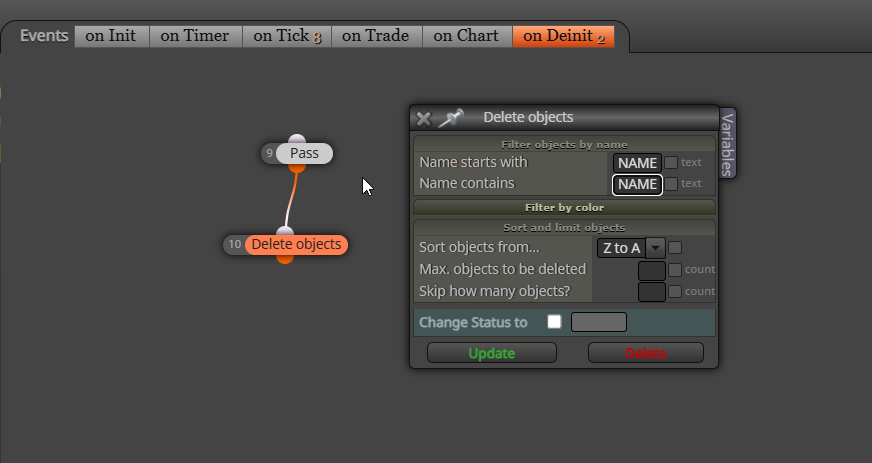
              In deinit delete the line:
              image.png

              Learn fxDreema Without the Wait!

              My comprehensive book, available on Amazon, is packed with examples and invaluable insights to help you fast-track your learning journey.

              The paperback and hardback editions include MT4 & MT5 QR codes for easy access to all prebuilt projects and robots, including my latest gold trading robot!

              Don’t miss out

              Click here➡️ https://mybook.to/fxDreema to get your copy today!

              Enjoy! 😊

              1 Reply Last reply Reply Quote 0
              • M
                Manuel M last edited by

                Thank you for your response.
                Should the project be like this?
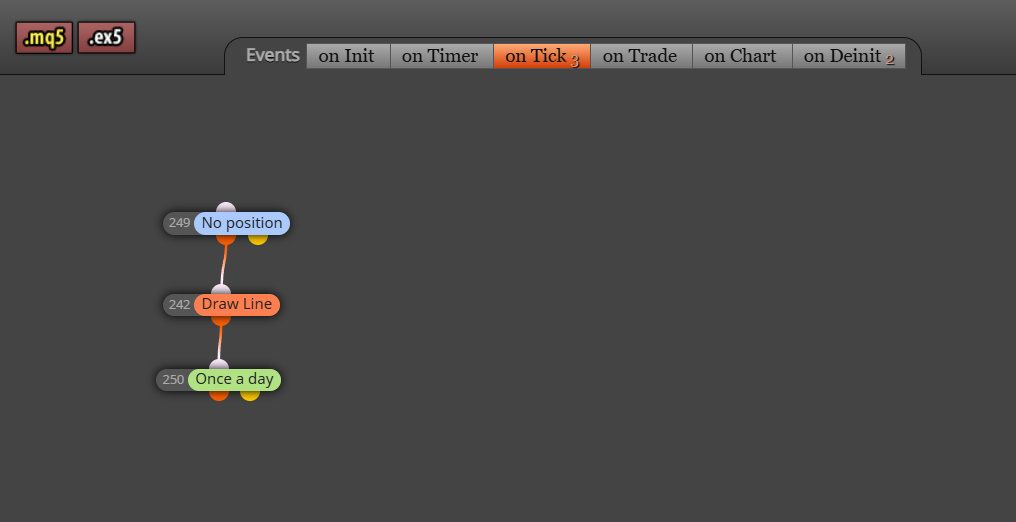
                img1.jpg
                img2.jpg

                1 Reply Last reply Reply Quote 0
                • jstap
                  jstap last edited by

                  Yes looks good, as long as you have used the name of your line (is easier to use names)

                  Learn fxDreema Without the Wait!

                  My comprehensive book, available on Amazon, is packed with examples and invaluable insights to help you fast-track your learning journey.

                  The paperback and hardback editions include MT4 & MT5 QR codes for easy access to all prebuilt projects and robots, including my latest gold trading robot!

                  Don’t miss out

                  Click here➡️ https://mybook.to/fxDreema to get your copy today!

                  Enjoy! 😊

                  1 Reply Last reply Reply Quote 0
                  • M
                    Manuel M last edited by

                    Thank you,

                    1 Reply Last reply Reply Quote 0
                    • M
                      Manuel M last edited by

                      Hello:
                      It's not working. The lines remain on the chart.
                      It seems to be disregarding the "hourly filter."
                      Could it be a MetaTrader cache issue?
                      Regards

                      1 Reply Last reply Reply Quote 0
                      • A
                        albyxx last edited by

                        @Manuel-M in your shared project you are drawing the line every tick if there is no position.
                        It will then get deleted at 13:00 and on the next and susequent ticks get drawn again.
                        Is that really what you want to do?

                        1 Reply Last reply Reply Quote 0
                        • M
                          Manuel M last edited by

                          Hello:

                          The project is an example.
                          The EA would also stop working at 13:00 (with a different time filter), which I forgot to include in the example.
                          I was able to solve the problem (with a boolean constant). Although it's not how I want it.
                          Thanks.

                          1 Reply Last reply Reply Quote 0
                          • jstap
                            jstap last edited by

                            Add your latest shared project link

                            Learn fxDreema Without the Wait!

                            My comprehensive book, available on Amazon, is packed with examples and invaluable insights to help you fast-track your learning journey.

                            The paperback and hardback editions include MT4 & MT5 QR codes for easy access to all prebuilt projects and robots, including my latest gold trading robot!

                            Don’t miss out

                            Click here➡️ https://mybook.to/fxDreema to get your copy today!

                            Enjoy! 😊

                            1 Reply Last reply Reply Quote 0
                            • M
                              Manuel M last edited by

                              Hello:

                              In this example, I think the logic is easier to understand.
                              I'd like the line to appear "or not" on the graph, but I have to do it with false-true, and it's annoying every day.
                              https://fxdreema.com/shared/VjPDdMT7e

                              1 Reply Last reply Reply Quote 0
                              • M
                                Manuel M last edited by

                                I forgot to select the input parameter
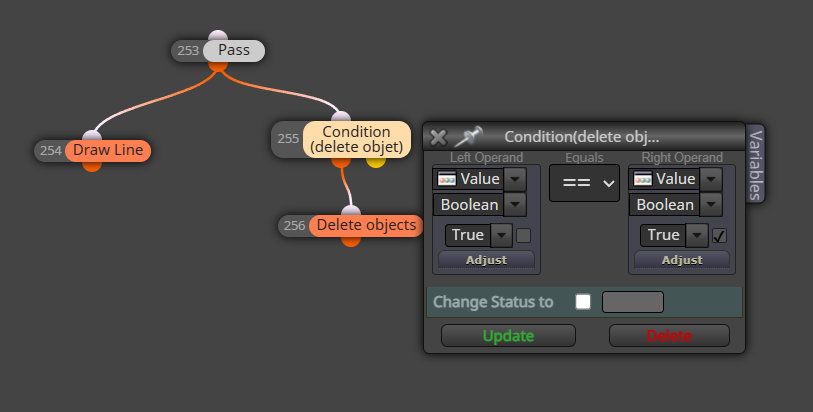
                                img5.jpg

                                1 Reply Last reply Reply Quote 0
                                • jstap
                                  jstap last edited by jstap

                                  on chart only works when you do something on your chart, I think you want this on tick, if you had for example one per day at a specific time on tick delete then at a time you want the object would be deleted

                                  Learn fxDreema Without the Wait!

                                  My comprehensive book, available on Amazon, is packed with examples and invaluable insights to help you fast-track your learning journey.

                                  The paperback and hardback editions include MT4 & MT5 QR codes for easy access to all prebuilt projects and robots, including my latest gold trading robot!

                                  Don’t miss out

                                  Click here➡️ https://mybook.to/fxDreema to get your copy today!

                                  Enjoy! 😊

                                  1 Reply Last reply Reply Quote 0
                                  • M
                                    Manuel M last edited by

                                    I've tried these changes. But they don't work.
                                    https://fxdreema.com/shared/szMzSPKhb

                                    1 Reply Last reply Reply Quote 0
                                    • A
                                      albyxx last edited by

                                      Go back to basics and do this:

                                      image.png

                                      1 Reply Last reply Reply Quote 0
                                      • M
                                        Manuel M last edited by

                                        Thanks, it worked.
                                        The line should appear on the graph again. Specifically, the next day and during the project schedule.
                                        Are any additional blocks necessary?
                                        Best regards

                                        1 Reply Last reply Reply Quote 0
                                        • A
                                          albyxx last edited by

                                          So now you know how it works, apply it to your needs and build up your EA.
                                          Good luck.

                                          1 Reply Last reply Reply Quote 0
                                          • M
                                            Manuel M last edited by

                                            Thank you

                                            1 Reply Last reply Reply Quote 0
                                            • 1 / 1
                                            • First post
                                              Last post

                                            Online Users

                                            H
                                            J
                                            E
                                            T
                                            E

                                            14
                                            Online

                                            146.6k
                                            Users

                                            22.4k
                                            Topics

                                            122.6k
                                            Posts

                                            Powered by NodeBB Forums | Contributors