fxDreema

    • Register
    • Login
    • Search
    • Back to the main page
    • Categories
    • Recent
    • Tags
    • Popular
    • Search

    Buttons

    Questions & Answers
    4
    7
    5462
    Loading More Posts
    • Oldest to Newest
    • Newest to Oldest
    • Most Votes
    Reply
    • Reply as topic
    Log in to reply
    This topic has been deleted. Only users with topic management privileges can see it.
    • P
      Piroozmand last edited by

      Hello,

      Can someone tell me how to arrange a button that do a function by pressing it just once. I like that the button returns to its depressed position while the function which it initiates yet runs..........
      put it simple:
      Click on button -------> -run a function
      - and the button returns to normal position

      Thank you very much:-)

      1 Reply Last reply Reply Quote 0
      • M
        miro1360 last edited by

        do this if you need working with tester:
        https://fxdreema.com/forum/topic/4201/tutorial-05-ema-cross-part-5-buttons-behavior-beginners

        if you dont need tester you can working in on Chart section:
        https://fxdreema.com/shared/W5ieDE9qe

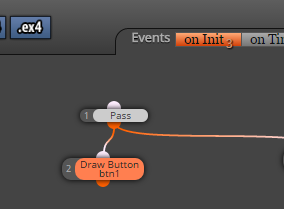
        create buttons in on Init:
        0_1486860832380_upload-128065ea-557a-4274-88e8-2f3d4eb045ca

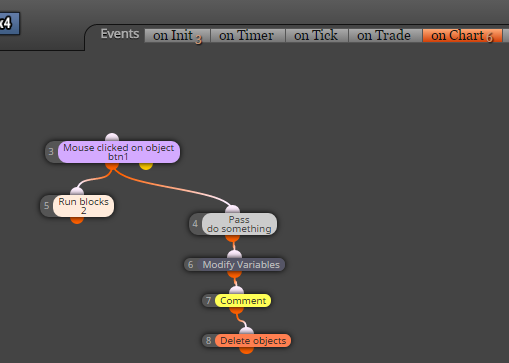
        work with them in on Chart:
        0_1486860861180_upload-4c97d260-65ea-4d0d-af5f-c24f3e2674bd

        see, I used block Run blocks with ID 2 (ID 2 is block which creates button with initially state non pressed, and it just repaint this button into initially state) ...

        Between trading and gambling is a very small gap, be careful.

        1 Reply Last reply Reply Quote 0
        • P
          Piroozmand last edited by

          .... I did it right now, the problem is that when the button repaints the function stops immediately. The function is slowing down of the tester and when the custom code runs and puts the button in its depressed state then the tester runs as fast as it can!!!!

          1 Reply Last reply Reply Quote 0
          • P
            Piroozmand last edited by

            can you take a look at this please?
            https://fxdreema.com/shared/lYosLPDyb

            1 Reply Last reply Reply Quote 0
            • M
              miro1360 last edited by

              try this change (I have not tried functionality) :
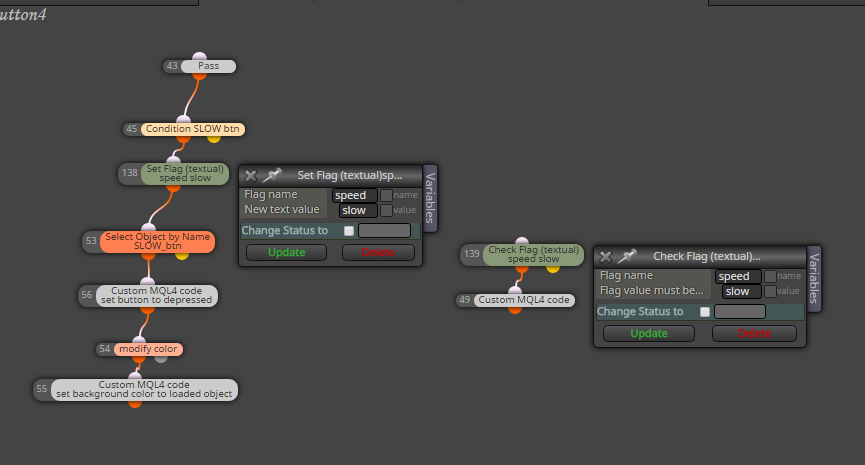
              0_1486932477784_upload-ff8cf100-cd07-423c-9e35-652f423bdb2c

              Between trading and gambling is a very small gap, be careful.

              1 Reply Last reply Reply Quote 0
              • Helmud_H87
                Helmud_H87 last edited by

                @miro1360 - What is the custom code?

                Regards
                FX_Ghost

                jstap 1 Reply Last reply Reply Quote 0
                • jstap
                  jstap @Helmud_H87 last edited by

                  @helmud_h87 miro is not on here very often, if you click Piroozmand's link, then click the on tick tab all blocks are there to view.

                  Learn fxDreema Without the Wait!

                  My comprehensive book, available on Amazon, is packed with examples and invaluable insights to help you fast-track your learning journey.

                  The paperback and hardback editions include MT4 & MT5 QR codes for easy access to all prebuilt projects and robots, including my latest gold trading robot!

                  Don’t miss out

                  Click here➡️ https://mybook.to/fxDreema to get your copy today!

                  Enjoy! 😊

                  1 Reply Last reply Reply Quote 0
                  • 1 / 1
                  • First post
                    Last post

                  Online Users

                  K
                  A
                  S
                  B
                  A

                  13
                  Online

                  146.7k
                  Users

                  22.4k
                  Topics

                  122.6k
                  Posts

                  Powered by NodeBB Forums | Contributors