Tutorial 06 - My Indicators in fxDreema
-
how to use enum, I did some reply here:
https://fxdreema.com/forum/topic/4416/get-custom-indicator-values
https://fxdreema.com/forum/topic/4035/How-to-use-enum/4with enums it is sometimes not very easy
 sometimes you need upload indicator manually, in input parameters instead of enum type give "int", normally it must working
Between trading and gambling is a very small gap, be careful.
-
Thank you Miro!
I actually was able to solve it myself, as I explained here: https://fxdreema.com/forum/topic/4842/lack-of-support-to-enum-datatype/4. It is pretty much like your solutions. I placed my enum list in the Global Variables section of the FxDreema EA (see picture in the link). I also changed the input parameter at all the iCustom functions as seen in the picture. I wish FxDreema would be able to do all this work for us.
-
perfect
 ... maybe admin try something to do ...
 -
@miro1360 hey miro i watched the video that you had sent me but i just cant get it right for the indicaters could you please make a new video on how to do it for indicators insted of pairs or just a tutoral on how to do it please would be great it you could and it will give every one something new to learn aswell
-
and what exactly is not working for you? importing ex4 file indicator or creating dashboard from indicators?
because dashboard for one pair can be done very easily from basic blocks, dont overcomplicate it for yourself ...
https://fxdreema.com/shared/Zb3mroUMbBetween trading and gambling is a very small gap, be careful.
-
perfect @miro1360 thats just what i was looking for
can you now please sure me the best way to set up my buy conditions depending on if my ma1 is up or down on the dash bored And thanks a lot -
dont do it from dashboard, do it with separate EA where you filter these trades with blocks (once per bar, or No trade, depends what you need)
result is than one EA as dashboard and other EA as trading EABetween trading and gambling is a very small gap, be careful.
-
@miro1360 sorry i dont get what you mean could you sure me an exampal or somting
what i wanted to do was to get dater from my dash bored and if just say rsi 1h and rsi 4h are both green then tell me ea to buy -
or try this:
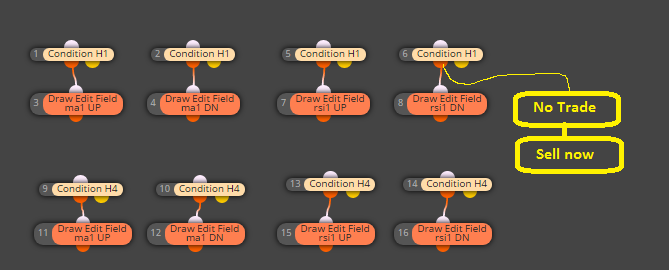
Between trading and gambling is a very small gap, be careful.
-
@miro1360 nop that dnt work i need to get the dater from the objects blocks
-
and this?
https://fxdreema.com/shared/Tcyz7tMSBetween trading and gambling is a very small gap, be careful.
-
@miro1360 hahah mario that works man Thankyou so much your the best
but instead of having the block ''if no trade'' cant we have like a custom block coded to buy again when condition ma1=maUp againi know that many people have this problem when trying to make an ea and i have had this problem befor to but there is no other block that you can use apart from useing the block ''once per bar'' but even then that dont work if you useing mtf in your ea.
is there a way around this if you code something up in the custom mql4 block ? -
this with next trade is complicated, because here can be many ways for answer "when" open this next trade
..... one from ways ... if first trade is opened, this signal still valid ... so you can wait until this signal disappear and than when is here new signal appear, open next trade .... for this search here in forum for "switch" or "flags" .. I replied this question few times ...Between trading and gambling is a very small gap, be careful.
-
@miro1360 yer but what if my buy trade had hit my pt it just reopens another buy tarde is there away to stop opening a trade after it hits its pt and sorry i cant seem to find the form you telling me to look at could you please sur me and example
-
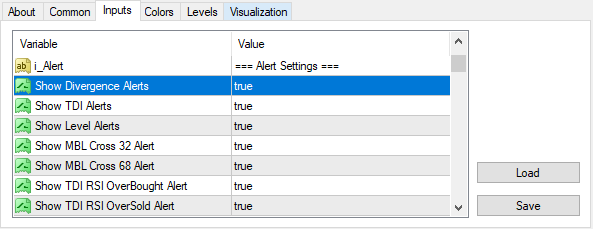
What if the .ex4 custom indicator input variable name is with space?
I tried using the same variable name with space under input parameters and it is not working.

-
type it as Show_Divergence_Alerts
with underscores -
@miro1360 does not work, still pop up alert window.
Is there any way to stop the alert window set default in the ex4?
-
search for TDI indicators in mql4 code, there must be something
-
okay thanks
-
I uploaded my indicators like you said and they worked but MT4 doesn't recognize them and will not take a trade on the backtester
