fxDreema

    • Register
    • Login
    • Search
    • Back to the main page
    • Categories
    • Recent
    • Tags
    • Popular
    • Search

    Four Conditions Met Before Trigger Order

    Questions & Answers
    3
    22
    4220
    Loading More Posts
    • Oldest to Newest
    • Newest to Oldest
    • Most Votes
    Reply
    • Reply as topic
    Log in to reply
    This topic has been deleted. Only users with topic management privileges can see it.
    • E
      edward brazil last edited by

      Hello everyone,
      I am really happy I created this EA, but something is missing, and it is not working.

      Could, somebody help me to finish it?

      How can I do, if I need four conditions to be met, before it triggers the order?
      This is the project.
      https://fxdreema.com/shared/1Kx3ENGzb
      Thank you very much for the help.
      Good day
      These conditions are separated by an indeterminate number of candles

      1 Reply Last reply Reply Quote 0
      • V
        vnpython 0 last edited by

        i think you cannot have more than 1 x< / x> in your string of conditions. use only 1 cross and the others have to be > or < conditions.

        T 1 Reply Last reply Reply Quote 0
        • T
          trader.philipps @vnpython 0 last edited by

          @vnpython-0 Sure you can have multiple x< / x> conditions in your chain. However, it reduce the number of occurrences if conditions have to take place at the same time.
          What you may do is to allow the cross not strictly on a certain candle, but on a pre-defined range. That means you would set the "cross width" parameter to a different value than 1 on each of the x< / x> blocks - or just some depending on the required strictness.

          I like to share my knowledge, but expect the others to contribute as well.

          1 Reply Last reply Reply Quote 0
          • V
            vnpython 0 last edited by

            if course you can use that strictness, why not? use it on candle 0 or candle 1?

            1 Reply Last reply Reply Quote 0
            • E
              edward brazil last edited by

              Hello, thanks for the reply, and ideas.

              Well, about being able to have more than 1 x< is possible, because when I put only, first condition and trigger condition with X< they working fine.

              I tried to put different cross width, like trader.philipps said but did not work.
              I put to cond. one width= 3, cond. 2= width 2, and cond. 3 =1, and trigger only change X< to <, but did not trigger the trade.

              Maybe it is something else, about the sequence.

              When I put only 1st condition and Trigger, like this:

              https://fxdreema.com/shared/QQrekQisd

              it works, but when I put more condition ( to work not at the same time, and depending on the previous one):

              https://fxdreema.com/shared/XJ7IKjyH

              it does not trigger.
              type name value description
              Variable set up is like this: bool / Variable_1 / false / blank.

              Any help?

              T 1 Reply Last reply Reply Quote 0
              • T
                trader.philipps @edward brazil last edited by

                @edward-brazil The issue is the crossing event. The 300 and 500 MA cross not very often. And you'd expect that this happens at the same time as 100 crosses 300 and 25 crosses 100 or soemthing like that.
                Usually I'd expect a certain condition to confirm the reason for opening a trade. Let's say you want to ensure that 100, 300 and 500 are aligned in the right order 100 > 300 > 500. So you confirmed you trading condition or reason for opening the trade. Now you'd have a trigger such as 25 x> 100 and open the trade.
                Is that what you try to achieve? Or does the crossing of any of your cross condition has a special meaning when considering to open the trade?

                I like to share my knowledge, but expect the others to contribute as well.

                1 Reply Last reply Reply Quote 0
                • E
                  edward brazil last edited by

                  Actually, I do not want them to cross at the same time, but as a sequence, one after the other.

                  so 1st condition happens, and code looks for 2nd condition, then when 2nd locks, it will look for the 3rd condition, then when the 3rd happens, it triggers the order with the trigger condition.

                  After the order is triggered, it resets and waits for the first condition again.

                  T 1 Reply Last reply Reply Quote 0
                  • T
                    trader.philipps @edward brazil last edited by

                    @edward-brazil Well in that case you should for the longer term MAs use just < or > and on the short term MA just the x> / x< from my perspective.

                    I like to share my knowledge, but expect the others to contribute as well.

                    1 Reply Last reply Reply Quote 0
                    • E
                      edward brazil last edited by

                      hi, I tried:

                      1st. only <
                      2nd. only <
                      3rd. only <
                      Trigger. x<

                      Also, I tried all only <, including trigger condition.

                      But, did not work.

                      I am testing a specific period where I can see it happens on the chart. So, even though it takes time to happen, I know in the period should happen, and for that, I follow all the way with visual and the MAs working together.

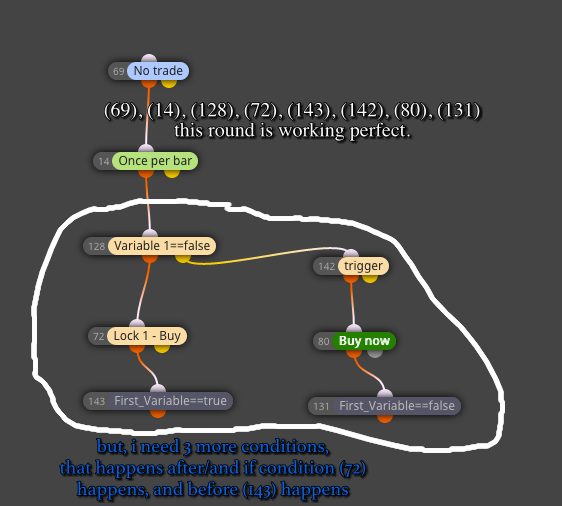
                      How can I make another copy of the logic, that is working, but only on the opposite side of the trigger.
                      As on the picture below:
                      0_1569271204432_Captura de Tela 2019-09-23 às 17.27.54.jpg

                      1 Reply Last reply Reply Quote 0
                      • E
                        edward brazil last edited by

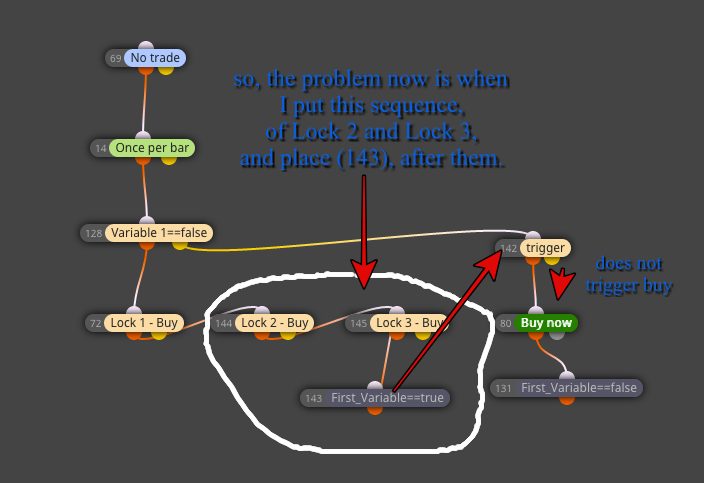
                        So, Sequence would be:
                        if Lock 1 happens, looks for Lock2
                        if Lock 2 happens, looks for Lock 3
                        if Lock 3 happens, activates (143)
                        and when the last condition, (trigger) happens
                        buy order is activated.

                        When (131) resets variable, going to look for Lock 1 again.

                        1 Reply Last reply Reply Quote 0
                        • E
                          edward brazil last edited by

                          0_1569272268226_Captura de Tela 2019-09-23 às 17.53.49.jpg

                          T 1 Reply Last reply Reply Quote 0
                          • T
                            trader.philipps @edward brazil last edited by

                            @edward-brazil In that case not all conditions are met. Maybe you can share a chart example where we can see how it should behave.

                            I like to share my knowledge, but expect the others to contribute as well.

                            1 Reply Last reply Reply Quote 0
                            • E
                              edward brazil last edited by

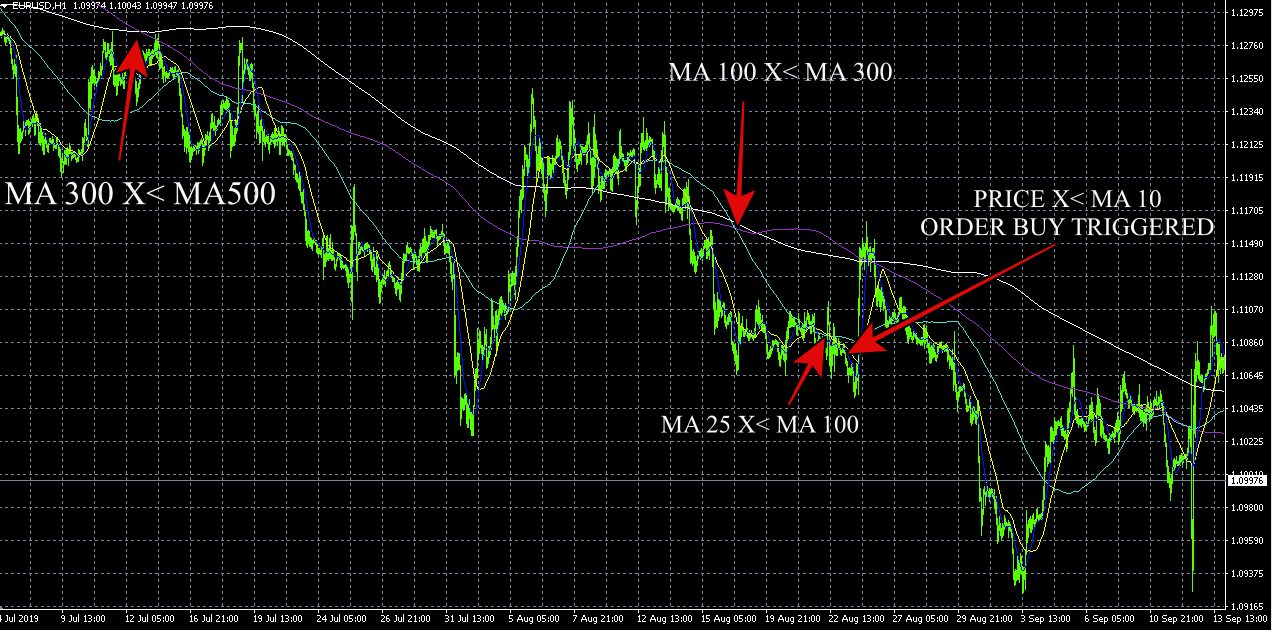
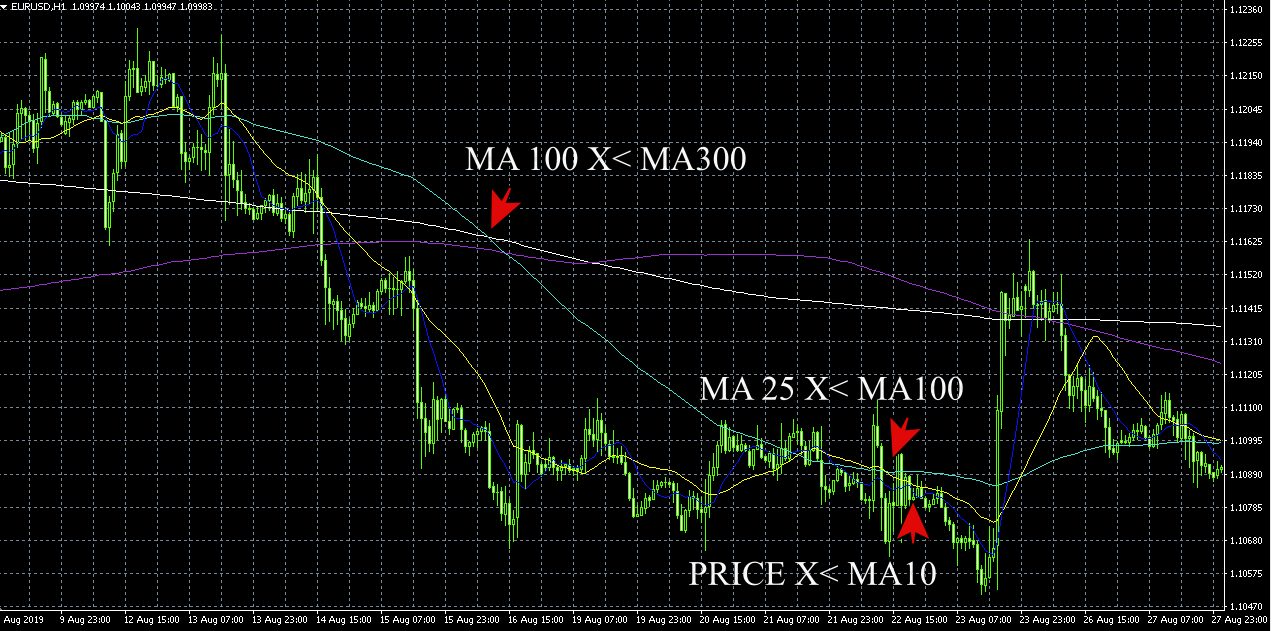
                              0_1569340899016_FIRST PART.jpg 0_1569340905347_2ND PART.jpg

                              thank you for helping.

                              T 1 Reply Last reply Reply Quote 0
                              • E
                                edward brazil last edited by

                                MA 500 white
                                MA 300 purple
                                MA 100 blue
                                MA 25 yellow
                                MA 10 dark blue

                                T 2 Replies Last reply Reply Quote 0
                                • T
                                  trader.philipps @edward brazil last edited by

                                  @edward-brazil I'm on mobile at the moment and can't see much. Will check later when on PC.

                                  I like to share my knowledge, but expect the others to contribute as well.

                                  1 Reply Last reply Reply Quote 0
                                  • T
                                    trader.philipps @edward brazil last edited by

                                    @edward-brazil Okay .. upper chart. When you mark the buy entr y the pruple (300 MA) was already above the white (500 MA) again. That means to me that it doesn't matter if 300 or 500 is above each other, just price must be below of them, right?
                                    If that is the case for the other MA's as well, you can forget about the x > / x< stuff.
                                    I that case you'd just check close price < all of the MAs besides the dark blue (10 MA).
                                    Here you want to open a buy trade each tim the price xcosses 10 MA (dark blue).

                                    Is that's what you want? Or do there have to be some alignment of MAs such as yellow must be under blue, blue under purple, purple under white?

                                    I like to share my knowledge, but expect the others to contribute as well.

                                    1 Reply Last reply Reply Quote 0
                                    • T
                                      trader.philipps @edward brazil last edited by

                                      @edward-brazil Okay, I digged a bit deeper into this. Here is what I did so far.0_1569375072212_EA_Help.mq4

                                      The thing is that you set your variable to true once the certain conditions eg. for buy is given.
                                      Once that happens, there are no checks if your lock conditions are still valid. Only if a trade is created once, the variable is reset to false and lock conditions are checked again.

                                      I re-ordered the conditions and let the EA draw a line if all lock conditions are met. So you can see where they're valid. It looks loke that now.
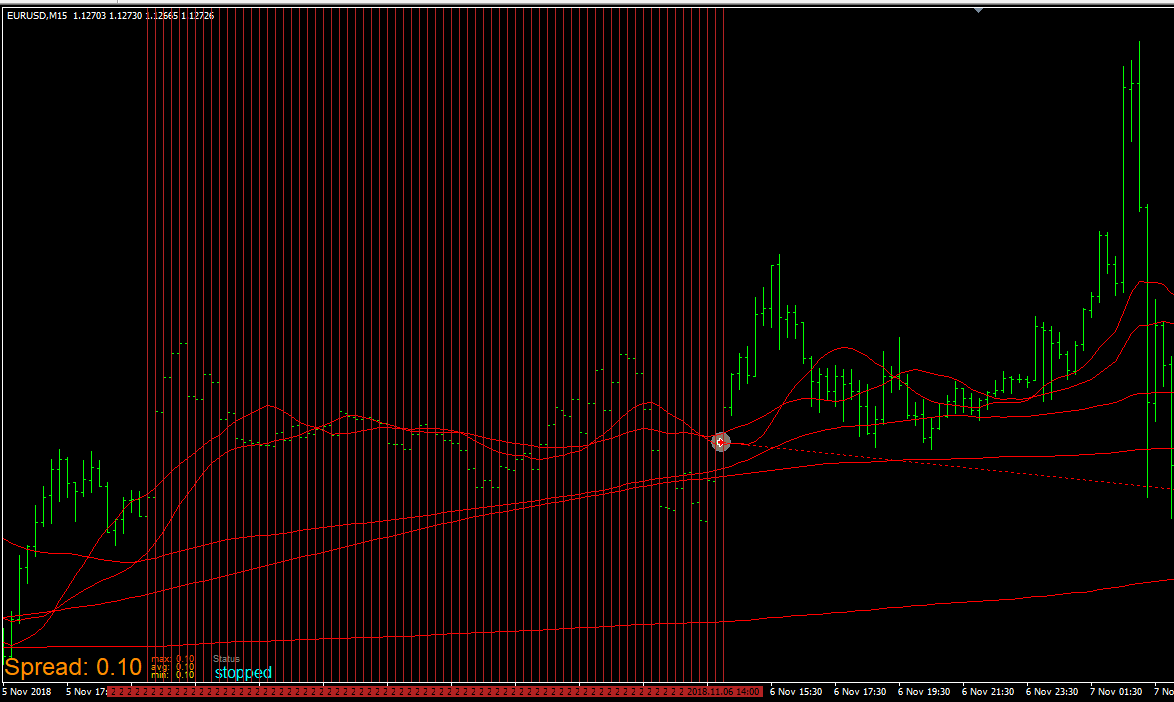
                                      0_1569375852914_b2257edf-46fd-45a3-bbcb-f50752177367-image.png
                                      But you can take the line out.

                                      Here is the reordered version.
                                      0_1569375936964_EA_Help_2.mq4

                                      I like to share my knowledge, but expect the others to contribute as well.

                                      1 Reply Last reply Reply Quote 0
                                      • E
                                        edward brazil last edited by edward brazil

                                        hi, thanks very much for taking time to help.

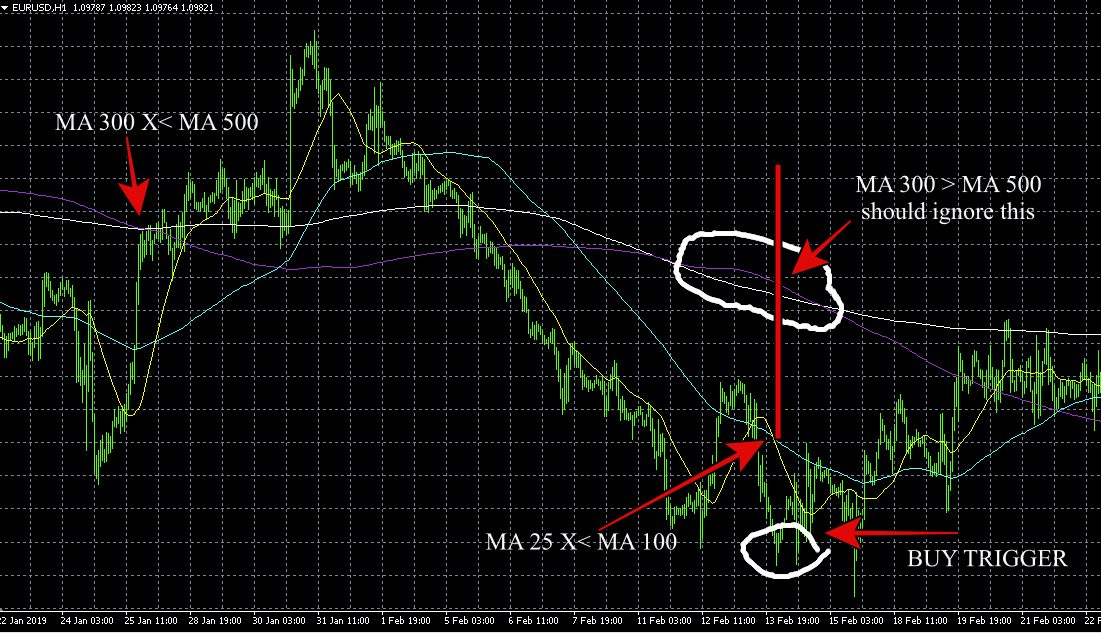
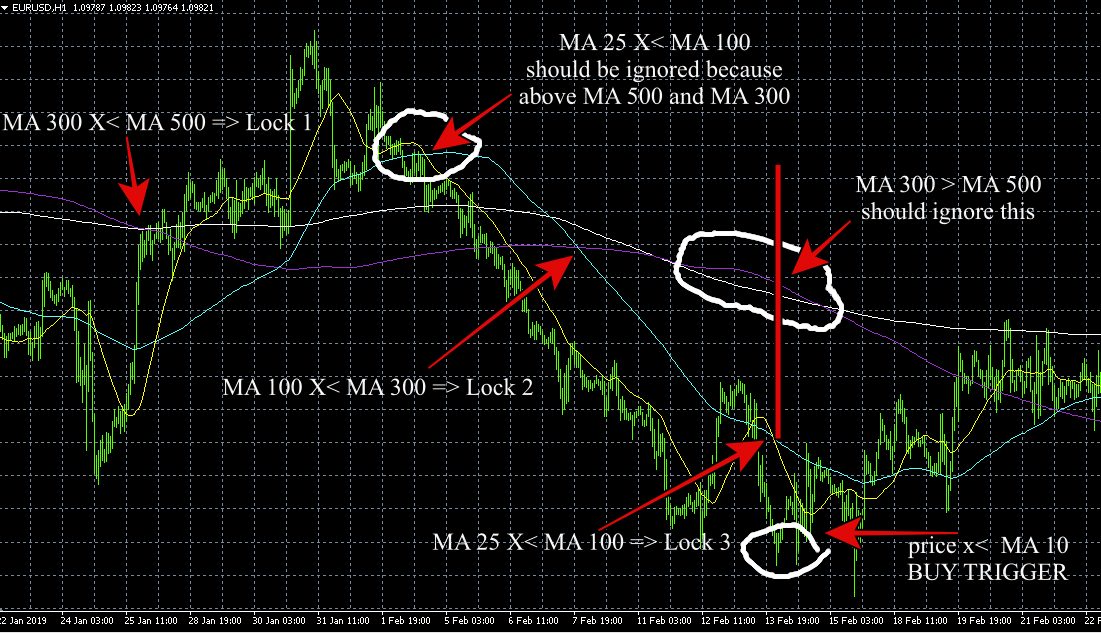
                                        That is very good. The only thing is that sometimes, MAs do not follow the same places, when at the same time.

                                        Sometimes, when MA 25 X< MA 100, at that time, MA 100 is already above MA 300, for example, and if that is on the chart, the order will not trigger.

                                        So, the idea is to have the sequence, even though longer MAs are already of alignment.

                                        The idea is to have the sequence: 1st Lock, then look for 2nd Lock, then look at the 3rd Lock, then Trigger condition, even though 1st or 2nd, or 3rd Lock could be already out of sequence on the chart., because this will happen eventually.

                                        For example, when MA 100 is X< MA 300, eventually, MA 300 will be above MA 500, and in this case trade will not happen.

                                        So, the sequence should go on, independently of the positions, of the X behind.
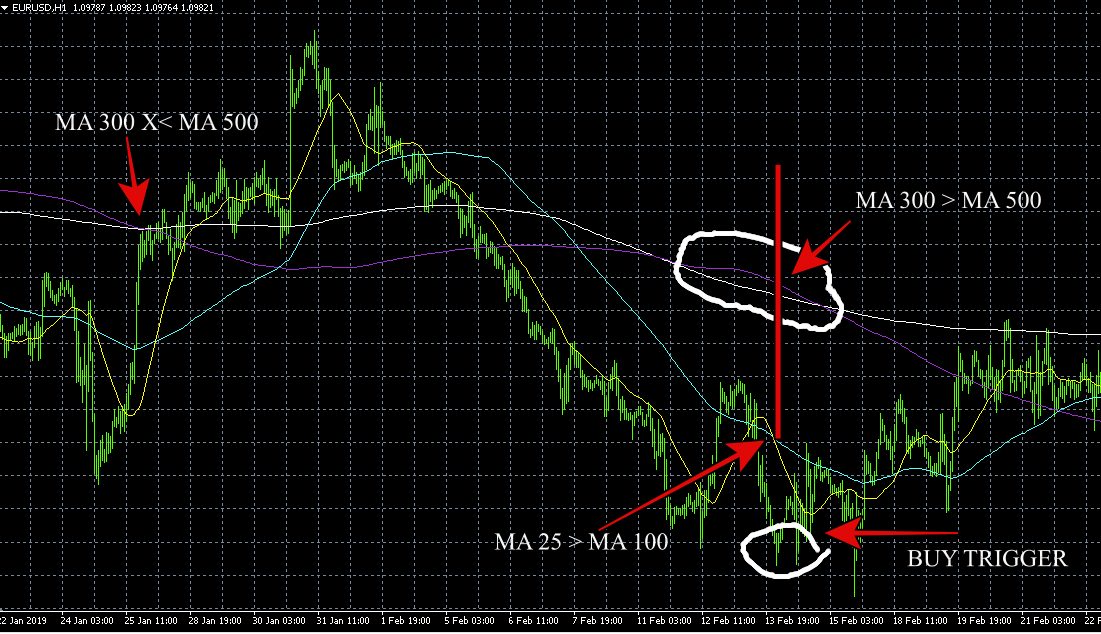
                                        0_1569414541728_HELP 2 - FIX.jpg

                                        1 Reply Last reply Reply Quote 0
                                        • E
                                          edward brazil last edited by

                                          0_1569414705534_HELP 2 - FIX 2.jpg

                                          sorry, disconsider last print., this one is correct.

                                          1 Reply Last reply Reply Quote 0
                                          • E
                                            edward brazil last edited by edward brazil

                                            Just to explain the MA 25 crossing, when!0_1569416150392_HELP 2 - FIX 4.jpg

                                            T 1 Reply Last reply Reply Quote 0
                                            • 1
                                            • 2
                                            • 1 / 2
                                            • First post
                                              Last post

                                            Online Users

                                            B
                                            P
                                            S
                                            S
                                            T
                                            F
                                            I
                                            S
                                            S

                                            17
                                            Online

                                            146.6k
                                            Users

                                            22.4k
                                            Topics

                                            122.6k
                                            Posts

                                            Powered by NodeBB Forums | Contributors