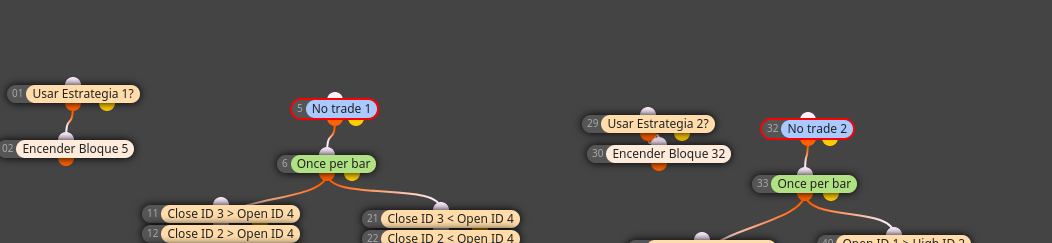
How can I do 3 or 4 strategies within the same robot.
-
How can I do 3 or 4 strategies within the same robot.
and how can I have the possibility to turn off or turn on each strategy separately to optimize each one separately in the backtesting
then once optimized each one by serparado ignite them all.
Examples please, I think this will help the community a lot.
-
@luisjunior1224 Well, that really depends on how different your strategies are. If you build it like 4 different EA for instance, with separate entry and exit paths, you might use boolean constant variables in combination with turn on / turn off blocks for instance. This you are able to switch on a specific strategy (or more) in the EA settings.
If you want to "reuse" some parts of the EA throughout all the strategies you should separate the different phases of the trades.
- Entry condition(s) (including maybe trading hours, max spread, etc)
- In-trade management (such as set to BE, trailing, news)
- Exit condition(s)
If your strategies only differ on entry conditions only for instance, you'd use turn off/turn on blocks and the boolean constant only for the different entry conditions.
Here is a rough example how that may look!
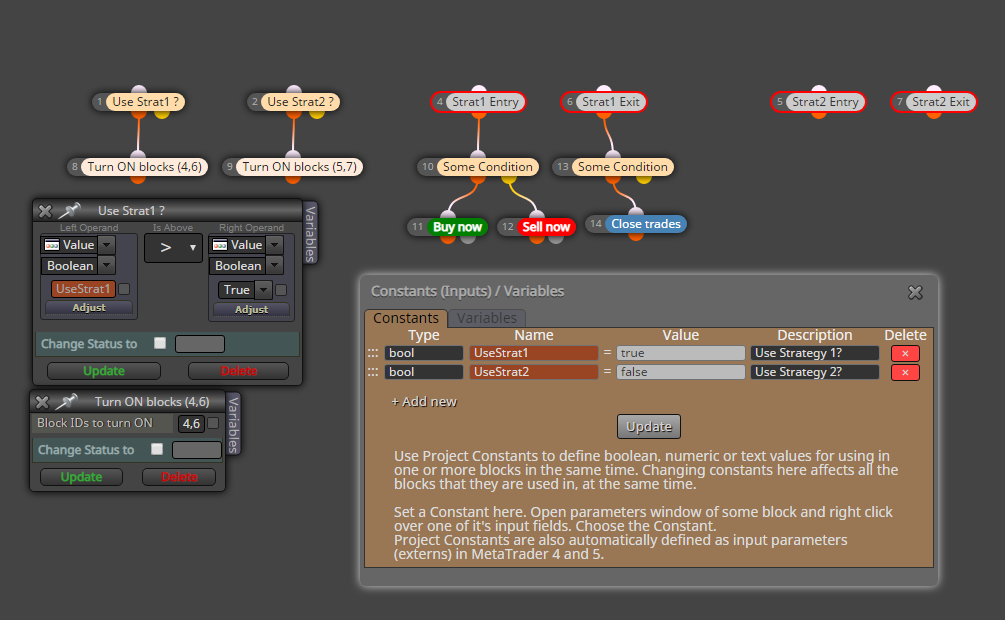
I simplified it a bit for the screenshot. I'd run the paths of block 1 and 2 afteranother on init tab rather than on the on tick tab, but like that I could place all in one screenshot.
Pleas also note that all blocks 4 to 7 are switched off by default and the conditions from block 1 and 2 would switch them on depending on EA parameter settings. -
thanks for your answer, but I'm afraid I didn't understand anything brother.
-
@luisjunior1224 Okay, so maybe start with describing your strategies and than we will figure out the differenrent trade states (open signal, in trade, close) accross them.
-
A disadvantage for backtesting 3-4 strategies in ONE single EA i found out is, that the backtests needs waaaay longer than if you backtest them single. To backtest i would test them separately, but later it makes sense to put them together.
-
I want to do 3 or 4 strategies in 1 single robot.
but for the backtesting process I want to have the option to turn off or turn on each strategy to optimize 1 to 1 and then have it turned on all of them so that they work together all at once
-
@trader-philipps I want to do 3 or 4 strategies in 1 single robot.
but for the backtesting process I want to have the option to turn off or turn on each strategy to optimize 1 to 1 and then have it turned on all of them so that they work together all at once
-
@luisjunior1224 It does not help if you repeat your aim a lot of times. You might specify your strategy in order to get started. If you're not able to specify your strategies, my answer you can read above as that's the way to do it
-
under controlling blocks bro. toggle on off,,, hit the little tick tho so you can use in mt4.
-
@trader-philipps I did what you told me, or at least I tried.
But even if you put false in the configuration in mt5 as you want the strategy works the same way
https://fxdreema.com/shared/oh7QBx4qb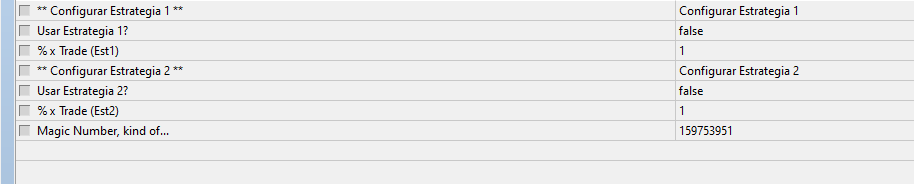
-
Turn of the 2 blocks 1 and 2 first (right mouse click ON / Off) it must look like in the screenshot