Backtesting stops abruptly and I don't know why (but I guess why)
-
This is the first time I find that a backtesting stops abruptly (i.e. before finishing the programmed testing period) for no apparent reason. Let me explain.
I'm working on a hedging EA that is programmed to work on two different timeframes at the same time, M15 and M1. If all conditions are on the same timeframe, it works fine. However, the inferior timeframe conditions are activated, it crashes so the reason must be there. Let's say a buy/sell is open on M15, if price moves back and reaches a specific ATR distance in pips from open price (in loss), the hedging part is activated and an opposite trade is open. I confirm my broker allows hedging.
Here is when the inferior timeframe is activated. It is programmed that if the close price of M1 bar is below o equal to that ATR distance, then the opposite trade is open. And it is exactly when this happens that the backest crashes and simply stops. Never happened to me before.
I used two ways to do this hedging part, but both failed. Initially I specified all relevant blocks as M1 on the available display within them. Then I used a 'Set current timeframe for next blocks' on top of the tree. Now I ran out of ideas.

Any hint?
-
@l-andorrà Did you check the journal / expert tab? Are you on MT4 or MT5?
-
Do you have enough space on your c drive as my tester crashes and won't work when it is full.
-
@hadees I have fixed that problem with a symbolic link to my larger storage drive.
The program "thinks" the data is in C:`...\AppData, but actually its on the D disk.
https://www.howtogeek.com/howto/16226/complete-guide-to-symbolic-links-symlinks-on-windows-or-linux/Need small help? Tag me in your post
Need big help? https://www.fiverr.com/big_algo/automate-your-winning-strategy-in-mql4-or-mql5 -
@roar Thanks Roar that is really good to know.
-
I forgot to tel that I was on MT4. I will take a llok on your link, roar, but I don't understand why the program 'thinks' that right now for the first time after so many, many years of backtesting.
-
@roar said in Backtesting stops abruptly and I don't know why (but I guess why):
@hadees I have fixed that problem with a symbolic link to my larger storage drive.
The program "thinks" the data is in C:`...\AppData, but actually its on the D disk.
https://www.howtogeek.com/howto/16226/complete-guide-to-symbolic-links-symlinks-on-windows-or-linux/Hi roar. As far as I can read, I understand what a symbolic link is, but I'm afraid I don't understand why I need now and not for so many years backtesing EAs. Can you please give me a hint?
(English) I will try to help everyone in these fxDreema forums. But if you want to learn how to use the platform in depth or more quickly, I can help you with my introductory fxDreema course in English at https://www.theandorraninvestor.eu.
(Català) Miraré d’ajudar tothom en aquests fòrums d’fxDreema. Tanmateix, si vols aprendre a fer servir la plataforma amb més profunditat o més de pressa, t’hi puc ajudar amb el meu curs d’introducció a fxDeema en català a https://www.theandorraninvestor.eu/ca.
(Español) Intentaré ayudar a todo el mundo en estos foros de fxDreema. Sin embargo, si quieres aprender a usar la plataforma en profundidad o más deprisa, te puedo ayudar con mi curso de introducción a fxDreema en español en https://www.theandorraninvestor.eu/es.
-
@l-andorrà Hi! Its a solution to an overfilled hard disk, may not be your problem though
-
@l-andorrà Doy our really have disk space issues? If so you might delete sone log files (or let Windows compress them) and maybe delete some of the historic data. As those are stored per broker you might have some unused in your MT4 instance.
-
No, I don't have any disk space issue. More than 40% of it is still empty. I will try to remove some log files, as you recommend.
-
I tried a different approach and Ican confim the issue is within the EA. I backtested a different EA using the same symbol, timeframe and period. It works fine. Retried with the new EA and the problem persists. No logs were changed or removed.
The problem is somewhere at the moment in which the lower timeframe is required. Everything else works fine. Weird...
-
@l-andorrà Are you using a custom indicator in your project? Can you backtest it in your terminal?
-
Yes, I'm using some custom indicators now, but I used exactly the same on previous verisons and they worked perfectly. I didn't change any of them in the new version. I just added that M1 part that is messing it up.
I can backtest all my previous EAs on the same terminal with nor problem at all. Whatever is happening, it's happening in this weird EA. I simply can't guess what the hell is going on.
-
I found something. Once backtesting was not an option, I tried forward testing. The EA doesn't work properly and I got this error message:

I have no idea what it means but I guess the tow final numbers are code lines related to it, so here they are:
For line 105:
102 {
103 public:
104 static bool Bull_candle_signal;
105 static bool Bear_candle_signal;
106 static double Break_Even_price;
107 static double OBV_MA_red;
108 static double OBV_MA_yellow;
109 static double buys_only;
110 static double sells_only;
111 static double Buy_counter;That line is showing one of my variables.
For line 13490:
13487 else if (mode=="equity") {size=(value/100)AccountEquity()/(LotSizeTickValue);}
13488 else if (mode=="balance") {size=(value/100)AccountBalance()/(LotSizeTickValue);}
13489 else if (mode=="freemargin") {size=(value/100)AccountFreeMargin()/(LotSizeTickValue);}
13490 else if (mode=="equityRisk") {size=((value/100)AccountEquity())/(sl((TickValue/ticksize)*point)*PipValue(symbol));}
13491 else if (mode=="balanceRisk") {size=((value/100)AccountBalance())/(sl((TickValue/ticksize)*point)PipValue(symbol));}
13492 else if (mode=="freemarginRisk") {size=((value/100)AccountFreeMargin())/(sl((TickValue/ticksize)*point)PipValue(symbol));}
13493 else if (mode=="fixedRisk") {size=(value)/(sl((TickValue/ticksize)*point)PipValue(symbol));}
13494 else if (mode=="fixedRatio" || mode=="RJFR")Any clue?
-
The error is at line 13490 and 105 is the horizontal position at that line. It's about the lot size and I can tell you what is the problem

So, what you have is this:
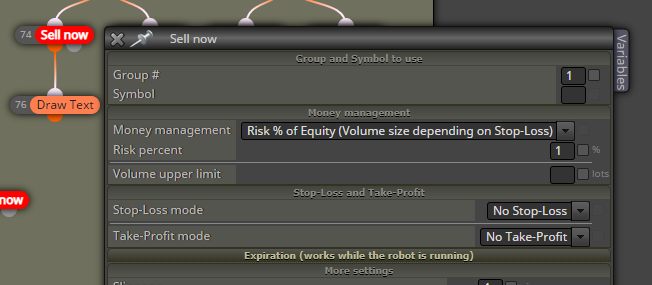
The thing is, this MM method requires some positive value for SL and you can read that "Volume size depending on Stop-Loss". To calculate the lot size, the size of SL is considered - the bigger the SL, the smaller the lot size. But when SL is 0, then the lot size should be infinity, which is of course not possible, and that's why the error is "zero divide".
-
Thank you very much for the explanation. I finally found the solution by reading other forum threads.


