Multiple Pending Orders in Sequence
-
hello,
can anyone please support me in order how to the EA place my pending orders in sequences,,,,, it's like make the them one after one ... Exp. place pending order #1 ,,, then once activated (#1) them place pending order #2 ,,,, etc... no mater how many orders my ea has.
really appreciate your support,
thanks,
Ava -
Do you mean that every open trade will create a pending order automatically? Ore that every open trade will create several pending orders at the same time?
-
thanks for reply,
what i mean, my ea will create a trade once the conditions met, then i need to but a punch mixed Pending Orders (Buys + Sells) according to my strategy. for Exp: my ea has 5 or 6 Pending Orders... what i want is Pending Order #1 comes first & once activated "the market price hit it" then the Pending Order #2 start/initiated ......etc.
i don't know where the right Tap is for this fuction "on Tick" or "on Trade" and which "Cloude" is it.
i hope you've got the idea of my issue sir,
thanks,
Ava -
There can be several solutions for what you want but depending on your current project. Can you please share it to take a look on it?
-
hi there,
sorry for the delay, kind of busy.
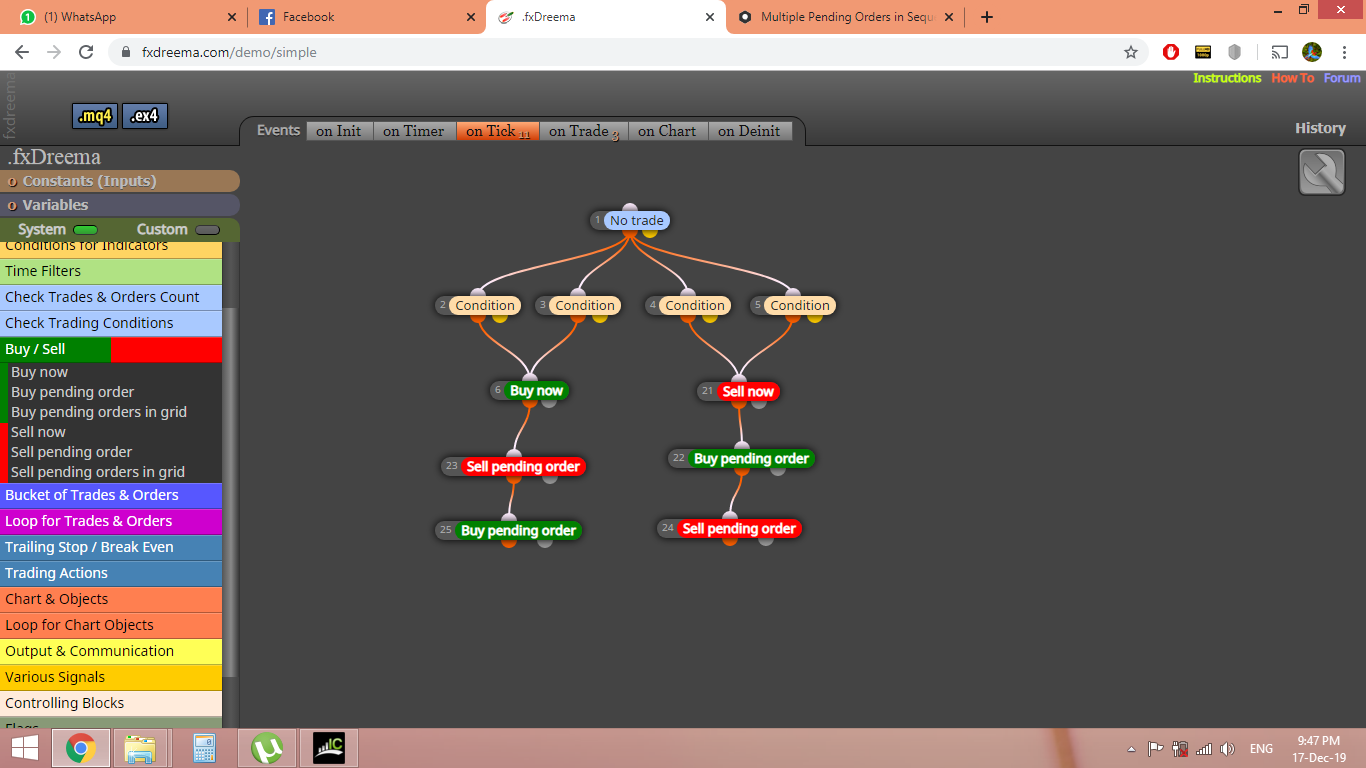
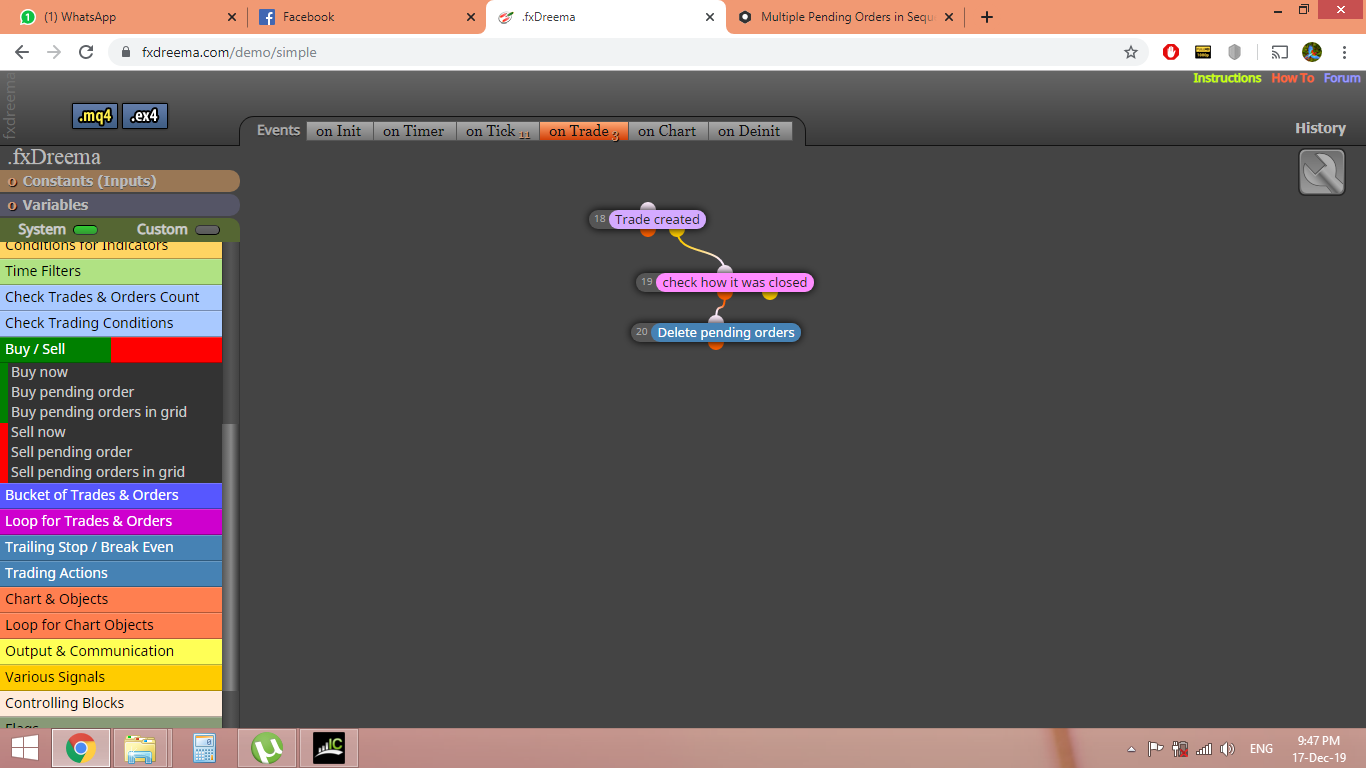
please see the attached EA & the screen shuts for my strategy that i'm working on, but till now didn't goes well. so bad.
i hope you sir can guide me for the right solutions to make it work.
-
The ex4 fils is apparently corrupted. Could you please select on the builder 'Projects' --> 'Create a shared copy (web link)' --> Select 'Get a link' button --> Select the created link (a new window will pop up) --> select the URL and copy it here?
That way we'll be able to check it out block by block.
-
sorry,
i couldn't follow, where i can find the settings that you ask for:
Could you please select on the builder 'Projects' --> 'Create a shared copy (web link)' --> Select 'Get a link' button --> Select the created link (a new window will pop up)
can you pls make a screen shuts for the this.. thanks
-
yah yah, i found it,..
thx
wait a moment
-
here is the link, i hope you can figure it out.,,,,, pls
thx
-
-
Ok This is what I see in my quick first glance.
-
I recommend you to specify candle ID 1 on all operands of all your condition blocks. Clock on 'More settings' and you will see the place. Now you are working on candle ID 0 and that can mess things up.
-
Your current structure means that if conditions 2 and 3 are true on the same tick, two buy trades will be opened. Is that as intended?
-
Why is block 27 connected to the yellow point of block 26. I can't imagine when that condition will be true. Can you please tell me the logic behind that?
-
Your block on top of the whole structure is a 'No trade'. That means that, once there is at leasu on trade open, nothing blow it will be executed anymore. According to your fisrt post, you want that new trades are open and new pending orders are also created. In that case I recommend you to substitute that block for a 'Once per bar' one.
Try this changes and let me know.
-
-
Dear Friend,
Good day to you,.
Please see the below remarks,. thanks.
- I recommend you to specify candle ID 1 on all operands of all your condition blocks. Clock on 'More settings' and you will see the place. Now you are working on candle ID 0 and that can mess things up.
"I have already make the changes as per your recommendations but it seems not that effected"
- Your current structure means that if conditions 2 and 3 are true on the same tick, two buy trades will be opened. Is that as intended?
"Yes, once the conditions in Clouds 2 + 3 are meets the the buy order should be created. The same with Clouds 4 + 5 as well for sell order"
- Why is block 27 connected to the yellow point of block 26. I can't imagine when that condition will be true. Can you please tell me the logic behind that?
"Because that's the only way i could find to delete the pending orders after previous trade was successfully closed with Take Profit" if you might know an another way to do it please let me know.
- Your block on top of the whole structure is a 'No trade'. That means that, once there is at leasu on trade open, nothing blow it will be executed anymore. According to your fisrt post, you want that new trades are open and new pending orders are also created. In that case I recommend you to substitute that block for a 'Once per bar' one.
"I have already make the changes as per your recommendations but it seems not that effected"
Please see the shared project of my EA after editing.
https://fxdreema.com/shared/v96lA4ekcI believe you now have a complete idea about my EA that what i'm trying to build. could you please support me in how to do it even in an another Structure. you sure have a much more experience than me.
I really appreciate your support,.
Ava -
Let me ask you two questions. a) Do you need both conditions of blocks 2 and 3 to be true for a trade to be open or just any of them? b) I don't see the 'Once per bar' block anywhere. Are you sure that's the last verision of your project?
-
Let me ask you two questions.
a) Do you need both conditions of blocks 2 and 3 to be true for a trade to be open or just any of them?
"Yes, once the two conditions are met. this is the right time to place a trade."
b) I don't see the 'Once per bar' block anywhere. Are you sure that's the last verision of your project?
"Yes, this is the latest version i made. i only replace the (No Trade) with (Once per bar) as advised. i don't where else i should put."
Thanks,
Ava -
- In that case connect them one after the other and not in parallel as they are now.
- I don't see that 'Once per bar' block substituting the 'No trade' one in your link. Results cannot be the same by using 'No trade' instead.