fxDreema

    • Register
    • Login
    • Search
    • Back to the main page
    • Categories
    • Recent
    • Tags
    • Popular
    • Search

    how do i arrange my final ea input for simple identification like in the picture below ?

    Questions & Answers
    3
    4
    600
    Loading More Posts
    • Oldest to Newest
    • Newest to Oldest
    • Most Votes
    Reply
    • Reply as topic
    Log in to reply
    This topic has been deleted. Only users with topic management privileges can see it.
    • M
      mbiganyi dagwi last edited by

      i want to simply identify my ea inputs like this
      0_1580495038331_expert_advisor_input.png
      but each time i try to set flags or check flags i end up having those ab labeling block at the bottom
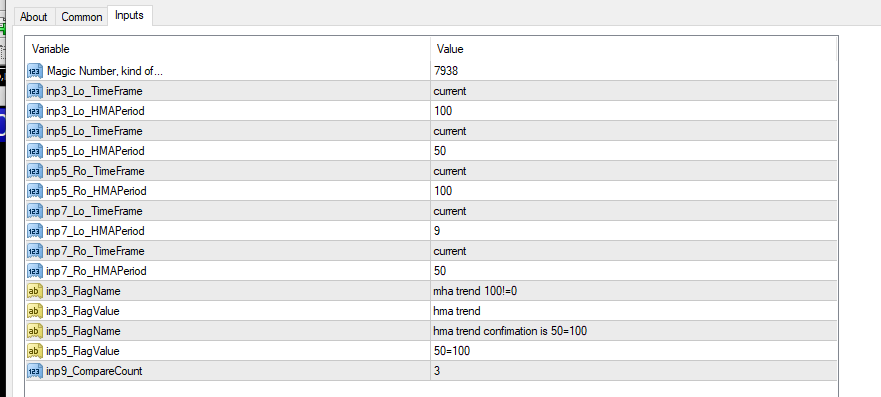
      0_1580495654774_Screenshot (18).png

      this is how i did. its not a final thing its just an example just to understand how to arrange my inputs for simple identification
      0_1580496302115_Screenshot (20).png

      T 1 Reply Last reply Reply Quote 0
      • l'andorrà
        l'andorrà last edited by

        Forget all those glags. Uncheck ALL boxes and create as many Constants as you need. There you can write whatever you need and order them as you wish.

        (English) I will try to help everyone in these fxDreema forums. But if you want to learn how to use the platform in depth or more quickly, I can help you with my introductory fxDreema course in English at https://www.theandorraninvestor.eu.

        (Català) Miraré d’ajudar tothom en aquests fòrums d’fxDreema. Tanmateix, si vols aprendre a fer servir la plataforma amb més profunditat o més de pressa, t’hi puc ajudar amb el meu curs d’introducció a fxDeema en català a https://www.theandorraninvestor.eu/ca.

        (Español) Intentaré ayudar a todo el mundo en estos foros de fxDreema. Sin embargo, si quieres aprender a usar la plataforma en profundidad o más deprisa, te puedo ayudar con mi curso de introducción a fxDreema en español en https://www.theandorraninvestor.eu/es.

        1 Reply Last reply Reply Quote 0
        • T
          trader.philipps @mbiganyi dagwi last edited by

          @mbiganyi-dagwi You have to define constants rather than just checking the Use as input parameter checkbox.

          That might look like this ..
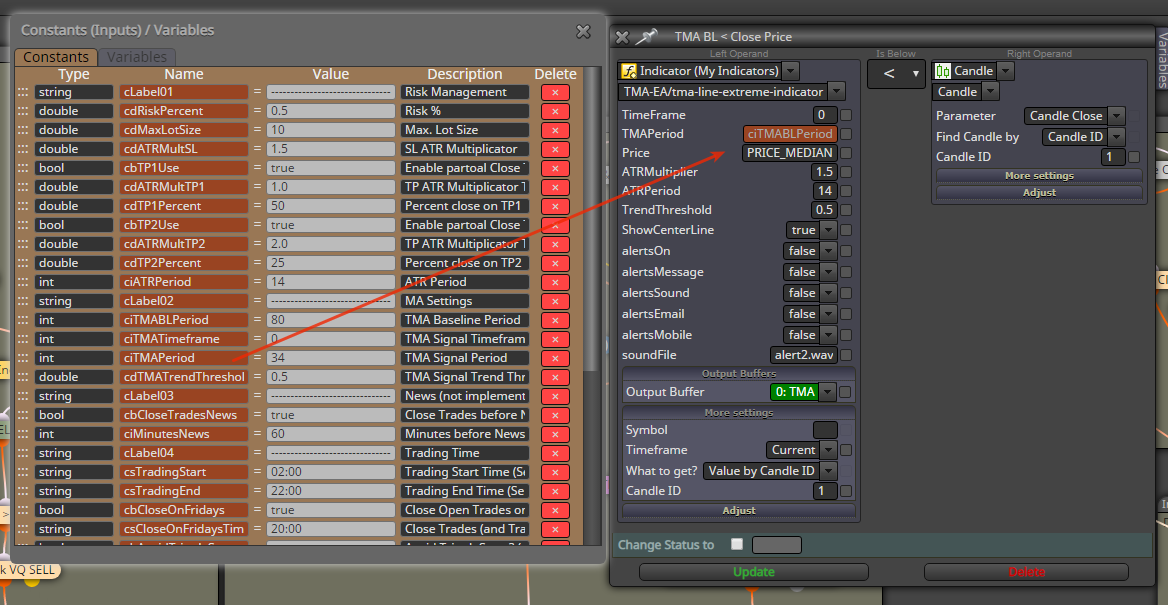
          0_1580498338969_02a37bd3-1e6a-4416-99cb-d6411da33dec-image.png

          Than you can by right clicking on an input fielt define the constant as input paramter in the blocks. That works on most blocks, but you have to know the data types and set them the right way.

          I like to share my knowledge, but expect the others to contribute as well.

          M 1 Reply Last reply Reply Quote 0
          • M
            mbiganyi dagwi @trader.philipps last edited by

            @trader-philipps thanks'

            1 Reply Last reply Reply Quote 0
            • 1 / 1
            • First post
              Last post

            Online Users

            C
            F
            S
            R
            M
            U
            C

            13
            Online

            146.8k
            Users

            22.4k
            Topics

            122.6k
            Posts

            Powered by NodeBB Forums | Contributors

