fxDreema

    • Register
    • Login
    • Search
    • Back to the main page
    • Categories
    • Recent
    • Tags
    • Popular
    • Search

    News time filter

    Questions & Answers
    6
    15
    4539
    Loading More Posts
    • Oldest to Newest
    • Newest to Oldest
    • Most Votes
    Reply
    • Reply as topic
    Log in to reply
    This topic has been deleted. Only users with topic management privileges can see it.
    • T
      trader.philipps last edited by trader.philipps

      In my tutorial EA I tried to implement the icefx NewsInfo indicator. Somehow it from time to time diables Live Trading even if in settings it's configured not to do so. Hence I must admit that the newsinfo indicator is unfortunately not reliable for fxdreema use.
      Furthermore I contacted darkmoonfx (former icefx) in order to ask how back-testing with that EA should work. I recently received the answer that the only remaining news profider (forex factory) doesn't offer the required data for bt and hence all efforts to make it run in bt was for nothing 😕

      All in all it's a very disappointing result.

      So I kept on searching for more reliable news filters that might work with fxdreema EAs. So far I only found FFCal based indicators such as FFC or FFCal itself.
      On latest FFCal versions I was facing strange time values sometimes even negative ones so I believe there might be an issue in times calculations. Btw. the new forexfactory url for weekly calendar is http://cdn-nfs.faireconomy.media/ff_calendar_thisweek.xml

      0_1581957256357_ffcal_net.mq4

      0_1581957270355_FFC.mq4

      FFC seems to count the minutes right, but it doesn't offer the minutes after news options.

      So what I'm seeking for now is some help to figure out a constellation that works well on live trade (not BT) with any news indicator. As BT is not possible, it is a bit time consuming to test development.
      So, has anyone already some experience in news integration or is willing to help a bit on that topic?
      There might be a way in tweaking the xml file in order to produce some dummy news events, but I haven't dig deeper into this.

      Btw. here is the actual project of Tutorial EA V1.03 with icefx NewsInfo included.
      0_1581957668065_Tutorial-EA_V1.03.mq4
      https://fxdreema.com/shared/XpmPAFtK

      I like to share my knowledge, but expect the others to contribute as well.

      J 1 Reply Last reply Reply Quote 1
      • l'andorrà
        l'andorrà last edited by

        Your effort is simply proceless man. I'm really impressed! 😮

        (English) I will try to help everyone in these fxDreema forums. But if you want to learn how to use the platform in depth or more quickly, I can help you with my introductory fxDreema course in English at https://www.theandorraninvestor.eu.

        (Català) Miraré d’ajudar tothom en aquests fòrums d’fxDreema. Tanmateix, si vols aprendre a fer servir la plataforma amb més profunditat o més de pressa, t’hi puc ajudar amb el meu curs d’introducció a fxDeema en català a https://www.theandorraninvestor.eu/ca.

        (Español) Intentaré ayudar a todo el mundo en estos foros de fxDreema. Sin embargo, si quieres aprender a usar la plataforma en profundidad o más deprisa, te puedo ayudar con mi curso de introducción a fxDreema en español en https://www.theandorraninvestor.eu/es.

        1 Reply Last reply Reply Quote 0
        • J
          jzfusion last edited by

          @trader-philipps
          This is on another level. Have you considered training in some form. I think a lot of us could use some of the knowledge you have. If you already have something going please let me know.
          cheers

          T 1 Reply Last reply Reply Quote 0
          • T
            trader.philipps @jzfusion last edited by

            @jzfusion Well, my aim is to have a template for creation of EAs with all the stuff that is usefull and one only needs to set entry and exit conditions (if other than SL/TP or trailing).
            The one thing missing is a low footprint news filter I think. Once that template exists, of course we may talk about the specific parts if someone is interested in or just simply use it.
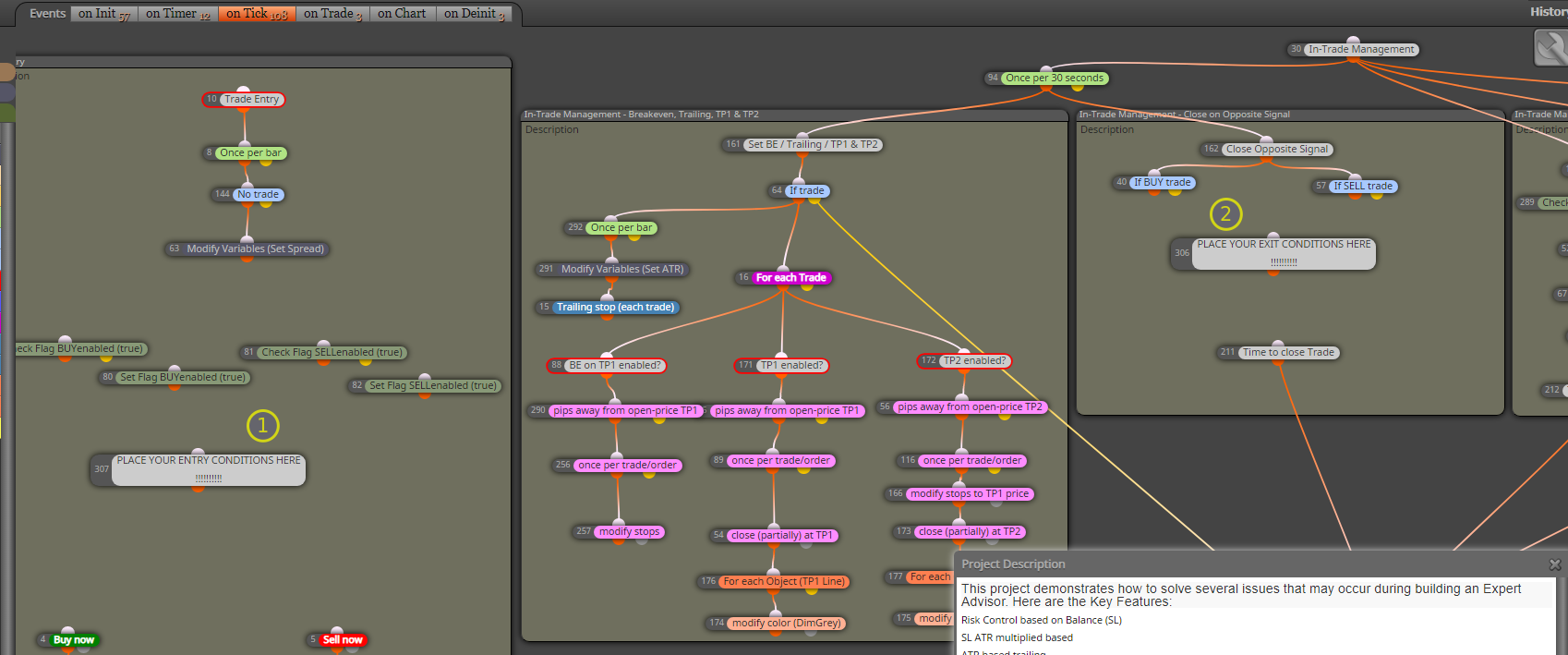
            A template might look like this ..
            0_1581979020848_e387ff4d-bb6d-4330-8d17-e5c0ba1046b1-image.png

            .. where (1) you'd put your entry conditions and if applicable on (2) place your exit conditions. All other fratures are still in place and usable if switched on in parameter settings.

            I like to share my knowledge, but expect the others to contribute as well.

            1 Reply Last reply Reply Quote 0
            • J
              jzfusion last edited by jzfusion

              @trader-philipps
              Thanks for this idea. It will certainly save us a lot of time and effort!
              I loaded this to see it action on a demo account and I have disabled time filter but New Trades allowed is still showing false. Is there something I'm not doing right?0_1581979483487_Screenshot 2020-02-17 at 22.44.28.png
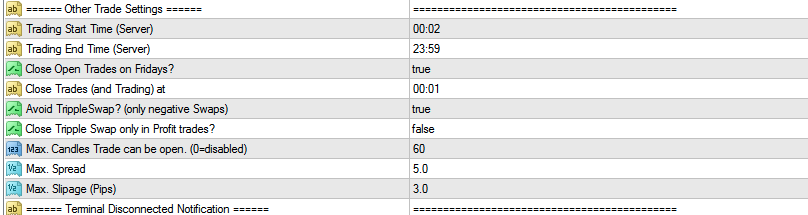
              Ignore the above question. It's working now
              cheers

              1 Reply Last reply Reply Quote 0
              • J
                jzfusion last edited by

                @trader-philipps
                Last question
                I tried running a quick backtest but I keep getting "Expert Advisor self terminated". I have all the historical data etc

                T 1 Reply Last reply Reply Quote 0
                • T
                  trader.philipps @jzfusion last edited by

                  @jzfusion which Version did you load? If the TMA example you have to import the custom indicators to a sub folder as described in the tutorial.
                  For the icefx version you have to import the indicator as well. That task is very tricky as indicators parameters and buffers have to be created in the right order.
                  did you get any errors in the log files?

                  I like to share my knowledge, but expect the others to contribute as well.

                  1 Reply Last reply Reply Quote 0
                  • J
                    jzfusion last edited by

                    @trader-philipps
                    All the indicators are in the TMA-EA folder as per the instruction.
                    I managed to get it running and the system placed a trade on UK100. I loaded the same on EURGBP, EURUSD, AUDUSD, GBPUSD and EURAUD all day and there was not trade on any of these currencies. I find that quite surprising as I didn't change the indicator settings. I saved a set from the same one loaded and tried to use that for backtesting and that too self terminated.
                    The logs simply says it self terminated.
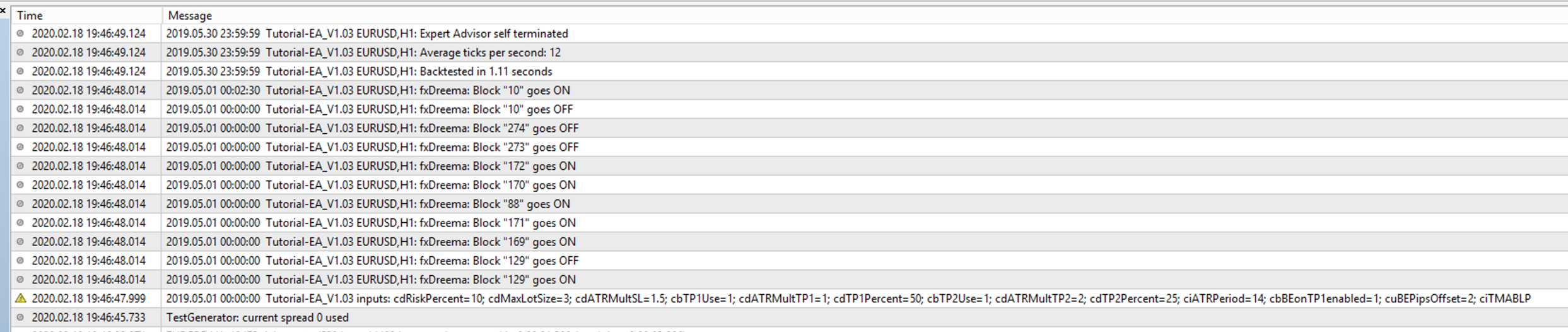
                    0_1582055591626_Screenshot 2020-02-18 at 19.52.55.png

                    T 1 Reply Last reply Reply Quote 0
                    • T
                      trader.philipps @jzfusion last edited by

                      @jzfusion Hm .. strange. I never saw that in my environments. Does the Journal say anything?

                      I like to share my knowledge, but expect the others to contribute as well.

                      1 Reply Last reply Reply Quote 0
                      • Fabien S
                        Fabien S last edited by

                        @trader-philipps said in News time filter:

                        Btw. here is the actual project of Tutorial EA V1.03 with icefx NewsInfo included.

                        damn nice to see your progress with this!

                        T 1 Reply Last reply Reply Quote 0
                        • T
                          trader.philipps @Fabien S last edited by

                          @fabien-s But icefx NewsInfo is a beast. And from time to time it just seem to skip some parameters and starts deactivating autotrade leading your account into extreme danger. hence I cannot recommand using it at the moment.

                          I like to share my knowledge, but expect the others to contribute as well.

                          1 Reply Last reply Reply Quote 0
                          • J
                            jzfusion last edited by jzfusion

                            @trader-philipps

                            How do I safely disable the In-Trade managment (Opposite signal) blocks if my trade doesn't need them? I have added my conditions to no1 but I don't need no2. Also I notice in your example above you left the green check flag blocks. How do I utilise them?
                            cheers

                            T 1 Reply Last reply Reply Quote 0
                            • T
                              trader.philipps @jzfusion last edited by

                              @jzfusion I just made a new version that allows you for switching of that path in the EA's parameters.

                              0_1582505724166_Tutorial-EA_V1.021_EMA-STO-Sample.mq4
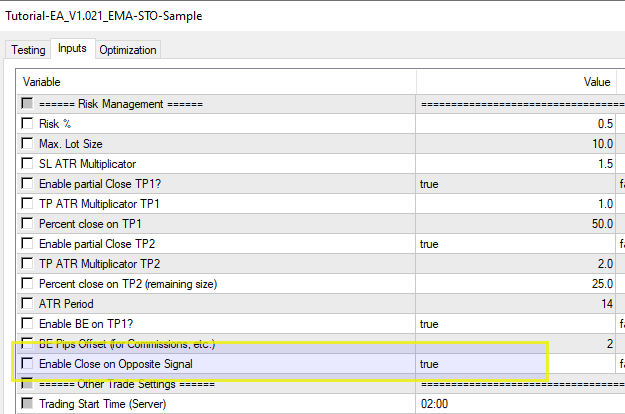
                              0_1582505826116_b75b1359-fb8b-49e2-9117-745963c87253-image.png

                              You might delete all below block 324 if not needed.
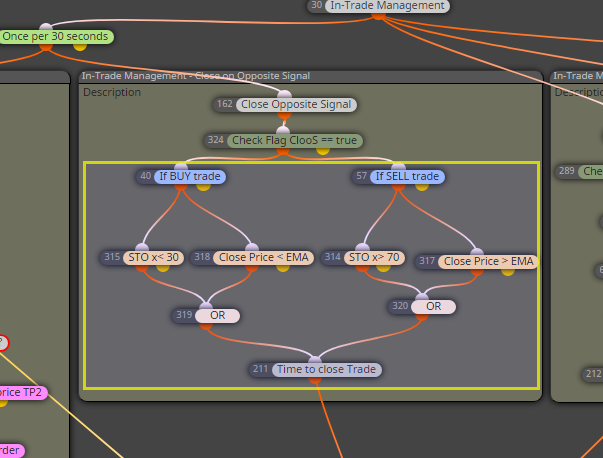
                              0_1582505926413_6ad9a7d1-99b2-4af5-a5e6-6deab5db32f5-image.png

                              I like to share my knowledge, but expect the others to contribute as well.

                              1 Reply Last reply Reply Quote 0
                              • J
                                jaloef @trader.philipps last edited by

                                @trader-philipps

                                Dear Sir...I want to make a My_Indicator in Fxdreema using IceFx.NewsInfo.

                                Can you pls send me the MQ4 source code of this indicator.

                                Thank U

                                Jaloef

                                1 Reply Last reply Reply Quote 0
                                • P
                                  premsinghmar8 last edited by

                                  Can we set such a block before news arrival that trading automatically stops and starts again 30 minutes after the news event? Sir please help.

                                  1 Reply Last reply Reply Quote 0
                                  • 1 / 1
                                  • First post
                                    Last post

                                  Online Users

                                  B
                                  A
                                  T
                                  M
                                  E
                                  C

                                  20
                                  Online

                                  146.7k
                                  Users

                                  22.4k
                                  Topics

                                  122.6k
                                  Posts

                                  Powered by NodeBB Forums | Contributors