fxDreema

    • Register
    • Login
    • Search
    • Back to the main page
    • Categories
    • Recent
    • Tags
    • Popular
    • Search

    Turning Exit Rule Blocks off with button on chart.

    Questions & Answers
    3
    10
    1724
    Loading More Posts
    • Oldest to Newest
    • Newest to Oldest
    • Most Votes
    Reply
    • Reply as topic
    Log in to reply
    This topic has been deleted. Only users with topic management privileges can see it.
    • Pan4Pips
      Pan4Pips last edited by

      Re: Button: Turn off some blocks.

      Is this still the valid method for turning blocks off with a selector button? I've copied this and it doesn't work in either on init, chart or ontick - Help anyone?

      I have exit rules that I want to manually turn off at times... whats the best method to use a button on chart?

      T 1 Reply Last reply Reply Quote 0
      • T
        trader.philipps @Pan4Pips last edited by

        @pan4pips Well, if the button executes the blocks correctly, you might use one of the Switch ON / OFF or Toggle blocks. If you don't like the output in the logs, you might use flags for achieving the same.

        I like to share my knowledge, but expect the others to contribute as well.

        Pan4Pips 1 Reply Last reply Reply Quote 0
        • Pan4Pips
          Pan4Pips @trader.philipps last edited by

          @trader-philipps said in Turning Exit Rule Blocks off with button on chart.:

          @pan4pips Well, if the button executes the blocks correctly, you might use one of the Switch ON / OFF or Toggle blocks. If you don't like the output in the logs, you might use flags for achieving the same.

          Button doesn’t allow or stay pressed. On init and onchart it doesn’t show up when applying to live chart

          Ontick button shows but doesn’t allow interaction

          T T 3 Replies Last reply Reply Quote 0
          • T
            TitanGeorge @Pan4Pips last edited by

            @pan4pips

            If I'm not mistaken, that project creates a button using OBJECTS. The objects would be "Text"

            If you have a specific button that you use, maybe an external indicator. Then I have a solution for you.

            It will take a little bit of work, and it won't be a "fix all" but if you use the same charts, it shouldn't be a problem.

            Simply, place your OBJECT underneath your existing button. You will need the X and Y coordinates and choose a size big enough for your button.

            If the logic tree is correct, then it should work.

            If you don't have an existing button, it's the same rule. If you've tried it, then it's possible your logic tree is not routed correctly.

            If you wish to know my trading style, look up TRO and visit him on the Kreslik forums. BambinoFlex is my other internet handle as well as my Gamer Tag.

            1 Reply Last reply Reply Quote 0
            • T
              trader.philipps @Pan4Pips last edited by

              @pan4pips Ok, I just build it. I couldn't manage to use the toggle block or at least there were no messages in the journal. So I decided to use flags.

              First I created a button on the On Init tab.

              0_1582517438441_4942aedd-5178-45ca-ae17-8039712a83cf-image.png

              Then on the on Chart tab I did the following ..

              0_1582517460818_62559a1b-e732-4e06-a323-2d12603b7ea2-image.png

              In order to display the message, I created a boolean variable and it is set to true if block 332 is passed and to false if block 331 is passed. The result I display in the alert text.

              Now, on every click on the button I receive a message .. it toggles the flag ..

              0_1582517610391_ddb7f5fd-9e1d-4c78-9f2f-2c611fa04a09-image.png

              So, for your issue, you'd use the same check flag block with the desired condition /true or false to check) and place your exit logic behind the corresponding dot (orange or yellow depending).

              I like to share my knowledge, but expect the others to contribute as well.

              T 2 Replies Last reply Reply Quote 1
              • T
                TitanGeorge @trader.philipps last edited by

                @trader-philipps

                I responded on the wrong thread. That's some skill you got there Trader Philipps!

                If you wish to know my trading style, look up TRO and visit him on the Kreslik forums. BambinoFlex is my other internet handle as well as my Gamer Tag.

                1 Reply Last reply Reply Quote 0
                • T
                  TitanGeorge @Pan4Pips last edited by TitanGeorge

                  @pan4pips

                  @pan4pips

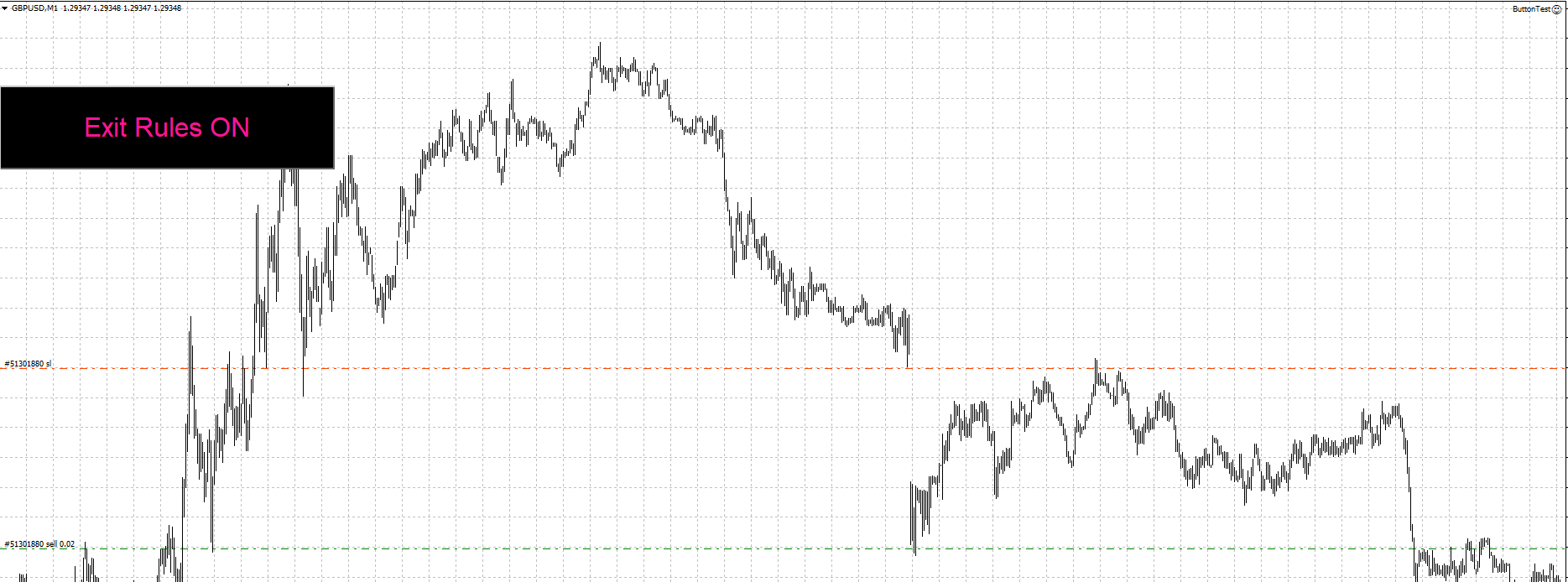
                  FOUND THE SOLUTION! Learned how to create buttons in the process. Can you imagine I was creating TEXT messages to control my blocks. Such a hassle.

                  Any who, here's your solution.

                  https://fxdreema.com/shared/QstMKBHE

                  0_1582519390620_Button Pressed.PNG
                  0_1582519400098_ButtonNOTPressed.PNG

                  The button didn't change to "Exit Rules OFF" since I made the program terminate itself. But it should work once you replace it with the correct ON/OFF blocks. You can delete the Pass button. I was just testing it.

                  If you wish to know my trading style, look up TRO and visit him on the Kreslik forums. BambinoFlex is my other internet handle as well as my Gamer Tag.

                  T 1 Reply Last reply Reply Quote 0
                  • T
                    trader.philipps @TitanGeorge last edited by

                    @titangeorge Well, the issue ist that the google block or turn Off/On blocks didn't show any message in the journal that the defined block turned off. That's why I used the flags. One could also just define a boolean variable and check it's state which is set by button click.
                    I think there are several options once the buttons work well.

                    I like to share my knowledge, but expect the others to contribute as well.

                    T 1 Reply Last reply Reply Quote 1
                    • T
                      TitanGeorge @trader.philipps last edited by

                      @trader-philipps

                      That is correct! Many different options to incorporate, thanks to you, I've learned how to create alerts!

                      If you wish to know my trading style, look up TRO and visit him on the Kreslik forums. BambinoFlex is my other internet handle as well as my Gamer Tag.

                      1 Reply Last reply Reply Quote 0
                      • T
                        TitanGeorge @trader.philipps last edited by

                        @trader-philipps

                        Hey, I noticed my Button Logic is off. I assumed that the button would "reset" but it doesn't. It stays pressed. If I "click" again, it would technically get stuck in an infinite loop of being pressed.

                        Would you happen to know how I could cause an On Off On Off button? Once per click deal. Maybe a custom code but I don't know how to.

                        If you wish to know my trading style, look up TRO and visit him on the Kreslik forums. BambinoFlex is my other internet handle as well as my Gamer Tag.

                        1 Reply Last reply Reply Quote 0
                        • 1 / 1
                        • First post
                          Last post

                        Online Users

                        J
                        B
                        M
                        B
                        T

                        18
                        Online

                        146.7k
                        Users

                        22.4k
                        Topics

                        122.6k
                        Posts

                        Powered by NodeBB Forums | Contributors