at least 4 up bars above SMA 5 shift 5 and BUY, please fix this project
-
My project: https://fxdreema.com/shared/TFPlfk14d
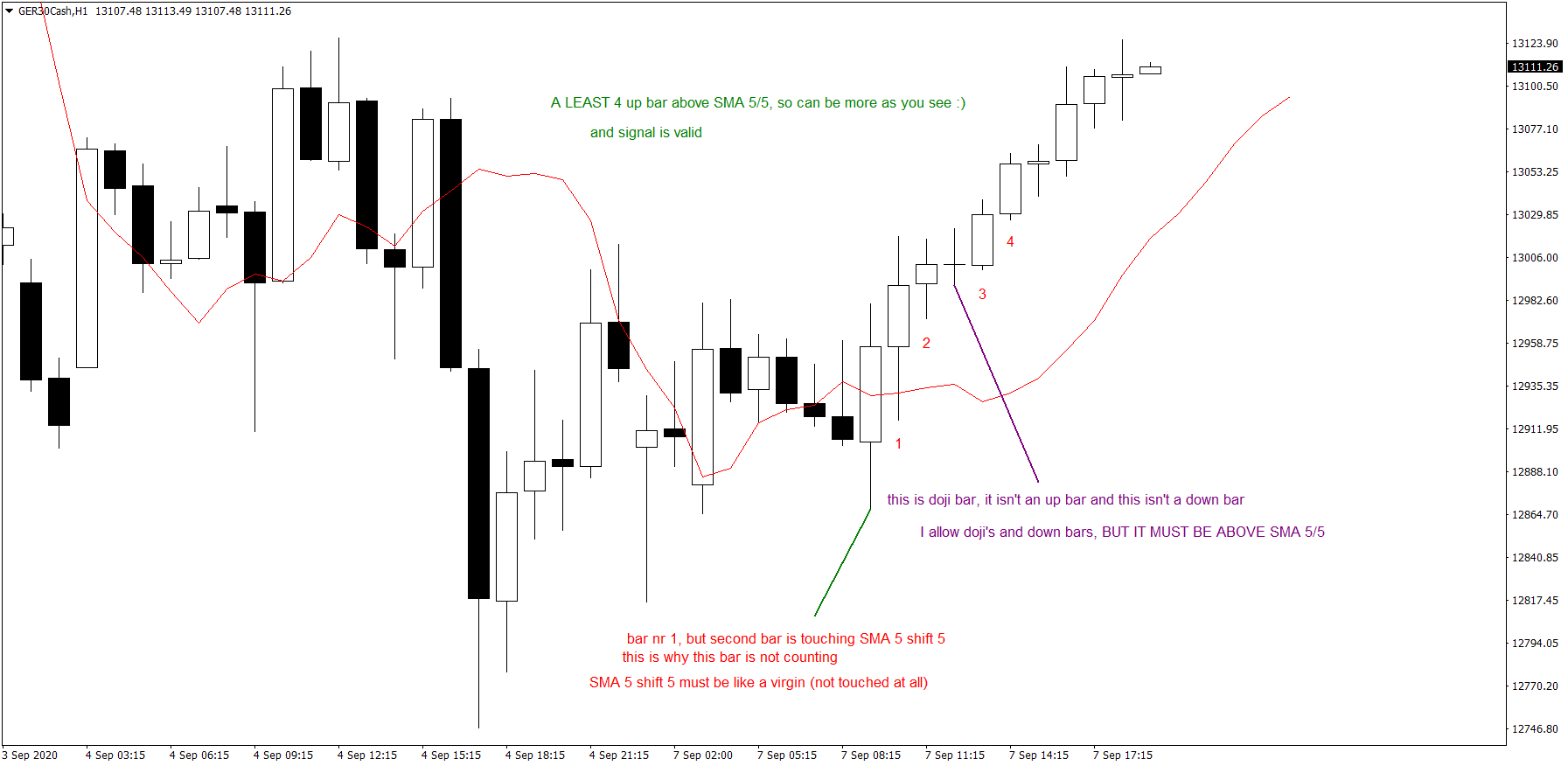
can be also others bars down bars, doji inside this above SMA 5 shift 5, but must be at least 4 up bars above SMA 5 shift 5,
This SMA 5 shift 5 is like a virgin (can't be even touched
 if will be touched before will be at least 4 up bars avoce SMA 5 shift 5, then no signal, because it's invalid.
Thank you in advance for help

-
@krystian Please do this:
- Remove all 'AND' blocks.
- Connect all blocks from the orange output semidot down the block to the white one on top of the block below and not the opposite as it is now.
- Select 'Candle ID 1' on both operands of block 34.
- Select 'Candle ID 2' on both operands of block 36.
- Select 'Candle ID 3' on both operands of block 37.
- Select 'Candle ID 4' on both operands of block 38.
-
@l-andorrà thank you very much for help, but now I have ANY 4 bars aboce SMA 5 shift 5, I would like to have at least 4 up bars (bars which is closing at least 1 tick above than opening price.
-
@krystian Not sure I get it. Can you please upload an image?
-
@l-andorrà here you are
-
@krystian You can add 5 additional 'condition' blocks specifying that the low MUST be above the SMA for buy and below it for sell.
-
@l-andorrà , Is it what you meant? or in another way i should do this?
-
@krystian Yes, but you need to specify the same value of the candle ID to each position of the MA. Candle ID 1 with MA ID 1, Candle ID 2 with MA ID 2, etc. And please connect all blocks correctly. Now all input point are connect to other input point not to output dots.
-
@l-andorrà Is it 100% good now? https://fxdreema.com/shared/xf04WYkrd
-
Sorry to say like this...but run the EA and tell us if its right! haha
-
ok, I will run
-
Dont save EA with special characters or spaces preferably.
-
@krystian No. It will never work. Please read my previous post on block connections.
-
@l-andorrà Is it good now? https://fxdreema.com/shared/bALOmMtAb
I checked that this EA made 10 trades (martingale mode) within 1 minute!! where i selected time frame to testing H1, how to fix this? Only 1 trade unless second trade will not be finished. Only 1 trade can be open at any time.
-
@krystian said in at least 4 up bars above SMA 5 shift 5 and BUY, please fix this project:
@l-andorrà Is it good now? https://fxdreema.com/shared/bALOmMtAb
I checked that this EA made 10 trades (martingale mode) within 1 minute!! where i selected time frame to testing H1, how to fix this? Only 1 trade unless second trade will not be finished. Only 1 trade can be open at any time.
"once per bar" block should be added in the beginning or just before the "Buy Now:...or perhaps a "Close Trade" block before the "Buy now"?
-
@krystian Just curious. Why are you sistematucally ignoring my correction? The EA will never work properly unless you connect the blocks correctly. No matter what changes you do in the blocks.
-
@l-andorrà I am new, i don't understand everything here, please show me in 1 project how it should looks and then I will know and understand you in 100%, I am learning mostly by seeing/watching.
-
@krystian This is your project with blocks moved side to side:
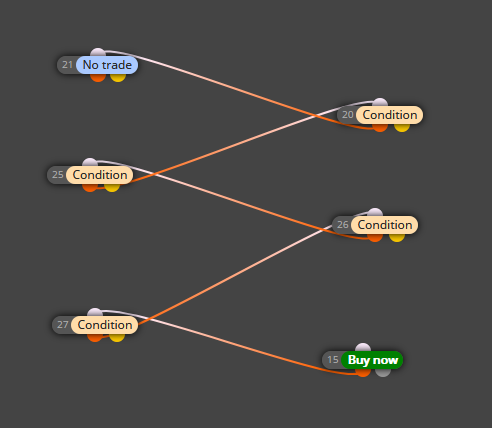
All those blocks are wrongly connected. You are connecting white on top dots with orange down dots. That will never work. All connections MUST BE:
- Block on top: Orange down dot connected to...
- Block below the previous one:...white dot on top.
You are doing it just the other way round. Clearer now?
-
@l-andorrà said in at least 4 up bars above SMA 5 shift 5 and BUY, please fix this project:
output semidot down
@l-andorrà Is it good now? If no, please send me correctly made project, I like to learn by watching.
-
@krystian yes, that will makes trades, given that the conditions are true in regards with what you want to do with it.
I would search the forums for other projects to see how other people have used blocks. You can copy and paste parts of other persons projects into your own window so that you can figure it out on your own.
I'd start from the beginning too. Use the no trade, the 1 condition, the once per bar, and a buy now block. See what that does, then add a 2nd condition, retest and observe. If you would like to watch exactly what your conditions are doing you can use the Trace Activity block, that will help find any problems too. If what you need is someone to stand over you shoulder and teach you I think L'andorra does that kind of stuff as a paid service.


