How to set/check a time stamp or candle ID
-
I am struggling for a really long time on a hurdle and would be glad if anyone can help.
following example:
Let's say I have a certain rule, that in certain circumstances I only trade when xyz happened before.I have some condition blocks referring to ID 0 that need to be true, fine that is no problem.
Then I also need to check if certain conditions were true in the past.
The problem here is that two different strings of conditions need to be true one after another but the 2nd one should only look back to the first and not further back.
How is it possible that the first condition produces a time stamp where the 2nd condition can refer to so that It doesn't look back further.
I haven't found a way to solve it with the candle ID because its not possible when putting lets say ID 0, 1, 2, 3... in one block. (it would still look back further as the first condition happened.Many thanks for your answers.
It's probably not well described (not easy), pls let me know if you need further clarification. -
@ikarus_ There is no single way to get it. You can create several variables and stor information there, but your info is a bit too general to specify. Can you please share your project to find a way to do it for your case?
-
Hi @l-andorrà thanks for your fast reply. Here's the link: https://fxdreema.com/shared/xslLnhN6b
-
I would be glad if you could answer and present a solution @l-andorrà.
Many thanks. -
@ikarus_ you need a loop, every programmer's best friend.
And to operate this loop, you have to use variables.
Are you familiar with variables? -
@roar yes I am familiar with variables but not that much with loops.
How would you solve this?
(fyi this is not my whole project, just the part I am trying to get right) -
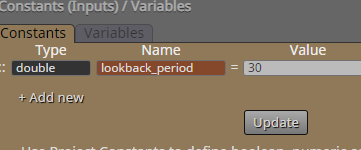
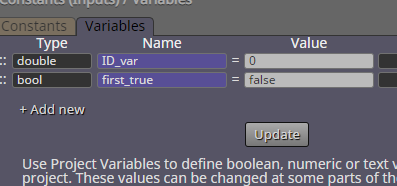
@ikarus_ all right, here is an example of two loops. The example goal is to first find some candle above tenkan-sen line in the last 30 candles, and then find some candle below moving average in the last 30 candles.
There is probably something weird-looking here, just ask
https://fxdreema.com/shared/iiAq2ApF
-
Many many thanks! @roar. It makes sense what you did and I am sure I am able to implement it into the EA.
Just one thing from the moment the candle close was above the tenkan sen Line it should always close above.
When the price closes below SMA and then crosses up again is when the order should trigger.
I am not sure if your example is already fulfilling that.Also the Loop conditions have to always be on Tick right?
-
@ikarus_ said
Just one thing from the moment the candle close was above the tenkan sen Line it should always close above.
So the condition is "each of last 30 candles are above tenkan-sen"?
Then use the loop to try and find a candle that doesnt meet the condition -> now set your tracking variable to FALSE. The logic flow continues to next stage only if the variable keeps its TRUE value throughout the whole loop. Hope you get what I mean...Also the Loop conditions have to always be on Tick right?
Not necessary.. As long as you can activate the loop (using OnTick, OnTrade, OnInit, whatever), it will surely do its thing.
-
So grateful for your help. @roar
Let me know if that is what you meant? https://fxdreema.com/shared/y1i7btjD
I need to get a better understanding of the loop system in fxdreema: any sources you can recommend? -
@ikarus_ Your example is missing all variables - you need to declare them yourself, exactly as is shown in my pictures above.
I don't know any great learning source, my style is to try and fail, learn that way...
Well, Miro has created a loop tutorial but that uses the actual, official loop block, I didnt.
http://fxdreema.com/forum/topic/4510/tutorial-loop-advanced-find-and-save-specific-value-from-indicator-historyBy the way, you can reset your block IDs from "Project Options"

-
@roar yes I did it as you shared. I just was not able to send a picture. the variables are stored in the real project.
Thanks so much. Besides of the variables is it correct now?yeah, try and fail worked for me until now.
-
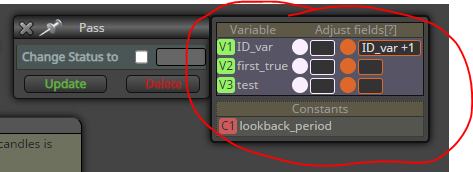
@ikarus_ yeah looks ok, but because of the missing variables, cannot see the variable modifications (in right-side of blocks) which are critical for the logic
-
@roar https://fxdreema.com/shared/fHL9Vur3
just did it that you can approve.
I think there is a big learning curve awaiting for me about loops.
Oh, and is it needed to reset the block ID's? I tought they always follow the logic.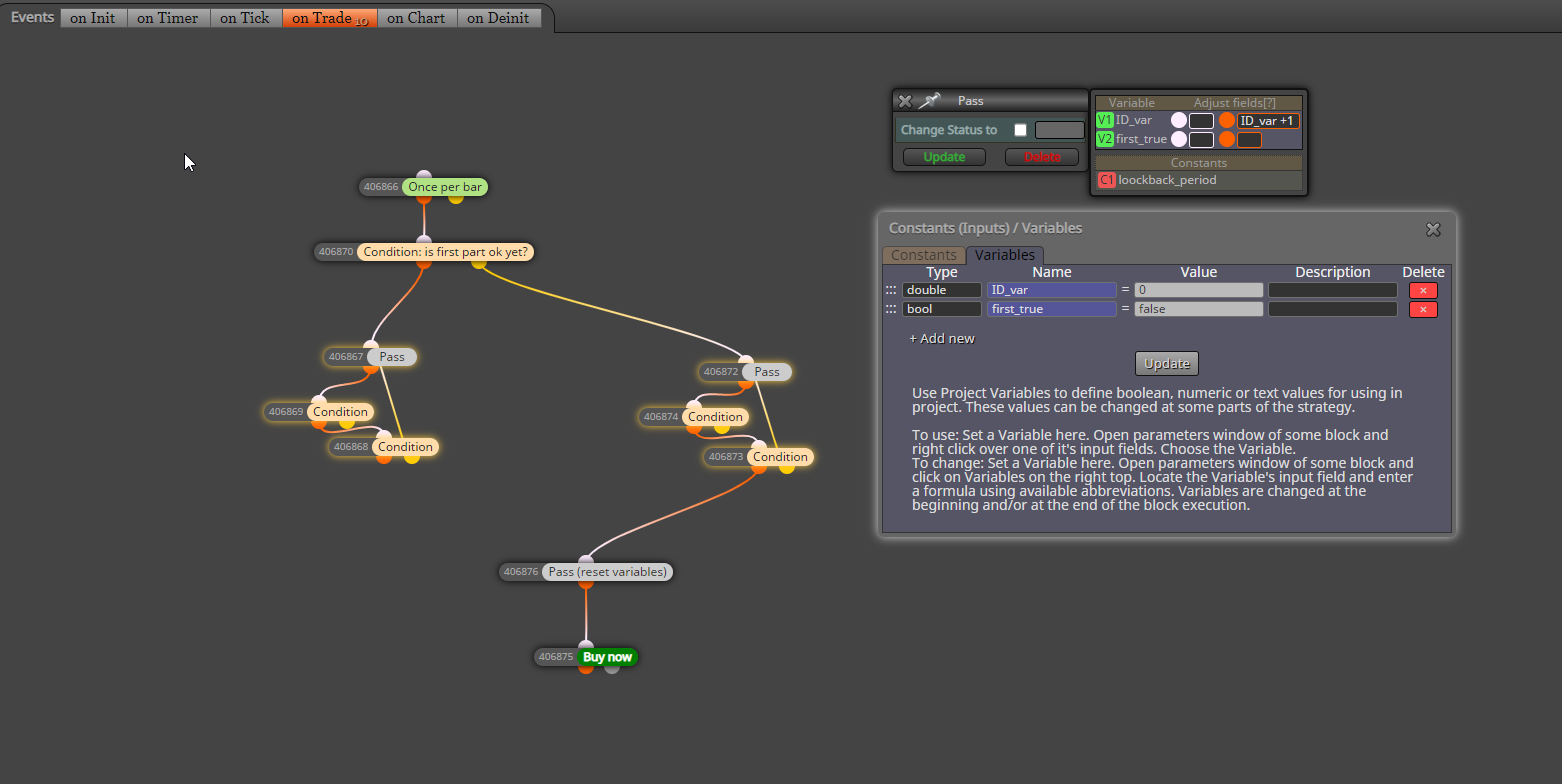
-
@ikarus_ this block needs to change the variable when the loop finds a suitable candle, otherwise the algo never proceeds to the next stage
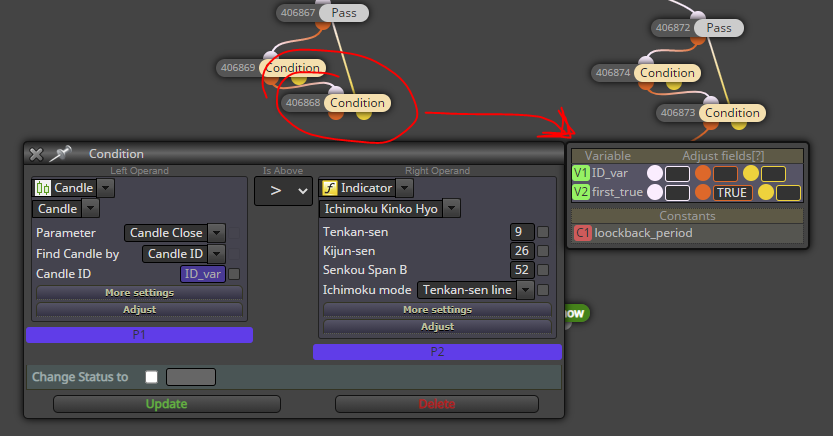
You dont need to reset the IDs, they dont matter in this EA. I just like to keep them small myself, just a preference.
-
@ikarus_ said
I think there is a big learning curve awaiting for me about loops.
Yes I think its more "advanced" stuff - and the worst part is, this particular loop logic is my own scribble lol
There is also an official loop block in the builder, it works a bit different. If youre familiar with the coding jargon, my loop here is a while loop, whereas the fxdreema loop block is a for loop.
-
@roar maybe I need to hire a coder zhat does that for me
haha
https://fxdreema.com/shared/px7iX32Wb -
@ikarus_ Sorry, I confused even myself with the true/false things here.
Made a fix: the comparator in the second block is ==, not !=.
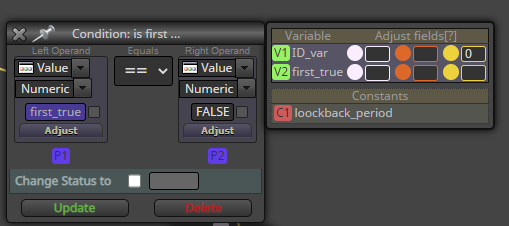
So, the logic is
- when variable is false, run the loop and try to find a candle setup which makes the variable true
- when it is true, proceed to next section of the EA.
Edit: Goddamn now I'm confusing my projects with each other, fixed again.
Need small help? Tag me in your post
Need big help? https://www.fiverr.com/big_algo/automate-your-winning-strategy-in-mql4-or-mql5 -
@roar hahah no stress. We are all humans
-