MT5 and FXDreema communication issues
-
Fxdreema does not communicate to my MT5 to download my EA from Fxdreema
also
MT5 does not communicate with a new EA after pasting in and refreshing -
@steve-4 mt5 doesnt find the EA you downloaded?
Hit ctrl+shift+D to get to the correct folder
-
@roar
It is in the Expert-Advisors folder with the other EA'sHow ever, the new EA is an EX4 file not an MQL5 program or source file
Do I need to convert the new EA to an MQL5 file? -
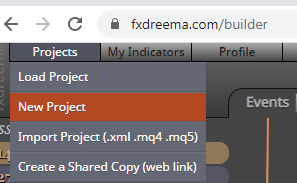
@steve-4 you need to make new fxdreema project for mt5.
Open the new project into new tab and then copy-paste the blocks over.
-
A few things I learned in my transition over, and I'm still learning...
Pay attention to the blocks. Some from 4 don't carry over to 5, such as "if trade". Replace with if position.
Next, when saving MT5 files, always, do both types at the top. Its not like MT4 where you could import both files for edit what you need, you must have the mq5 file for FXDreema to read it and then the ex5 is what your platform software will import.
-
Many thanks, you saved me