How to create block for different strategies inside same EA?
-
Hi, it is unclear to me how to create different buy/sell orders related to different entries inside same project.
If I just create different entries they don't work image url)
The only edge on the market is to lose less than you win...
-
@alex81 Just put a buy/sell beneath the conditions as you have above, you can do this as many times as you like, use a bool condition to switch on/off in inputs if you want to limit what EA can do.
Learn fxDreema Without the Wait!
My comprehensive book, available on Amazon, is packed with examples and invaluable insights to help you fast-track your learning journey.
The paperback and hardback editions include MT4 & MT5 QR codes for easy access to all prebuilt projects and robots, including my latest gold trading robot!
Don’t miss out
Click here➡️ https://mybook.to/fxDreema to get your copy today!
Enjoy! 😊
-
@jstap as I did above it doesn't work. Instead if I create 3 different EAs they work with just one buy and one sell. What am I missing?
The only edge on the market is to lose less than you win...
-
@alex81 I am unsure, put a shared link here and I'll have a look
-
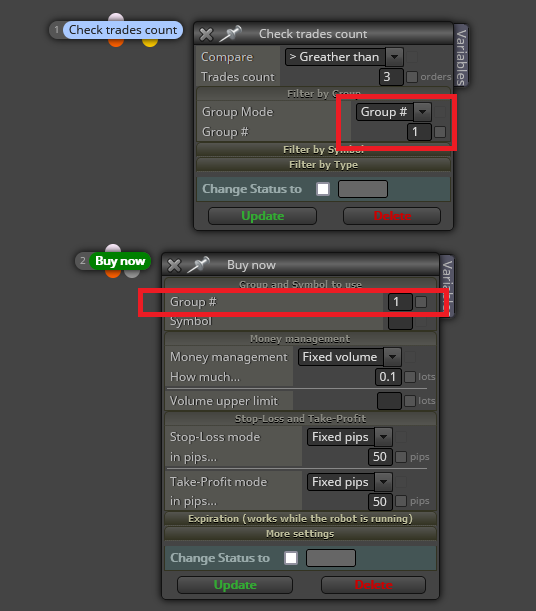
@alex81 The most efficient way is using groups. Each set of conditions can be defined under a different groups. That way trades can be managed in fifferent ways too.
https://fxdreema.com/instructions/builder/groups-and-magic-numbers
(English) I will try to help everyone in these fxDreema forums. But if you want to learn how to use the platform in depth or more quickly, I can help you with my introductory fxDreema course in English at https://www.theandorraninvestor.eu.
(Català) Miraré d’ajudar tothom en aquests fòrums d’fxDreema. Tanmateix, si vols aprendre a fer servir la plataforma amb més profunditat o més de pressa, t’hi puc ajudar amb el meu curs d’introducció a fxDeema en català a https://www.theandorraninvestor.eu/ca.
(Español) Intentaré ayudar a todo el mundo en estos foros de fxDreema. Sin embargo, si quieres aprender a usar la plataforma en profundidad o más deprisa, te puedo ayudar con mi curso de introducción a fxDreema en español en https://www.theandorraninvestor.eu/es.
-
@l-andorrà said in How to create block for different strategies inside same EA?:
@alex81 The most efficient way is using groups. Each set of conditions can be defined under a different groups. That way trades can be managed in fifferent ways too.
https://fxdreema.com/instructions/builder/groups-and-magic-numbers
that's my issue, how do we create blocks? The instructions are unclear to me...
The only edge on the market is to lose less than you win...
-
@alex81 You need to create separate block trees for evey different group/entry. Each with a 'high' position block definiting the origin of group condition and finally with a 'low' position buy/sell now block like this: