fxDreema

    • Register
    • Login
    • Search
    • Back to the main page
    • Categories
    • Recent
    • Tags
    • Popular
    • Search

    How to do include in "Custom MQL code" ?

    Questions & Answers
    4
    7
    1804
    Loading More Posts
    • Oldest to Newest
    • Newest to Oldest
    • Most Votes
    Reply
    • Reply as topic
    Log in to reply
    This topic has been deleted. Only users with topic management privileges can see it.
    • M
      mndiarra last edited by

      Hi,

      I was trying to use #include in a block of mine before realising that this is not supported - find below excerpts after clicking on the question mark beside the "Customer MQL code" itself.

      <snip>
      You also can't define global variables or use #define, #import or #include.
      </snip>

      Is there any workaround for that ? Thanks in advance for your help.

      l'andorrà fxDreema 2 Replies Last reply Reply Quote 0
      • l'andorrà
        l'andorrà @mndiarra last edited by

        @mndiarra Not sure if someone created any totorial for that. I'm not a programmer, though. I guess you will need a real one for this.

        (English) I will try to help everyone in these fxDreema forums. But if you want to learn how to use the platform in depth or more quickly, I can help you with my introductory fxDreema course in English at https://www.theandorraninvestor.eu.

        (Català) Miraré d’ajudar tothom en aquests fòrums d’fxDreema. Tanmateix, si vols aprendre a fer servir la plataforma amb més profunditat o més de pressa, t’hi puc ajudar amb el meu curs d’introducció a fxDeema en català a https://www.theandorraninvestor.eu/ca.

        (Español) Intentaré ayudar a todo el mundo en estos foros de fxDreema. Sin embargo, si quieres aprender a usar la plataforma en profundidad o más deprisa, te puedo ayudar con mi curso de introducción a fxDreema en español en https://www.theandorraninvestor.eu/es.

        M 1 Reply Last reply Reply Quote 0
        • M
          mndiarra @l'andorrà last edited by

          @l-andorrà No worries, thanks I will try or unless somebody has done this before that would be appreciated. As said, everything is feasible, but the problem is time.

          l'andorrà 1 Reply Last reply Reply Quote 0
          • l'andorrà
            l'andorrà @mndiarra last edited by

            @mndiarra Please share any solution you find, if you don't mind.

            (English) I will try to help everyone in these fxDreema forums. But if you want to learn how to use the platform in depth or more quickly, I can help you with my introductory fxDreema course in English at https://www.theandorraninvestor.eu.

            (Català) Miraré d’ajudar tothom en aquests fòrums d’fxDreema. Tanmateix, si vols aprendre a fer servir la plataforma amb més profunditat o més de pressa, t’hi puc ajudar amb el meu curs d’introducció a fxDeema en català a https://www.theandorraninvestor.eu/ca.

            (Español) Intentaré ayudar a todo el mundo en estos foros de fxDreema. Sin embargo, si quieres aprender a usar la plataforma en profundidad o más deprisa, te puedo ayudar con mi curso de introducción a fxDreema en español en https://www.theandorraninvestor.eu/es.

            1 Reply Last reply Reply Quote 0
            • fxDreema
              fxDreema @mndiarra last edited by

              @mndiarra said in How to do include in "Custom MQL code" ?:

              Is there any workaround for that ? Thanks in advance for your help.

              You can try to make a custom block here https://fxdreema.com/studio/MQL4

              Here is some example of the things you can add in the code of the block to make it functional:
              0_1638908503543_02d10922-e595-4673-b5a6-4790e475fe51-image.png

              Think of the ~Indicator~ thing as the value from the parameter Indicator (look at the right where the parameters are).
              ~datatype:Indicator~ is obviously there to deal with the different data types, but this is only needed in very few blocks like this one, you probably don't need this.

              Think of ~next~ as the orange output. ~inext~ is for the yellow output (the "i" probably means inverted). To have a gray output, which is normally to indicate that there is an error, try ~error~.

              Imports and such stuff is to be put below on the other code field at the bottom. But better don't put very fancy code.

              M Q 2 Replies Last reply Reply Quote 0
              • M
                mndiarra @fxDreema last edited by mndiarra

                @fxdreema Thx for getting back to me on this. Actually what I did is, I created "Custom MQL code" blocks with what I needed. Then I generated the code as .mq4 (.not ex4 because at this stage the .mqh file is not included therefore it won't compile). Afterwards, I went to mql4 editor, added "#include <xxxxx.mqh>" and then compiled everything together. The process is a little bit longer but it works. Thanks a million for your help.

                1 Reply Last reply Reply Quote 0
                • Q
                  QuantEngineer @fxDreema last edited by

                  @fxdreema This message is very clarifying to help build with the FX Dreema Studio.
                  I am working on building some tutorials for the studio and would like to know if there is somewhere, a list of all the things that we can use with this ~~ notation, like:

                  {~next~} is used to move from the current block to the next block
                  {~inext~} is used to move to the other block, the orange dot output
                  etc... etc...

                  Specifically, I am currently looking for ways to assign values in FX Dreema Studio, to variables created on the FX Dreema Builder....

                  On this Screenshot, I want the custom FX Dreema Block "testBlock" to replace the initial value "initial value", but what is in the custom code, "Hello World".
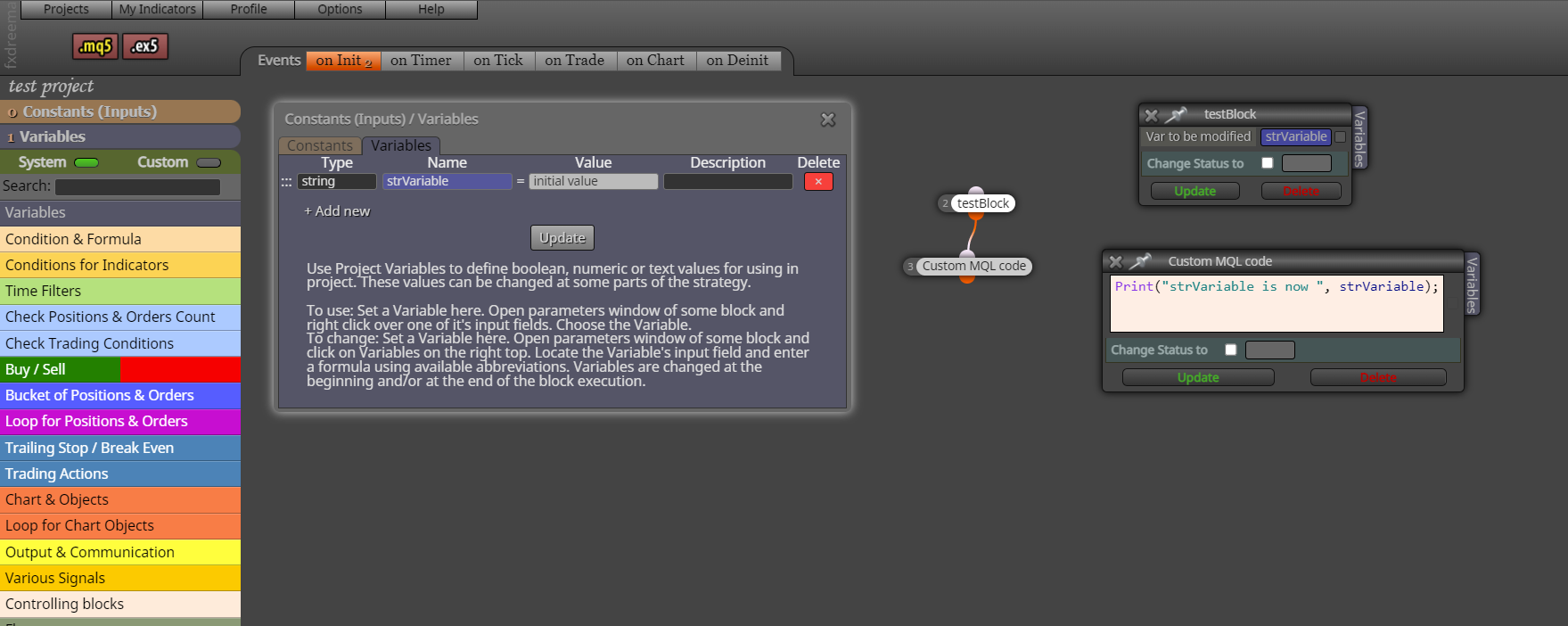
                  0_1650760093405_1f24e0c5-972d-4f4b-a9e6-8e816280de4d-image.png

                  And here is a screenshot of the custom code that I am working on to figure out how to make happen.
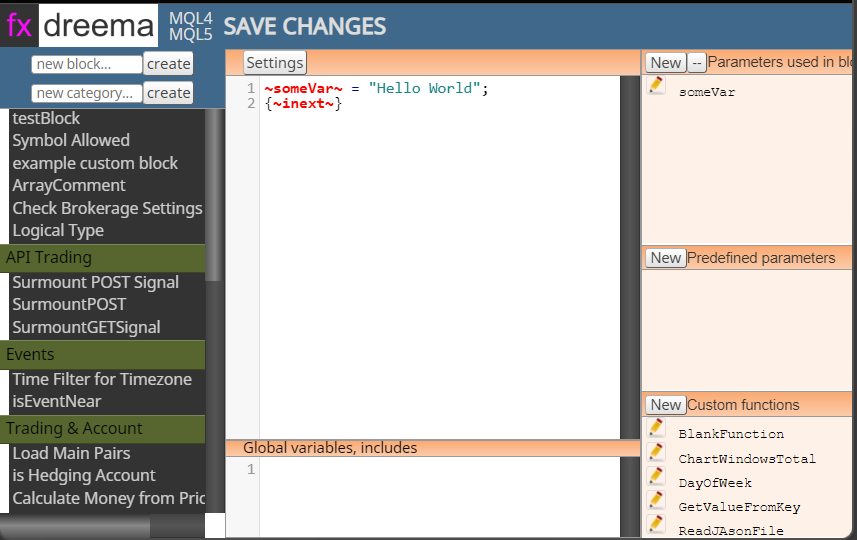
                  0_1650760389032_29df4a05-dfdc-4807-8408-ba7c5a41d695-image.png

                  And here is the link to the project shared/m7CchTVcd

                  Quant Engineer
                  www.abfs.tech

                  1 Reply Last reply Reply Quote 0
                  • 1 / 1
                  • First post
                    Last post

                  Online Users

                  A
                  A
                  X
                  K
                  F

                  13
                  Online

                  146.7k
                  Users

                  22.4k
                  Topics

                  122.6k
                  Posts

                  Powered by NodeBB Forums | Contributors