TESTING EA WHEN LIVE MARKETS ARE CLOSED
-
Is there a way that one can simulate live market conditions on Metatrader for testing of EA as though it is happening in real time.
-
@od Crypto markets are open 24/7
Need small help? Tag me in your post
Need big help? https://www.fiverr.com/big_algo/automate-your-winning-strategy-in-mql4-or-mql5 -
Also with MT5.
-
@roar I'll have to change my broker for that. They don't trade crypto.
-
@biztet I dont think MT5 can simulate live markets.
-
@od said in TESTING EA WHEN LIVE MARKETS ARE CLOSED:
@biztet I dont think MT5 can simulate live markets.
MT5 backtest reproduces live market at 100% quality with the following settings
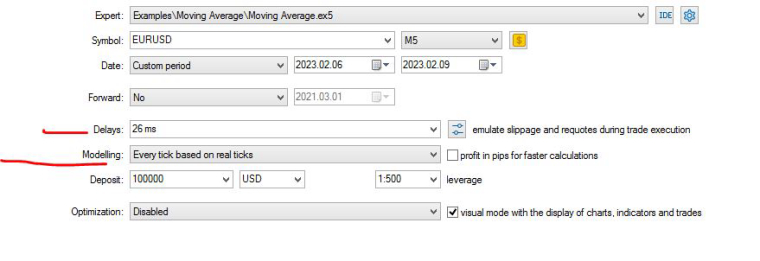
-
@ambrogio There is a difference of testing and backtesting. Personally am using comments to check if my variables are working correctly, when backtesting you dont get the chance to use comments. This way testing can only be done when the market is live, that's what am asking if there is a way to simulate a live market in metatrader like during weekends for forex.
-
@ambrogio Comments displayed on chart*
-
@od said in TESTING EA WHEN LIVE MARKETS ARE CLOSED:
@ambrogio Comments displayed on chart*
i understand now, I think I have no suggestion......
-
Since you don't have time to test on weekdays, so your only option is to test with crypto on weekend.

-
@od said in TESTING EA WHEN LIVE MARKETS ARE CLOSED:
@ambrogio Comments displayed on chart*
you mean the comments are not displayed on visual backtest at all?
-
@ambrogio Actually they do display.
-
@biztet I have time just didn't want to stop on weekends. Plus my broker doesn't have crypto markets.
-
@ambrogio But there are two types of comments I use. Firstly the one with the comment block to display on chart ,it works, then the other is in the trade or order block. I had confused the two previously. The second type of comment is displayed in the terminal during live testing but in the strategy tester it is not there ,if it is I haven't found out how to display it in there.
-
@od https://fxdreema.com/shared/QBPOUHkcc
Here is an example the trade blocks have variable comments that am testing. They are not there on the tester -
@od this way ?
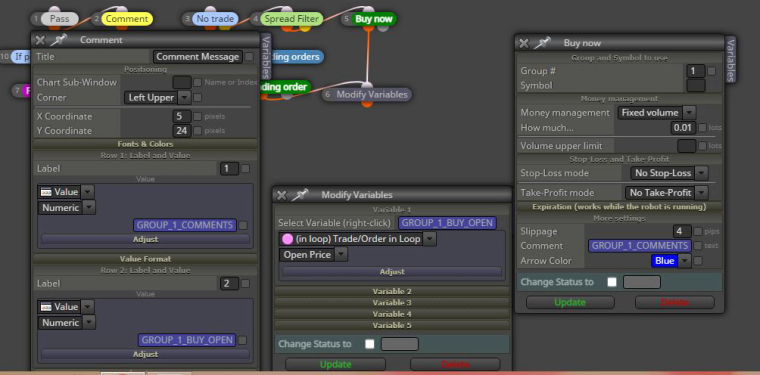
-
@ambrogio The group 1 comments variable appears on the terminal as a trade comment during live testing. It appearing on the comment block is for monitoring it while it is happening. But when checking through history only the one in the terminal can be useful.
-
@od i'm sorry, i can't help you


