Is the admin modifying the code on variables?
-
im sorry to interrupt why dont you use check profit period of time?
-
@roar I'm still struggling with this problem and I found something interesting. Only those variables in blocks 8 and 18 are stored into the 'hidden memory'. Although they are correctly reinitiated as per the structure shared in the link, the information that was stored yesterday is somehow recovered and printed on chart again.
However, I tried something new this time. I waited until the last minutes of one session with all the results visible and then I removed the EA. I removed just two minutes before the end of the day but AFTER the time limit specified on the time filter block. And the result was a different number this time! It should be 0 because the bot couldn't know the max values of profit or loss. At most it should be coincidential with the REAL closed profit/loss . In no case there should be a value for the max profit because NO OPEN TRADES at that moment! However, some result was visible although not the original one.
In my opinions this means some kind of calculation from the loops is executed AFTER the variables were reinitiated. However, the number was still visible at the beginning of the new day when the candle ID for the daily TF is zero.
This is definitely a problem within the loop blocks.
(English) I will try to help everyone in these fxDreema forums. But if you want to learn how to use the platform in depth or more quickly, I can help you with my introductory fxDreema course in English at https://www.theandorraninvestor.eu.
(Català) Miraré d’ajudar tothom en aquests fòrums d’fxDreema. Tanmateix, si vols aprendre a fer servir la plataforma amb més profunditat o més de pressa, t’hi puc ajudar amb el meu curs d’introducció a fxDeema en català a https://www.theandorraninvestor.eu/ca.
(Español) Intentaré ayudar a todo el mundo en estos foros de fxDreema. Sin embargo, si quieres aprender a usar la plataforma en profundidad o más deprisa, te puedo ayudar con mi curso de introducción a fxDreema en español en https://www.theandorraninvestor.eu/es.
-
@l-andorrà I can't follow your reasoning there... If you think the problem is inside the loop block, can you make a simpler example with just the loop system? No need to complicate with the whole profit checking system, just a minimal loop example.
I still think the final culprit will be dates and timezones. Why? Because the problem doesnt appear in backtest, and the main difference between real chart and backtest is the timezone handling.
Need small help? Tag me in your post
Need big help? https://www.fiverr.com/big_algo/automate-your-winning-strategy-in-mql4-or-mql5 -
@roar I cannot simplify it more because I need to show what the problem is and why the variables are not showing the correct result. I managed to circumvent the problem this way:
https://fxdreema.com/shared/RZ8Si62bc
Blocking the loops at the end of the day and then reinitiating the variables the next day makes it work. That is the final proof the the problem is within the loops. As soon as the variables are reinitiated at the beginning of the following day the loops are making its calculations and yesterday's values are used when they shouldn't. Maybe the problem is timezone handling, I don't know, but how can a variable that is correctly reinitiated as 0 'recover' a value that was correctly changed?
I will not change the status of the thread until a satisfactory answer is provided. However, I will not add any more posts here for now. Sooner than later this problem will appear again until definitely fixed.
-
@roar I finally found it! I found the damn problem in this structure. After endless tests week after week I can confirm the problem is in the way the ‘For each closed trade’ block filters the conditions connected to it. This is the way I discovered it.
I made some modifications on the initial structure and I added a time filter at the end of the day that closed all trades a few minutes before 23:59:
https://fxdreema.com/shared/pjj8UV5Md
Thanks to roar’s suggested script I soon confirmed that variables were correctly reinitiated at the beginning of the next day so why the closed trades result was always ‘restored’ over and over?
Now please look at block number 5. There I selected today’s session as the only time period to collect information from. How was yesterday’s value been recovered every day if the variable was correctly reinitiated AND the new day has no closed trades whatsoever?
The answer came to me just by chance (kind of). I decided to watch the chart between two trading sessions just to see if I could find any hint to shed light on this issue. And boy I saw it! As soon as the new session was open at 00:05 I confirmed once more on the Expert tab that variables had been correctly reinitiated. However, yesterday’s closed trades result was visible…again! What was different now was that I saw the hour that was supposed to happen on the Expert tab. IT WAS AT 23:05, MY LOCAL TIME!!! There is one hour gap between my broker’s server and my local time. The filter used in block 5 was still considering that it was the previous day and not the next one. All closed trades were recalculated and the variable changed accordingly.
So the problem is that the ‘For each closed trade’ block cannot distinguish correctly broker’s time and local time. As it goes to search for all closed trades on the ‘account history’ tab, the local time is considered only. That also explains why the error disappeared ‘spontaneously’ after some time every day. That happened exactly one hour in the new day, when my local time was 00:00. So much pain and agony for weeks is finally over!
Could the admin finally fix this? I would definitely appreciate.
(English) I will try to help everyone in these fxDreema forums. But if you want to learn how to use the platform in depth or more quickly, I can help you with my introductory fxDreema course in English at https://www.theandorraninvestor.eu.
(Català) Miraré d’ajudar tothom en aquests fòrums d’fxDreema. Tanmateix, si vols aprendre a fer servir la plataforma amb més profunditat o més de pressa, t’hi puc ajudar amb el meu curs d’introducció a fxDeema en català a https://www.theandorraninvestor.eu/ca.
(Español) Intentaré ayudar a todo el mundo en estos foros de fxDreema. Sin embargo, si quieres aprender a usar la plataforma en profundidad o más deprisa, te puedo ayudar con mi curso de introducción a fxDreema en español en https://www.theandorraninvestor.eu/es.
-
@l-andorrà can you elaborate, how the loop block uses local time?
In your example, you just check that the candle ID is 0. Candles are always server time...
Can you test by printing out the "Close Time (UNIX)" variable from each closed trade, so we see what timezone those values will be?
I would test myself, but I have the same timezone as my broker..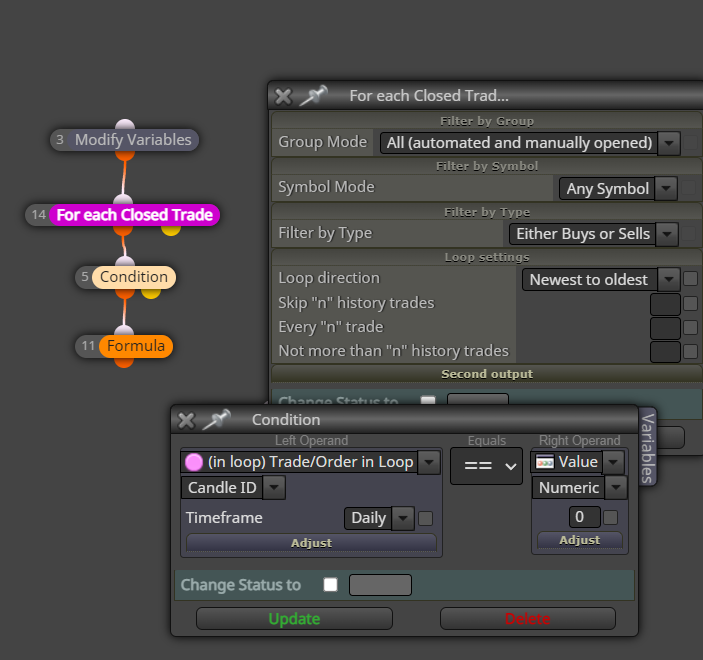
-
Unfortunately, I'm not a programmer so I have no idea why the block does so. I just can check it did as I described. My guess (and it's just a guess) is that block 5 is correctly executed but the 'For each closed trade' applies that candle 0 condition on what it can find on the 'Account history' tab, ignoring the time gap. That is the best explanation I can provide with my 0 knowledge of mql4 language.
(English) I will try to help everyone in these fxDreema forums. But if you want to learn how to use the platform in depth or more quickly, I can help you with my introductory fxDreema course in English at https://www.theandorraninvestor.eu.
(Català) Miraré d’ajudar tothom en aquests fòrums d’fxDreema. Tanmateix, si vols aprendre a fer servir la plataforma amb més profunditat o més de pressa, t’hi puc ajudar amb el meu curs d’introducció a fxDeema en català a https://www.theandorraninvestor.eu/ca.
(Español) Intentaré ayudar a todo el mundo en estos foros de fxDreema. Sin embargo, si quieres aprender a usar la plataforma en profundidad o más deprisa, te puedo ayudar con mi curso de introducción a fxDreema en español en https://www.theandorraninvestor.eu/es.
-
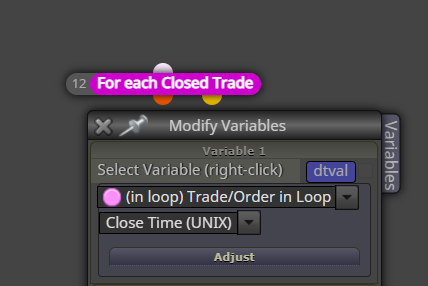
@l-andorrà you dont have to guess, just look: get the close time of that order, put it in a variable and see what the value is
-
I confirm the unix time stored into the variable is that of the 'Account history' tab for the close trade time. In my case, it is my local time and not the server time.
(English) I will try to help everyone in these fxDreema forums. But if you want to learn how to use the platform in depth or more quickly, I can help you with my introductory fxDreema course in English at https://www.theandorraninvestor.eu.
(Català) Miraré d’ajudar tothom en aquests fòrums d’fxDreema. Tanmateix, si vols aprendre a fer servir la plataforma amb més profunditat o més de pressa, t’hi puc ajudar amb el meu curs d’introducció a fxDeema en català a https://www.theandorraninvestor.eu/ca.
(Español) Intentaré ayudar a todo el mundo en estos foros de fxDreema. Sin embargo, si quieres aprender a usar la plataforma en profundidad o más deprisa, te puedo ayudar con mi curso de introducción a fxDreema en español en https://www.theandorraninvestor.eu/es.
-
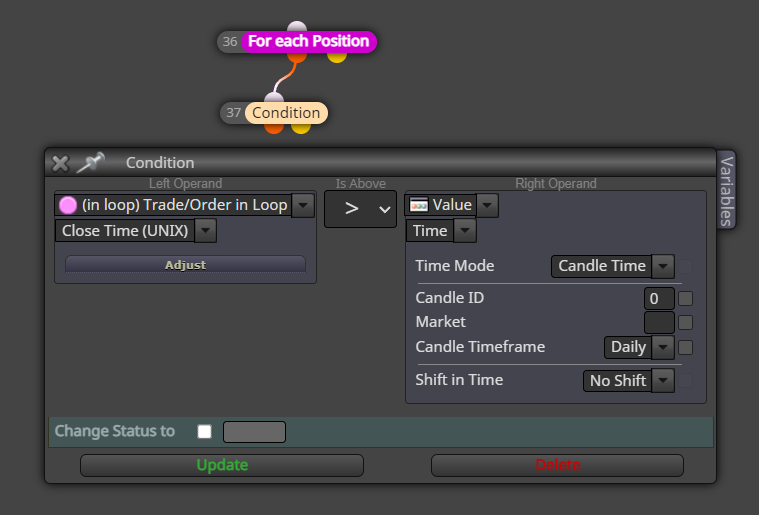
@l-andorrà ok, so the loop is getting the candle ID (server time) using a local time. That will cause problems. But its easy to fix, just convert the closing times to server time before using the candle ID condition; add the timezone difference to your close time variable, then use iBarShift() function instead of the basic candle ID dropdown.
There might be some easier options too, for example this type of check might automatically take the timezone into account:
-
I don't know how to use the iBarShift() function as a custom code in this context, sorry. How would you suggest to do it? On the other hand, I'm not sure your suggestion in the image would work. Are you sure the operand on the right will not be doing the same 'mistake' as the one in the left?
-
Put the closing time into variable dtval, then put this condition in a custom condition block:
iBarShift(NULL, PERIOD_D1, dtval + TimeLocal()-TimeCurrent()) == 0I dont know which mql functions automatically correct timezones and which dont, but its worth it to try a couple approaches.
-
Thank you for the info. I think I will have to use that function because your last image suggestion doesn't work. I used it as per your settings and I found that the new daily timeframe UNIX time is correctly identified the first tick of the new day, but as soon as the 'for each closed trade' loop is executed, yesterday's value (ie my local day) is used instead!

This is definitely a bug.
-
I finally found that the problem was in the platform I used. For some reason the code was not fully functional on it. As soon as I tried on a new one, everything worked fine. Maybe this is not a bug after all.

-
I can provide more details on what happened exactly, just in case someone else finds this same problem. My broker is doing something really weird. Forex charts are disconnected from the server at 23:55 and reconnected at 00:05 the following day. Well, I noticed that at 00:04 there is a fast reconnection that is immediately disconnected until 00:05. It is at that ultrashort connection that the bot is working as expected but...only yesterday's info is used!!!
 For some reason I can't understand, all values for daily candle ID are adjusted to the last day instead of the new one.
In my case I fixed the problem by using a time filter for the bot to begin at 00:10 every day. Then today's candle ID value are used normally. Damn brokers! Their cheating tricks are everywhere!!


