fxDreema

    • Register
    • Login
    • Search
    • Back to the main page
    • Categories
    • Recent
    • Tags
    • Popular
    • Search

    Grid Distant Increase

    Questions & Answers
    4
    9
    457
    Loading More Posts
    • Oldest to Newest
    • Newest to Oldest
    • Most Votes
    Reply
    • Reply as topic
    Log in to reply
    This topic has been deleted. Only users with topic management privileges can see it.
    • P
      Pheaktra Capo last edited by

      Hello.
      I am looking for how to increase grid distant for every X trade.
      For ex:
      Initial Grid Distant == 100point
      Grid distant increase == 100point
      Count trade to increase distant == 2

      With this input, first 2trade will have 100point distant and next 2trade will have 200point distant and another next 2trade will have 300point distant and so on..

      Believe brother in this forum have the idea.

      Thanks and have a nice day . . . .

      A 2 Replies Last reply Reply Quote 0
      • jstap
        jstap last edited by

        Set your initial grid to 2, when 2 running place the next grid, etc.

        Learn fxDreema Without the Wait!

        My comprehensive book, available on Amazon, is packed with examples and invaluable insights to help you fast-track your learning journey.

        The paperback and hardback editions include MT4 & MT5 QR codes for easy access to all prebuilt projects and robots, including my latest gold trading robot!

        Don鈥檛 miss out

        Click here鉃★笍 https://mybook.to/fxDreema to get your copy today!

        Enjoy! 馃槉

        1 Reply Last reply Reply Quote 0
        • P
          Pheaktra Capo last edited by

          Hello brother
          Please show me the block

          A 1 Reply Last reply Reply Quote 0
          • jstap
            jstap last edited by

            Set it up, if not working add a shared link and say why.

            Learn fxDreema Without the Wait!

            My comprehensive book, available on Amazon, is packed with examples and invaluable insights to help you fast-track your learning journey.

            The paperback and hardback editions include MT4 & MT5 QR codes for easy access to all prebuilt projects and robots, including my latest gold trading robot!

            Don鈥檛 miss out

            Click here鉃★笍 https://mybook.to/fxDreema to get your copy today!

            Enjoy! 馃槉

            1 Reply Last reply Reply Quote 0
            • P
              Pheaktra Capo last edited by

              Honestly, i dont understand this "Set your initial grid to 2, when 2 running place the next grid"

              1 Reply Last reply Reply Quote 0
              • jstap
                jstap last edited by

                Check trade count when = 2 set next grid, do this for all the trades you want to count, you can also set buy/sell and use groups to differentiate.

                Learn fxDreema Without the Wait!

                My comprehensive book, available on Amazon, is packed with examples and invaluable insights to help you fast-track your learning journey.

                The paperback and hardback editions include MT4 & MT5 QR codes for easy access to all prebuilt projects and robots, including my latest gold trading robot!

                Don鈥檛 miss out

                Click here鉃★笍 https://mybook.to/fxDreema to get your copy today!

                Enjoy! 馃槉

                1 Reply Last reply Reply Quote 0
                • A
                  Alan.paredes2 @Pheaktra Capo last edited by

                  @Pheaktra-Capo yo uso esto pero es manual ![alt text](cbe77dac-ef6e-4158-a0f5-a915e2fbb965-image.png image url)

                  1 Reply Last reply Reply Quote 0
                  • A
                    Alan.paredes2 @Pheaktra Capo last edited by

                    @Pheaktra-Capo esta es una versi贸n que no recuerdo si funciona bien la hice, pero prefer铆 seguir usando la versi贸n anterior https://fxdreema.com/shared/FyIaCLmkd

                    de aqu铆 a lo mejor puedes sacar alguna idea,

                    el bot crea 2 botones para colocar ordenes pendientes, le puedes modificar todos los par谩metros desde la pantalla, desde la cantidad de 贸rdenes a colocar hasta la separaci贸n entre ellas, tambien tiene un espacio para colocar el take profit de la ordenes pendientes

                    1 Reply Last reply Reply Quote 0
                    • A
                      alok @Pheaktra Capo last edited by

                      @Pheaktra-Capo there are several ways to increase Grid will depend on your project
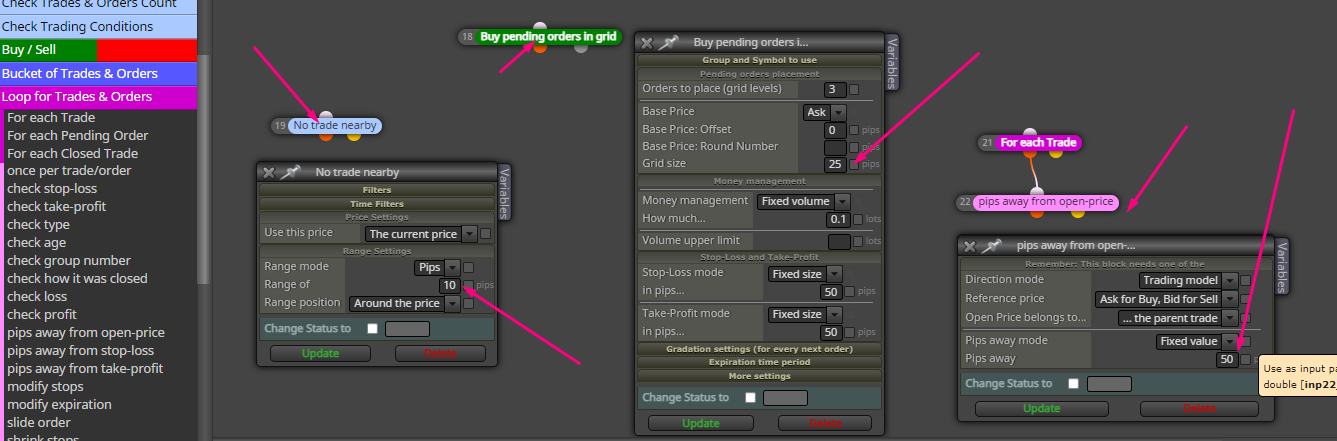
                      c09385da-3f31-49fe-a1ff-b7757081b901-image.png

                      1 Reply Last reply Reply Quote 0
                      • 1 / 1
                      • First post
                        Last post

                      Online Users

                      S
                      A
                      R
                      B
                      N
                      M
                      A
                      T
                      V
                      M
                      A
                      A
                      R
                      S

                      39
                      Online

                      146.7k
                      Users

                      22.4k
                      Topics

                      122.6k
                      Posts

                      Powered by NodeBB Forums | Contributors