Check Candle 1-5 if Price was higher then MA
-
Hi, I did an EA who checks if one of the Candles with ID 1-5 had a Price higher then an MA.
I did use 1 Condition Block for each Candle, which leads leads to 5 consecutive Conditions, it is working but it looks bad.
So I want to ask: Is there another design to check if one of the Candle 1-5 has crossed the MA?
https://fxdreema.com/shared/JhtXIHbjc
Thanks in Advance!
-
@siggi12345 Yes, you can create a loop to get that same result, but don't worry to create 'ugly' block trees. If they work, they work. Period.

-
@l-andorrà
would you be so kind and show me how to do it with loops? I never worked with loops before and I might need that in future... Thank you very much -
@siggi12345 Man, I wish I was an expert at loops as roar is.
He is by the the 'loop man' here. Maybe him could give us a hand? 
-
@l-andorrà alright, i will ask him.
Hello Mrs/Mr/Person @roar it would be very grateful if you could inform us how we could solve this with a loop. I would appreciate your generosity!
-
@siggi12345 sure!
To operate our loop, we need to first create 2 variables. The variables menu opens from the top of blocks list.
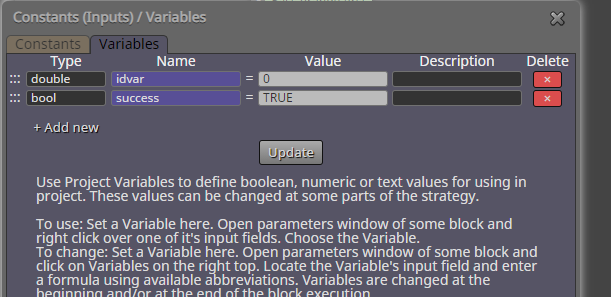
The idea in my loop is to first set some boolean variable ("success" in the example) to TRUE, and then loop through all 5 candles -> if some of them breaks our condition, the variable is set to FALSE.
After the loop, we can simply check if our variable has stayed TRUE, which would mean that all conditions were ok.
https://fxdreema.com/shared/6Zmxnuj6cEdit: wrong pic
-
@roar wow! this is more complicated that i thought. Thank you very much!
It works and i think i understand the most part.
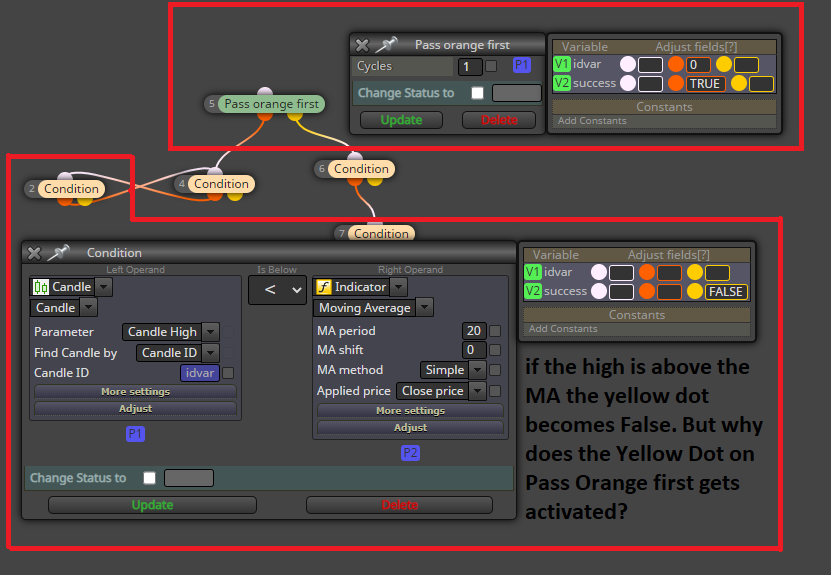
The first condition checks if idvar is below 5, if true it checks if candle idvar (currently 1, because of idvar+1) is below the MA. If true the Variable "success" stays true. but since the candle idvar stayed below the MA the yellow dot was not activated.
I have one questios:
Thank you very much!
Edit: I have just found out that the bool variables have to be in lower case in MQL5
-
@siggi12345 yes this is pretty technical stuff, youre smart for learning it so fast!
Answer to question: "Pass orange first" is my method of organizing the whole algorithm. It first does the loop thing, and later does other things (whatever is connected to yellow output).
Basically just to make sure the EA doesnt check the loop results before the loop has even done its calculations.Oh, didnt know about the casing.. I don't use boolean variables myself, just integers 0 and 1 for true/false, but I thought that would confuse others..
-
@roar thank for this detailed answer, i think i have to try out more to get a full understanding.
I have tried your code again, but unfortunetly I was wrong, it does not work as expected and I dont know how to fix it.
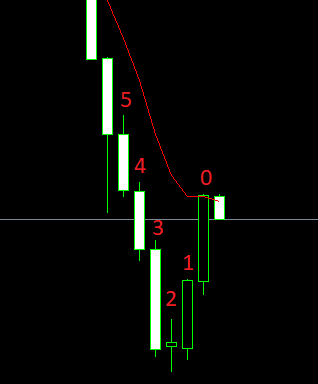
Candle 1-5 have not touched the EMA9 on this GBPUSD M15 Chart @ 5. Feb 2017 but as candle 0 crosses the EMA it should trigger the sell. I dont know why. The loops says:
-candle 1-5 high below EMA
and the Condition before the Sell:
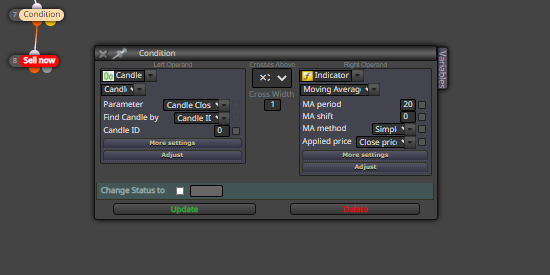
-candle 0 Crosses Above...This is exactly what happend here, right? So I have no idea how to fix it. Can you help me again please.
-
candle 0 might not of closed above that EMA, that could be the high ? Block 7 =
-
@siggi12345 I think the logic is right and you do understand the structure, but there is just some minor bug. Maybe the MA is not 9, instead its 20, etc... Does the EA make trades at all, even in "weird" situations? Share a link?
-
@roar yes, he is doing "weird" trades and he is also doing correct trades:
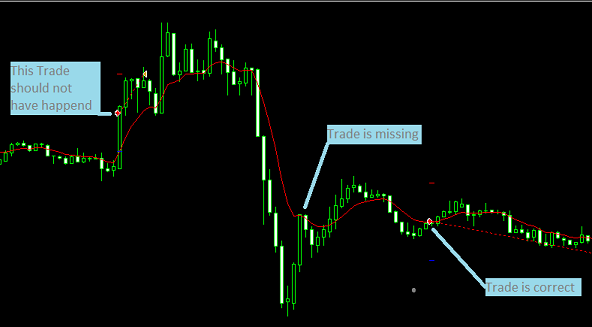
link: https://fxdreema.com/shared/LgfUz4Uod
Thanks!
-
@siggi12345 I think I got it, try this version
https://fxdreema.com/shared/cV7V8KE9e -
@roar alright. Thank you very much. You are right, the Candle idvar was missing at one condition!
Such a small mistake but still such a big difference. Thanks for the finding and everything!
-
@roar I try to use your loop but I got error like this.
"Compilation errors
'TRUE' - undeclared identifier
'FALSE' - undeclared identifier
'TRUE' - undeclared identifier
'TRUE' - undeclared identifier"What's the mistake on this loop?:D
https://fxdreema.com/shared/R0VTg6MRcThank you.
-
@gobeef when you copy blocks between projects, the variables dont actually copy properly to the destination. You have to declare them manually, or:
Download the .mq5 file from my example, and then import the .mq5 to your builder. Then the variables will be declared properly.
-
@roar In this project I download your .mq4 and convert to .mq5 but still doesn't work. Do I have to set something more on .mq5 version? Thank you.
https://fxdreema.com/shared/xog76xzBd -
@gobeef you have to also change all "TRUE" values to "true" - mql5 is picky about the capitalizing there.
-
@roar It works ! thank you for your help.


