check the number of open and pending operations
-
Hi, I have seen a broque that checks the trade count and another one that checks the order count.
but this broque compares it to me with a number, (that is: ==,>, <, ¡=).
What I cannot find, or do not know how to put in variables,
n sell operations
n buy operations
n sell stop
n buy stop -
@cesardefez if you dont care if theyre runnig trades or pending orders, use function OrdersTotal() to get that value.
https://docs.mql4.com/trading/orderstotalIf you need to separate running trades and pending orders, you have to use "for each trade" loop and just count the loop iterations into some variable.
-
309/5000
place a variable and update each time you make a buy or sell order, it would be simple if it were direct orders. But in my EA, I place 30 buy stop and 30 sell stop orders. I don't know where to put the counter. And if I am interested in knowing how many buy orders are opened and how many sell orders are opened. -
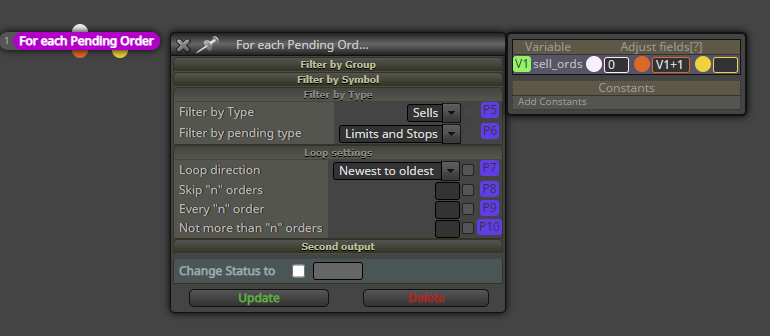
@cesardefez for example, this one counts the sell pending orders.
-
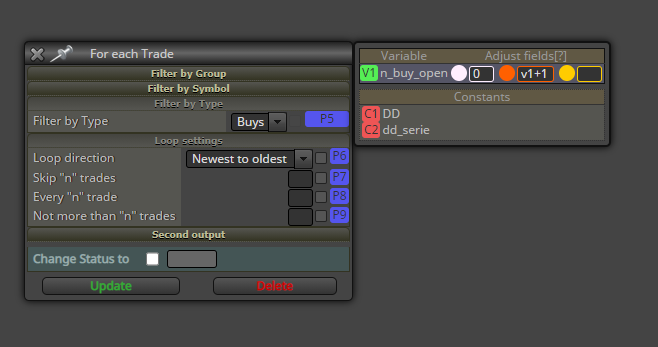
Supposedly this will tell me the open buy operations?
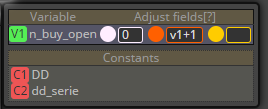
Out of curiosity, I have never known what the unlocking panel of the variables was for, I understand, correct me if I am wrong, the white circle is the default value of the variable V1, the red circle, V + 1 increases by 1 and updates the variable V1 . What is the circle for
yellow??
-
@cesardefez yes, thats correct for buys. Just change v to V, its case-sensitive.
Here's explanation of the variables box
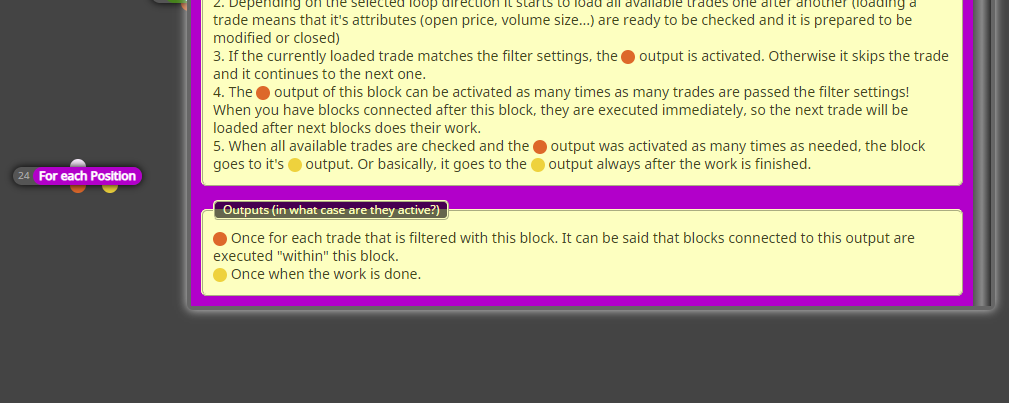
https://fxdreema.com/forum/topic/10894/scan-historical-data-for-conditions-values/8In a case of loop block, orange happens on each loop iteration, yellow happens after the loop has completed. See block information
-
THANK YOU VERY MUCH, Today I have learned a lot, it is these details that make it get its full potential.
thanks

