Adjust Fibonacci Levels/ Object Levels
-
Hello guys,
Introduction:
The EA draws Fib levels at 0% and 100%.
The EA knows exactly how and when to draw the 100% and 0% level.I did not find any approach to adjust an already drawn Fib level or redraw a Fib.
The Task:
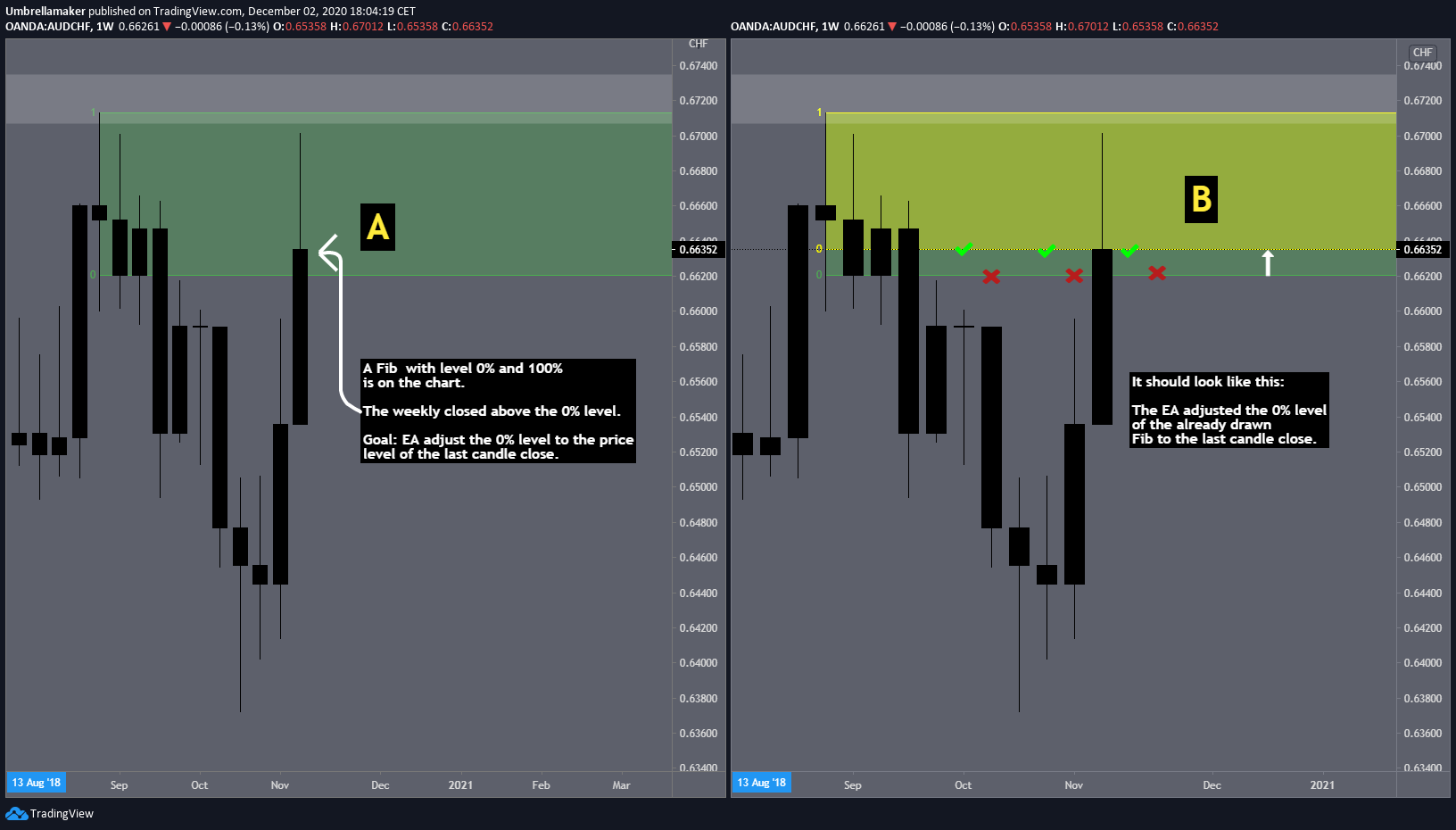
The EA shall adjust the 0% level to the latest candle close above it (see screenshot).Any other approach or thoughts to that approach are very welcomed!
Thanks for your efforts in advance!!!
-
@umbrellamaker Certainly not a trivial thing to do. If I understand it correctly, every new candle should 'adjust' the value of the 0% level. Correct? But would the 100% level be stationary?
(English) I will try to help everyone in these fxDreema forums. But if you want to learn how to use the platform in depth or more quickly, I can help you with my introductory fxDreema course in English at https://www.theandorraninvestor.eu.
(Català) Miraré d’ajudar tothom en aquests fòrums d’fxDreema. Tanmateix, si vols aprendre a fer servir la plataforma amb més profunditat o més de pressa, t’hi puc ajudar amb el meu curs d’introducció a fxDeema en català a https://www.theandorraninvestor.eu/ca.
(Español) Intentaré ayudar a todo el mundo en estos foros de fxDreema. Sin embargo, si quieres aprender a usar la plataforma en profundidad o más deprisa, te puedo ayudar con mi curso de introducción a fxDreema en español en https://www.theandorraninvestor.eu/es.
-
The 100% level does not adjust to candles which follow after.
The 0% level of the fib need to be adjusted when price closes above the 0% price level of the fib.
I would be already happy to get an approach how to adjust the price level of an already drawn object

Somehow with the MOVE block and variables?
-
@umbrellamaker First things first. If you look at the 'darw fibo' bloc you will see therer are 4 positions: Time(1), Price(1), Time (2) and Price (2). Those are the reference points to draw levels 0% and 100 % respectively. As you suggest, you can use variables to define any of those 4 points. But you will need a previous structure calculating them. Do you have something like that now?
(English) I will try to help everyone in these fxDreema forums. But if you want to learn how to use the platform in depth or more quickly, I can help you with my introductory fxDreema course in English at https://www.theandorraninvestor.eu.
(Català) Miraré d’ajudar tothom en aquests fòrums d’fxDreema. Tanmateix, si vols aprendre a fer servir la plataforma amb més profunditat o més de pressa, t’hi puc ajudar amb el meu curs d’introducció a fxDeema en català a https://www.theandorraninvestor.eu/ca.
(Español) Intentaré ayudar a todo el mundo en estos foros de fxDreema. Sin embargo, si quieres aprender a usar la plataforma en profundidad o más deprisa, te puedo ayudar con mi curso de introducción a fxDreema en español en https://www.theandorraninvestor.eu/es.
-
@l-andorrà Yes. The EA knows exactly where and when to place the 0% and the 100% level. The EA is also able to save the price levels of these levels. Now, the next challenge is the adjustment of the fib levels. Do you need more information?
Will answer as fast as possible!
-
@umbrellamaker Ok. Can you please share your project to check it out?
(English) I will try to help everyone in these fxDreema forums. But if you want to learn how to use the platform in depth or more quickly, I can help you with my introductory fxDreema course in English at https://www.theandorraninvestor.eu.
(Català) Miraré d’ajudar tothom en aquests fòrums d’fxDreema. Tanmateix, si vols aprendre a fer servir la plataforma amb més profunditat o més de pressa, t’hi puc ajudar amb el meu curs d’introducció a fxDeema en català a https://www.theandorraninvestor.eu/ca.
(Español) Intentaré ayudar a todo el mundo en estos foros de fxDreema. Sin embargo, si quieres aprender a usar la plataforma en profundidad o más deprisa, te puedo ayudar con mi curso de introducción a fxDreema en español en https://www.theandorraninvestor.eu/es.
-
@l-andorrà
https://fxdreema.com/shared/cdPSaTMEcHere you see how the EA is placing the Fibs and saving them into variables. It is only an illustration, otherwise it would be too messy.
-
@umbrellamaker I don't undertand the reason for blocks 4419 and 4420. Why are you adding 0 to store it into a variable?
(English) I will try to help everyone in these fxDreema forums. But if you want to learn how to use the platform in depth or more quickly, I can help you with my introductory fxDreema course in English at https://www.theandorraninvestor.eu.
(Català) Miraré d’ajudar tothom en aquests fòrums d’fxDreema. Tanmateix, si vols aprendre a fer servir la plataforma amb més profunditat o més de pressa, t’hi puc ajudar amb el meu curs d’introducció a fxDeema en català a https://www.theandorraninvestor.eu/ca.
(Español) Intentaré ayudar a todo el mundo en estos foros de fxDreema. Sin embargo, si quieres aprender a usar la plataforma en profundidad o más deprisa, te puedo ayudar con mi curso de introducción a fxDreema en español en https://www.theandorraninvestor.eu/es.
-
@l-andorrà To make the price level recognizable for the EA
-
@umbrellamaker You can get the same result without any additional calculation by using a 'Modify variable' block.