[SOLVED] Cannot manage a position counting
-
https://fxdreema.com/shared/X1uAPjBtd
Hi everyone,
I am having troubles to get my EA to count positions when they closes on the same tick.
It works very well when they don't close together though.
Algo :
EA opens on init 3 positions in 3 differents groups
Goes on break even for each one (on EURUSD starting 2020.01.01)
There are 3 tests (for each group) to check if it was closed by SL, TP or BE and it increments each variables for statistics.Problem : only the 1st group seems to be tested.
I tried also to do it in the on Trade tab but it wasn't functionning at all, maybe I did it wrong.
-
Ok I did some digging and the issue was on "check BE"
If you want to use it you should use "No matter how" instead of "Not by SL or TP" -
@jerkha Wow, you are using many loops within loops! HonestlyI would recommend you to deconstruct the whole structure and rebluild it one step at a time. Once that step is confirmed then adding the new one. My guess (and it's just a guess) is that probably additional loops will be required to cover all your requirements per group.
What I can tell you now is that those 'Pass' blocks on top of the break even blocks are redundant. You can remove them.
-
that can'T work the way you are doing this!
you should try to loop less in a more efficient way and also determine the order you want to loop something!
-
Thanks for your help,
I did delete everything and took it back from scratch and I've come to this : https://fxdreema.com/shared/Vn9K6f7Vb
The issue as I explained on another topic (couldn't find this one) is that the first opened trade is never counted as it should.
NB : I replaced the break-even blocks by modify stops for a future use but at the moment they are doing the same thing
-
@jerkha Did you check all those loops independently? Did you confirm they work correctly when isolated?
(English) I will try to help everyone in these fxDreema forums. But if you want to learn how to use the platform in depth or more quickly, I can help you with my introductory fxDreema course in English at https://www.theandorraninvestor.eu.
(Català) Miraré d’ajudar tothom en aquests fòrums d’fxDreema. Tanmateix, si vols aprendre a fer servir la plataforma amb més profunditat o més de pressa, t’hi puc ajudar amb el meu curs d’introducció a fxDeema en català a https://www.theandorraninvestor.eu/ca.
(Español) Intentaré ayudar a todo el mundo en estos foros de fxDreema. Sin embargo, si quieres aprender a usar la plataforma en profundidad o más deprisa, te puedo ayudar con mi curso de introducción a fxDreema en español en https://www.theandorraninvestor.eu/es.
-
@l-andorrà They are isolated one from another. And they work properly when the others are turned off if this is what you mean, except for the first opened
-
@jerkha No. I mean if they work correctly when they are used with NO other blocks in the EA other than those used to opebn a trade. I guess thay will work correctly that way but then they interfere each other when combined.
(English) I will try to help everyone in these fxDreema forums. But if you want to learn how to use the platform in depth or more quickly, I can help you with my introductory fxDreema course in English at https://www.theandorraninvestor.eu.
(Català) Miraré d’ajudar tothom en aquests fòrums d’fxDreema. Tanmateix, si vols aprendre a fer servir la plataforma amb més profunditat o més de pressa, t’hi puc ajudar amb el meu curs d’introducció a fxDeema en català a https://www.theandorraninvestor.eu/ca.
(Español) Intentaré ayudar a todo el mundo en estos foros de fxDreema. Sin embargo, si quieres aprender a usar la plataforma en profundidad o más deprisa, te puedo ayudar con mi curso de introducción a fxDreema en español en https://www.theandorraninvestor.eu/es.
-
@l-andorrà I'm sorry but I don't see what other blocks I could delete ?
Can you help me identify which blocks : https://fxdreema.com/shared/Vn9K6f7Vb
For me the whole EA is just
on init : open 3 positions in 3 different groups, count them, boolean they're not at break even
on tick : 6 loops, 3 checking how each group was closed, 3 modifying stops to break evenEdit : problem seems to come from block 223. Second output is used instead but it should be first
-
Okay I think I found out what is the problem. On the screenshot below you can see :
- in red the TPs that were took for SLs
- in green the TPs that were counted as TPs
- in blue the propers SLs
As you can see, the TP in red have all one common thing, they weren't closed as their proper TP (check price column).

So I have checked the block info of "check how it was closed" and it says :
"For each closed trade we know its Close Price (the price at which it was closed), SL and TP levels. The block simply checks whether the Close Price is the same as SL or TP."
I'm gonna try later today if that comes from the fact that I deleted the rules in project options but in the meantime I am wondering 2 things.
First is there a way for the EA to read the comment ? (I would read the comment of the last closed position to check if it's TP or SL)
Second is there another way to check how it was closed ? Maybe one that would have a tolerance around the closing price.
-
@jerkha Yes, you can use a condition block to find a comment:
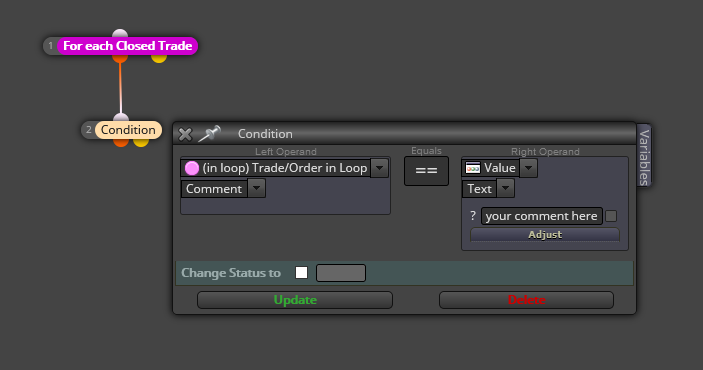
On your question about how the trade was closed, you can always use the purple blocks on the 'on trade' tab.
(English) I will try to help everyone in these fxDreema forums. But if you want to learn how to use the platform in depth or more quickly, I can help you with my introductory fxDreema course in English at https://www.theandorraninvestor.eu.
(Català) Miraré d’ajudar tothom en aquests fòrums d’fxDreema. Tanmateix, si vols aprendre a fer servir la plataforma amb més profunditat o més de pressa, t’hi puc ajudar amb el meu curs d’introducció a fxDeema en català a https://www.theandorraninvestor.eu/ca.
(Español) Intentaré ayudar a todo el mundo en estos foros de fxDreema. Sin embargo, si quieres aprender a usar la plataforma en profundidad o más deprisa, te puedo ayudar con mi curso de introducción a fxDreema en español en https://www.theandorraninvestor.eu/es.
-
@l-andorrà thanks I will try to do it again with on trade tab.
About the way to look for comment does it have to be an absolute value or it can be "start with"?PS (non related) : I see you are a big help for all the community and I would like to bring some help too (at least for what I can) but I find the forum hard to use on mobile, do you use some third-party program to read&answer?
-
@jerkha I think there can be a 'start with' as you say, but that required some hard coding I don't know, sorry.
 Maybe a real programmer can help.
No, I only use the web based forums and I have no idea if there are any third-party programs as you say. I'm afraid I'm too old for my eyes to read thrugh a small mobile screen.

-
Okay here we are : I moved all that part to "on Trade" tab, tested it with one group and all works like a charm.
Thing is when you put it for multiple groups it counts badly. It looks like the issue appears when multiple group trades closes simultaneously.
Shared project : https://fxdreema.com/shared/o6xgRKkzd
If you run it on visual backtesting you'll see that closed should be equal to opened - 1 but a gap appears telling us that sometimes a position is closed but not included in the count
@l-andorrà I'll look into it for the "start with" in MQL5, thanks for your answer, I definitely need a proper desk to be more comfortable spending time on the computer ^^
-
@jerkha It is certainly weird because I see no mistake in the logic of all blocks on the 'on trade' tab. That part should work corectly. Apparaetnly the problem should be on the 'on tick' tab, but I cannot see it right now.
(English) I will try to help everyone in these fxDreema forums. But if you want to learn how to use the platform in depth or more quickly, I can help you with my introductory fxDreema course in English at https://www.theandorraninvestor.eu.
(Català) Miraré d’ajudar tothom en aquests fòrums d’fxDreema. Tanmateix, si vols aprendre a fer servir la plataforma amb més profunditat o més de pressa, t’hi puc ajudar amb el meu curs d’introducció a fxDeema en català a https://www.theandorraninvestor.eu/ca.
(Español) Intentaré ayudar a todo el mundo en estos foros de fxDreema. Sin embargo, si quieres aprender a usar la plataforma en profundidad o más deprisa, te puedo ayudar con mi curso de introducción a fxDreema en español en https://www.theandorraninvestor.eu/es.
-
@l-andorrà "on Tick" & "on Trade" are different functions and instructions inside them should not (I am almost sure that it's "cannot") interfere one with another since they are called on different events.
see : https://www.mql5.com/en/docs/event_handlers
What I think is that the "on Trade" tab does not work in a loop like "on Tick", simply the closing of at least one position triggers it.
Then it does what it is supposed to do on the first block (lowest block ID) filling the conditions and what is connected to it but if multiple positions are closed simultaneously it cannot handle the execution of multiple starting point (at least not the way I connected them).
I tried connecting the end of 1st group to the start of the 2nd and 2nd with 3rd, same result, doesn't solve.
-
@jerkha I think the best option is contacting the admin and letting him know. He will take some time to answer but will provide an explanation for sure.
(English) I will try to help everyone in these fxDreema forums. But if you want to learn how to use the platform in depth or more quickly, I can help you with my introductory fxDreema course in English at https://www.theandorraninvestor.eu.
(Català) Miraré d’ajudar tothom en aquests fòrums d’fxDreema. Tanmateix, si vols aprendre a fer servir la plataforma amb més profunditat o més de pressa, t’hi puc ajudar amb el meu curs d’introducció a fxDeema en català a https://www.theandorraninvestor.eu/ca.
(Español) Intentaré ayudar a todo el mundo en estos foros de fxDreema. Sin embargo, si quieres aprender a usar la plataforma en profundidad o más deprisa, te puedo ayudar con mi curso de introducción a fxDreema en español en https://www.theandorraninvestor.eu/es.
-
@l-andorrà Thanks. I'm sending him the link of this topic.
-
So today I sent an email to fxDreema to have some help on the topic and just after I found out how to do it... (I feel like my grandma when she tells me that it doesn't work but everything works fine ^^)
Anyway for anyone interested : https://fxdreema.com/shared/bVc9fI3vb
Everything that is in "on Trade" works the same in "on Tick", it is just way faster for backtesting.
Now it's time for statistics !!
-
@jerkha Interesting. Thank you for sharing.