fxDreema

    • Register
    • Login
    • Search
    • Back to the main page
    • Categories
    • Recent
    • Tags
    • Popular
    • Search

    How to use Heiken Ashi Smoothed custom indicator?

    Questions & Answers
    2
    2
    787
    Loading More Posts
    • Oldest to Newest
    • Newest to Oldest
    • Most Votes
    Reply
    • Reply as topic
    Log in to reply
    This topic has been deleted. Only users with topic management privileges can see it.
    • T
      Tomaschek58 last edited by

      Hi everyone,

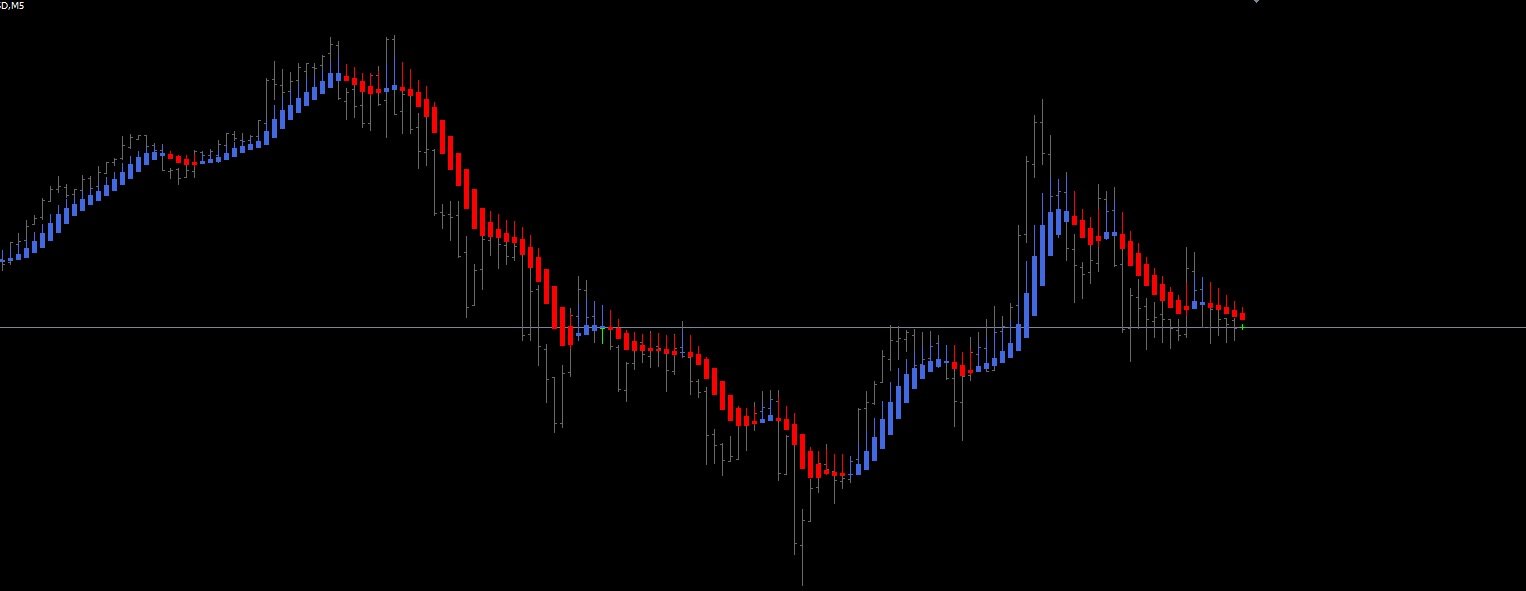
      I uploaded my custom indicator Heiken Ashi Smoothed and it works fine but I don't know how to use it...
      It looks like this:
      0_1621440431644_Smoothed.jpg

      There are 4 buffers but how can I find out which buffer is what?

      All I need is, to recognize in FxDreema what candle this indicator shows.

      Example: When it shows last candle red on H1 and last candle red on M15 > SELL...
      Or when last few candles are the same colour, it gives me the condition to trade...

      Thank you for any afford.

      0_1621441190732_Heiken_Ashi_Smoothed_TF.mq4

      1 Reply Last reply Reply Quote 0
      • max c
        max c last edited by max c

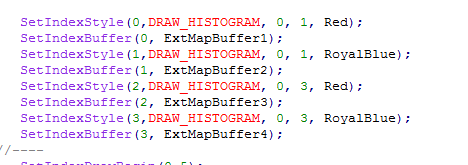
        first have a look at the code , buffers are usually near the top.
        second set a different colour arrow after each buffer type then test in visual mode.

        heres your buffers

        0_1621580279751_Screenshot_39.png

        1 Reply Last reply Reply Quote -1
        • 1 / 1
        • First post
          Last post

        Online Users

        C
        K
        T
        K
        D
        K
        E
        S

        19
        Online

        146.6k
        Users

        22.4k
        Topics

        122.6k
        Posts

        Powered by NodeBB Forums | Contributors