Change Meta editor to other terminal.
-
Can anyone help me. I have Oanda and LMFX, I’m creating a EA. I uploaded the EA in LMFX. When I press folder in Oanda and do everything to upload the EA, it uploads again in LMFX. I don’t now how to change the terminal so I can upload to Oanda. And how can I disable the bot if I have it in 2 pairs running but I want to disable it from only one pair and let it running on the other pair. Thanks for anyone that can help.
-
@kelrobot I'm afraid I cannot answer the first part because I never used those platforms. On the second one, do you mean the same EA will run both trades on both symbols at the same time or several EAs running on different charts?
-
Well, even if is the same robot or different robots, if I want to disable a robot from 1 pair without disable the auto trading, so can the other pairs stay functioning with their robot. What platform do you use to upload the scrip to your brokers platform?
-
How can I send the project if I have a problem. My trailing stop and my break even block don't work. I have checked de question and answers and saw some examples. I think I have it right but its not working. How can I send the project here? Copy and paste the https?
-
@kelrobot Put a shared link on here, you have (global variables) terminal variables on FXDreema that place a mark on your terminal, this can be read by EA to do something/or not. If conditions are all in the same EA then there is no point. You can make a bool (true/false) condition to activate/deactivate parts of the EA, these can be an internal variable or an external (input changeable) constant.
-
@jstap what shared link? A link to the broker to see how to change the terminal of meta editor to other broker? Or what link do you mean?
-
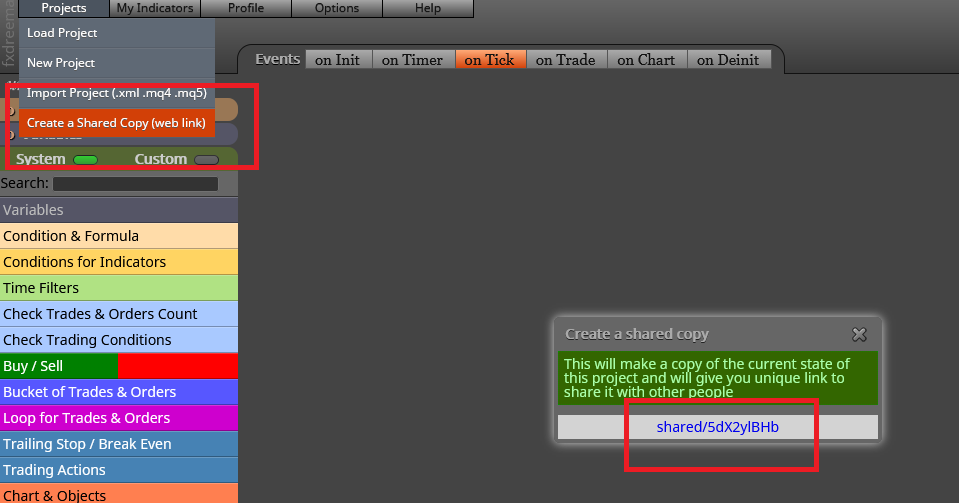
@kelrobot Top right, projects, create shared link, open in web page, copy from address bar and paste here.
-
OK, know what you mean now. But the meta editor has to do with the EA?
-
@kelrobot The mt4 button compiles like meta editor, so you only need 1 or the other, if you are not quick enough with mq4 button editor will steal and change the folder.
-
@kelrobot jstap is right. Without the link we can just speculate where the issue is.
-
@l-andorrà hello, but what link should I send? Its happening with all EA. I can open them in 1 brokers mt4 platform, but I cant send it to the other, even if I select open folder in the other broker that I want to uploads the robot. It uploads in the broker that its always uploading. I don't know how to change the meta editor from 1 broker platform to another.
-