Line Alert
-
Hello!
I would like to receive an alert for each line. But for some reason it doesn't work. What could be the problem? Please help me!
https://fxdreema.com/shared/RXkzNfFrb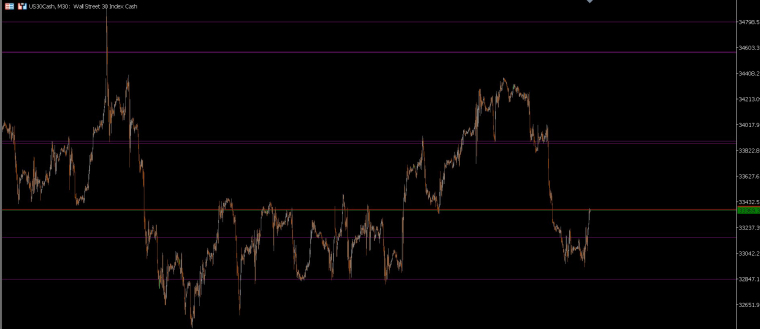
-
@bandito7 I think you would be better drawing a horizontal line on 0, not sure how this trend line option works.
-
Thanks!
How can I filter dashed line "for each object"? -
@bandito7 Not in "For each Object", but after that in Condition you can check the style. However, it's not very intuitive, because you have to know the constant of the style of the line. Take a look:
https://fxdreema.com/shared/uggHdlLbd
Make a horizontal line on the chart, set its style, run this EA (the blocks are in Init, so it works more like a Script) and if there is a dotted line, it will alert a message.
You can see I used a constant named STYLE_DOT. There are tons of predefined constants like this in MQL, for different purposes. In this particular case, there are 5 constants for line style. Here they are:
https://www.mql5.com/en/docs/constants/indicatorconstants/drawstyles#enum_line_style
STYLE_SOLID - Solid line
STYLE_DASH - Broken line
STYLE_DOT - Dotted line
STYLE_DASHDOT - Dash-dot line
STYLE_DASHDOTDOT - Dash - two pointsAs integer values, I can assume that STYLE_SOLID is 0, STYLE_DASH is 1 and so on... but they didn't follow this rule everywhere.
If for some reason you want to make a Constant (input parameter), make it like this:
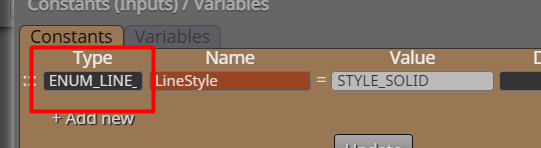
Here the data type is ENUM_LINE_STYLE (not fully visible). You can see this type name just above the table of 5 line styles in the link above. -
Thank you Administrator!
Can you help me? Why is none of them giving a signal? When I put it on the chart, sometimes it beeps, sometimes it doesn't. Nothing after that. Please help me make one that indicates the purple lines (trend by angle).
https://fxdreema.com/shared/o0HO5EZHd -
This way I get a continuous beep, so it works. If I add any two blocks, it doesn't work. How to condition it with another block to indicate when the line is crossed?
https://fxdreema.com/shared/ENkfkYvWb -
@bandito7 You should select 'horizontal line' instead of 'trendline' option. That will make available the 'proce level 1' option that will allow the block to identify the crossing.
-
It doesn't work with horizontal lines either. Surely there is a solution to this.
-
@bandito7 try with these 4 changes. You should also check the actual object type from your objects list on the chart.
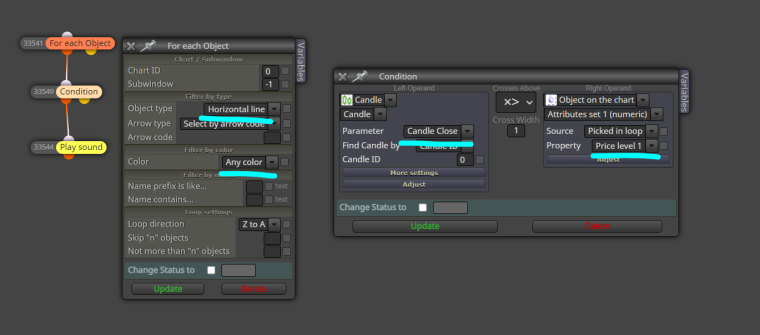
-
Thank you very much!!!!!!!!!!!!!! He is working!!!!!!!!!!


