Which is better to use>?
-
Which is better to use>? the Set "Current Market" for the next blocks or the symbol option in each block.
The reason for this is that when I place the Set "Current Market block above the logic order because I use martingale and variable on multiple currencies, it opens a bigger lot size in the order of another currency
an example is if on EURUSD we have 0.1, 0.3, 0.5 and a martingale order comes in for GBPUSD from 0.1 instead starting with the basic formula it then opens 0.7 which is wrong.
What's the best way to solve this...wasn't like this before
-
You should use as many different groups as traded charts. That way each group will be holding its specific martingale lot size. However, you will need different variables too. Sharing the same variable on all trades will never work.
-
@l-andorrà said in Which is better to use>?:
However, you will need different variables too. Sharing the same variable on all trades will never work.
ooh...I think this is my mistake, How can do this for 25 pairs? using grid martingale and the Set "Current Market block above the logic
-
You need to re-calculate your variables for each market in the loop. In the case of martingale, take the latest trade with the selected currency, see its lot size, calculate next lot size.
-
@roar thank you but am trying to get this am not good with variables. Can you help me with a demonstration pls

-
@l-andorrà this is what my grid martingale logic looked like. What should I do differently to get what you said.... https://fxdreema.com/shared/gkW4QAzGb
-
@ambrogio I need your guide on this pls...
If you wouldn't mind. If you need clarity I'll explain better
-
@tec-nacks if I were you, in order not to complicate my life, since you only have three pairs, I would make separate structures for each one
-
@ambrogio what about in a place of more than 15 pairs"? because the model is on H4 and it takes longer for each pair to form what should I do in that case?
-
@tec-nacks I always stay away from things that I consider complicated for me, I would do as I told you before. Also three or four EAs with three four pairs each. Surely it is possible to do with the "set market" block, but this work is not for me. Best developer can do it (paying).
https://fxdreema.com/shared/mBKVslnod
this is a very simple 6 blocks system to increase the lot against trend (it's not martingale, the real martingale is doubling the money after a loss, roulette game for example) -
so did all that is necessary for my grid martinagle logic herehttps://fxdreema.com/shared/0KqTkl0jb
but i still get this error of lot sizing
@ambrogio am studying your lot sizing logic, How can I open the next martingale or bigger lot at Candle ID1 that is after a candle closes
-
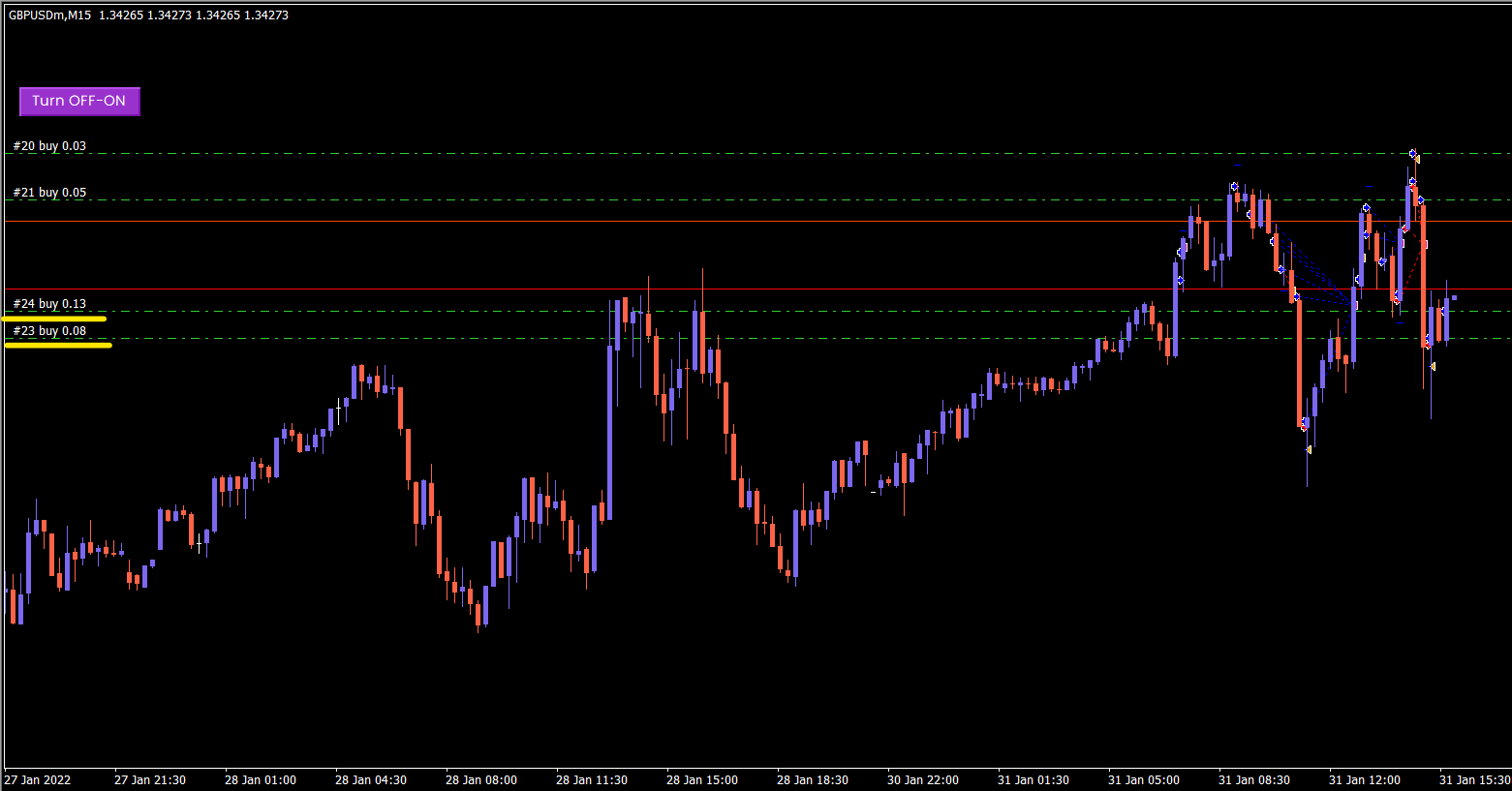
@tec-nacks it seems to me that the lot sizes increments are correct, the strange thing I notice is that buy trade #24 occurred above buy trade #23. This depends on the rules you set up.
-
The rules are here. can you help cross check https://fxdreema.com/shared/0KqTkl0jb
-
@tec-nacks you are requesting candle close ID1 to be below the open price in loop, so can happens that it places a buy above the last trade if the price goes up.
Try to put ask below open price in loop and you can see.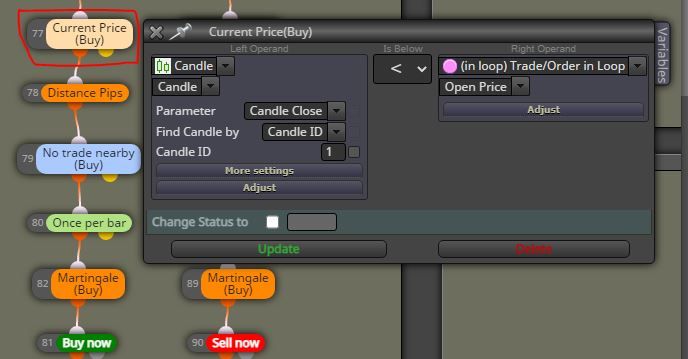
-
@ambrogio said in Which is better to use>?:
Try to put ask below open price in loop and you can see.
i dont understand what you mean by this because I want the martingale grid to open at ID 1 not at the middle of a candle...it is not a equal distance grid system but a minimum grid distance at the close of current candle
-
- can buy trades opens above the last open trade?
- you want trades to open at candle 0 opening?
-
- Trades can open below open price if it is a buy order
- I want to open at Candle ID1, if price pulls below a buy order for minimum 50pips for example, the logic is Only open a Martingale Order at the close of current candle if the distance between the open price is equal or above 50pips distance.
Hope you get the logic now?
-
@tec-nacks @bb-2 can you look into this for me also?
-
@tec-nacks now it's clear, I think you placed some useless blocks, that's why I sent you my project to increase lots against trend.
Move the "once per bar" at the top
Remove your blocks #91 #78 #79
Put a "pips away from open price" with your desired pips distance
This is your project as should be: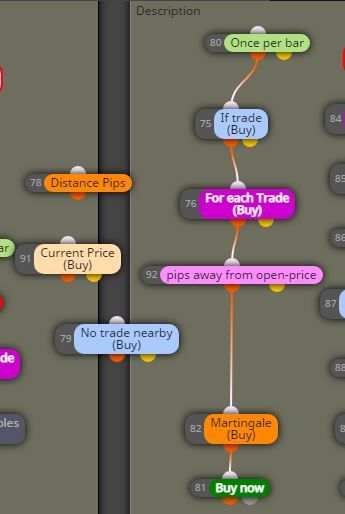
-
@ambrogio worked 100% man, you're a genius

Thank you


