How can a button's backgorund colour be changed?
-
All options I find in fxDreema are used to change the text colour of a button but I cannot find any allowing changing the background colour. Am I missing something or it is simply not possible?
(English) I will try to help everyone in these fxDreema forums. But if you want to learn how to use the platform in depth or more quickly, I can help you with my introductory fxDreema course in English at https://www.theandorraninvestor.eu.
(Català) Miraré d’ajudar tothom en aquests fòrums d’fxDreema. Tanmateix, si vols aprendre a fer servir la plataforma amb més profunditat o més de pressa, t’hi puc ajudar amb el meu curs d’introducció a fxDeema en català a https://www.theandorraninvestor.eu/ca.
(Español) Intentaré ayudar a todo el mundo en estos foros de fxDreema. Sin embargo, si quieres aprender a usar la plataforma en profundidad o más deprisa, te puedo ayudar con mi curso de introducción a fxDreema en español en https://www.theandorraninvestor.eu/es.
-
@l-andorrà if all else fails, you can use mql code:
ObjectSetInteger(0,"objectname",OBJPROP_BGCOLOR,clrRed);
https://docs.mql4.com/constants/objectconstants/enum_object/obj_button

-
I will try. Thanks
-
@l-andorrà said in How can a button's backgorund colour be changed?:
All options I find in fxDreema are used to change the text colour of a button but I cannot find any allowing changing the background colour. Am I missing something or it is simply not possible?
Is this what you mean or I misunderstood

-
@majidai Yes, that is the block used to create a button. What I need is an option to change the selected colour there for a different one. The only option I found was deleting the old button and drawing a new one.
-
@l-andorrà two simple ways (if I understood your request correctly), one by check the box, one by constant type color

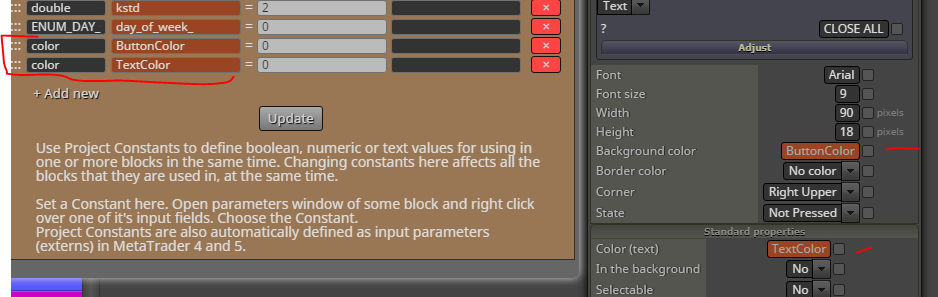
-
Interesting. I can try that! Thanks

-


