Add Volume to the manualy opend trade
-
Hello Forum!
I would like to support my manual trading with a simple EA that, when the market goes against me, EA opens additional positions every X pips from the first position I opened, while also increasing the LOT size to X with each subsequent entry.
So for example, I opened a BUY position, the price dropped by 2 pips, and the EA is supposed to add an additional 0.02 LOT. If the price drops another 4 pips from the initial entry, the EA should add another 0.05 LOT, and so on.
The LOT parameter should be adjustable. The distance from the opening price can remain the same.
I've read the HOW TO section, and there's an example there on how to do similar thing called Add to Volume (every 10 pips), but I can't figure out how to modify it to fit my own needs, so I'd really appreciate your help with this.
-
So when I started digging deeper, I created such a simple EA that worked great on the tester and did exactly what I wanted it to do.
https://fxdreema.com/shared/jg50oIJdd
Later, I modified it a bit to work on manually opened position
https://fxdreema.com/shared/YBfJ21JUb
and switched to live trading. When I tried using it on a demo account, it went crazy and either didn't open positions at set intervals (X pips) or opened positions with incorrect lot sizes or many positions every tick ingoring distance. No matter what I tried, it didn't perform the same as it did on the tester. Can anyone help me with this?
-
Just to get it right. You will be opening trades MANUALLY and then bot the bot should open additional hedging trades AUTOMATICALLY. Is that correct?
(English) I will try to help everyone in these fxDreema forums. But if you want to learn how to use the platform in depth or more quickly, I can help you with my introductory fxDreema course in English at https://www.theandorraninvestor.eu.
(Català) Miraré d’ajudar tothom en aquests fòrums d’fxDreema. Tanmateix, si vols aprendre a fer servir la plataforma amb més profunditat o més de pressa, t’hi puc ajudar amb el meu curs d’introducció a fxDeema en català a https://www.theandorraninvestor.eu/ca.
(Español) Intentaré ayudar a todo el mundo en estos foros de fxDreema. Sin embargo, si quieres aprender a usar la plataforma en profundidad o más deprisa, te puedo ayudar con mi curso de introducción a fxDreema en español en https://www.theandorraninvestor.eu/es.
-
@l-andorrà said in Add Volume to the manualy opend trade:
Just to get it right. You will be opening trades MANUALLY and then bot the bot should open additional hedging trades AUTOMATICALLY. Is that correct?
well, not exactly that.
I've explained everything on the attached picture as an example.
Hope that helps.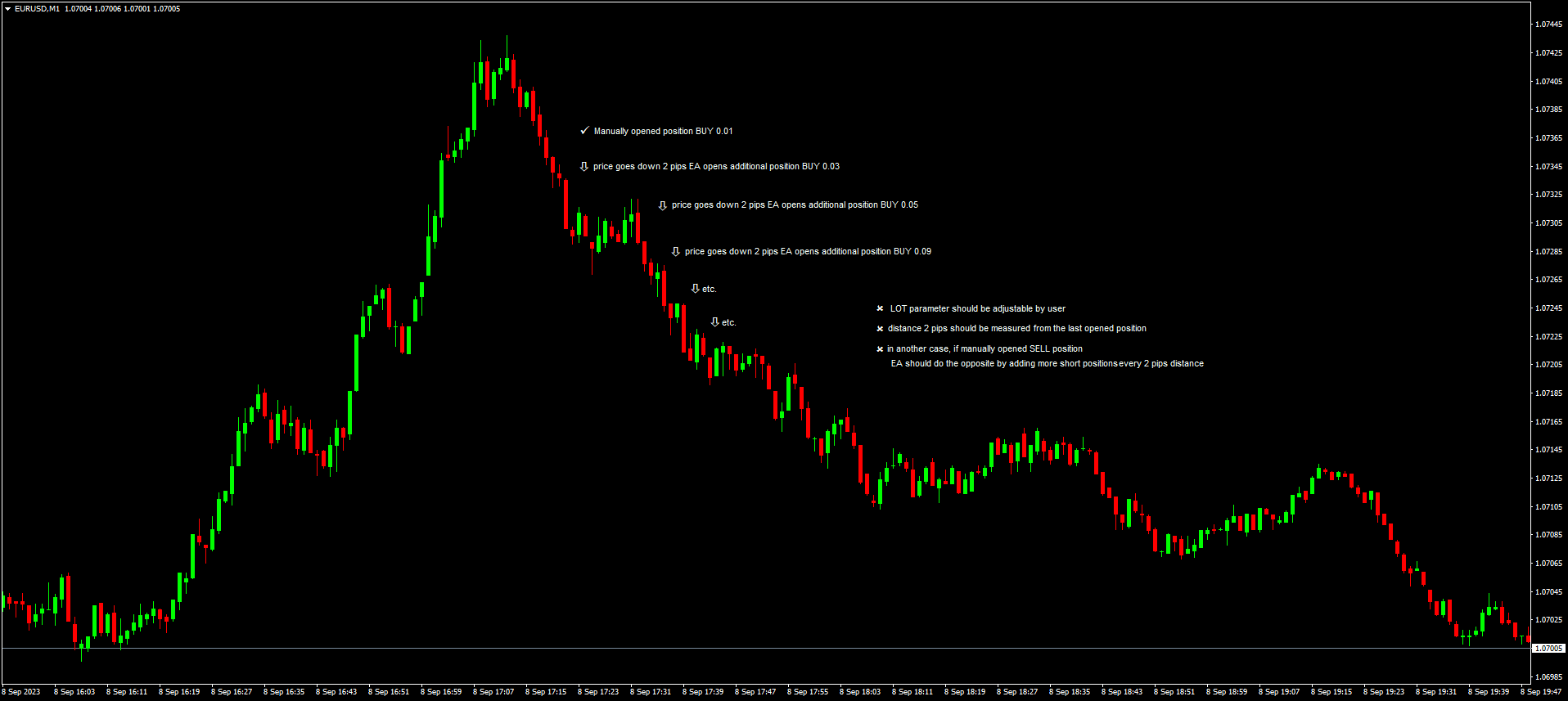
-
This is the maximum I was able to achieve on my own after spending several hours reading other posts with similar problems:
https://fxdreema.com/shared/gYXD4aW9d
And it still doesn't work the way I want it to.
I thought it would be the easiest EA in the world to build.
It should simply open new positions when the previous ones are in loss, as presented on the attached picture above.
Each new position should open every 2 pips from the last one. The lot size for each subsequent position must be user-defined.
At times, it will be 0.01, 0.05, 0.12, and at other times, it will be 0.02, 0.05, 0.09I've found plenty of options for multiplying the last lot size, for increasing the subsequent lot sizes based on a percentage of the last one, but I can't find any option for simply manually defining the sizes of the next positions.
I really need your help guys, because I'm starting to give up on this.
-
- You are calculating the lot size after the next trade is already opened, not sure if that makes sense
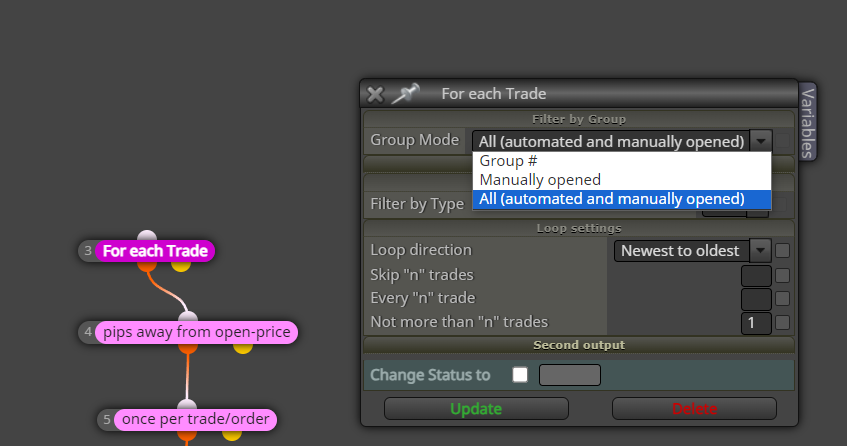
- To make an EA work together with manual trades, you need to filter by group "All"
- If you have a pre-defined list for each subsequent order size, you must always check the current count of trades and selecting the proper lot size according to the count, before making the next addition
Need small help? Tag me in your post
Need big help? https://www.fiverr.com/big_algo/automate-your-winning-strategy-in-mql4-or-mql5 -
@roar said in Add Volume to the manualy opend trade:
- You are calculating the lot size after the next trade is already opened, not sure if that makes sense
- To make an EA work together with manual trades, you need to filter by group "All"
- If you have a pre-defined list for each subsequent order size, you must always check the current count of trades and selecting the proper lot size according to the count, before making the next addition
I appreciate your guidance, but I really don't know how to build this EA. The more I read, the more I get confused about which direction to take. With each passing hour of trials and errors, I lose hope that I can do it on my own. I would genuinely appreciate it if someone could simply show me how such an EA should look like.
-
@Archer here's some example
https://fxdreema.com/shared/h6BiNKJocNeed small help? Tag me in your post
Need big help? https://www.fiverr.com/big_algo/automate-your-winning-strategy-in-mql4-or-mql5 -
@roar said in Add Volume to the manualy opend trade:
@Archer here's some example
https://fxdreema.com/shared/h6BiNKJocRoar, this looks very promising. Thank you very much. I will now test your solution, and after analyzing it, I will try to add the opposite block by myself that will do the same but for SELL positions.
-
@roar So I did some testing.
It seems that quite often, for some reason, EA does not respect the required distance before opening the next position and opens them whenever it wants.This is especially noticeable when the price movement is a bit more volatile.
I tried to use the 'slippage' option, but it doesn't work on ECN accounts that most brokers use, including mine.
I'm attaching an example after an hour of testing.
This is during the nighttime session when the market is barely moving. During the day, the price movements will be obviously much more abrupt.There's no problem if the EA opens the next position further than 2 pips away. That's actually beneficial for me. But if it does so earlier or accidentally, it's not good.
Would you be so kind and show me how to limit the opening of consecutive positions so that a minimum of 2 pips from the last opening is maintained?
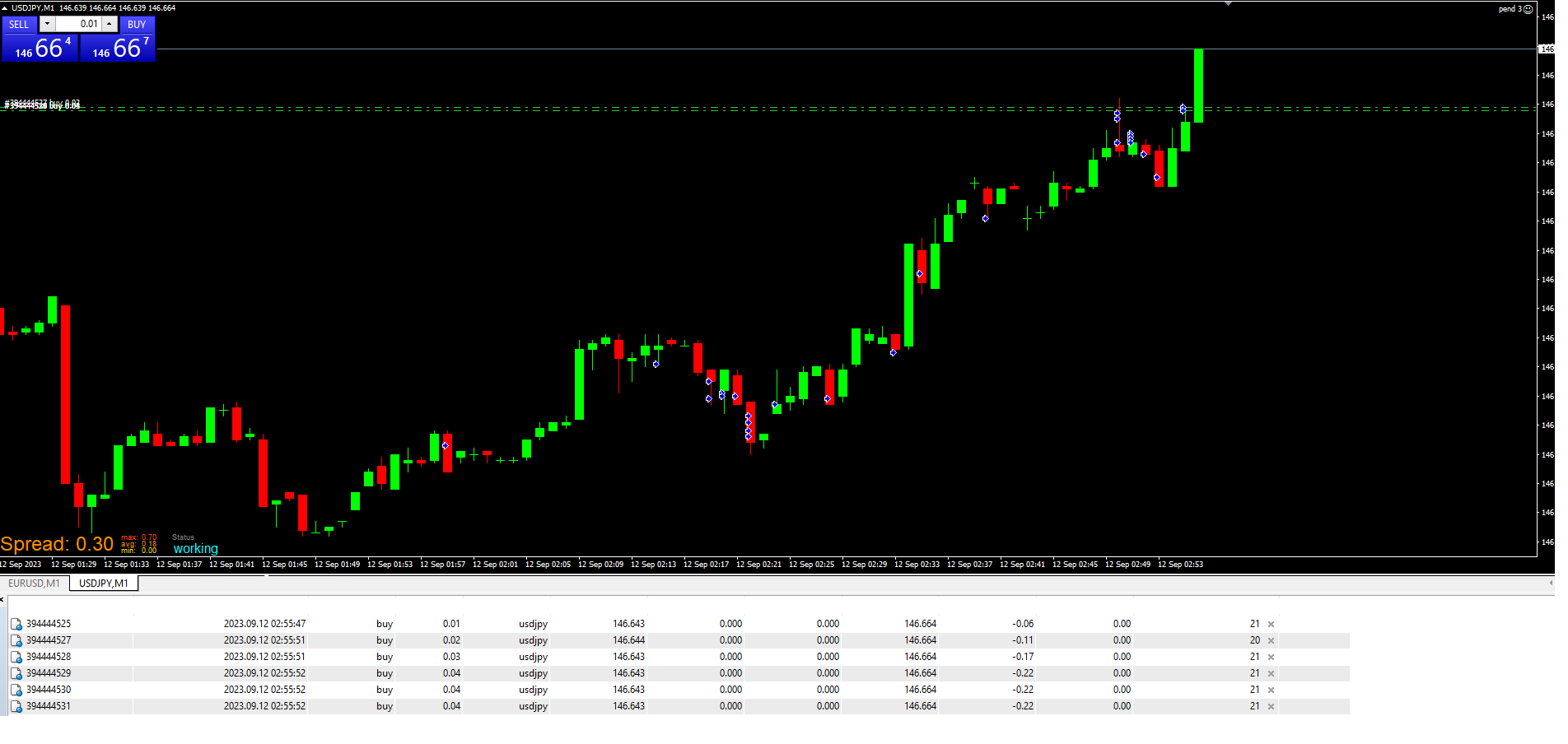
-
I tried to reduce premature position opening by adding, among other things, a block called "check distance" in every possible place and configuration, but it only disrupts the solution proposed by @roar :
https://fxdreema.com/shared/xBSiyQRDd
Could someone please point me in the right direction for a proper solution?
-
@Archer pip values on JPY pairs can be messed up.
Try replacing the Pips with a _Point conversion
Need small help? Tag me in your post
Need big help? https://www.fiverr.com/big_algo/automate-your-winning-strategy-in-mql4-or-mql5 -
@roar thank you. Of course, I will try.
But I spent the whole day today testing your solution on a separate MT4 to see how the EA behaves on different currency pairs. I ran it on 5 pairs, and for example, USDJPY has been performing almost perfectly for the past hour. The distances between consecutive openings are nearly perfect. I've attached a screenshot. However, on other pairs like EURUSD or GBPUSD, the issue persists even though the same EA with the same parameters is running on each of them. I also checked the latency in milliseconds, and it's negligible everywhere, so it's not a connection issue either. That's why I believe it's related to sudden price movements rather than a specific pair.
Do you think it's possible to somehow prevent the EA from opening positions earlier than the specified distance?
Maybe with a additional block or a function, etc.?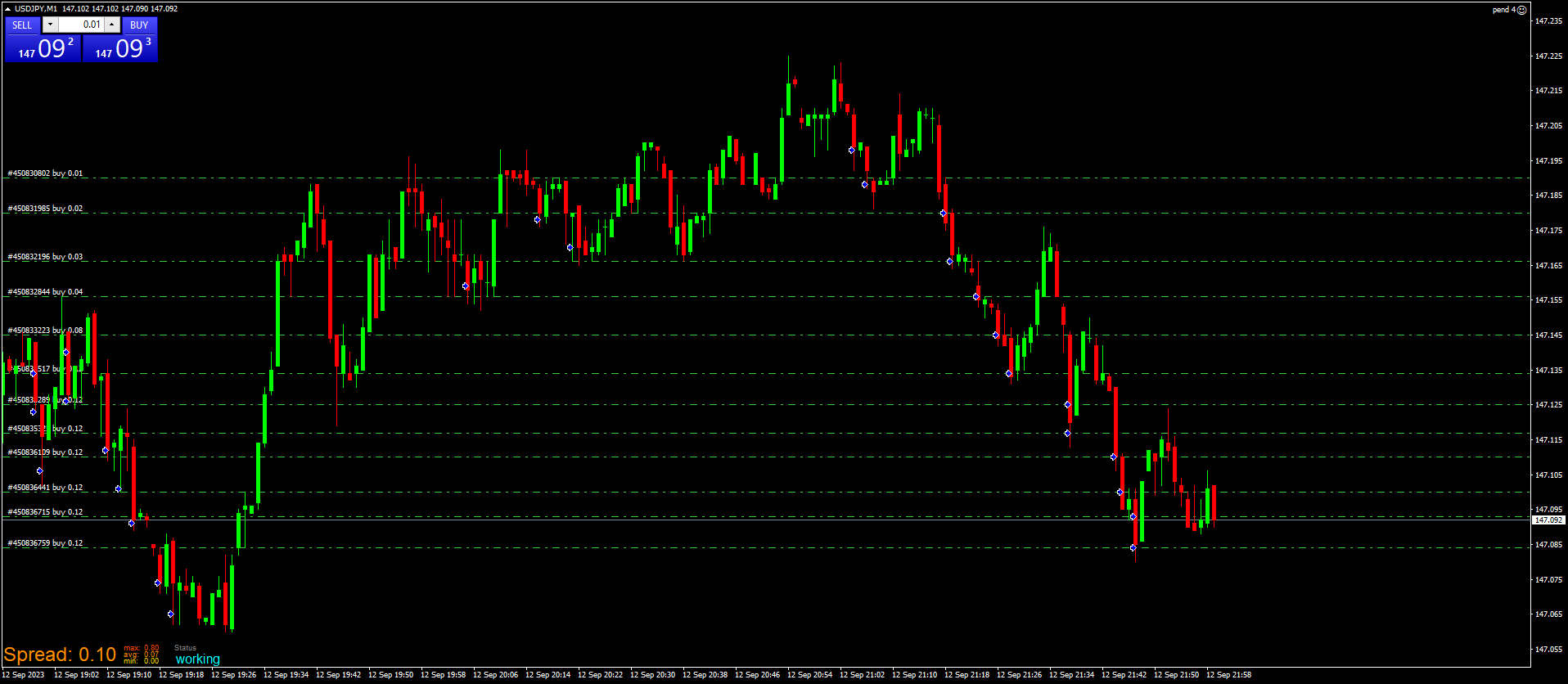
-
@Archer if the EA seems to not follow the 2 pip rule, dont add more rules but instead troubleshoot why the 1st rule is not followed. This can be done by simply printing out the values the EA looks at:
https://fxdreema.com/shared/1ihsjoy2dNeed small help? Tag me in your post
Need big help? https://www.fiverr.com/big_algo/automate-your-winning-strategy-in-mql4-or-mql5 -
@roar Okay, thanks. I'll add these changes to the EA, leave it for a few hours tomorrow, check what the log shows, and I'll let you know.
-
Hey @roar.
Another day of testing is behind me. The EA is being tested on low-spread pairs that almost always have zero spread. However, to eliminate sudden spread spikes that can negatively affect the accuracy of distance checking when opening BUY positions, I modified the block functions to open opposing SELL positions.https://fxdreema.com/shared/b3zog4Tab
Now, the spread has no influence on the accuracy of distance because it always opens a position at a fixed BID price. Unfortunately, there are still cases of premature position openings by the EA. I recorded some tests today so that you could see how it looks, but YouTube is taking so long to process the video that it would be faster if I upload screenshots instead.
The first example shows a situation of premature opening on USDJPY (bottom left corner).
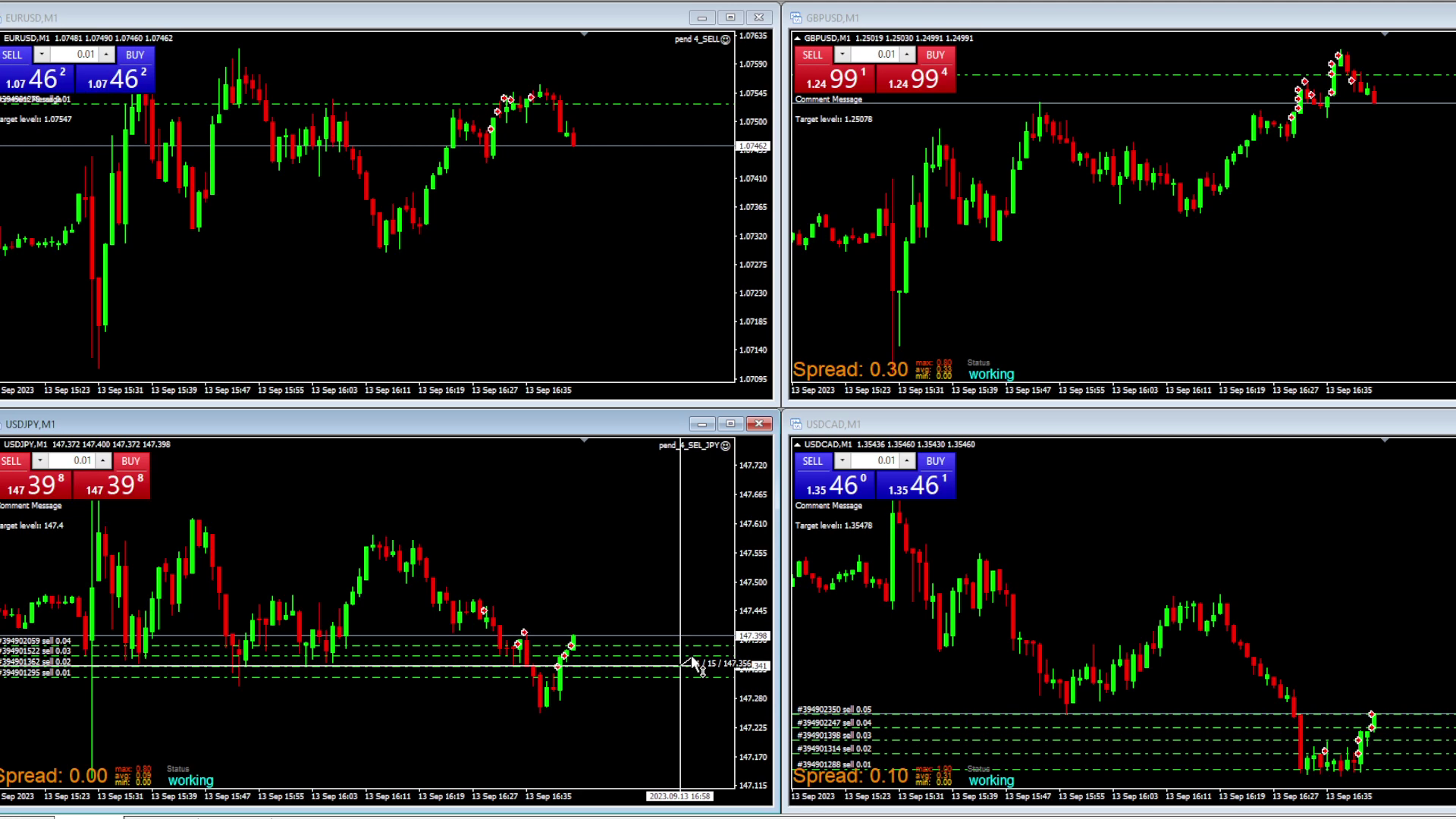
Another one is GBPUSD (top right corner). You'll have to trust me that the distances are below 2 pips here :). I measured them, but after two I went off the recorded screen...
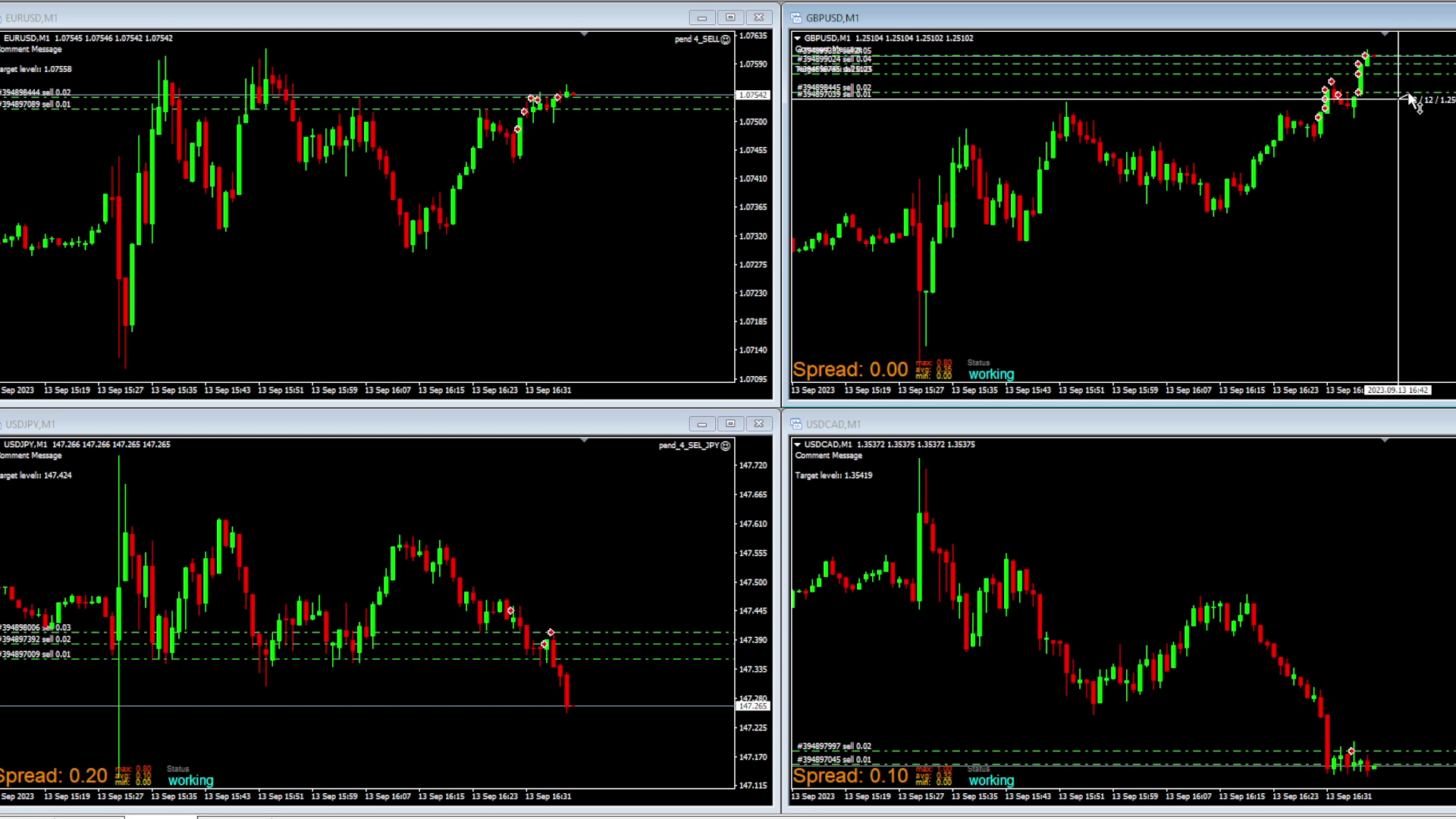
The target distance is always correctly determined by the EA. I still believe that the issue occurs when the price movement or TICK is sudden and sharp, indicating that the EA is simply too slow.
Describing it in the EA's perspective, it probably thinks like this: "Okay, the distance from the last position is 2 pips, so I can open a new one." A sudden TICK makes it just 1 pip away, and the EA still opens a new position. So, at this point, it might be beneficial to add another command for the EA to double-check before opening, ensuring that the distance is still indeed 2 pips.
This is just my logical thinking; what matters more is what you think?
What should be the next step that we should take? -
Hello @roar,
I don't want to put pressure on you or something, but this is important to me. If you believe that such a technical limitation is not possible, or it's simply not a one-block or one-line code job, please let me know. Bad news is better than no news. -
@Archer The time between the distance check and order send is minimal, milliseconds at most. The time for finalizing the order in the server takes 100x more time. You cant make the broker server faster with any extra condition. But if you cant allow 1 pip of slippage, I think you need to work with pending orders instead of market orders.
Need small help? Tag me in your post
Need big help? https://www.fiverr.com/big_algo/automate-your-winning-strategy-in-mql4-or-mql5 -
@roar I see what you mean. I will consider it.
Thx for all your help. -
Hi @roar
I need to return to the topic of this EA for a moment. Namely, I would like to test one more solution and see how the EA will respect a 2-pip distance when it is calculated not from the last opened position but always from the first position manually opened by the user.
So, for example, each subsequent position should open at a distance of 2, 4, 6, 8 pips, etc., counting from the first position.
Based on the average of all entries, theoretically, the EA should perform much better, even if it opens one of the positions at the wrong distance due to some sudden movement or server delay along the way.
I would greatly appreciate it if you could guide me in the right direction once again, showing in one example how and in which block to make the necessary change for the EA to calculate distances from the first entry.
https://fxdreema.com/shared/6kFgi3j1c
I thought this solution would resolve the issue, but after several tests and trying all the options in the block, I'm convinced that the distance is still calculated from the last opened position, not from the first one:


