Trailing Stop + Check type (last loser)
-
i use {Trailing Stop} by stop loss to take profit point. my strategy if winner by possitive (+$) is nothing, but losser by negative (-$) must be open more position. my problem is {Check type (last loser)} it open position every trade closed by ignore how it closed (+$) or (-$).
https://fxdreema.com/shared/Zc19ETvGb
i want {Check type (last loser)} trigger only REAL loss trade, loss money.
please help me, thanks -
Not sure I fully understand. Do you mean you want to open new trades only if the LAST open trade is in loss? Should previous open trades be ignored?
-
YES !
Open Trade [Next>] Trailing Stop [Next>] Win = OK
Example : BUY [Next>] Trailing Stop [Next>] Win = OKOpen Trade [Next>] Stop Loss [Next>] Loss = Check type (last loser) [Next>] Open Trade
Example : BUY [Next>] Stop Loss [Next>] SELLI use [Check type (last loser)] to filter out trade signals that Which trades lost. In order to fix trades but [Check type (last loser)] RUN every trade that is closed whether Win or lose.
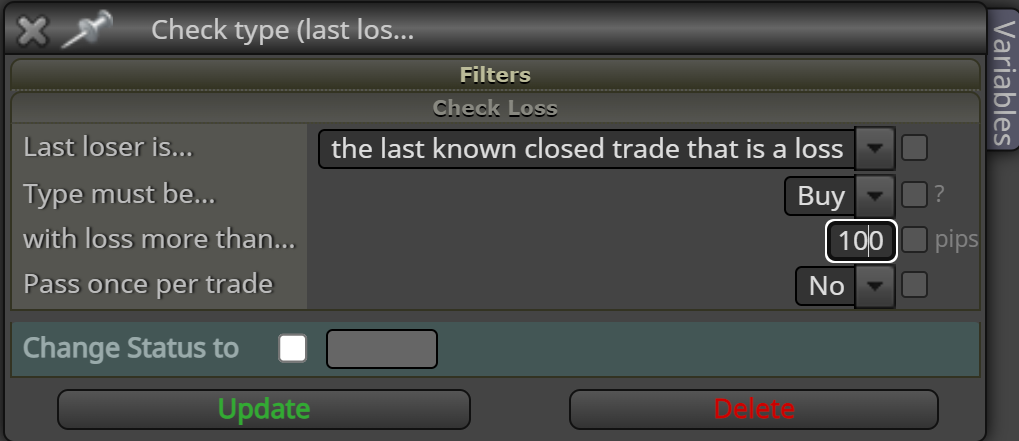
I think [Check type (last loser)] it's filtered closed trade by STOP LOSS but i set CHECK LOSS WITH LOSS MORE THEN 100 Pips. but it not help. [Check type (last loser)] alway RUN in every Closed Trade whether Win or Loss money. I WANT filtered only that closed trade is LOSS Money. -
@voiture Then you can do something like this:
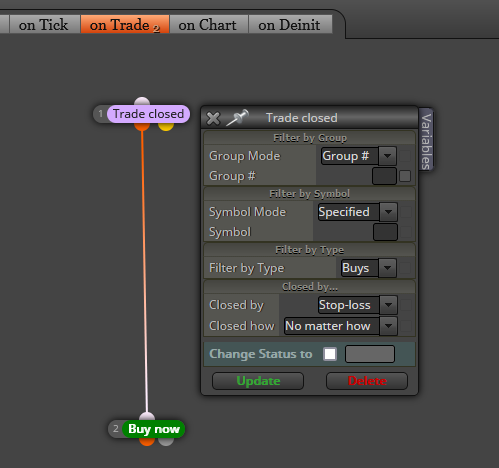
This will open a buy as soon as a sell hit its stop loss. Please notice they are in the 'on trade' tab. Not 'on tick'.
-
i think i can't use [Trade closed] on 'on trade' tab because i use trailing stop. every my TRADE will hit STOP LOSS. that why i want to use [Check type (last loser)] to filtered each STOP LOSS is WIN by money or LOSS by money. By SET "CHECK LOSS WITH LOSS MORE THEN 100 Pips". i think [Check type (last loser)] is BUG. It work every STOP LOSS not only LOSS by money. can you tell to admin to resolve it.
-
I don't understand what is the problem. Once a trade is closed its SL doesn't move any more. I you need to do it that way, you can ask the admin to add that option.

