== operation not working
-
Hello why is some operation in the value not working ? For example the == operation not working. Only greater than > and less than < are working. But == (equal to) operation not working yet. In indicator I chose RSI then in value I selected == and inputed the value of RSI within range but == operation failed to work only < greater than or less than are working
-
i don't think it's a bug. Can you share the link to your project?
-
If you look at the RSI value it has at least 4 decimal numbers, so it is very difficult to look for the value equal to eg.: 50. You can put two conditions in a row rsi >=49.9 and rsi <=50.1
-
Mmmmm I see so what is I use ==49.9
Am actually using == so when price is at such line it picks trade and when the trade is closed in loss or profit it does not pick another trade..
So don't you think that if is >=49.9 because of the greater than > it will keep opening buy trade as far the line remains >49.9 even after the first trade has closed in profit? How do I go about that not happening? Or with the >= you think that won't happen? Will it only pick trade once until the line falls below it and come back to it (49.9)
-
@ambrogio but in trading view you will see 50.1 as 50.01 and 49.9 as 49.90 guess the zero doesn't matter by maths standard..
And secondly can one make it 49.99 instead?
-
@princeomughele As i said above is almost impossible to get the round value.
This way the signal comes when rsi is very nearest to 50 value.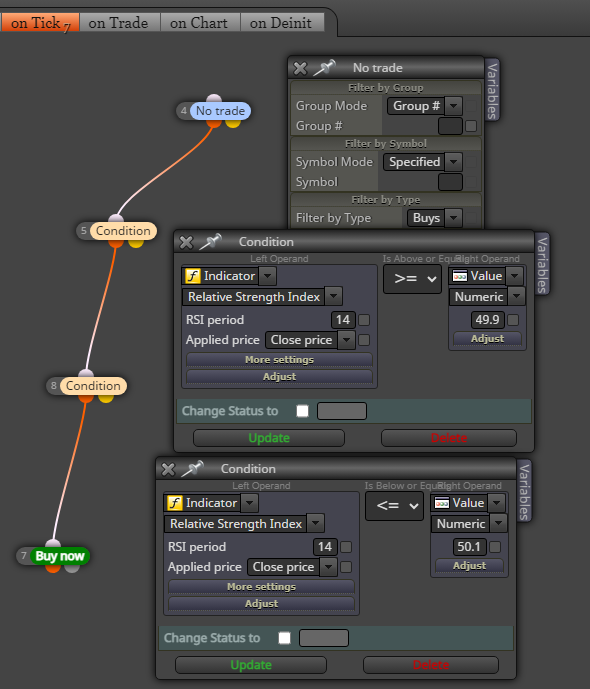
two RSI condition together
-
@ambrogio and can you send me the proper way of linking two conditions in a row guess the one I watched on youtube may not be that correct..
-
@ambrogio Very good dear I really appreciate this graphical explanation please continue in this way. Though I did it that way already. But the bot kept on picking numerous sell, it picks sell continually each time it reaches the sell condition and I know it will do likewise for buy. So how do I condition it to pick sell or buy only once each time it reaches such condition and not pick another trade until the first trade has hit stop loss or take profit?
-
@ambrogio @ambrogio Very good dear I really appreciate this graphical explanation please continue in this way. Though I did it that way already. But the bot kept on picking numerous sell, it picks sell continually each time it reaches the sell condition and I know it will do likewise for buy. So how do I condition it to pick sell or buy only once each time it reaches such condition and not pick another trade until the first trade has hit stop loss or take profit?
-
the setup i showed you above opens one buy trade at a time only
-
@ambrogio please I also need your help,
My EA opens a buy trade when it's supposed to open a sell trade. -
just change buy now with sell now
-
@ambrogio Please to what? What should I change it to? Can you include a graphical illustration here
-
@ambrogio Here but it will keep on opening it continually as far as is above the specified value
-
show your project
-
@ambrogio Thanks sorted it out already.
The other issue is if you set buy >= 49.9 and =< 50.1 on what scenario does it only buy ? is it only when the RSI rises from below and touches such >=49.9 and <=50.1 condition or it also executes buy when the RSI line falls from above and falls in between the >= 49.9 and <=50.1 condition (which is a problem or a bug if so).
Because when humanly trading I will only enter buy at such level when RSI line or price rises from below or from underneath until it meets such point >=49.9 and <=50.1
-
@ambrogio Thanks sorted it out already.
The other issue is if you set buy >= 49.9 and =< 50.1 on what scenario does it only buy ? is it only when the RSI rises from below and touches such >=49.9 and <=50.1 condition or it also executes buy when the RSI line falls from above and falls in between the >= 49.9 and <=50.1 condition (which is a problem or a bug if so).
Because when humanly trading I will only enter buy at such level when RSI line or price rises from below or from underneath until it meets such point >=49.9 and <=50.1
-
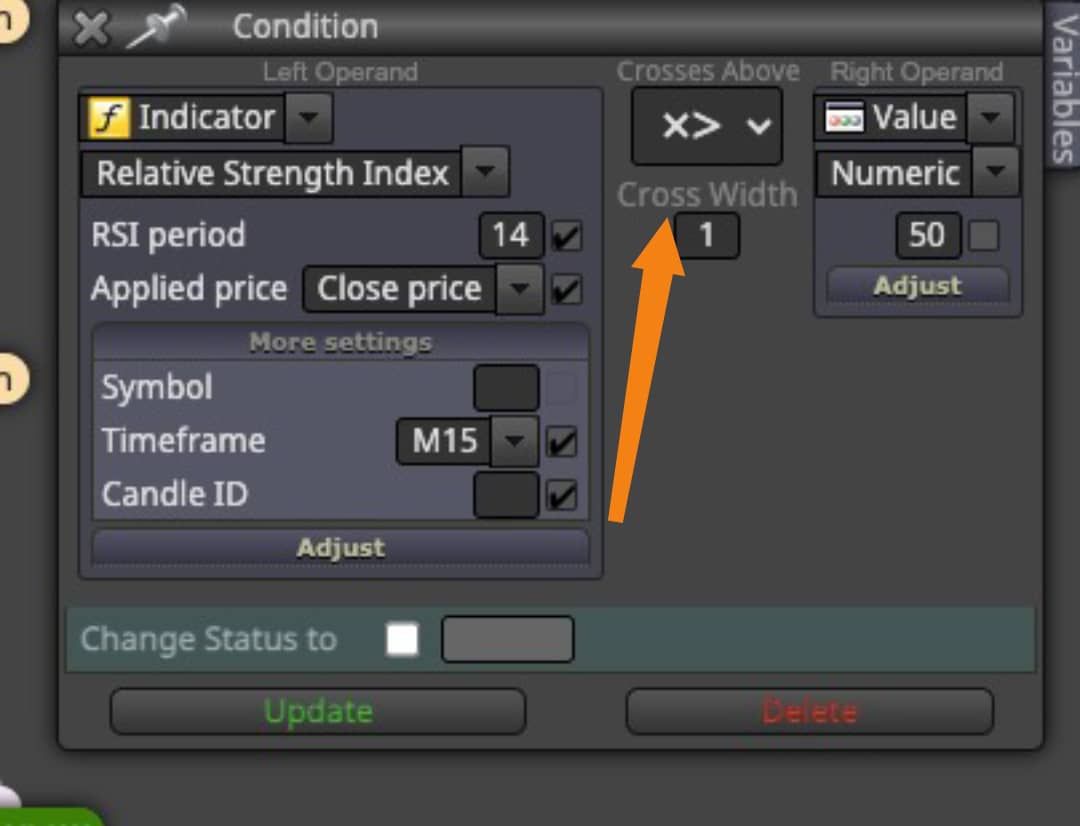
@princeomughele you started the topic by saying that RSI == doesn't work. I explained to you that it is not a bug, I explained to you how to have the signal very close to the value 50 (or whatever value you want). If you want the signal that comes from below and cross the value 50, you have to use the cross X> condition instead >= or <=
-
@ambrogio Yh and you explained to me == sign is difficult due to RSI decimal. Am really learning alot from all your explanations none of it is a waste and thanks for this very last explanation will look more into it and put it in practice and give you a feedback
-
Am on it already. Please what's the meaning of the cross width at the side I pointed the orrange arrow to? And I can see the default value beneath it is 1. What value do I put there?