fxDreema

    • Register
    • Login
    • Search
    • Back to the main page
    • Categories
    • Recent
    • Tags
    • Popular
    • Search

    TRENDLINE BREAKOUT EA

    Questions & Answers
    5
    73
    7868
    Loading More Posts
    • Oldest to Newest
    • Newest to Oldest
    • Most Votes
    Reply
    • Reply as topic
    Log in to reply
    This topic has been deleted. Only users with topic management privileges can see it.
    • D
      DROGO last edited by

      TRENDLINE BREAK 4.mq4 THIS INDICATOR LOOKS FOR A TRENDLINE ON THE CHART AND WHEN PRICE CROSSES IT ,IT THE DRAWS A ARROW WAS GONNA TRY TO USE INDICATOR APPEAR BLOCK TO MAKE THE EA BUT HOPE SOMEONE CAN GIVE ME A MORE EFFECTIVE METHOD

      V 1 Reply Last reply Reply Quote 0
      • V
        Vortrexcian @DROGO last edited by

        @DROGO

        Hi

        Sorry for the delay in response.
        Been super busy.

        Here is a previous post that might help you in the right way.
        https://fxdreema.com/forum/topic/4233/example-trendline-ea

        Have a look and see if this is what you're loking for.
        Play around with it on your demo ( or tester ).

        Unfortunately, I do not operate on MT4 ( for the moment )
        Therefore, I cant open that indicator to test and see.

        However, I do hope the link guides you in the right directions.

        D 1 Reply Last reply Reply Quote 0
        • D
          DROGO @Vortrexcian last edited by

          @Vortrexcian HEY I ALSO APOLOGIZE FOR THE LATE REPLAY WE ALL SUPER BUSY NO PROBLEM WILL CHECK IT OUT AND LET YOU KNOW THANK YOU SO MUCH FOR THE HELP APPRECIATE YOU

          1 Reply Last reply Reply Quote 0
          • D
            DROGO last edited by

            https://fxdreema.com/shared/Xh5NLKSCd HEY EVERYONE BEEN PLAYING AROUND WITH FXDREEMA AND I MANAGED TO MAKE A EA WHICH OPENED A TRADE WHEN PRICE CROSSED TRENDLINE I PLACED ON CHART MANUALLY BUT I CANT GET IT TO OPEN TRADE WITH TRENDLINE PLACED BY AUTO TRENDLINE INDICATOR CAN ANYONE PLS HELP

            V 1 Reply Last reply Reply Quote 0
            • V
              Vortrexcian @DROGO last edited by

              @DROGO

              Hi Bud

              Try this.
              https://fxdreema.com/shared/D2hEK7pZd

              b5591983-a031-4fc3-91db-61d665cc4dc3-image.png

              Hope it helps.
              🤞

              D 2 Replies Last reply Reply Quote 0
              • D
                DROGO @Vortrexcian last edited by

                @Vortrexcian HI BUD THANK YOU SO MUCH WILL TRY IT OUT AND LET YOU KNOW

                1 Reply Last reply Reply Quote 0
                • D
                  DROGO @Vortrexcian last edited by

                  @Vortrexcian HELLO MY FRIEND I TRIED IT OUT AND IT DRAWS THE TRENDLINE THE PROBLEM IS THAT IT REPAINTS WAY TOO MUCH SO MUCH SO THE CROSSOVER CANT HAPPEN SO NOT EVEN SURE IT OPENS TRADES

                  V 1 Reply Last reply Reply Quote 0
                  • V
                    Vortrexcian @DROGO last edited by Vortrexcian

                    @DROGO

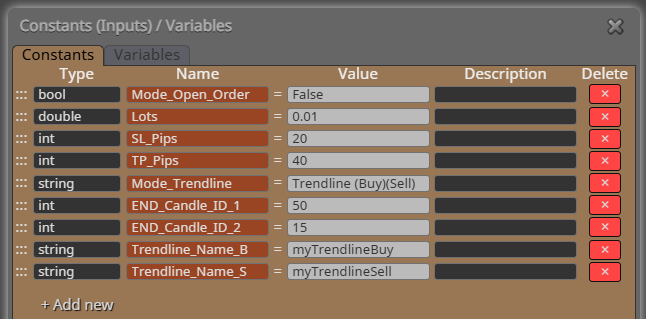
                    You can change the Candle ID , 50 and 15 is the amount of bars it would read to draw the trendlines.

                    Alternatively, look at the construction of it, to see if you might have missed something, because this definitly opens trades.

                    Also, I do not have MT4, so cant see your personal trendline indicator, the reason your project might not be opening trades, could be incorrect buffer as well.

                    Maybe @l-andorrà could shed some light on this

                    D 1 Reply Last reply Reply Quote 0
                    • D
                      DROGO @Vortrexcian last edited by

                      @Vortrexcian HI BUD YEAH WILL CHANGE THE 50 AND 15 AND SEE IF IT MAKES A DIFFERENCE .I THINK U HAVE A POINT ON THE BUFFER.CAN YOU PLS HELP ME WITH THE CONDITION WHERE PRICE CROSSES LH OR HL

                      1 Reply Last reply Reply Quote 0
                      • D
                        DROGO last edited by

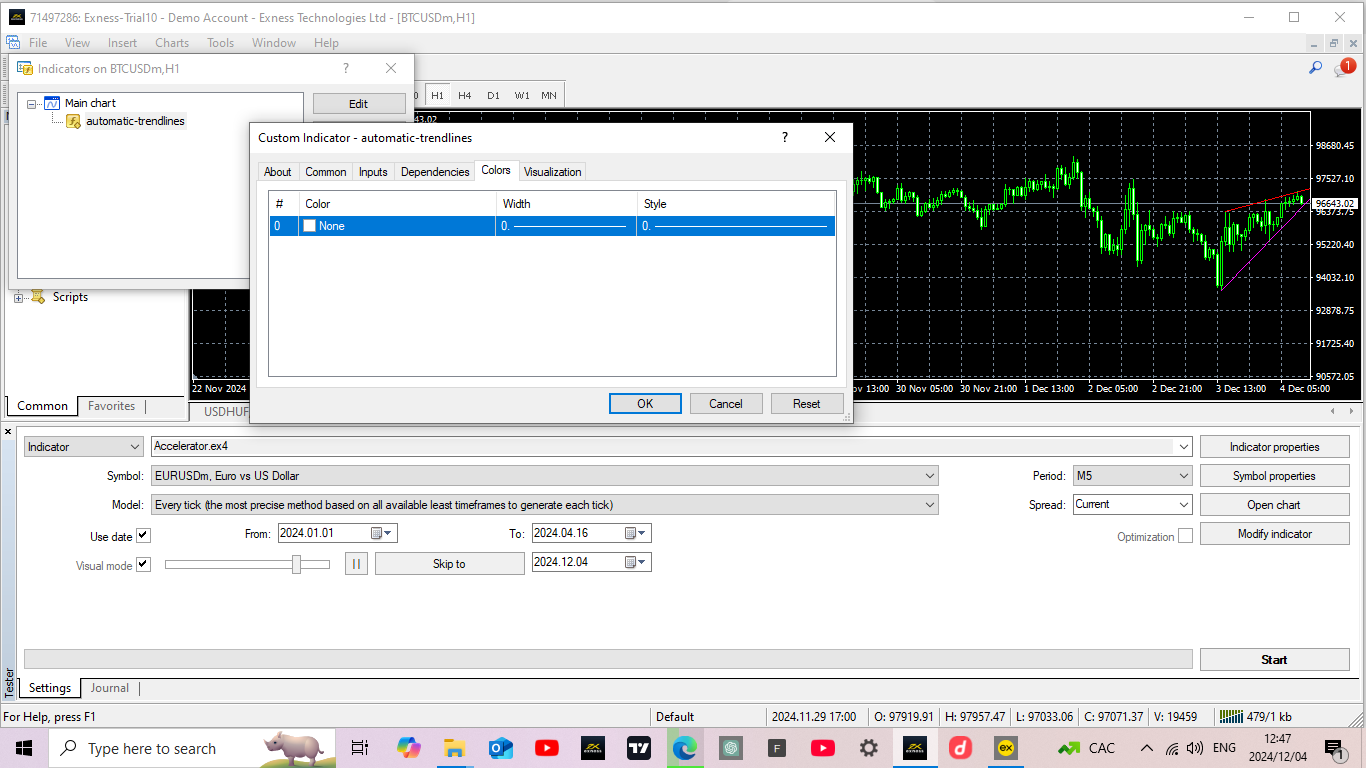
                        Screenshot (32).png AS U CAN SEE THAT IS THE BUFFER THE INDICATOR HAS BUT ON CHART IT DRAWS TWO LINES RED AND PURPLE FOR SUPPORT AND RESISTENCE

                        V 1 Reply Last reply Reply Quote 0
                        • V
                          Vortrexcian @DROGO last edited by

                          @DROGO

                          Hi Bud

                          I would say, make sure your setup is correct, first of all ( that it would open and close when conditions are met )

                          Then, and this is the "YEET" part, you will have to add buffer 0 to 10, then test again, if not working, change buffer 0 to 1 and so on, till a trade opens.

                          Do this only for buy at first, till you find the right buffer, then do the same for sell.

                          Did you create the indicator or do you at least have the source code, cause the buffer will be there, otherwise, if not, the above method is the only thing I can think of at this point to find the right buffer.

                          D 2 Replies Last reply Reply Quote 0
                          • D
                            DROGO @Vortrexcian last edited by

                            @Vortrexcian HI BUD YEAH WILL TRY YOUR SOLUTION HOPEFULLY IT WORKS.THANK YOU

                            1 Reply Last reply Reply Quote 0
                            • D
                              DROGO @Vortrexcian last edited by

                              @Vortrexcian NO I GOT IT SOMEWHERE SO DONT HAVE THE SOURCE CODE AND WHEN YOU SAY ADD BUFFER 0 TO 10 WAT DO YOU MEAN BY THAT

                              V 1 Reply Last reply Reply Quote 0
                              • V
                                Vortrexcian @DROGO last edited by

                                @DROGO

                                Hi

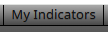
                                Under MyIndicators
                                269d3c3a-31a8-4185-bf27-7c6c4e0219eb-image.png

                                Select the custom indicator that you want to use.
                                And add the output buffers
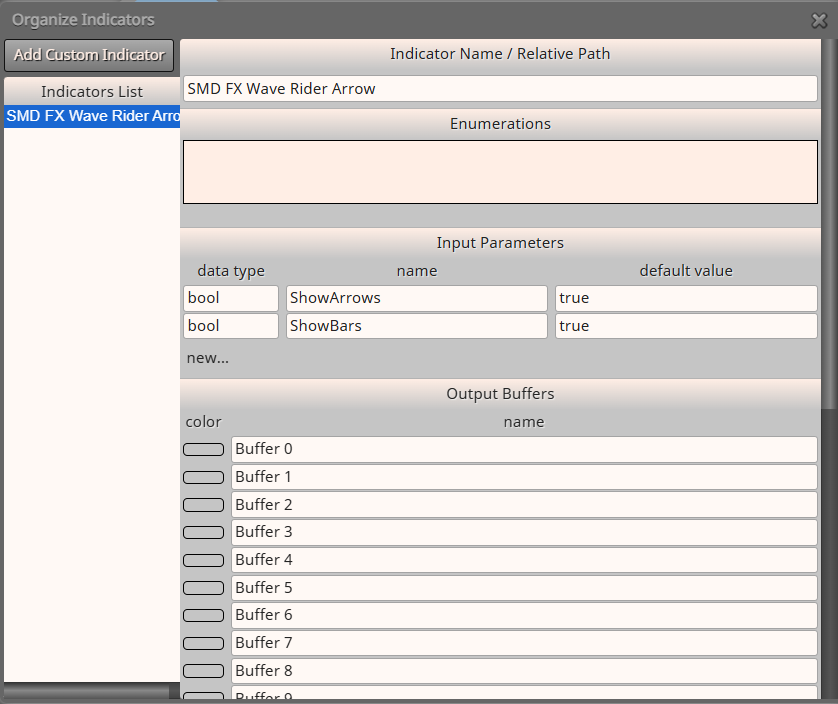
                                86e4588c-7b99-4dd8-ac01-ded79b65ce3e-image.png

                                As seen on the image, my custom indicator had 10 buffers
                                The arrow signals were buffer 8 and 9, which I had to use to open a buy and sell trade.

                                Not knowing which buffer on your custom indicator activates the "BUY" signal, you would need to add a lot of buffers, and keep on changing and testing, untill a buy order opens
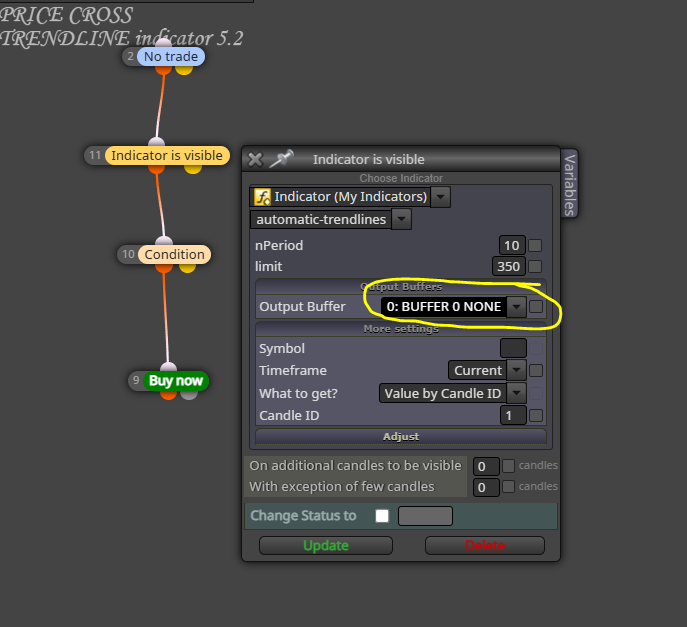
                                12a6ffd7-4b4f-43c2-abb7-11b726b22a7b-image.png

                                I'm not that good with this and still new myself.

                                You might want to ask for assistance from
                                @l-andorrà
                                @jstap
                                @roar

                                Or some of the other L337 guys...

                                Hope this helps a bit...

                                D 2 Replies Last reply Reply Quote 0
                                • D
                                  DROGO @Vortrexcian last edited by

                                  @Vortrexcian HI BUD SORRY FOR LATE REPLAY OK WILL TRY IT THANK U SO MUCH APPRECIATE YOU TRULY

                                  1 Reply Last reply Reply Quote 0
                                  • D
                                    DROGO last edited by

                                    @JSTAP HI BUD HOPE YOU GOOD WAS WONDERING IF U CAN ASSIST ME WITH THIS PROBLEM I AM HAVING.U HELPED ME THE LAST TIME TRULY APPRECIATE IT

                                    1 Reply Last reply Reply Quote 0
                                    • jstap
                                      jstap last edited by

                                      On backtest this doesn't draw any line?

                                      Learn fxDreema Without the Wait!

                                      My comprehensive book, available on Amazon, is packed with examples and invaluable insights to help you fast-track your learning journey.

                                      The paperback and hardback editions include MT4 & MT5 QR codes for easy access to all prebuilt projects and robots, including my latest gold trading robot!

                                      Don’t miss out

                                      Click here➡️ https://mybook.to/fxDreema to get your copy today!

                                      Enjoy! 😊

                                      D 1 Reply Last reply Reply Quote 0
                                      • D
                                        DROGO @Vortrexcian last edited by

                                        @Vortrexcian HI TRIED YOUR SUGGESTION DONT WORK ADDED LIKE 7 BUFFERS NON OF THEM OPEN TRADE BUT THE INDICATOR WORKS BECAUSE EA REDRAWS TRENDLINE AS PRICE MOVES SO THE OPEN TRADE IS THE ONLY PROBLEM EVN TRIED OPENING A TRADE WITH MANUAL TRENDLINE WITH SAME NAME AS INDICATOR NAME AND IT WORKED SO DONT KNOW WHY IT DONT OPEN TRADE

                                        V 1 Reply Last reply Reply Quote 0
                                        • V
                                          Vortrexcian @DROGO last edited by

                                          @DROGO

                                          Hi

                                          Cant think why of why not.

                                          Your custom indicator, is it under the normal "nagivgator" listing or in a custom folder.

                                          I had an issue where my EA did not want to open trades either, but this was because my custom indicator was under a custom folder.

                                          I moved it under the normal lising and then i worked.

                                          Other than that, I have no idea.
                                          Sorry Bud.

                                          D 1 Reply Last reply Reply Quote 0
                                          • D
                                            DROGO @Vortrexcian last edited by

                                            @Vortrexcian HI BUD YEAH MY INDICATOR IS IN THE NORMAL FOLDER LIKE THE REST OF THE INDICATORS IN MQL4 INDICATOR FILE THATS THE RIGHT PLACE RIGHT?I AM REALLY LOSING HOPE IN THIS LITERALLY TRIED EVERYTHING I COULD THINK OF TO MAKE IT WORK
                                            V 1 Reply Last reply Reply Quote 0
                                            • 1
                                            • 2
                                            • 3
                                            • 4
                                            • 2 / 4
                                            • First post
                                              Last post

                                            Online Users

                                            M
                                            F
                                            E
                                            T
                                            M
                                            P

                                            17
                                            Online

                                            146.6k
                                            Users

                                            22.4k
                                            Topics

                                            122.6k
                                            Posts

                                            Powered by NodeBB Forums | Contributors