for each object
-
Hello everyone .
I want to have the price level of the last arrow .
But most of the time it dosnt work . and the comment is belong to another arrow not the last one .
Can anybody help me please ??? -
Take the value of the highest price directly instead of that of the arrow.
-
@l-andorrà
Thank you for answering .
It is ok .
But to tell you the truth I want the information of last drawed shape for some thing else .For example I have draw some arrows .
Then with “ for each object “ block im going to take the candle ID or time value of specific arrow .
And then draw a vertical line on that arrow .
But most of the time it draw the vertical line in another candle . or draw a lot of lines in 1 candle .In other hand when I want to get the “ Price 1 “ and plus 5 pips to it and set a pending order it gives me a fault price level .
Important :
I have see this problems in backtest mode .
Is it because of backtest mode ???Please take a look at my picture that belongs to draw line example .
Thank you so much .
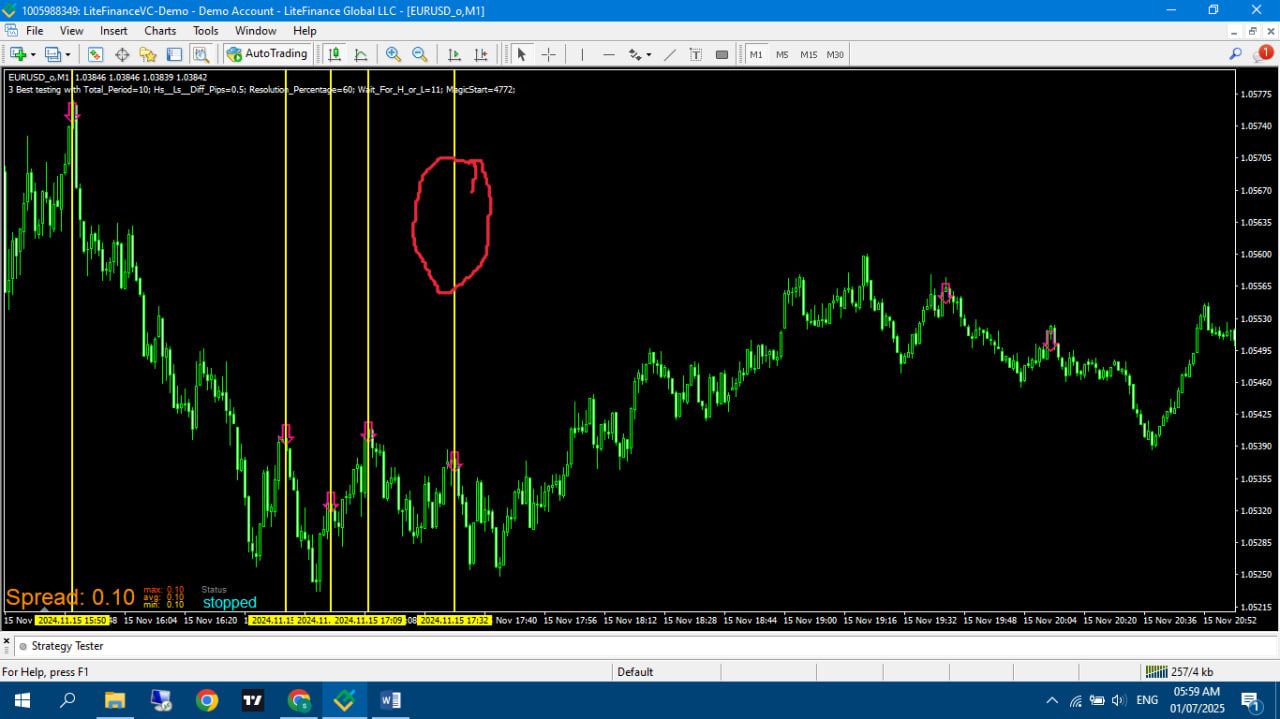
A lot of lines in red circle place .
-
But why do you need the vertical line if you are interested in the price level of the arrow? I'm afraid I don't get the idea behind it.
-
Hello again .
You are right .
My examples are useless .
But totally I mean sometimes I see problems with objects blocks .
I have set it to modify the color from last one to the first one ( Z to A ) .
But it does different from what I want .
Does it in this order :
9 , 8 , 7 , 6 , 5 , 4 , 3 , 2 , 11 , 10 , 1 .And when I change the direction in to ( A to Z )
Does it in this order :
11 , 12 , 1 , 2 , 3 , 4 , 5 , 6 , 7 ,8 , 9 , 10Now how can I have the correct and normal row of numbers ???
Please take a look at this share link .
Thank you so much .
-
You current configuration of the 'for each object' block is searching for one object only, not many. You should remove that limitation. Then the correct order will depend on how many objects that are NOT arrows are also present on the chart. That makes the A-Z or Z-A order to search for them too when you don't need them, necessarily.
