fxDreema

    • Register
    • Login
    • Search
    • Back to the main page
    • Categories
    • Recent
    • Tags
    • Popular
    • Search

    FXDreema source code

    Questions & Answers
    6
    21
    1093
    Loading More Posts
    • Oldest to Newest
    • Newest to Oldest
    • Most Votes
    Reply
    • Reply as topic
    Log in to reply
    This topic has been deleted. Only users with topic management privileges can see it.
    • J
      jpsam last edited by

      Hello friends! How do i get a source code of an EA i built with Fxdreema?

      1 Reply Last reply Reply Quote 0
      • jstap
        jstap last edited by

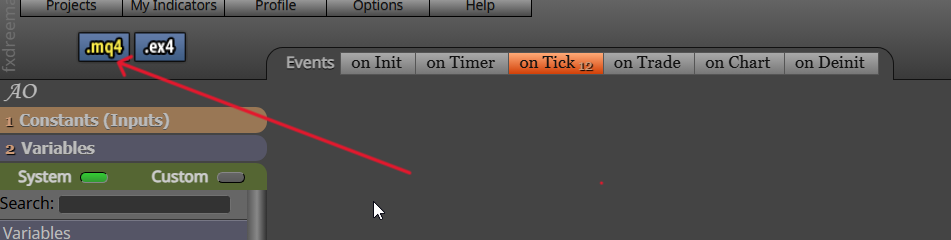
        click the mq button

        Learn fxDreema Without the Wait!

        My comprehensive book, available on Amazon, is packed with examples and invaluable insights to help you fast-track your learning journey.

        The paperback and hardback editions include MT4 & MT5 QR codes for easy access to all prebuilt projects and robots, including my latest gold trading robot!

        Don’t miss out

        Click here➡️ https://mybook.to/fxDreema to get your copy today!

        Enjoy! 😊

        1 Reply Last reply Reply Quote 0
        • J
          jpsam last edited by

          Jstap, thanks for response. Where is the mq button? Can you please screenshot and direct me with an arrow pointing at it? Thanks

          1 Reply Last reply Reply Quote 0
          • l'andorrà
            l'andorrà last edited by

            It's on top left of the builder page.

            (English) I will try to help everyone in these fxDreema forums. But if you want to learn how to use the platform in depth or more quickly, I can help you with my introductory fxDreema course in English at https://www.theandorraninvestor.eu.

            (Català) Miraré d’ajudar tothom en aquests fòrums d’fxDreema. Tanmateix, si vols aprendre a fer servir la plataforma amb més profunditat o més de pressa, t’hi puc ajudar amb el meu curs d’introducció a fxDeema en català a https://www.theandorraninvestor.eu/ca.

            (Español) Intentaré ayudar a todo el mundo en estos foros de fxDreema. Sin embargo, si quieres aprender a usar la plataforma en profundidad o más deprisa, te puedo ayudar con mi curso de introducción a fxDreema en español en https://www.theandorraninvestor.eu/es.

            J 1 Reply Last reply Reply Quote 0
            • J
              jpsam @l'andorrà last edited by

              @l-andorrà Thanks very much, though I couldn't see it and I wondered if my builder page is different from yours. I will be grateful if you would send me a screenshot with an arrow directing me to the place. Thanks

              1 Reply Last reply Reply Quote 0
              • jstap
                jstap last edited by

                For mt5, it says mq5

                msedge_j9fLbenWyZ.png

                Learn fxDreema Without the Wait!

                My comprehensive book, available on Amazon, is packed with examples and invaluable insights to help you fast-track your learning journey.

                The paperback and hardback editions include MT4 & MT5 QR codes for easy access to all prebuilt projects and robots, including my latest gold trading robot!

                Don’t miss out

                Click here➡️ https://mybook.to/fxDreema to get your copy today!

                Enjoy! 😊

                J 2 Replies Last reply Reply Quote 0
                • J
                  jpsam @jstap last edited by

                  @jstap Thanks! Let me try it.

                  1 Reply Last reply Reply Quote 0
                  • J
                    jpsam @jstap last edited by

                    @jstap I am back. It's like my description or the use of
                    the word "source code" was wrong, so let me use a lame man description: I am looking for where I will see plain code which I wrote with the help of FXdreema. I use that MQL5 button you showed me on the screen to download the EAs as an application to my download folder and install them on my charts for testing; there is no issue with it. I only want to see the plain codes, thinking it would be easier to make specific changes and get the desired result, that's combining the help of FXdreema with my little knowledge of MQL coding. I hope I didn't confuse you. Thanks as usual.

                    A 1 Reply Last reply Reply Quote 0
                    • S
                      sktsec last edited by

                      1. After your download suggested by @jstap, you can see the source code.
                      2. To add your code in fxdreema, you better use the MQL block (very useful), or creating your own custom block (seems very difficult).
                      J 1 Reply Last reply Reply Quote 0
                      • A
                        ambrogio @jpsam last edited by

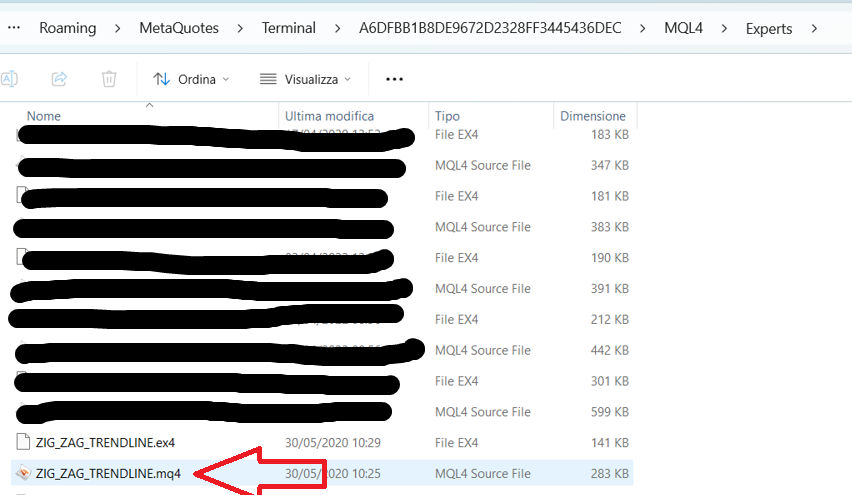
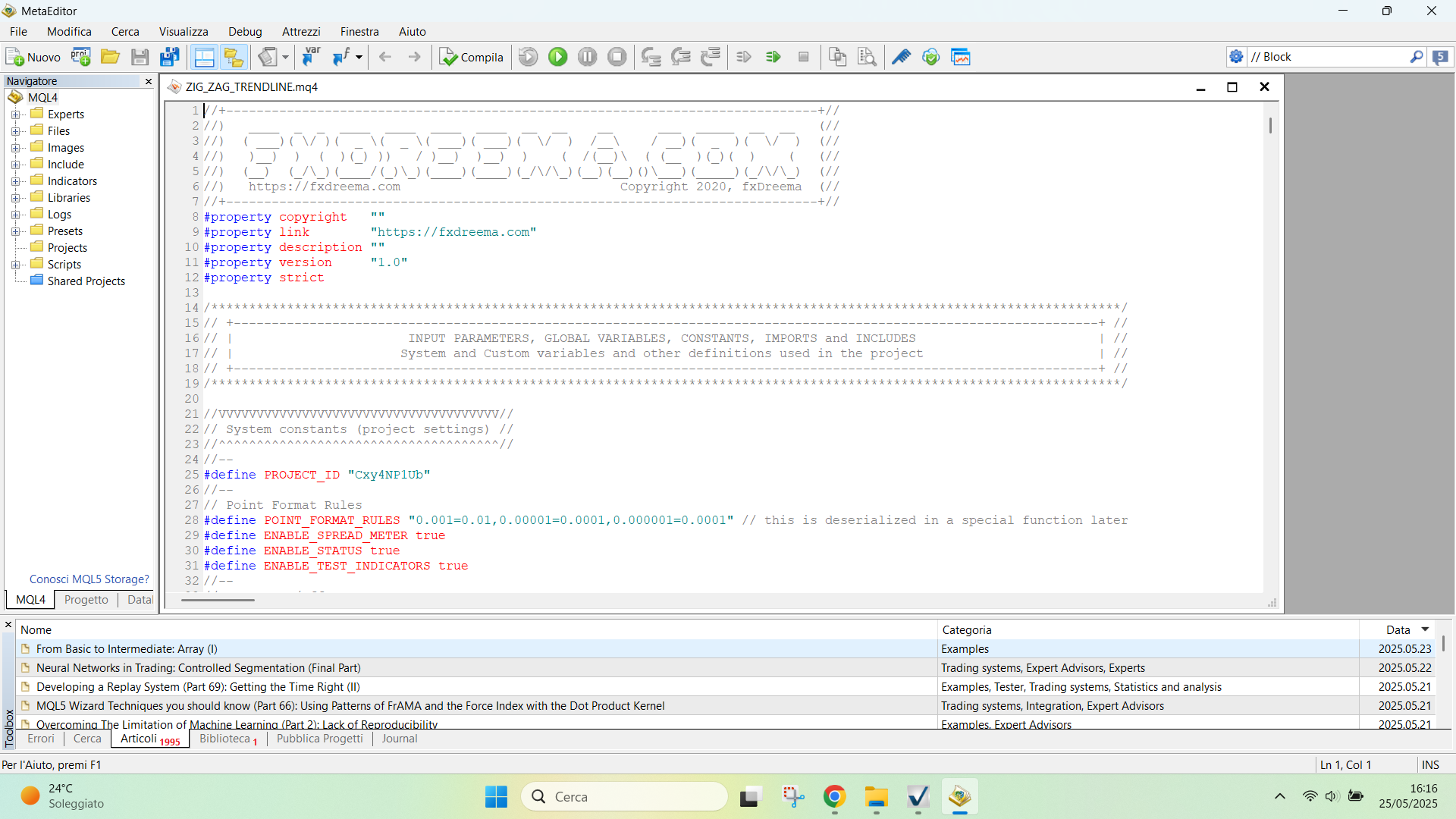
                        @jpsam If you want to make changes on source code directly, you can double click on the mq file in your PC folder and it will be opens in Metaeditor directly

                        J 1 Reply Last reply Reply Quote 0
                        • J
                          jpsam @sktsec last edited by

                          @sktsec Thanks, I will try it

                          1 Reply Last reply Reply Quote 0
                          • J
                            jpsam @ambrogio last edited by

                            @ambrogio double clicking the mq folder didn't open the source code, instead it attached it on the chart. My goal is to see the EA codes so that I can manually input some code lines that may not be easy to add using fxdreema blocks

                            1 Reply Last reply Reply Quote 0
                            • A
                              ambrogio last edited by

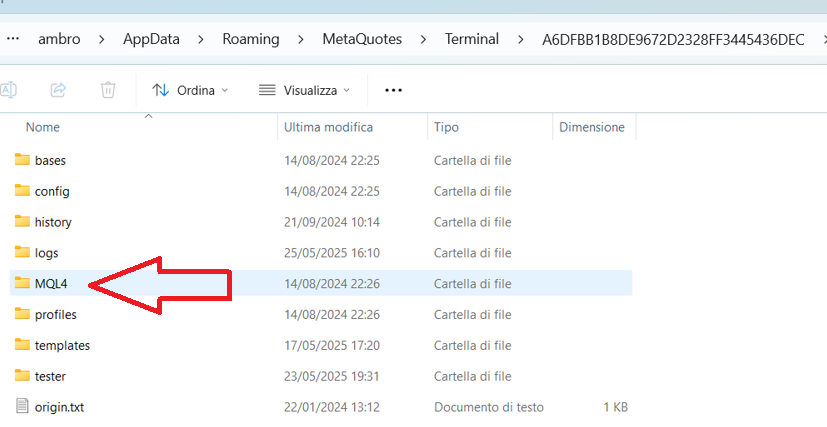
                              Not in MT navigator, but in the PC folder, right where the file was saved. Ctrl+Shift+D from metatrader

                              J 2 Replies Last reply Reply Quote 0
                              • J
                                jpsam @ambrogio last edited by

                                @ambrogio Sorry, I meant double clicking the file in the download folder. It doesn't show the source code, however, I will try once more. Thanks 👍

                                1 Reply Last reply Reply Quote 0
                                • A
                                  amin80 last edited by

                                  Hello @Jstap. Could you pls help me in custom indicator ex4 to my fxdreema

                                  Hott - Lott (candles + btn).ex4

                                  1 Reply Last reply Reply Quote 0
                                  • J
                                    jpsam @ambrogio last edited by

                                    @ambrogio I know. It didn't open. Can you demonstrate on your (screenshot) PC folder, showing the opened source code? I shall be grateful. Thanks

                                    A 1 Reply Last reply Reply Quote 0
                                    • A
                                      ambrogio @jpsam last edited by

                                      @jpsam

                                      Screenshot (12).png Screenshot (13).png Screenshot (14).png Screenshot (15).png Screenshot (16).png

                                      J 2 Replies Last reply Reply Quote 1
                                      • J
                                        jpsam @ambrogio last edited by

                                        @ambrogio Thanks! It's clearer. I will try it

                                        A 1 Reply Last reply Reply Quote 0
                                        • A
                                          ambrogio @jpsam last edited by

                                          @jpsam 👍

                                          1 Reply Last reply Reply Quote 0
                                          • J
                                            jpsam @ambrogio last edited by

                                            @ambrogio Maybe something is wrong with my system! I followed your guide well with the help of the screenshots and was happy because everything seemed to work fine until the final stage when I double clicked the EA in the Expert folder, instead of opening the source code, it attached it on the chart that's loaded with another EA, and ready to change the present EA. If there is an alternative method, please help. I really need to get the source code of FXdreema EA so that I might be able to bypass some bottlenecks of using FXdreema alone. Please help! Thanks

                                            A 1 Reply Last reply Reply Quote 0
                                            • 1
                                            • 2
                                            • 1 / 2
                                            • First post
                                              Last post

                                            Online Users

                                            M
                                            G
                                            D
                                            A
                                            A
                                            R

                                            19
                                            Online

                                            146.7k
                                            Users

                                            22.4k
                                            Topics

                                            122.6k
                                            Posts

                                            Powered by NodeBB Forums | Contributors