Resetting variables
-
Hello, can you help me? How can I reset the variables to their initial values or zero at the start of a new day? https://fxdreema.com/builder
-
Once a day, then modify variables
-
@jimifx707 This is what sktsec means:
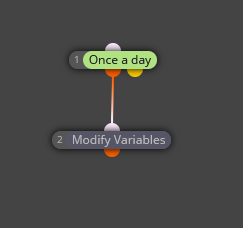
You need to be sure the 'once a day' block ID number needs to be 1, as it is supposed to be the first block executed every day.
-
Thank you very much for your advice, I will definitely try it.
-
You're welcome.
-
@jimifx707 Hello again, unfortunately I did what you said, but it didn't work and I'm still trying to reset the variable that calculates the total losses for me after the trades are closed or at the start of the day. I would appreciate it if you could help me. I'll post the project link. Thanks. https://fxdreema.com/builder
-
Hi! If you want to reset your variables at the start of a new day, you can use the "Once a Day (time filter)" block. Connect it to a "Set Variable" block and set your variables back to zero or their initial values.
Make sure to place this logic at the top of your project flow so it triggers at the beginning of each new trading day. Also, double-check your terminal time settings to make sure the reset happens when you expect.
-
Actually it needs to be a once per (daily) bar block. This will wait until the 1st tick of the day, once a day may try to work when there's no tick, so fail,
-
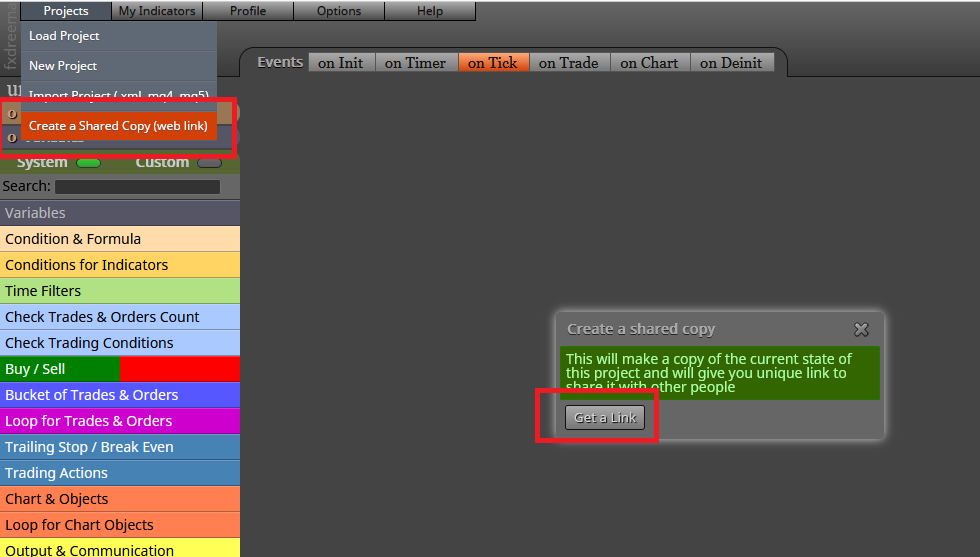
@jimifx707 You didn't provide the right link. This is the way to do it:
-
First of all, hello and thank you for your guidance. I apologize for the late reply. I was sick for a few days and I'm sorry, I didn't know how to share the project link. Thank you for reminding me. The problem I had was that the total loss variable would be zero, but I would get it again. I solved my problem by setting a time condition.
-
shared/w9nNFleWc


