fxDreema

    • Register
    • Login
    • Search
    • Back to the main page
    • Categories
    • Recent
    • Tags
    • Popular
    • Search

    Where are comments printed now?

    Questions & Answers
    3
    9
    296
    Loading More Posts
    • Oldest to Newest
    • Newest to Oldest
    • Most Votes
    Reply
    • Reply as topic
    Log in to reply
    This topic has been deleted. Only users with topic management privileges can see it.
    • l'andorrà
      l'andorrà last edited by l'andorrà

      I'm using this custom code for years now on MT5:

      *string cmt = "";

      cmt += ", " + "Max win" + max_win;
      cmt += ", " + "Total: " + total;

      Print(cmt);*

      Up to the last MT5 update, a log file was created with the variables data I show. However, now I can't find it any more. Could some one please help with this? Where is the ne log file created now?

      (English) I will try to help everyone in these fxDreema forums. But if you want to learn how to use the platform in depth or more quickly, I can help you with my introductory fxDreema course in English at https://www.theandorraninvestor.eu.

      (Català) Miraré d’ajudar tothom en aquests fòrums d’fxDreema. Tanmateix, si vols aprendre a fer servir la plataforma amb més profunditat o més de pressa, t’hi puc ajudar amb el meu curs d’introducció a fxDeema en català a https://www.theandorraninvestor.eu/ca.

      (Español) Intentaré ayudar a todo el mundo en estos foros de fxDreema. Sin embargo, si quieres aprender a usar la plataforma en profundidad o más deprisa, te puedo ayudar con mi curso de introducción a fxDreema en español en https://www.theandorraninvestor.eu/es.

      1 Reply Last reply Reply Quote 0
      • l'andorrà
        l'andorrà last edited by

        Any suggestion?

        (English) I will try to help everyone in these fxDreema forums. But if you want to learn how to use the platform in depth or more quickly, I can help you with my introductory fxDreema course in English at https://www.theandorraninvestor.eu.

        (Català) Miraré d’ajudar tothom en aquests fòrums d’fxDreema. Tanmateix, si vols aprendre a fer servir la plataforma amb més profunditat o més de pressa, t’hi puc ajudar amb el meu curs d’introducció a fxDeema en català a https://www.theandorraninvestor.eu/ca.

        (Español) Intentaré ayudar a todo el mundo en estos foros de fxDreema. Sin embargo, si quieres aprender a usar la plataforma en profundidad o más deprisa, te puedo ayudar con mi curso de introducción a fxDreema en español en https://www.theandorraninvestor.eu/es.

        S 1 Reply Last reply Reply Quote 0
        • jstap
          jstap last edited by jstap

          Does this help? From Copilot (chatGPT)...

          It sounds like your friend’s custom MT5 code used to reliably write to the log file via Print(), but after a recent update, the log location may have changed or the behavior of logging might have shifted slightly.
          Here’s how to track down the new log file location and ensure the output is still being captured:
          📁 Where MT5 Stores Log Files Now
          There are two main types of logs in MT5:

          1. Platform Logs
          • These are stored in:
            ...\MetaTrader 5\Logs\
          • They capture general platform activity, including terminal startup, network events, and trade operations.
          1. Expert Logs (EA/Script Output like Print())
          • These are stored in:
            ...\MetaTrader 5\MQL5\Logs\
          • This is where your Print(cmt); output should appear.
            To locate them:
          • Open MT5.
          • Go to File → Open Data Folder.
          • Navigate to:
          • MQL5\Logs for EA/script logs.
          • Logs for platform logs.
            Each log file is named by date: YYYYMMDD.log.
            🛠️ If Nothing Is Showing Up
            If your friend’s Print() output isn’t appearing:
          • Check the Experts tab in the MT5 terminal (bottom panel). If the EA is running, output should appear there live.
          • Make sure the EA is attached and running—if it’s not triggered, no logs will be written.
          • Confirm that logging is enabled in MT5 settings (some updates may reset preferences).
          • If the EA is compiled in Release mode, some debug output might be suppressed. Try compiling in Debug mode.

          If your friend wants to make the output more persistent or structured, I can help them write to a custom file using FileOpen() and FileWrite() instead of relying solely on Print(). Want to go that route?

          Learn fxDreema Without the Wait!

          My comprehensive book, available on Amazon, is packed with examples and invaluable insights to help you fast-track your learning journey.

          The paperback and hardback editions include MT4 & MT5 QR codes for easy access to all prebuilt projects and robots, including my latest gold trading robot!

          Don’t miss out

          Click here➡️ https://mybook.to/fxDreema to get your copy today!

          Enjoy! 😊

          1 Reply Last reply Reply Quote 1
          • S
            sktsec @l'andorrà last edited by sktsec

            @l-andorrà

            First check if it prints out inside the Experts tab within terminal Window

            1 Reply Last reply Reply Quote 0
            • l'andorrà
              l'andorrà last edited by l'andorrà

              Firstly, thank you very much both jstap and sktsec for your help. this is what I checked:

              1. The information does appear correctly on the Experts tab of the terminal.
              2. The information is NOT included in the log file available in the ...\MetaTrader 5\Logs\ folder. The log file is there but the information I need is not included in it.

              I accept your kind offer, jstap. Would you mind providing some help on how to create a file including the requested information, please?

              (English) I will try to help everyone in these fxDreema forums. But if you want to learn how to use the platform in depth or more quickly, I can help you with my introductory fxDreema course in English at https://www.theandorraninvestor.eu.

              (Català) Miraré d’ajudar tothom en aquests fòrums d’fxDreema. Tanmateix, si vols aprendre a fer servir la plataforma amb més profunditat o més de pressa, t’hi puc ajudar amb el meu curs d’introducció a fxDeema en català a https://www.theandorraninvestor.eu/ca.

              (Español) Intentaré ayudar a todo el mundo en estos foros de fxDreema. Sin embargo, si quieres aprender a usar la plataforma en profundidad o más deprisa, te puedo ayudar con mi curso de introducción a fxDreema en español en https://www.theandorraninvestor.eu/es.

              1 Reply Last reply Reply Quote 0
              • jstap
                jstap last edited by

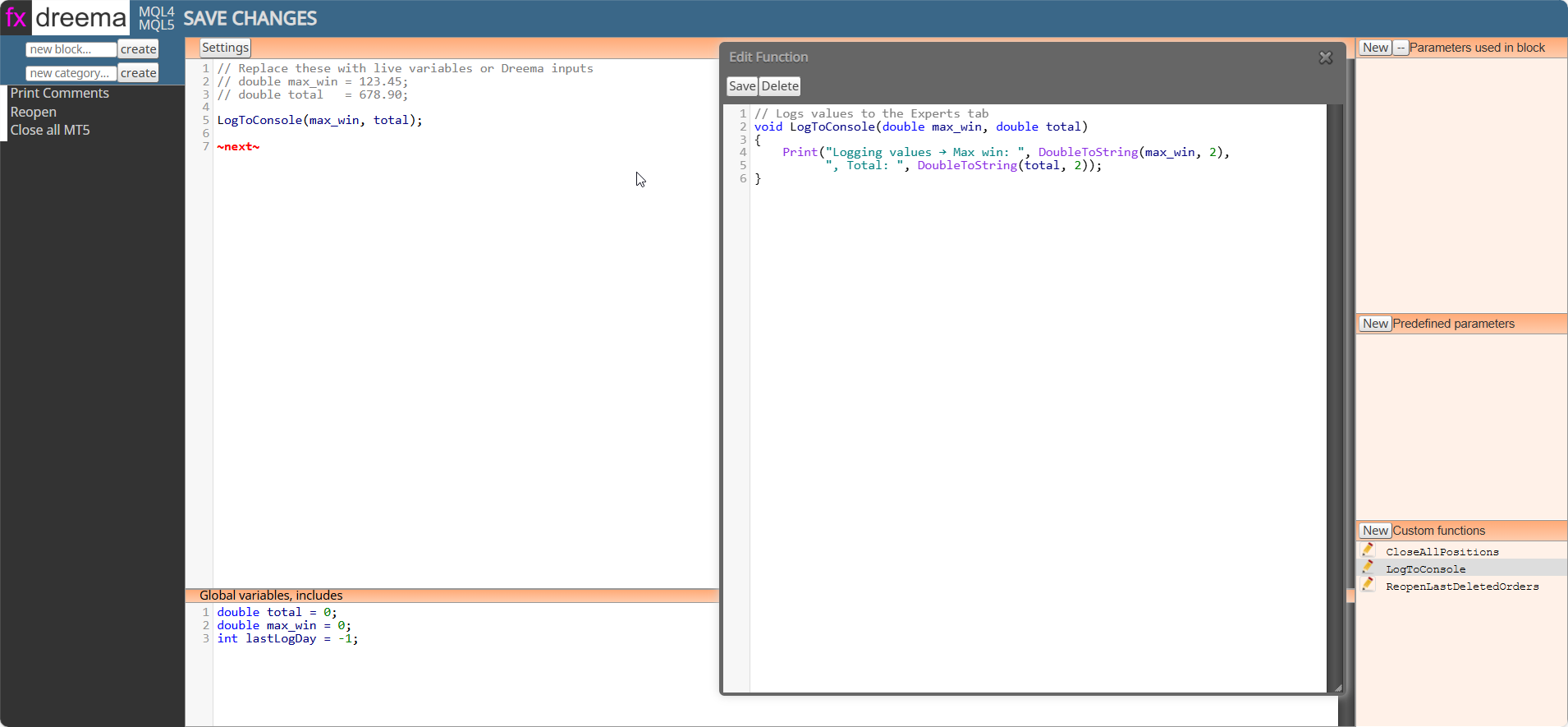
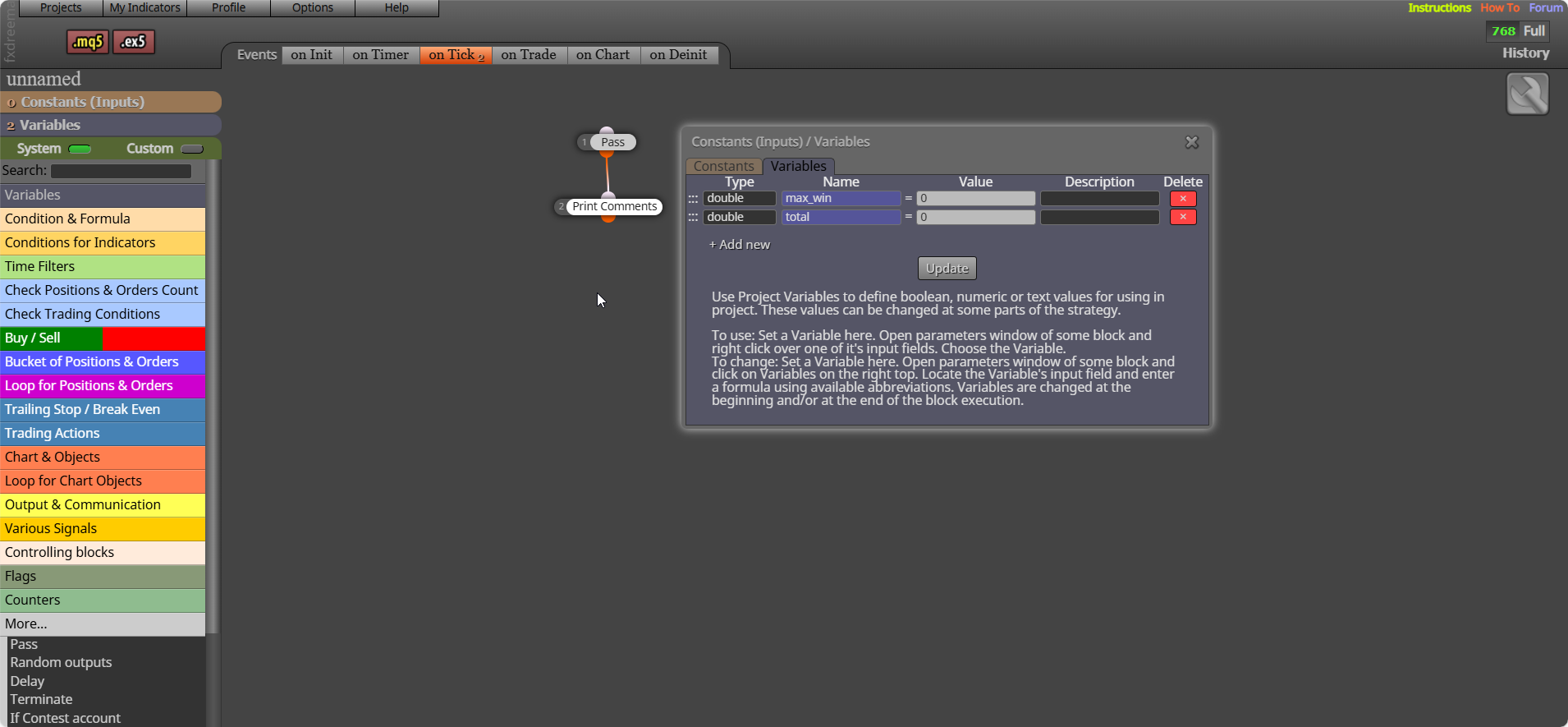
                This compiles but does use Print(), not tested so give it a try. I will put everything you need below:
                msedge_wv33nh08N5.png

                Settings:
                LogToConsole(max_win, total);

                ~next~

                Global variables, includes:
                double total = 0;
                double max_win = 0;
                int lastLogDay = -1;

                Custom function:
                // Logs values to the Experts tab
                void LogToConsole(double max_win, double total)
                {
                Print("Logging values → Max win: ", DoubleToString(max_win, 2),
                ", Total: ", DoubleToString(total, 2));
                }
                msedge_5louQxM4p1.png

                Learn fxDreema Without the Wait!

                My comprehensive book, available on Amazon, is packed with examples and invaluable insights to help you fast-track your learning journey.

                The paperback and hardback editions include MT4 & MT5 QR codes for easy access to all prebuilt projects and robots, including my latest gold trading robot!

                Don’t miss out

                Click here➡️ https://mybook.to/fxDreema to get your copy today!

                Enjoy! 😊

                1 Reply Last reply Reply Quote 2
                • l'andorrà
                  l'andorrà last edited by

                  I will try it. Thank you,

                  (English) I will try to help everyone in these fxDreema forums. But if you want to learn how to use the platform in depth or more quickly, I can help you with my introductory fxDreema course in English at https://www.theandorraninvestor.eu.

                  (Català) Miraré d’ajudar tothom en aquests fòrums d’fxDreema. Tanmateix, si vols aprendre a fer servir la plataforma amb més profunditat o més de pressa, t’hi puc ajudar amb el meu curs d’introducció a fxDeema en català a https://www.theandorraninvestor.eu/ca.

                  (Español) Intentaré ayudar a todo el mundo en estos foros de fxDreema. Sin embargo, si quieres aprender a usar la plataforma en profundidad o más deprisa, te puedo ayudar con mi curso de introducción a fxDreema en español en https://www.theandorraninvestor.eu/es.

                  S 1 Reply Last reply Reply Quote 0
                  • S
                    sktsec @l'andorrà last edited by

                    @l-andorrà

                    It seems that in MT5 :
                    Items in the Experts Tab is saved only if you right click and select "open". A list of folder will be listed in Windows File Explorer, the latest one is the saved file.

                    According to the manual:
                    The following commands can be run from the context menu of this tab:

                    Open "Open" — open the folder that contains the journal log files. Besides that, when this command is executed, all current journal entries are saved in log files. The platform log files are stored in the Logs directory, and Expert log files are saved in MQL5\Logs. File names correspond to the date of journal generation — YYYYMMDD.LOG

                    1 Reply Last reply Reply Quote 1
                    • l'andorrà
                      l'andorrà last edited by

                      Thank you very much for the info. 😉

                      (English) I will try to help everyone in these fxDreema forums. But if you want to learn how to use the platform in depth or more quickly, I can help you with my introductory fxDreema course in English at https://www.theandorraninvestor.eu.

                      (Català) Miraré d’ajudar tothom en aquests fòrums d’fxDreema. Tanmateix, si vols aprendre a fer servir la plataforma amb més profunditat o més de pressa, t’hi puc ajudar amb el meu curs d’introducció a fxDeema en català a https://www.theandorraninvestor.eu/ca.

                      (Español) Intentaré ayudar a todo el mundo en estos foros de fxDreema. Sin embargo, si quieres aprender a usar la plataforma en profundidad o más deprisa, te puedo ayudar con mi curso de introducción a fxDreema en español en https://www.theandorraninvestor.eu/es.

                      1 Reply Last reply Reply Quote 1
                      • 1 / 1
                      • First post
                        Last post

                      Online Users

                      A
                      M
                      B
                      E
                      S
                      M
                      2

                      20
                      Online

                      146.6k
                      Users

                      22.4k
                      Topics

                      122.6k
                      Posts

                      Powered by NodeBB Forums | Contributors
