Loop through bucket of trades
-
Hello,
I want to loop through any number of groups of trades and check for specific things like :- total buy lots in group
- total sell lots in group
- profit/loss
- number of trades in group etc (see attached)
Two issues:
- How to automatically update the group numbers i.e increasing the no as groups form and reducing it as
groups are closed? - How to loop through all groups and perform these checks on them?
I am aware of the [bucket of trades] block which I can use to get group related parameters, the loop is the main problem - just need a few tips to get my juices flowing again - haven't used fxdreema in a long while

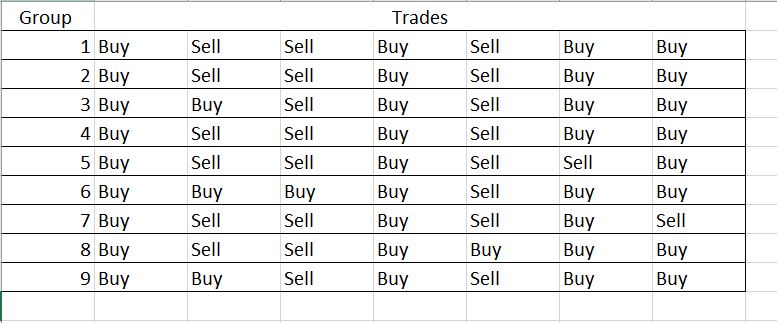
I'm thinking of using a custom code block that appends all the profitable group numbers (for groups in profit) in the text format so I can use in the [check unrealized profit] block
I.E convert the group number to text and append to a string variable, then use the variable in the [check unrealized profit] block (Group # - filter parameter)
-
@fxDreema I have been able to get a work around the two issues, above.
I have another issue:
I have groups which contain buys and sells (the number of groups are dynamic), How can I get the unrealized sums of groups in profit as well as those in loss ? i.e the green and red totals in the picture.
Something similar to the [Bucket of trades] block would be ideal - [Bucket of Groups]?

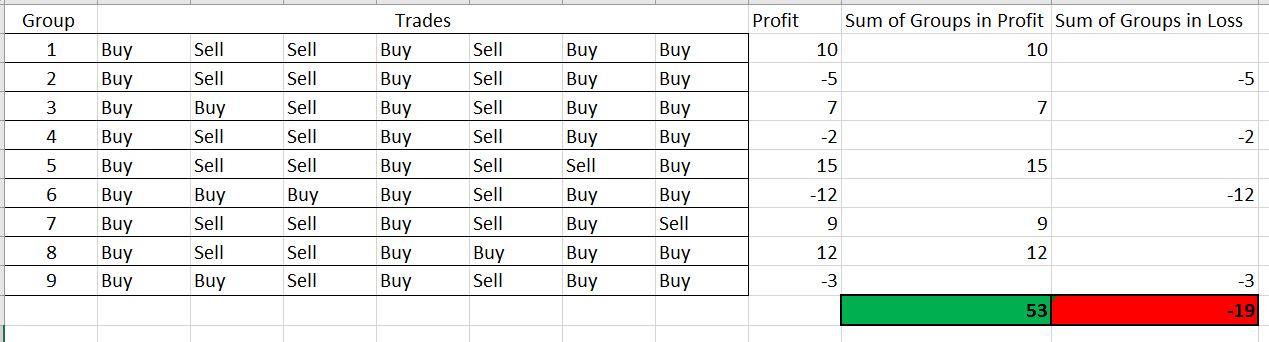
Since I can get the group number of all profitable groups. I am thinking of converting the group number to a string and then appending it to a new string variable to get all the groups. Then using the string variable in the [Check unrealized profit] block (Group# - parameter) - custom code to do this? I hope it makes sense
Ideally the : variable - buy_groups_profit would be an updating string with all the profitable group numbers
-
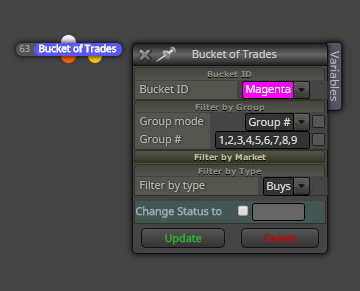
you can type all groups where it is looking for into Group # and separate them with comma:
-
@miro1360 Thanks for that info, but its not what I require, you see, the number of groups is dynamic, it changes according to my entry logic, my group numbers are automatically updated each time just like trades so I cannot use static values (set and forget) .
-
than try save groups from trades into string variable and this variable use into group # instead of static values
improve this logic:
https://fxdreema.com/shared/RUr7b3j7e -
@miro1360 Thanks for the idea I will take a good look at your example...I am trying to do exactly that, thing is, group numbers will not only be added but also removed depending on the groups profit.
EDIT: Lovely Idea! , one more thing, any idea on how to remove tempStr from groupNRs ?
Example: current tempStr = '1' and groupNRs was = '1,2,3,4' new groupNRs = '2,3,4'
-
@miro1360 problem solved thanks again.
This is my final version, I'm leaving here for posterity and record keeping
https://fxdreema.com/shared/dWdtampfe -
I was already replied you with that StringReplace function and you solved it, than it is ok
.. -
Hello all
I now have a string manipulation problem.
I want to check for a string in another string and either remove or add in order to modify groups numbers for the [Bucket of Trades] block.The code works for single digit numbers, but when it gets to 10 (i.e buy_BE_group_loop = "10") it loads it as two separate strings ("1" then "10") and this causes errors any ideas on how to solve?
See Code used below
if (BG_in_profit == "") BG_in_profit = buy_BE_group_loop;
else if(BG_in_profit != "" && (StringFind(BG_in_profit,buy_BE_group_loop,0) != -1)) {BG_in_profit = BG_in_profit;}
else if (BG_in_profit != "" && (StringFind(BG_in_profit,buy_BE_group_loop,0) == -1)) {BG_in_profit = BG_in_profit+","+buy_BE_group_loop;}
See full fxdreema logic: https://fxdreema.com/shared/JxgWKocKb
-
I get a little bit scared when I see people trying to "enter inside" the blocks that I have made
Isn't this already too complicated? I think that sometimes it's easier to just write a custom block instead of using 10s of system blocks. Especially if you know MQL. Making "for" loop in a code probably takes few seconds more, but then you can easily read that code in the future.
I mean, if you connect 10-20 blocks and you are looking at them in the future... you must open each one of them to see what's inside and understand what is going on. Compared to just looking at 10-20 rows of code for some relatively simple "for" loop.
I probably don't fully understand what you are trying to do here, but isn't it possible to forget about the groups and to write some "for" loop in MQL that automatically works with them?
-
@fxDreema Ha. In my mind its so simple, then I begin and it suddenly gets complicated
. You are right. I get confused looking at some old projects of mine. The thing is "I don't know or want to learn MQL, I'm already learning Python, lol". fxdreema has made me lazy Thanks for the advice though. I will probably go and learn a bit here and there.
-
MQL4 is relatively easy in my opinion and that's why so many people are making EAs and Indicators. Yes, you need to know variables, functions, data types, "if" and "for"... but that's almost everything. Then you only need to go to the MQL4 documentation and see what functions can you use.
Now MQL4 is very much like MQL5, which includes Object Oriented Programming, but for a simple loop this is absolutely not needed. You basically need to do something like this:
for (int pos=0; pos<OrdersTotal(); pos++)
{
     if (OrderSelect(pos, SELECT_BY_POS) == false) continue;
     // do something here using other functions like OrderLots(), OrderStopLoss(), OrderTicket()...
 }
OrdersTotal() gives you the current count of orders (trades + pending orders). Let's say you have 3 trades.
The next job is to load the first one and do something with it, then load the second one and do basically the same thing with it, and then do the same with the third. This is what this "for" cycle does. "pos" is just a variable, which is 0 in the first iteration, 1 on the second and 2 on the third.
OrderSelect() obviously select an order by position number. You got the position number from "pos". Just imagine that MetaTrader has a database (table) of all orders and they are sorted by time. I think 0 points to the oldest one. So what OrderSelect() does is to select the order from a certain row of the database.
And OrderSelect() is needed, because it "fills" all the other functions with data. For example OrderLots() - this function gives you the lot size of the currently selected order. Remember that you can have many many orders at the same time and that's why you must select one before working with it.
And the row where OrderSelect() is used does something else - if OrderSelect() returns false (which means that for some reason MetaTrader cannot select order with that "pos" number, then the "for" loop would continue (the rows below the word "continue" are skipped).
If for example you see the word "break" in a loop, this means that the loop breaks at that point, or in other word that word sends you outside the loop, it finishes the loop in the middle of the work. This is useful when you don't have anything else to do in the loop and it's better to escape it.
-
@fxDreema Hello I currently have to issues
-
I want to write more than 10 columns of data to an excel file, [write to file] has a max 10. How to extend it?
-
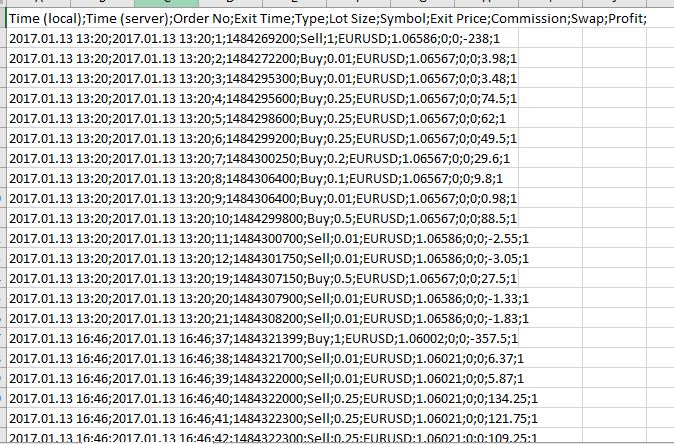
When I write to file it displays all the information in one column (Excel 2016). See picture. How to fix?
-
Can I specify the folder I want to write the file to?
-
-
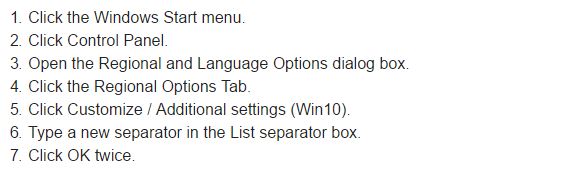
@uchiha solved number 2 by changing my computers default list separator (see picture). Number 1 and 3 are still being stubborn
-
- easiest what can you do : create more separated files and merge them manually
- ...
- read Note on this page: https://docs.mql4.com/files/fileopen
it means, you can not working outside mql4 folders (you can create only subfolders in this main folder) ... but with custom code and using some C++ language maybe it is possible, who knows, I have not tried yet ...
-
@miro1360 Thanks. I have found that I am able to do a quick modification of fxdreema's mql4 export file to accommodate more columns (add more columns to the blocks manually)... not sure I can do the same for other values.
Ahh, I had no idea one could not work outside the mql4 folders, now I know