Compile Error: Constant expected
-
The problem seems to be because of the constants that I use. If I hardcode the values, there is no problem. However, if I use the "risk" "cutloss_pips" & "trailing_pips" constant, the project doesn't compile as ex4
Please help me.
[Click here to see my project]Here are my constants:!
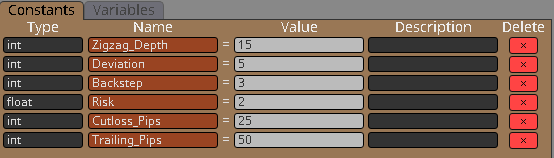
EDIT:
I got the "Cutloss_pips" and "Trailing_Pips" to work. Apparently, I should choose the "custom(pips)" mode "I MEAN" "this value, as is."
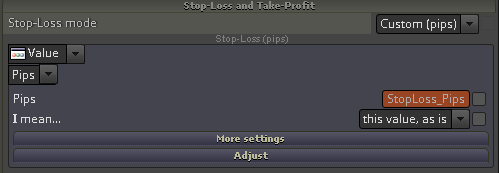
The RISK is still a problem though.

HOW DO I SOLVE THIS?
-
This means you should change your "float" to "double".
-
@uchiha i got it to work already actually. I didnt know how. I just redid everything editing the inputs that only matter. (I think if you can an input parameter, then switch it back to a different parameter, it messes with the codes.)
-
I don't see that there is a problem with "float". I tested this, I put "float" constant in this "Risk percent" field and I got no error. But I got that "Constant expected" error immediately when I checked the checkbox. That checkbox is obviously not checked on the screenshot, but I assume that you have checked it in your actual project at some time and because of that you saw that error. And my explanation is this...
Don't put a Constant in an input field and then check the checkbox. Because the constant is an input parameter for the EA, there is no need to also check it as such. When you do both things, the EA builder does not check for that and as a result you see an error when compiling. This is some kind of bug that I am actually aware of. But I always recommend to use the checkboxes only for quick tests when you are lazy to create a Constant, but to use Constants when you finally decide to have official input parameter.

