RUN and ON/OFF blocks linking question
-
Hello,
I want to run ON/OFF blocks without making a lot of connections.
I'm trying to use RUN blocks to execute the ON/OFF blocks. Like this:
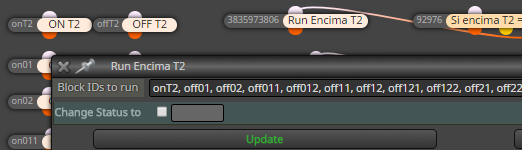
Would it be correct? have the RUN blocks or the ON/OFF to be connected by any "phisical connection?"
Something is not working on this step of my EA and I'm not sure how to use the blocks.Thank you,
David R. -
you can have a condition connected to the turn on/off blocks if the condition are true it the turn on blocks will turn on the blocks you want that are off at the moment , and the turn off blocks will turn on the blocks that are on and running .
So first try only using on/off blocks , the run block only forces the ea to run the blocks that you have entered.
Take notice that you have to write the number ( name) of the blocks you want to be executed with a comma to seperate them , no spaces between at all if i remember right. -
I also think that it's better to have some Condition block that checks whether some Variable equals to true/false or 1/0... or something else.
If you have fully disconnected blocks, they are excluded from the output file. In your case this will happen, I believe. The EA generator does not check the contents of the Run block. And so many blocks to turn on/off... I think it's too much and you are doing something in the worse way.
Just in case, if you have a group of blocks and you want to prevent that group of blocks to work, it's enough to turn off only the block on the top (if there is only 1 block on the top). If the block on the top doesn't have the chance to pass, then the blocks below will never pass, even if they are not disabled.

