fxDreema

    • Register
    • Login
    • Search
    • Back to the main page
    • Categories
    • Recent
    • Tags
    • Popular
    • Search

    EA of management of another EA

    Questions & Answers
    4
    11
    1877
    Loading More Posts
    • Oldest to Newest
    • Newest to Oldest
    • Most Votes
    Reply
    • Reply as topic
    Log in to reply
    This topic has been deleted. Only users with topic management privileges can see it.
    • J
      Juan Manuel Quiñonero last edited by

      Create an EA that closes all the operations of another EA to a certain benefit or loss.

      1 Reply Last reply Reply Quote 0
      • M
        miro1360 last edited by

        you can do it with fxdreema ... it will contains only few blocks, try it 🙂

        Between trading and gambling is a very small gap, be careful.

        1 Reply Last reply Reply Quote 0
        • J
          Juan Manuel Quiñonero last edited by

          How can I do it? I'm new.
          Thank you

          1 Reply Last reply Reply Quote 0
          • J
            Juan Manuel Quiñonero last edited by

            I'm trying but I can not.

            1 Reply Last reply Reply Quote 0
            • J
              Juan Manuel Quiñonero last edited by

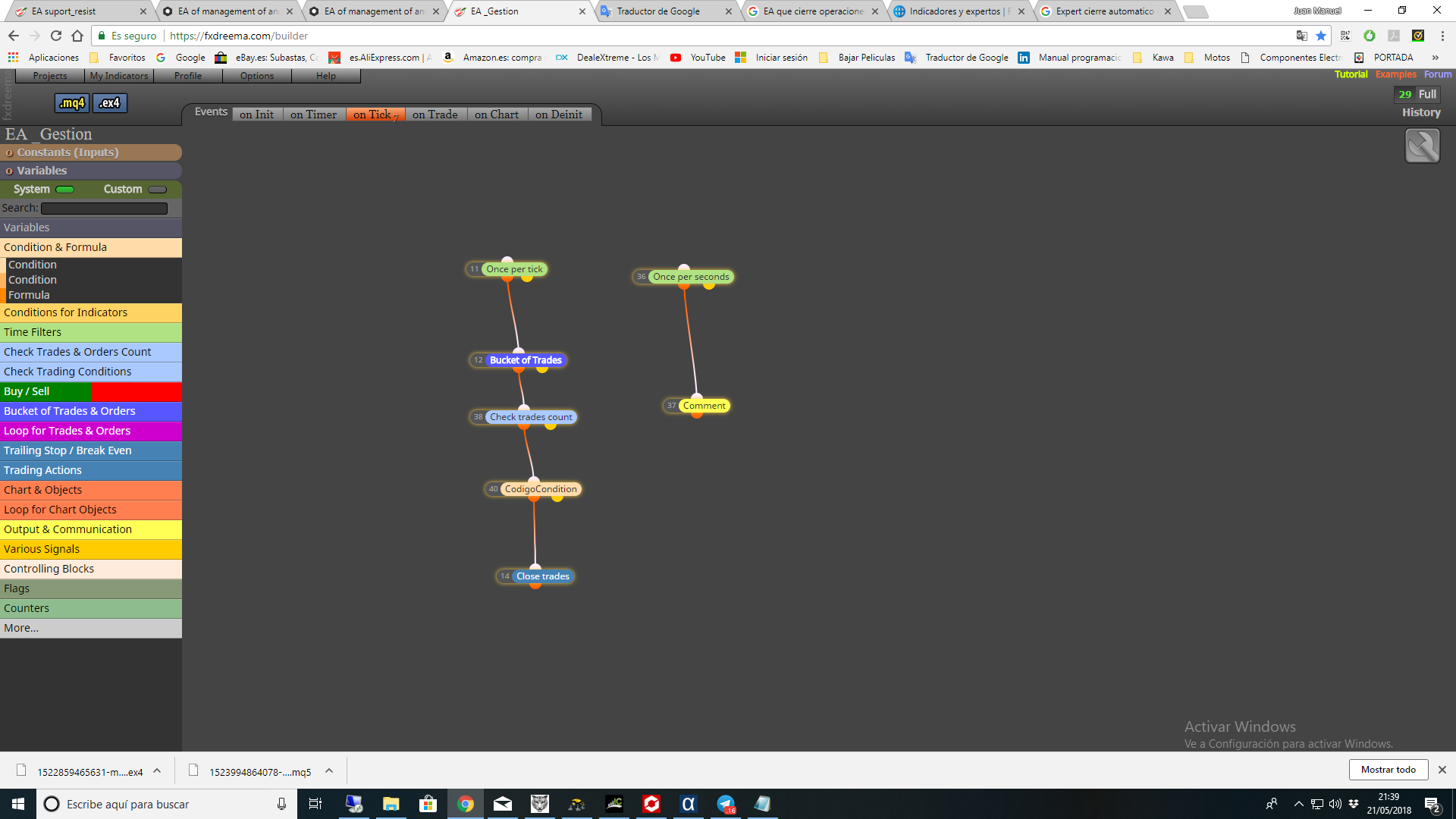
              0_1526931603995_4f982038-2948-4b70-9bab-4c3534d429da-image.png

              A 1 Reply Last reply Reply Quote 0
              • M
                miro1360 last edited by

                0_1526977065247_69c12de3-b41e-44c2-afbc-52ef143c5baf-image.png

                and set Magic number the same, as the other EA has ..

                Between trading and gambling is a very small gap, be careful.

                A 1 Reply Last reply Reply Quote 0
                • J
                  Juan Manuel Quiñonero last edited by

                  Thank you.
                  But this is not what I want.
                  What I want to do is when the open trades exceed a certain amount in losses I close (in losses) all of the other EA.
                  regards

                  1 Reply Last reply Reply Quote 0
                  • fxDreema
                    fxDreema last edited by

                    You don't care about the magic numbers of the trades? Because as you probably know, each EA is supposed to create trades with certain magic number, so that the EA knows its own trades and does not touch the trades of other EAs. Of course, each EA can do anything with any trade anyway, so you can close all existing trades if you want, regardless of the magic number. But of course, the blocks of fxDreema are set by default to work with particular magic number. So you may need to change some settings. If I take the above screenshot for example, open "Filters" and there you will see some Group settings. Change the Group mode to "All..." for all blocks.

                    That Group numbers is just an extension to the magic number, see this: https://fxdreema.com/tutorial/builder/groups-and-magic-numbers

                    J 1 Reply Last reply Reply Quote 0
                    • J
                      Juan Manuel Quiñonero @fxDreema last edited by

                      @fxdreema Gracias

                      1 Reply Last reply Reply Quote 0
                      • A
                        ALIBABA @Juan Manuel Quiñonero last edited by

                        @Juan-Manuel-Quiñonero said in EA of management of another EA:

                        0_1526931603995_4f982038-2948-4b70-9bab-4c3534d429da-image.png

                        Hi,
                        I tried to replicate the example but I can't find where to put the Magic Number of the EA to control.

                        If after the SL or TP I wanted to remove the EA from the graph and then put it back to start it again with a new series, would it be complicated?

                        I will appreciate your support very much

                        1 Reply Last reply Reply Quote 0
                        • A
                          ALIBABA @miro1360 last edited by

                          @miro1360 said in EA of management of another EA:

                          0_1526977065247_69c12de3-b41e-44c2-afbc-52ef143c5baf-image.png

                          and set Magic number the same, as the other EA has ..

                          Sorry for bad quote before

                          Hi ,
                          I tried to replicate the example but I can't find where to put the Magic Number of the EA to control.
                          If after the SL or TP I wanted to remove the EA from the graph and then put it back to start it again with a new series, would it be complicated?
                          I will appreciate your support very much

                          1 Reply Last reply Reply Quote 0
                          • 1 / 1
                          • First post
                            Last post

                          Online Users

                          R
                          F
                          S

                          12
                          Online

                          146.7k
                          Users

                          22.4k
                          Topics

                          122.6k
                          Posts

                          Powered by NodeBB Forums | Contributors