Counter status information **Solved**
-
Dear Friends & @fxDreema ,
I need to get status information of 'Counter: pass once' and 'Counter: pass "n" times' blocks.
I want to obtain such information as follows:
-Did the counter worked?
-How many times the counter worked?Since I could not find any way to do this on the forum, I needed to ask for your advice.
Thank you.
-
Easy. Just create a variable to to confirm its counting those 'n' times.
Try this example:
https://fxdreema.com/shared/ttbxqQvtc
And please notice how the counter is connected to the variable.
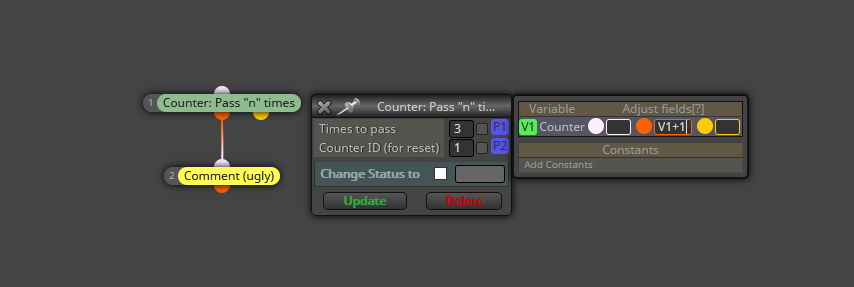
In this example you should see a number 3 on top left of the chart because I chose 3 time to pass. On the right you can see how any pass is adding +1 to the counter.
-
Hello @l-andorrà ,
Thank you for your kind reply.
I thought of using such a way but since I was going to use formulas with variables to do that, It didn't seemed nice to me. Now I have a better way by your help. I will try that. Thank you very much!
But I still wonder if @fxDreema can provide a shorter way to get the status of counter blocks?
Regards.
-
You're welcome. I have no idea what @fxDreema will or will not do to get that, though.

-
Hi Friends,
I got answer from fxDreema. Here what he says;
"Well, the value that says how much times the counter worked is inside
the block. If you want to get that number, try that:Counter(1)
Where 1 is the number of the counter. Basically I use this custom
function called Counter and with it I set or get the values. But note
that at any time in the future I can do anything with that function. For
now it will work.Or, you can implement the counting functionality with some "int" Variable."
I hope this helps to who need.
Regards.
notify: @l-andorrà
-
Thank you very much for sharing that info.

-
It's a pleasure for me @l-andorrà and as always, thank you for your kind help
-
Hello, I also want to use a counter to know if the block is still going through. However, I don't understand fxdreama's explanation. Can you please send me an example.
