fxDreema

    • Register
    • Login
    • Search
    • Back to the main page
    • Categories
    • Recent
    • Tags
    • Popular
    • Search

    How to modify one order in a block if another one hit target?

    Questions & Answers
    3
    9
    1219
    Loading More Posts
    • Oldest to Newest
    • Newest to Oldest
    • Most Votes
    Reply
    • Reply as topic
    Log in to reply
    This topic has been deleted. Only users with topic management privileges can see it.
    • F
      faiz43 last edited by

      If I have created one BUY order & one SELL order without any condition and If one of them has achieved the Take Profit, I need to reduce the take profit of the remaining one in the same block.
      So question is How to Modify the TP of one trade when another trade hit its TP?

      1 Reply Last reply Reply Quote 0
      • F
        faiz43 last edited by

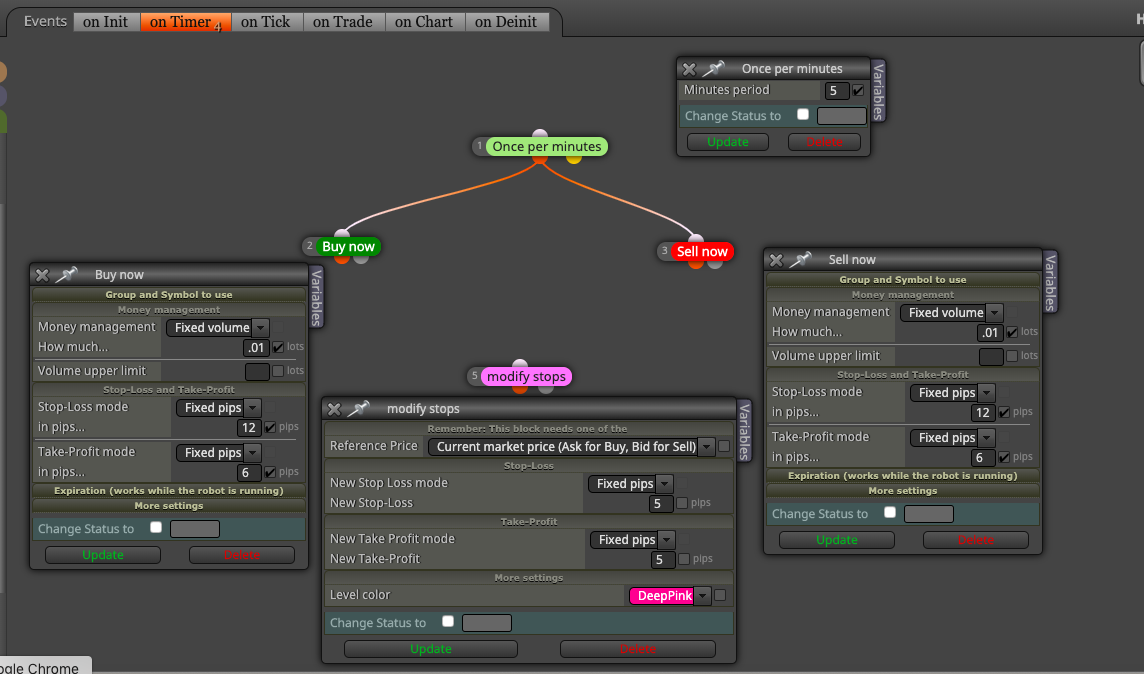
        0_1584708474540_Screenshot 2020-03-20 at 4.47.22 PM.png

        I have done till here. But Confused which one I need to put as No.4. Any one here to help me for this?

        roar 1 Reply Last reply Reply Quote 0
        • roar
          roar @faiz43 last edited by

          @faiz43 "Check trade count == 1" and then "Once per trades" and then this "modify stops"

          Need small help? Tag me in your post
          Need big help? https://www.fiverr.com/big_algo/automate-your-winning-strategy-in-mql4-or-mql5

          F 1 Reply Last reply Reply Quote 0
          • F
            faiz43 @roar last edited by

            @roar Thanks very much for your quick response. I checked the with the above. But it is directly changing the TP&SL of my first position once I open the position.
            What my requirement is I need to change based on my TP.
            For Eg.
            I open 1 BUY & 1 SELL Each having TP 60 & SL 120
            My BUY hits TP of 120.
            Now I need to modify the TP and SL of my SELL to 50 each from the ask/bid price.

            If I use "COUNT" option it will not consider my SL hit trades.

            Can you please help on this

            roar 1 Reply Last reply Reply Quote 0
            • roar
              roar @faiz43 last edited by

              @faiz43 You can better control those mechanics from the On Trade tab, using a suitable activation:
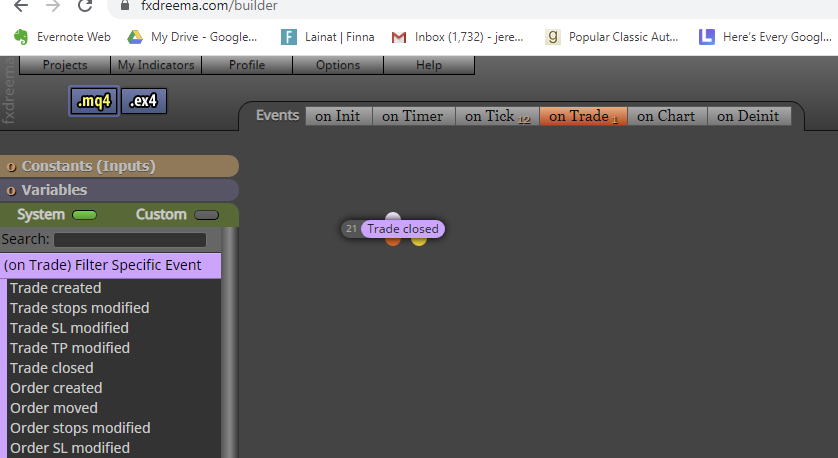
              0_1584720547291_7e234b3d-97f1-408c-a979-5aeff24b840c-image.png

              Need small help? Tag me in your post
              Need big help? https://www.fiverr.com/big_algo/automate-your-winning-strategy-in-mql4-or-mql5

              1 Reply Last reply Reply Quote 0
              • F
                faiz43 last edited by

                @roar Can I keep blocks in both tabs? in "On Trade" and Tab an in "On Tick" Tab?

                1 Reply Last reply Reply Quote 0
                • l'andorrà
                  l'andorrà last edited by

                  Yes, any EA can run blocks on all tabs simultaneously.

                  (English) I will try to help everyone in these fxDreema forums. But if you want to learn how to use the platform in depth or more quickly, I can help you with my introductory fxDreema course in English at https://www.theandorraninvestor.eu.

                  (Català) Miraré d’ajudar tothom en aquests fòrums d’fxDreema. Tanmateix, si vols aprendre a fer servir la plataforma amb més profunditat o més de pressa, t’hi puc ajudar amb el meu curs d’introducció a fxDeema en català a https://www.theandorraninvestor.eu/ca.

                  (Español) Intentaré ayudar a todo el mundo en estos foros de fxDreema. Sin embargo, si quieres aprender a usar la plataforma en profundidad o más deprisa, te puedo ayudar con mi curso de introducción a fxDreema en español en https://www.theandorraninvestor.eu/es.

                  F 1 Reply Last reply Reply Quote 0
                  • F
                    faiz43 @l'andorrà last edited by

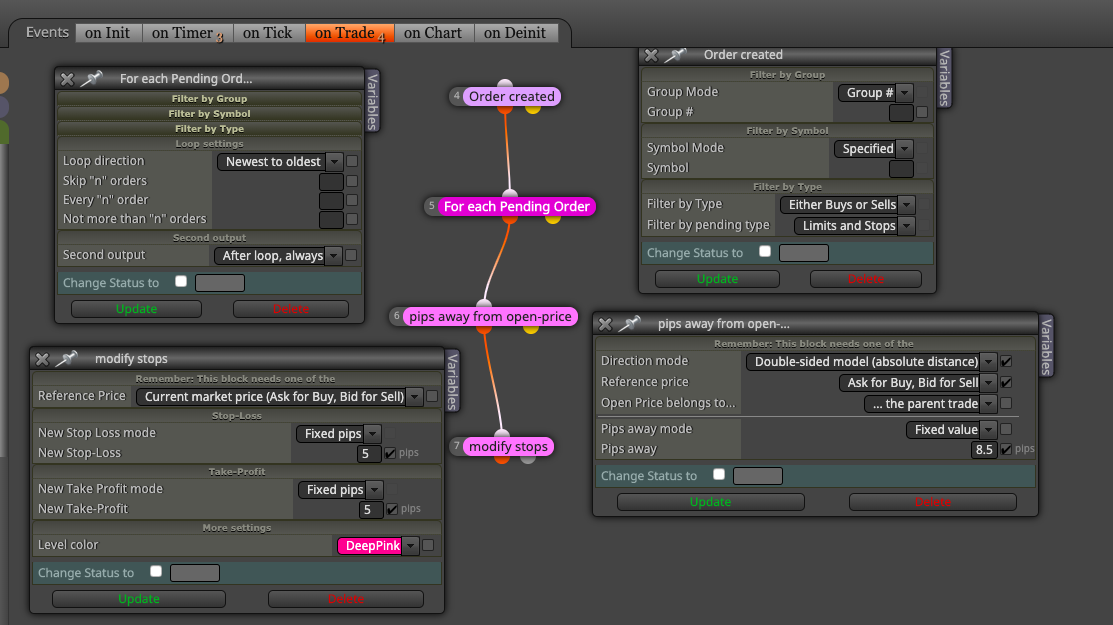
                    @l-andorrà I have tried this, But its not working. can you please look at below and find where I have mistaken? I gave BUY NOW SELL NOW blocks in "On Timer" Tab and remaining on "ON Trade" tab. Positions are taken as per "On Timer" Tab, but none of the blocks in "On Trade" tabs wroking. Please help0_1584735309949_Screenshot 2020-03-21 at 12.12.12 AM.png

                    1 Reply Last reply Reply Quote 0
                    • l'andorrà
                      l'andorrà last edited by

                      If you opened an order, it cannot be a pending orders any more. You need to substitute that 'For each pending' block for a 'For each order' block.

                      (English) I will try to help everyone in these fxDreema forums. But if you want to learn how to use the platform in depth or more quickly, I can help you with my introductory fxDreema course in English at https://www.theandorraninvestor.eu.

                      (Català) Miraré d’ajudar tothom en aquests fòrums d’fxDreema. Tanmateix, si vols aprendre a fer servir la plataforma amb més profunditat o més de pressa, t’hi puc ajudar amb el meu curs d’introducció a fxDeema en català a https://www.theandorraninvestor.eu/ca.

                      (Español) Intentaré ayudar a todo el mundo en estos foros de fxDreema. Sin embargo, si quieres aprender a usar la plataforma en profundidad o más deprisa, te puedo ayudar con mi curso de introducción a fxDreema en español en https://www.theandorraninvestor.eu/es.

                      1 Reply Last reply Reply Quote 0
                      • 1 / 1
                      • First post
                        Last post

                      Online Users

                      S
                      T
                      F
                      I
                      S
                      S
                      G
                      I
                      B
                      D

                      19
                      Online

                      146.6k
                      Users

                      22.4k
                      Topics

                      122.6k
                      Posts

                      Powered by NodeBB Forums | Contributors