@roar - That's fixed the problem - I can now see the correct heading in the EA properties on the MT4 platform. Thanks for all your help. Something new learnt. I'll share the finished results when I'm done and you can take a look and play around with it for free for all your help. Not even sure it's gonna be any good but that's what is so great about this platform.
A
Posts made by Alphaandy
-
RE: Compilation Error Messageposted in Questions & Answers
-
RE: Compilation Error Messageposted in Questions & Answers
@roar - Thanks for your reply - I did try it like that so will add the underscores in to see if that solves the problem. If not then I'll try the heading of the block and see if that gives me the heading options that I need so that the title is correct . Currently when the EA is on the MT4 platform and I look at the properties it shows me "imp2_Ro_Value" and not the name of "Set time for Sell Trades".
-
RE: Compilation Error Messageposted in Questions & Answers
@l-andorrà - Thanks for your reply-The problem is that when I change the heading the settings in the condition change back to the default when I first added it. Can't see why it would do this, also, this is by no means complete but just wanted to solve this issue before I add any more conditions.
-
RE: Compilation Error Messageposted in Questions & Answers
Here's the link,
Where it say's 2 next to the "Once a Day" condition I have set the time to 08:00 - 22:00 and have made it adjustable. When I click on " to change the heading to "Set time for Sell Trades" it kicks out the settings and produces an error. Hope that helps.
https://fxdreema.com/shared/ZASlynLmd
Still have more to do but don't want to move on until I can get the headings right to adjust the EA.
Appreciate anything you can do. Thanks
-
Compilation Error Messageposted in Questions & Answers
Hi Everyone,
When changing a condition number and giving it a new name I keep getting some error messages. These are along the lines of "size" - semicolon expected - does anyone have any ideas what I need to do to correct this?
Thanks -
RE: New to fxdreema and would like some advice pleaseposted in Questions & Answers
@roar - Thank you - I'll give that a try.
-
RE: New to fxdreema and would like some advice pleaseposted in Questions & Answers
@roar Hi, The attached shows how I trade manually at the moment (no charge (-:) as you are kind enough to help me solve this problem.
My idea is to create the same manual trading strategy in the EA and test so that I can remove any emotion from my trading (sometimes my gut tells me to ignore my own system ie similar pairs etc) and want to test this on a demo account for a few months so that I can access the best pairs to trade.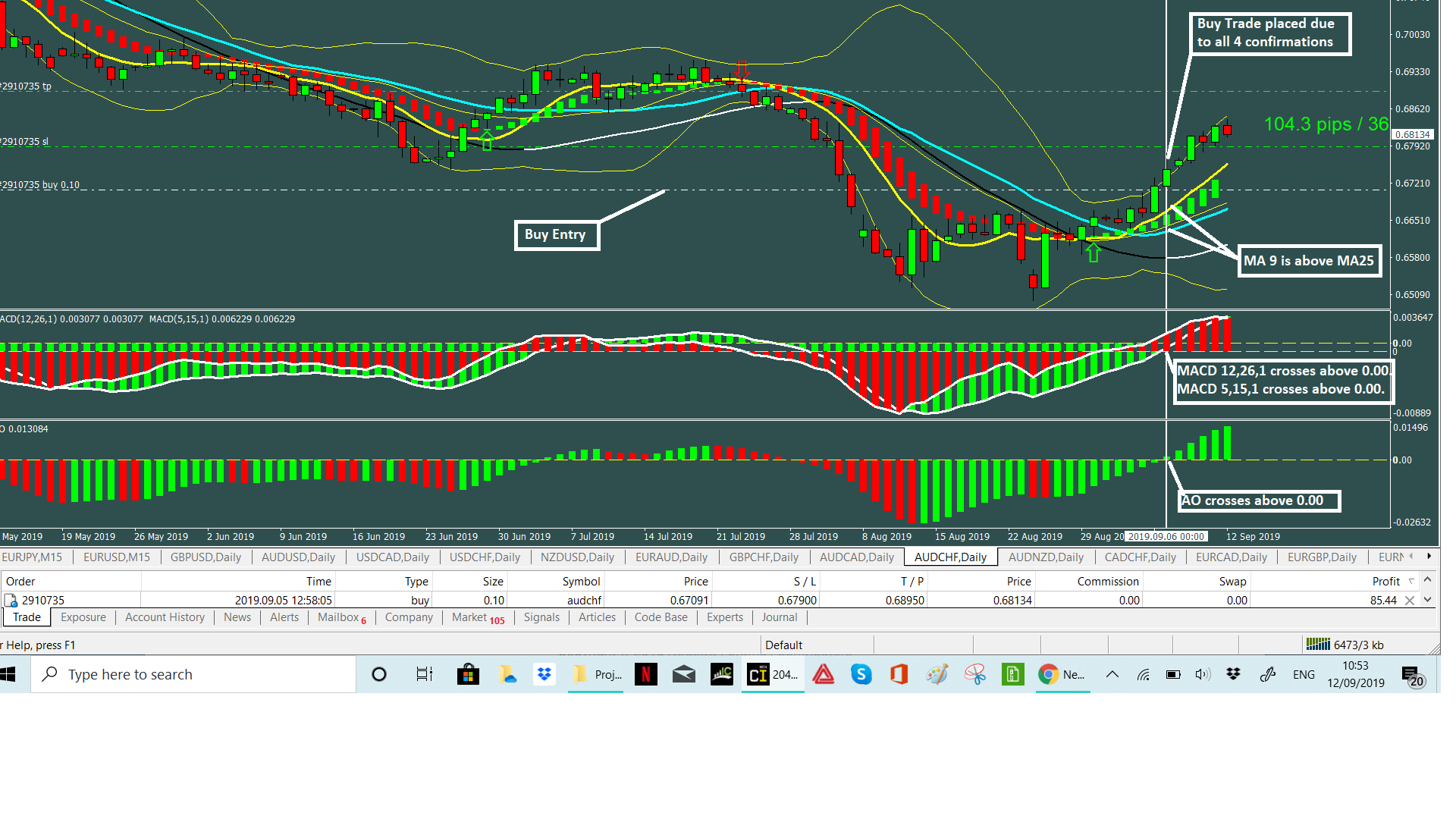
-
RE: New to fxdreema and would like some advice pleaseposted in Questions & Answers
@roar There can be time differences between the conditions being true ie the 2MA's may have moved above or below 2 days before so stay true until all of the other 3 conditions are met. At that point the EA should place the trade. The same goes for the MACD's and the Oscillator.Hope that helps
-
RE: New to fxdreema and would like some advice pleaseposted in Questions & Answers
Hi Guy's,
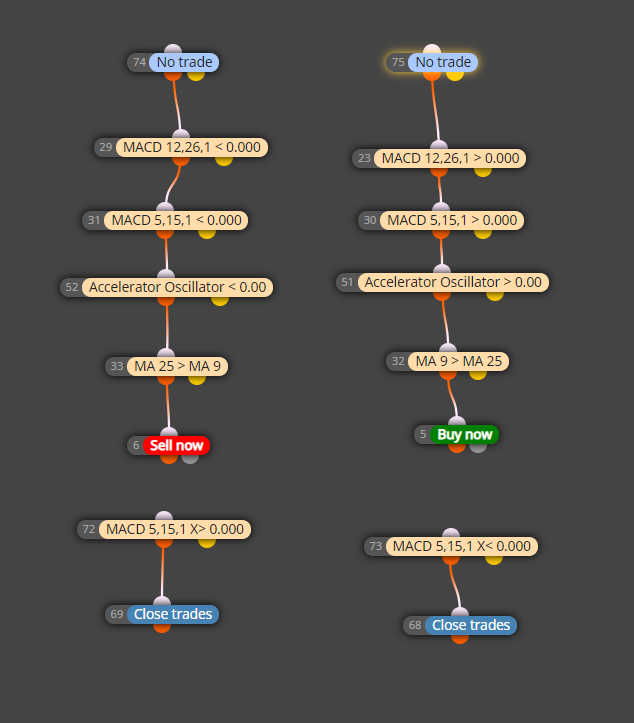
Think this is what you want.0_1568141600247_Double MACD + MA Cross EUR_GBP.mq4
-
New to fxdreema and would like some advice pleaseposted in Questions & Answers
Hi Everyone,
I've recently started with fxdreema and have been trying to create an EA with the following criteria.
The Ea should open one trade, either a sell or buy on the daily chart and only close the trade when a single condition is met.- How do I tell the EA that it should only open one trade in one direction?
There are four conditions that need to be met and are opposite for either a buy or sell ie
Buy Conditions
Condition 1 = MACD 12,26,1 > value 0.00
Condition 2 = MACD 5,15,1 > value 0.00
Condition 3 = Accelerator Oscillator > value 0.00
Condition 4 = MA 9 > MA 25
2. Either one of these conditions could pass the rule at anytime and in any order so therefore I need to set these so that they are not reliant on the order that the condition is met but when all of them are met - any help please.- How do I connect these conditions in the correct order.
The attached shows how I have this set at the moment but it's not trading as I expect