Any ideas how to use the trailing stop? i dont quite understand it , i want to modify a trade tp and sl when is almost hitting tp it modifies the tp with a more higher and the stop loss modfies to the first takeprofit, and it continues to do that until it reaches a stop loss
B
Latest posts made by Benito102
-
Trailing stop help!!!posted in Questions & Answers
-
Moving Avarage trend indicator helpposted in Questions & Answers
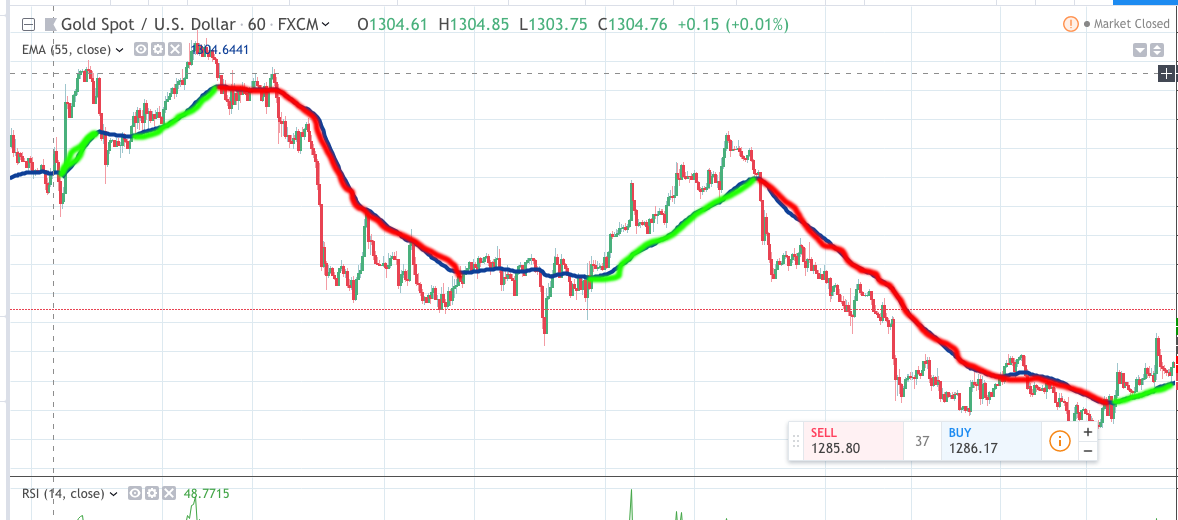
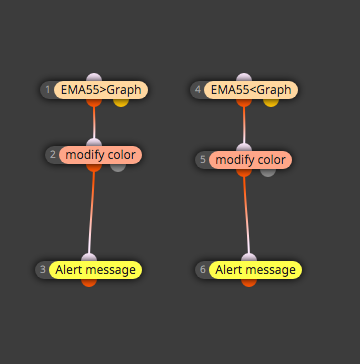
Hi i am trying to make a Ea that tells you the trend with Moving avarage 55, but i am having trouble i want the moving avarage to change to 3 colors red blue and green, blue is no trend, green is buying trend and red selling trend on Time frame H1 but so far no luck this is what i been trying shared/ArgUAeTcb i make a photo of how its suppost to look, and also send a alert with the trend.
-
Help with this martingale robot!posted in Questions & Answers


Hi i am creating this martingale robot that as soon as i start it opens hedge trades one buy and one sell each with a first takeprofit of 10 pips then if one of those trade doesnt close and get to -20 pips using the constant pipstep it open another trade with a tp of 25 pips if the trade goes down -20 pips it keeps open trades and like that it goes multipling the lots by 1.3 and when one trade reaches tp they all close but i cant get it to work i dont know what am i doing wrong
-
RE: How do i put a constant (input) on a commentposted in Questions & Answers
But i mean to see it on the chart, like information of the account and all that and i want to put a variable that says what lote are you currently using to ve visual on the chart, and another question how do i set up only one trade when a condition is meet, i made one but it keeps opening order when a condition is meet but i just one one trade at a time when it closes it can do that again, thanks
-
How do i put a constant (input) on a commentposted in Questions & Answers
How do i put a constant (input) on a comment?, i dont know if i got to choose value and put the constant name or what do i got to choose.