I just wanted to take a moment to thank you for creating such a wonderful product. I wanted to say I enjoy working on this and playing with all different blocks. I have yet to create a strategy that actually creates positive results but its nice to know I have everything I need to create one and I don't depend on anyone.
B
Best posts made by BlueMoon
-
Thank you fxDreemaposted in Questions & Answers
-
Trailing Stop to start trailing based on ATRposted in Questions & Answers
I want to set Trailing Stop for all my existing trades (they were either opened using EA or manual) of different currency pairs.
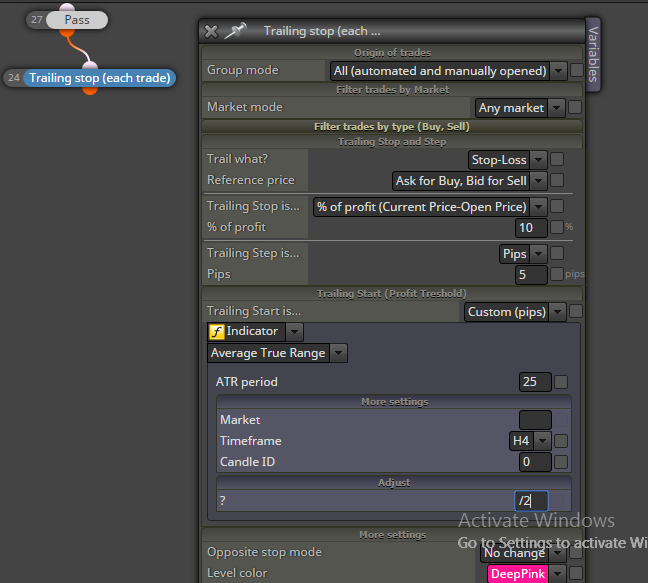
I want start trailing SL once my trades have reached certain profit. The certain profit is 50% of the 4 hour chart ATR 25 value. I am trying to use the following block but I am not getting the desired results.
I also wonder do I need to enter the value for "Market" in the "Trailing Start section" Will it get the value of the Market depending which open trade it is trying to set the trailing for? Also I need to divide the value of the ATR result by the "Point" value for that Market to get the actual Pips of the ATR. How and where do I do this?
-
How do I get absolute value of a number?posted in Questions & Answers
I know this should be very easy but is there a block to do this? If not can someone give me the custom code to convert a value into its absolute value?
e.g. of what I am looking for:
I will have a variable for the value could be a position number or a negative number. I want to convert this always in a positive number.
-3 should become 3
3 should stay 3
-5.987 should become 5.987 -
Limit on Set Current Market for next blocksposted in Questions & Answers
Seems like there is a limit of 256 characters that you can assign in this block in the "Market List"
This is causing me issues since 1 of my broker uses the format of "EURUSDpro" which uses 9 characters per currency pair. I also need to separate each pair using a comma. This means a total of 10 characters per pair. I am not able to use 28 pairs that I need this block since this will use 280 characters.
Can this limit be increased?
-
RE: Source Code Fxdreemaposted in Questions & Answers
@fxdreema said in Source Code Fxdreema:
Oh, I am doing something only when I'm in mood, I don't know

Any idea when will your mood trigger?

-
RE: Select the top 5 variablesposted in Questions & Answers
Thank you so much. I got to learn something really nice.
However, seems like I didn't explain it clearly what I needed. This code will generate a string with values of all the variables(out of 100) that has top 10 values separated by a comma. But I need the vairable names separated by comma. The result variable should look more like the following:
"var01,var09,var99,var10,var77,var72,var91........"
Thanks for your help
Latest posts made by BlueMoon
-
RE: Issues with Once per barposted in Questions & Answers
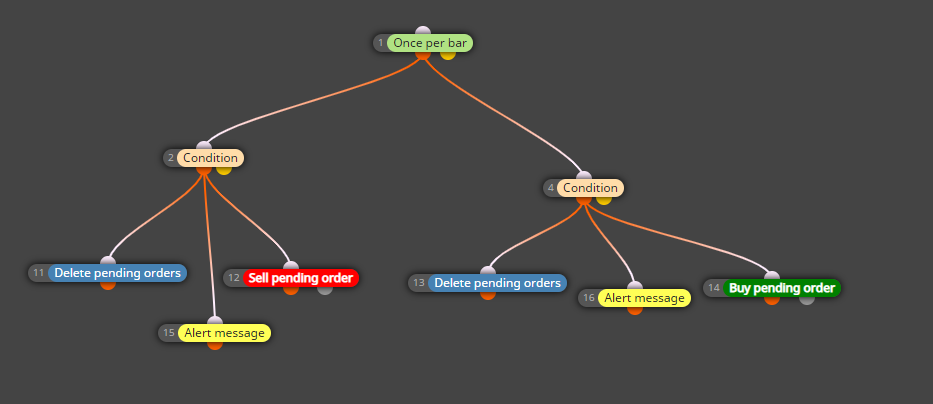
Thanks for your reply. Can you please explain what you mean by depends on the context? here is the full blocks screenshot. I just added the alerts block to see if I get those alerts to validate even if the Condition block is running.
-
Issues with Once per barposted in Questions & Answers
I am having some issues with "Once per bar" block. I am not sure if this is a bug or I am doing something incorrectly.
This is what I am trying to do:
Whenever a new H4 candle bar opens, I have a condition to check if the previous bar was a "Bull" or a "Bear. I do this by comparing the Open and Close price of Candle(1) I believe this is the right way to do this since Candle(0) is the current candle that might have just opened. I do not know what is going on but it works sometimes and does not work sometimes. Any ideas of such a behavior or if I can try something else to get the same result?
-
RE: Trade Created Block v/s Pending Order Triggeredposted in Questions & Answers
I am going to try the following. Let me know your thoughts. I will update here how it goes.
The other area of my EA where I am creating a new Trade, I will set a variable and set a value of it to "1" before I create the Trade. Once the Trade is created, it will trigger my "Trade Created" block. I will check the value of the variable first and if it is "1" then I will not execute the things I want to execute and just set the value of the variable back to "0"
When my Pending Order gets triggered it will also trigger my "Trade Created" block. This will again check the value of the variable and it will find thee value to be "0" so it will continue to execute my code.
-
RE: Trade Created Block v/s Pending Order Triggeredposted in Questions & Answers
I am already using "Group" for my trades in this EA for a different purpose and it is not possible to mix it with this.
-
Actions at a specific time everydayposted in Questions & Answers
I want to run some blocks everyday at a specific time.
Example: I want to run something everyday at 4:45pm EST. I checked all the Time Filters but could not find something that will meet me requirement.
-
RE: Trade Created Block v/s Pending Order Triggeredposted in Questions & Answers
@trader-philipps Thank you very much for your reply. Honestly I do not like any of the suggestions you have made. It will just over complicate things. I really like to keep things simple. I will just have to consider making design changes so I just don't have to deal with this while still achieving what I need to do.
I was just hoping that the "Trade" event had a special block called "Pending Order Triggered" and this block would get activated every time a new Trade is created due to Pending Order getting executed.
I really appreciate you taking the time to reply on a Sunday afternoon..