fxDreema

    • Register
    • Login
    • Search
    • Back to the main page
    • Categories
    • Recent
    • Tags
    • Popular
    • Search
    1. Home
    2. cesardefez
    3. Posts
    C
    • Profile
    • Following 2
    • Followers 1
    • Topics 39
    • Posts 128
    • Best 4
    • Controversial 0
    • Groups 0

    Posts made by cesardefez

    • Help with custom indicator

      I have an indicator in mq5, that when importing it, I do not get the Buffers, nor the input parameters.
      if I configure them manually, the output data from the buffers is wrong.
      Someone could take a look at the indicator, which I leave attached.
      Thanks

      indicator: https://drive.google.com/file/d/198DPv4kIdRTZicDTRQbqoioGl95rnL-M/view?usp=sharing

      posted in General Discussions
      C
      cesardefez
    • RE: ghost trading

      @l-andorrà
      The idea is to use it to filter, and accumulate less float.
      I want to filter that it does not operate if they have not opened two (x consecutive losses).
      For this I have to simulate in some way the entry and exit according to my strategy. if there are two, three x's missing, then go in.
      At no time do I want to make a strategy strictly by doing.
      but if it is true that if my backtes comes out "x" of consecutive wins and consecutive losses, I can use this data as a filter and reduce DD.

      posted in General Discussions
      C
      cesardefez
    • ghost trading

      The title seems a bit strange, but let me explain what I would like to achieve.
      I want to simulate placing buy and sell operations. Without being carried out, but if I want the EA to manage if it is a winner or a loser.
      I want to count x losers, and from there, that I can put them in real (stop doing simulated operations).
      Could someone give me a hand to build this idea?
      Thank you

      posted in General Discussions
      C
      cesardefez
    • RE: Indelible variable

      @cesardefez
      Solved.
      At least temporarily.
      the only drawback is that it is only saved up to 4 weeks after the last modification of the variable.
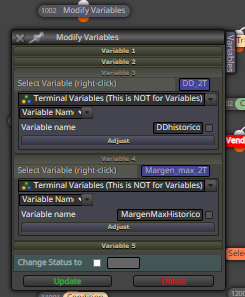
      What I have done is create a global variable, giving them the values that I need to keep.

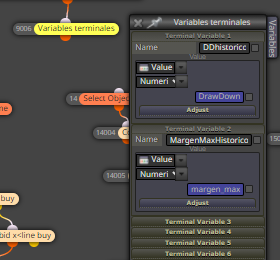
      0_1612818611745_3851425f-96c9-460d-9832-31dfa0f2ecee-image.png

      I create other variables in the EA, to be able to retrieve the value of the global variable and be able to present it on the screen.

      0_1612818717345_c6d0d256-014e-4ece-b5f7-726ea54c9a69-image.png

      Gracias, @ l-andorrà

      posted in General Discussions
      C
      cesardefez
    • RE: Indelible variable

      @l-andorrà I was hoping that in the same way that an ea can read a set, it could also read the value of a vriable from a text file.
      thanks

      posted in General Discussions
      C
      cesardefez
    • Indelible variable

      Hi.
      in my panel, I want to have some statistical data,
      such as drawdom, the max level of margin that the operation has taken me ... etc.
      The problem that arises for me is that if I turn off the mt5, when I turn it back on, my variables are reset to 0, losing the statistical data of my operations.
      Is there some way that these variables are fixed as if they were a constant. In other words, that the value of my variables are not volatile.
      I have tried, with the block modify variables, modify the value of a constant.
      but obviously it doesn't work.
      the solution would be to create a file with the value of the variables that I want not to be deleted. and when loading the EA in the init tab, retrieve these values from the text file.
      You can help me to do it.
      Thank you

      posted in General Discussions
      C
      cesardefez
    • RE: View earnings for today, last week, last month, last year

      @roarIt
      The configuration that you recommend does not work for me.
      I use the code for mt5.
      from my logic, I have used the following configuration.
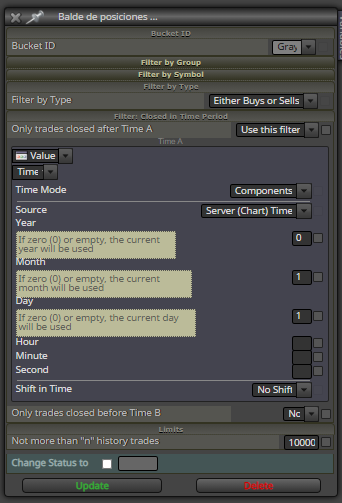
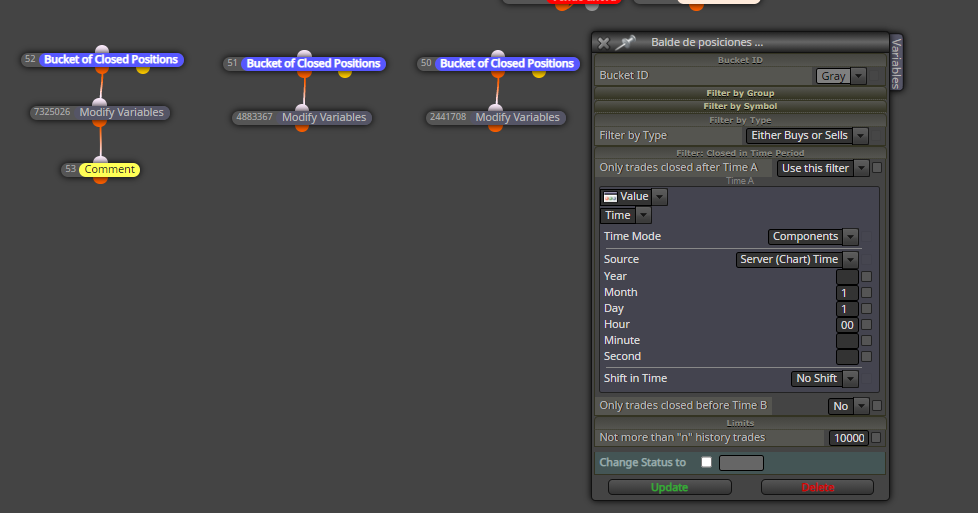
      year ... 0, or empty to indicate the current year (2021).
      month ... 1. No and if so. I have placed 1, thinking it is January.
      day 1 . -. , from day 1.

      January 1, 2021.
      shift in time ..... no shift. (I don't know what it's for)

      0_1612214061310_460c7ea0-6de8-48a3-9d39-03d07d76c647-image.png

      Please can you help me to calculate the week.
      from Mondays to Sundays .?
      7 / 5000
      Resultados de traducción
      Thank you

      posted in General Discussions
      C
      cesardefez
    • RE: View earnings for today, last week, last month, last year

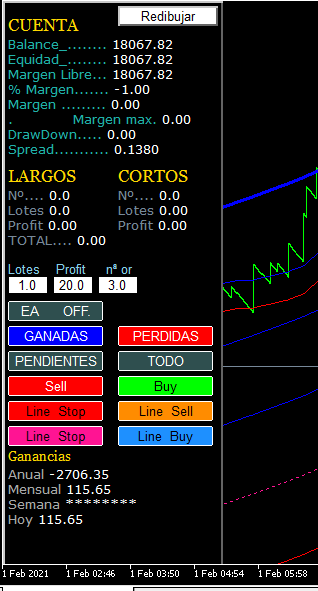
      Hi. I pass a photo of what I want to achieve in my panel.

      0_1612205540805_f857e150-098e-49c7-a200-a78ed1d4da7a-image.png

      As you can see at the bottom, I want you to report the profit for the year, the month, the week and today.
      for this I have used the following block.

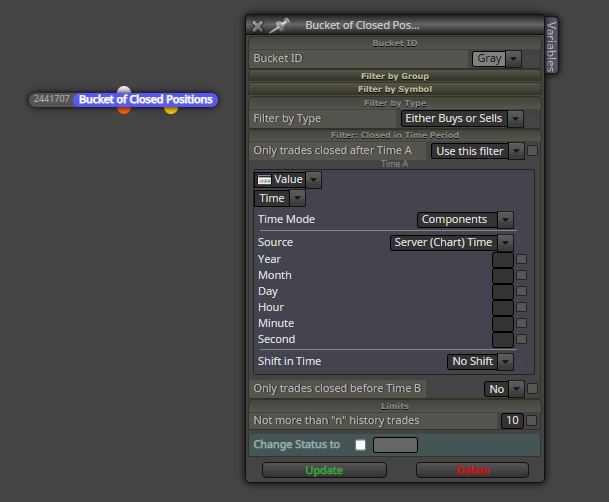
      0_1612205773713_06a697a0-d7e4-49e6-a1e5-b593c0c2c2c5-image.png

      I have two problems:
      the annual profit miscalculates it for me. it doesn't match the real thing. In the photo you can see how the box is configured.

      and for the week calculation I don't know how to do it. I would have to calculate the profit from Monday to Sunday of each week.
      and finally a doubt.
      What is the shift in time option for?

      thanks

      posted in General Discussions
      C
      cesardefez
    • RE: View earnings for today, last week, last month, last year

      @cesardefez Someone could say what expression could be used, and if it works.
      thanks

      posted in General Discussions
      C
      cesardefez
    • RE: View earnings for today, last week, last month, last year

      0_1612168340049_fd2caf05-f9ca-48af-836d-2dba9b2cf4ae-image.png

      I think this block should be configured.
      with some formula that tells you that we want operations closed today.
      we repeat the block for the current month, current week, current year.
      but this must surely be an expression in mql4 or mql5.

      posted in General Discussions
      C
      cesardefez
    • View earnings for today, last week, last month, last year

      Hello, how could I calculate the earnings of the EA?
      today's earnings
      current week earnings
      earnings of the month in current
      current year's earnings.

      posted in General Discussions
      C
      cesardefez
    • RE: button problems (solucionado)

      @xyon126
      Hi. I write this note in English and Spanish, It is the least I can do as respect and thanks to roar and xion. Thank you. (and forgive English because I use google translator).
      the loose blocks, is that I make modifications to test, and I do not delete them completely, in case I have to use again.
      but that does not worry me, I take it into account.
      It is true that I have encountered problems of duplicating operations. but I want that I have already solved it, both the problem that sometimes the buttons did not go.
      the solution that I have given is the following.
      1st, I draw the buttons in the "ON INIT" tab, Surprised? I also. With this, what I get is to set the button as pressed, it remains fixed in the pressed position. so I avoid the problem of sometimes not reading the button state.
      The selection of the button, detect if the button is pressed, I put it in the "ON CHART" tab.
      Here I have the problem that when the button remains pressed, it repeats orders without stopping. To avoid this, after placing the order I put a "execute block" block. And I send it to the draw button block that is in "ON INIT", so to redraw it leaves me the button in the not pressed state.
      I have noticed a great improvement in the execution of the keypad.
      Although it cost a lot to get here, I am happy, I think it is an elegant solution.

      Hola. Escribo esta notaen ingles y castellano, Es lo minimo que puedo hacer como respeto y agradecimiento a roar y xion. Gracias. ( y perdonar el ingles pues uso traductor de google).
      los bloques sueltos, es que hago modificaciones para probar, y no los borro del todo, por si he de volver a utilizar.
      pero eso no me preocupa, lo tengo en cuenta.
      Es verdad que he encontrado problemas de que me duplica operaciones. pero qureo que ya lo tengo solucionado, tanto el problema de que a veces no iba los botones.
      la solución que e he dado es la siguiente.
      1º ,dibujo los botones en la pestaña " ON INIT", Sorprendido? yo también. Con esto lo que consigo es fijar el botón como pulsado, se queda fijo en la posición pulsado. por lo que evito el problema de que a veces no lo lea el estado del botón.
      La selección del botón, detectar si el botón esta pulsado, lo pongo en la pestaña "ON CHART" .
      Aquí me surge el problema que al quedarse el botón presionado, repite ordenes sin parar. Para evitar esto, después de colocar la orden le pongo un bloque "ejecutar bloque". Y lo mando al bloque dibujar botón que esta en "ON INIT" , por lo que a redibujar me deja el botón en estado no presionado.
      He notado una gran mejora en la ejecución de la botonera.
      aunque costo mucho llegar aquí, estoy contento, creo que es una solución elegante.

      posted in General Discussions
      C
      cesardefez
    • RE: button problems (solucionado)

      hola xyon.
      has podido ver si mi botonera esa bien diseñada, o hay algun error para mejorar?
      gracias

      posted in General Discussions
      C
      cesardefez
    • RE: button problems (solucionado)

      por cierto, como consigues que un botón , sea pulsador como puede ser el buy o sell, o un selector (interruptor), que se quede pulsado (seleccionado) como supongo que será 1% , 5%.

      posted in General Discussions
      C
      cesardefez
    • RE: button problems (solucionado)

      hola xion.
      Si, es correcto. el desplazamiento lo he provocado adrede, para destacarlo, me parece importante el margen max que mi estrategia me esta exigiendo.
      botón todo,..... cierra todo, ordenes pendientes y abiertas, sell y buy.
      ganadas..........Cierra las operaciones con ganancias.
      perdidas..........cierra las operaciones con perdidas.
      invernar.......... me pone la variable stop=1, la usare para que el EA, no pueda colocar mas ordenes, pero si
      gestionar las perdidas.
      reset.............. coloca la variable stop=0, permite que el ea pueda volver a colocar ordenes.
      pendiente.......cierra las ordenes pendientes.
      Sell y buy....... coloca ordenes al mercado sell, o, buy.
      Close line..... me dibuja una linea, con el nombre "stop_line", lo utilizare para crear una linea de tendencia que
      cierre las ordenes si el precio la toca.
      Open line...... crea una linea de tendencia con nombre "open_line" . Se utiliza para que el ea, abra una operación si
      el precio la toca.

      Si , efectivamente no se pone a cero al cerrar operaciones, se me queda con lo que tenia, aunque al volver a colocar ordenes, si actualiza bien.
      por ultimo hay un cuadro de edición par cambiar el lotaje sin tener que abrir las propiedades del experto.

      me gusta tu panel, sobre todo la gestión de riesgo. Un gran trabajo. enhorabuena.

      si compartes, me gustaría aprender , sobre todo la lógica de programación, siempre se tiene vicios al realizar los ea, sin ver mejores formas y mas sencillas de hacerlo. Y ver soluciones que ni siquiera he llegado a plantearme.
      Muchas gracias.
      posted in General Discussions
      C
      cesardefez
    • RE: button problems (solucionado)

      Another failure of the button panel is that the positions loop, to update the data of open operations (number of open operations, lots, profit) is not updated when closing the operations. To achieve this, I have to update variables every time I close an operation. But at first the position loop box, it should.
      It is not like this?

      posted in General Discussions
      C
      cesardefez
    • RE: button problems (solucionado)

      @xyon126Hi Xyon.
      many thanks. I give you the link of the project.
      https://fxdreema.com/shared/EZ0q3O6rd

      posted in General Discussions
      C
      cesardefez
    • RE: button problems (solucionado)

      @roar Thank you very much, I'll try it.

      posted in General Discussions
      C
      cesardefez
    • RE: button problems (solucionado)

      @roar The problem continues.
      I have made the modification in a single button to test.


      0_1611571906760_374e9806-598b-4449-b34a-1ae8540b6c3f-image.png
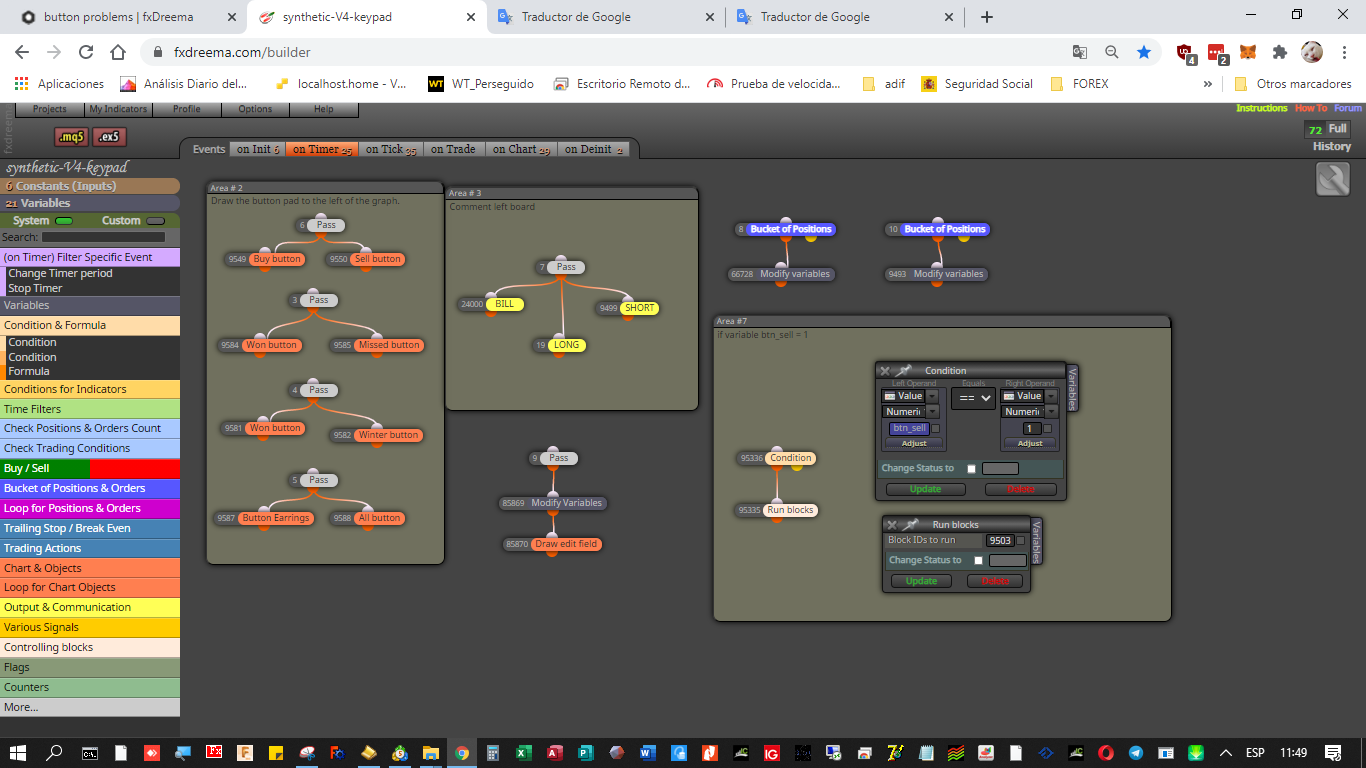
      I draw the buttons in the "on timer" tab
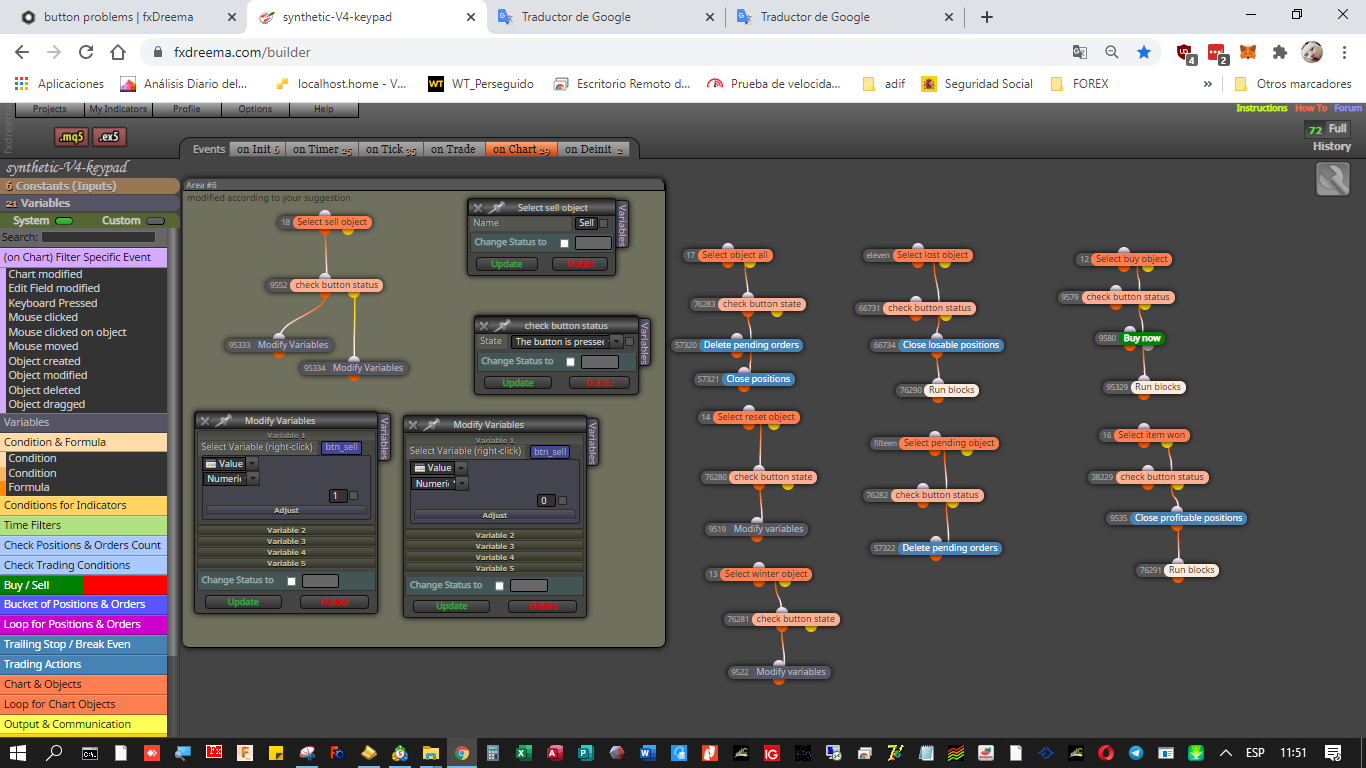
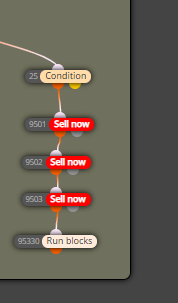
      I detect the pressing of buttons in the "on chart" tab. This is where I have modified according to your suggestion, and I assign a variable with value 1 if it is pressed and 0 if it is not pressed. execute block 9503 that is in the "on tick" tab.


      0_1611571857855_6bdebf02-0ad4-4481-ba32-25e76cf4e695-image.png

      0_1611572040143_38ef4d73-b738-4e94-853e-3593fb6ec62b-image.png
      the feeling I have is as if the code was very heavy and slow.
      in fact, I have noticed that when compiling in mt5 it takes much longer than it takes to compile mt4.
      Any support?
      thanks

      posted in General Discussions
      C
      cesardefez
    • button problems (solucionado)

      Hi. I have problems with some buttons.
      the buttons that I have drawn do not always react when pressed.
      sometimes they work and other times it doesn't.
      I have lowered the "period for the" on timer "event to 0.1 second.
      the selection of the object "button", and the verification of the state of the button I have it placed in the tab "in the graphic".
      Does anyone know why the buttons work only sometimes?
      thanks

      posted in General Discussions
      C
      cesardefez
    • 1
    • 2
    • 3
    • 4
    • 5
    • 6
    • 7
    • 1 / 7