fxDreema

    • Register
    • Login
    • Search
    • Back to the main page
    • Categories
    • Recent
    • Tags
    • Popular
    • Search
    1. Home
    2. coverman
    3. Posts
    C
    • Profile
    • Following 0
    • Followers 0
    • Topics 56
    • Posts 132
    • Best 0
    • Controversial 1
    • Groups 0

    Posts made by coverman

    • RE: Close all trades when open trades are in profit?

      But I want to close ALL trades if the account is in profit. So if I have 5 trades and 3 of them are at 5 dollar profit and I have 2 trades that are open with 1 dollar loss each. Then the total profit is 3 dollar profit. I want the EA to close all open trades then, since the account is in a total profit. Not just closing the ones in profit.
      No matter if they have the same MagicNumber or opened by another EA or another currency pair. If my open trades all together have reached a certain profit I want to close even the ones going wrong.

      It would be even better if I could put a trailing stop on all trades, so they can continue if they go in the right direction.
      posted in Questions & Answers
      C
      coverman
    • RE: Close all trades when open trades are in profit?

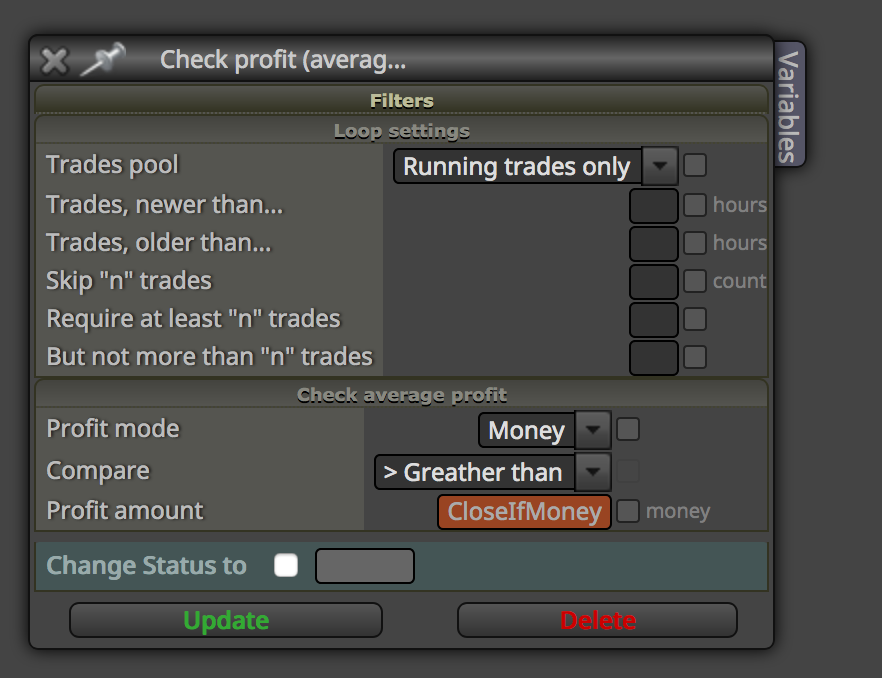
      I have used this block, but that one is only working if I set the MagicNumber to the same.
      So that one isn't working.
      0_1540980920897_ProfitTrades.png

      posted in Questions & Answers
      C
      coverman
    • Close all trades when open trades are in profit?

      I want to make an EA that closes all open trades (no matter if they are opened by one specific EA).
      I want it to look if the total profit is 5 USD. Then it should close all trades, even the ones in loss.
      I tried to find a solution and I found something that might work, but the block doesn't look like this now. The Market Mode part isn't available.
      Old from an old solution

      So I'm looking for something to close everything, no matter what pair or magic number.

      Is it possible?

      posted in Questions & Answers
      C
      coverman
    • RE: How can I print the stop loss live?

      No, didn't get the points from that example.

      posted in Questions & Answers
      C
      coverman
    • How can I print the stop loss live?

      Probably a very, very simple question.
      I want to output the actual loss on an open trade on the screen.
      But which block can tell me this? I want it to print the loss in points on open BUY trades and one line showing the loss on the open SELL trades on the trades that are open for this EA.

      Something like this:
      SELL LOSS: 250 points
      BUY LOSS: 732 points

      But which block can give me these numbers?
      Probably very, very simple, but I just can't find it.
      And I only have one BUY trade and one SELL trade open, so it's just one I'm looking for.
      What I'm looking for is the loss compared to the open price.

      posted in Questions & Answers
      C
      coverman
    • RE: Is there an easy way to find the hi/lo distance in pips?

      Great!!! Thank you. That one is working.

      posted in Questions & Answers
      C
      coverman
    • Is there an easy way to find the hi/lo distance in pips?

      I want to find out how many pips (or points) it is between the highest and lowest level from 20 candles back until now.
      I know how to find the highest and lowest price, but then I want to turn these into points to see the range.
      I made a formula to get the correct numbers by multiplying the result with 100000. But if I use the EA on a JPY pair I need to change that number to multiply by 100.
      But is there an easier way to get this result without changing this number depending on the chart I put the EA on?

      posted in Questions & Answers
      C
      coverman
    • RE: Hide the indicators used

      Actually I found the answer. It was in the main settings in fxdreema. Haven't seen them before.

      posted in Questions & Answers
      C
      coverman
    • Hide the indicators used

      When I run an EA in the Strategy Tester and stop it, it will show the indicators on the screen. They are added on the chart after I stop the test. Is there a way to have them invisible so a user can't see what indicators were used for the strategy?

      posted in Questions & Answers
      C
      coverman
    • RE: Drawing horizontal lines and open trades from them.

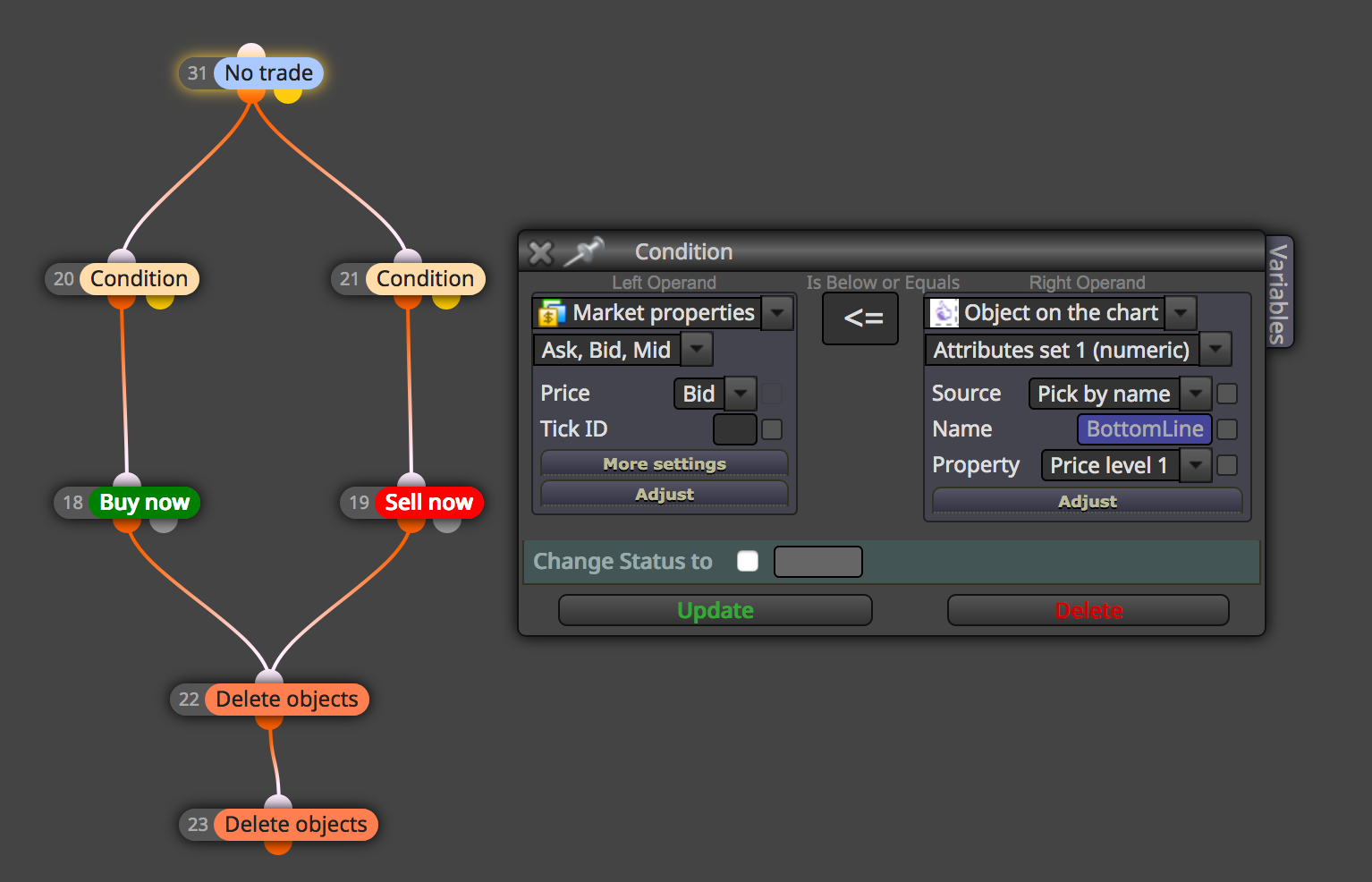
      Actually I could make that horizontal line after all. But can't make it BUY/SELL when it has crossed the lines.
      I did set the condition to check if it crossed the line, but it doesn't make the trade.

      0_1537435772576_Skärmavbild 2018-09-20 kl. 11.29.04.png

      posted in Questions & Answers
      C
      coverman
    • Drawing horizontal lines and open trades from them.

      I would like to draw a horizontal line 10 pips above current price and 10 below.
      How can this be done? Thought it should be done with "Draw Line".

      And if the market moves to this line it should buy/sell.
      I would also add a delay to the line so it isn't moving every tick.

      Is this possible to make? I have been looking around the different blocks but couldn't find the right ones.

      posted in Questions & Answers
      C
      coverman
    • RE: Max number of open trades

      Actually I think I solved it. It should have been connected to the yellow dot. I mixed up the True/False when using larger than.

      posted in Questions & Answers
      C
      coverman
    • Max number of open trades

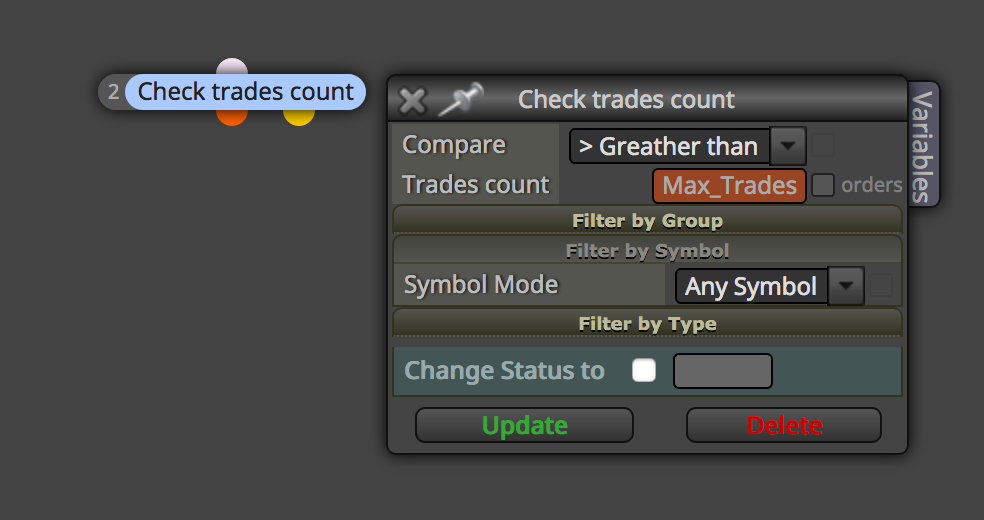
      I want to add one EA that is making trades with different currency pairs, but it should not take any new trades if there are more than the number of trades set.
      So, if I set Max trades to 3, the EA should not take any trades if there are 3 or more open trades running.

      I guess I can't use the Bucket of Trades, since the EA I am working on will only open trades and then another EA will take care of the open trades. So I just need to make sure that there are not too many trades open when taking a new trade.

      I tried the following block, but it won't take any trades at all when using this (at least when I tried it in the strategy tester).
      Is this the correct block to use for this idea?
      0_1535532561076_check.png

      posted in Questions & Answers
      C
      coverman
    • RE: Remove pending hedge orders

      Well, that's why I want it to look for all the open trades. If an EA is placing a pending order on USDCHF, EURUSD, AUDUSD or whatever pair, then it should look at all the open trades in my account and see if there are any open trades running in the opposite direction as the pending order and if so, then remove the pending order.
      This way I will not have any hedged open orders running in my account.

      It sounds so easy, but I just don't get it where to attack this strategy. In what end to start and then which blocks to use in the right way. And of, course... is it even possible?
      But in my head it sounds like an easy thing to check.

      posted in Questions & Answers
      C
      coverman
    • RE: Remove pending hedge orders

      Well, the might be a pending order on the EURUSD or the GBPUSD or other pairs. And there might be an open order on that pair that I took manually maybe. So I never know what it will be like all the time. So I need it to check the pending orders and if they are a BUY or SELL and then look if there are any other open trades in the opposite direction.

      posted in Questions & Answers
      C
      coverman
    • Remove pending hedge orders

      I want to make a very simple EA that removes pending orders that will hedge an already open order if they kick in.
      If I have an EA placing a pending BUY order on the EURUSD and I already haven an open SULL trade on the EURUSD I would like to delete that pending order.
      I guess it's very simple to make, but I'm not sure which way to start. So any ideas are welcome.

      I thought about starting with a block checking if there are any pending buy orders in any market.
      Then make a block next to that which is looking for any pending sell orders in any market.
      The next block after the buy check block have to look for open orders in that specific market and then I got stuck.

      Or should I start with a block looking for open orders and check wheter they are BUY or SELL and then look for pending orders?

      I just can't come up with a logical flow how to make it, but it should be easy... at least it would, if I just know which blocks to use here. Any ideas?

      posted in Questions & Answers
      C
      coverman
    • TradesTotal - function not defined

      When I use "Check profit (unrealized)"

      It says 'TradesTotal - function not defined' and also 'TradeSelectByIndex - function not defined'.

      Is it a bug?

      posted in Bug Reports
      C
      coverman
    • Any block to show pips after close?

      Is there any way I can get the amount of pips I have after an order is closed?
      I have tried to find it, but no luck.
      I would like to have the pips output either it's a positive or negative number.
      Is there a way to get this info in fxdreema?

      posted in Questions & Answers
      C
      coverman
    • RE: Close trades when they reach X pips loss

      Thank you. I tried this, but get an error when compiling it.
      It says 'TradesTotal - function not defined' and also 'TradeSelectByIndex - function not defined'.

      This is what I did.

      0_1520533313153_Skärmavbild 2018-03-08 kl. 19.21.22.png

      posted in Questions & Answers
      C
      coverman
    • Close trades when they reach X pips loss

      I want to make a very simple EA which is closing all trades (for that magic number) when they reach X pips negative. I did the blocks shown in the image, but it doesn't seem to work. What have I done wrong here?

      0_1520527777975_Skärmavbild 2018-03-08 kl. 17.46.48.png

      posted in Questions & Answers
      C
      coverman
    • 1
    • 2
    • 3
    • 4
    • 5
    • 6
    • 7
    • 1 / 7