fxDreema

    • Register
    • Login
    • Search
    • Back to the main page
    • Categories
    • Recent
    • Tags
    • Popular
    • Search
    1. Home
    2. fxDreema
    3. Best
    • Profile
    • Following 0
    • Followers 693
    • Topics 23
    • Posts 7308
    • Best 258
    • Controversial 18
    • Groups 1

    Best posts made by fxDreema

    • RE: VERY IMPORTANT....for all users

      Yes, sometimes it happens that all blocks suddenly appear empty. I don't know what is causing this, but fortunately it's easy to fix - just go one or more steps back in History (upper right corner).

      Also, when you doanload .mq4 or .mq5 file, the whole project is stored in this file down at the end in form of a comment. Even if the project is deleted from the server, it can be imported back from such file. And you can also store versions of such files as backups, just in case.

      posted in Bug Reports
      fxDreema
      fxDreema
    • RE: wait to pass

      https://fxdreema.com/demo/mt4-wait-crossovers

      posted in Questions & Answers
      fxDreema
      fxDreema
    • RE: All Blocks Resized + Lost All Connections

      I think I fixed this problem, although I could not understand why it happened.

      I'm still trying to find why the whole website is being so slow. I was thinking that big projects are to blame, but I was watching how the EA builder is working from different angles and I can't confirm that this is the problem.

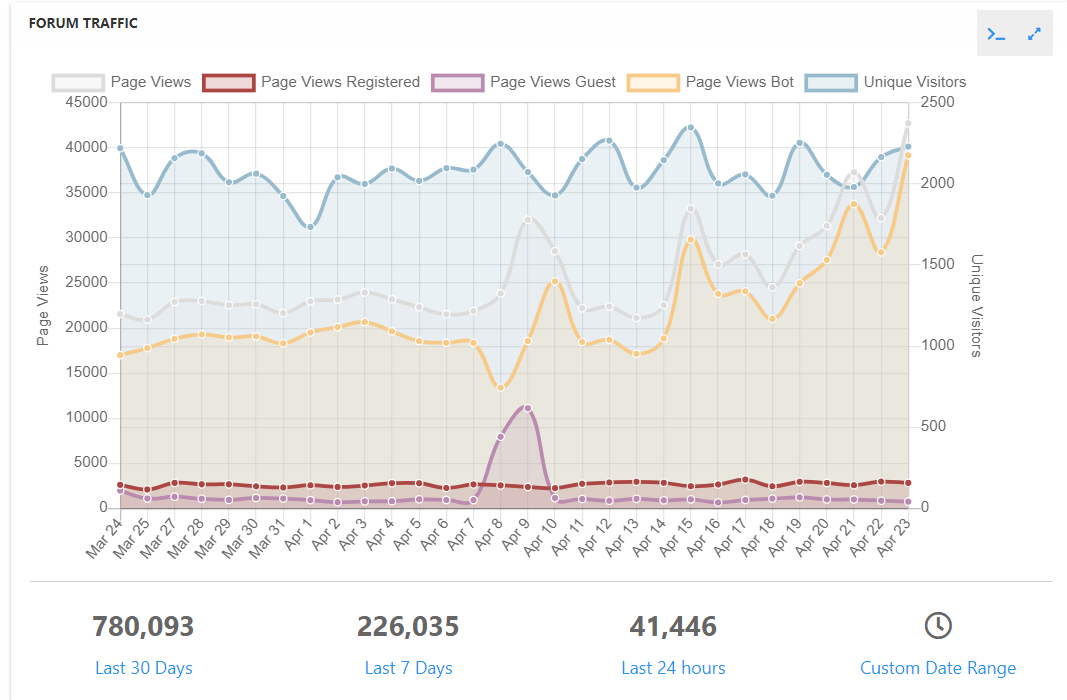
      Now I will focus on the forum. Look at the traffic these days:
      77306df4-68f0-4ac2-949a-5351500c5d40-image.png
      There is some obvious increase of traffic since these problems happened, although it doesn't seem too bad. But I will try what will happen if I disable the Search functionality or the whole forum for a while.

      posted in Bug Reports
      fxDreema
      fxDreema
    • RE: Inputs for Scripts

      It should be available now: http://prntscr.com/esicto
      Tell me if it doesn't work

      posted in Questions & Answers
      fxDreema
      fxDreema
    • RE: All Blocks Resized + Lost All Connections

      I found yet another slow query. Well, this one is not always slow, it becomes slow when the user has 1000s of projects, because there is sorting involved, which takes few seconds. And all of this is to get just the id of the last modified project. But it's possible to make this query very fast, I'm now trying to see exactly how. At this point it should be obvious that I'm not very good with databases 😄

      posted in Bug Reports
      fxDreema
      fxDreema
    • RE: I need help

      For the first question I can suggest this block "Indicator moves within limits". This block is a little bit scary, but it's a block who can actually iterate through candles and check values for each candle. Or, in "Condition" when you are using custom indicators there are few extra options available... for example you can find the candle number at which the indicator is "visible" (meaning, its value is different than EMPTY_VALUE)

      Zig Zag, I hate this indicator 🙂 Whatever I did for this indicator, I don't want to touch it anymore. I don't even know how this shit can be used, but anyway. In the indicators list you can find it, I have added few extra options on top of the original custom indicator that comes with MetaTrader. You can also import it as a custom indicator (in My Indicators) and use it like this... if you know how, because I really don't know 🙂

      posted in Questions & Answers
      fxDreema
      fxDreema
    • RE: All Blocks Resized + Lost All Connections

      Meanwhile an hour ago I updated all database queries. My hope and expectation now is that the website will be a little bit more stable when the 1000s of projects and 1000s of blocks come tomorrow.

      posted in Bug Reports
      fxDreema
      fxDreema
    • RE: How I use FXdreema For BackTest Multi Pairs By One EA In The Same Time ? In MT5

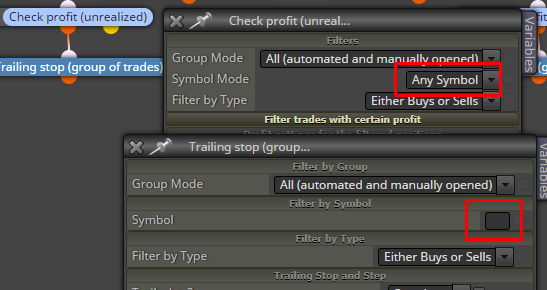
      I see that in some blocks the Symbol is empty and in other it's "Any Symbol":
      0_1549211854765_f68539e8-8b27-4a77-9442-0e8eb1b3d2cf-image.png

      So, the idea of "Set Current Market...." is that it makes the following blocks to think that the current symbol is not the current symbol. Let's say you have EURUSD,GBPUSD. Then the block will pass 2 times. The first time it will make the following blocks to think that the current symbol is EURUSD and the second time it will make them think that the Symbol is GBPUSD. But when you use "Any Symbol" for "Check profit", the block will check the profit of all trades from all symbols.

      posted in Questions & Answers
      fxDreema
      fxDreema
    • RE: "Renko Style" EA with trailling Stop, without indicator.

      If you are depressive, I don't think the place for you is in Forex. We all know the reality - most people lose money in Forex. This is brutal speculation where you have no control on the price. And when we add margin, eventually you will only sit and pray for the price to go back in your favor.

      posted in Questions & Answers
      fxDreema
      fxDreema
    • RE: 5 candles in a row with lower lows. Not working

      There is a block "Bears in a row"

      posted in Questions & Answers
      fxDreema
      fxDreema
    • RE: Digit Adjustment of Variable ** SOLVED **

      DoubleToStr() function takes a variable from "double" type and turns it into "string". "double" is a floating point number, while "string" is text. So it's not very correct what you are doing. Try NormalizeDouble() instead. The description of this function is like this: Rounding floating point number to a specified accuracy.

      In Adjust there is some trick that you can do. You know that in Adjust you normally start with +, 0, * or /. But you can also do it like this:

      = NormalizeDouble($, 5)
      

      When it starts with =, it's a little bit different. The final value will equal to whatever is on the right side of =. Well, I want to change the value that I got a little bit, not to give it a whole new value, so I use the value itself. That symbol $ is the value.

      posted in Questions & Answers
      fxDreema
      fxDreema
    • RE: Backtesting stops abruptly and I don't know why (but I guess why)

      The error is at line 13490 and 105 is the horizontal position at that line. It's about the lot size and I can tell you what is the problem 🙂

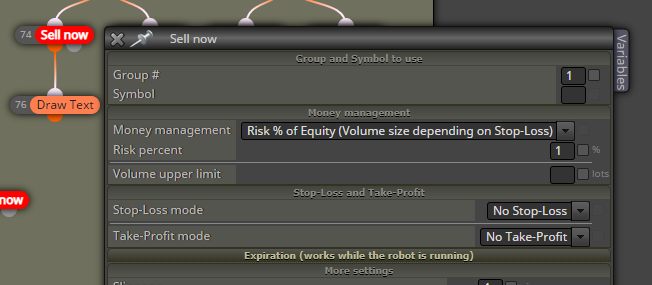
      So, what you have is this:
      0_1577105498279_005b25f6-d3ce-4c13-8ed9-b92d5c3de7bb-image.png

      The thing is, this MM method requires some positive value for SL and you can read that "Volume size depending on Stop-Loss". To calculate the lot size, the size of SL is considered - the bigger the SL, the smaller the lot size. But when SL is 0, then the lot size should be infinity, which is of course not possible, and that's why the error is "zero divide".

      posted in Questions & Answers
      fxDreema
      fxDreema
    • RE: Same TP multiple trades

      I didn't read the whole topic, so someone may already have given a good answer, but I will add mine just in case.

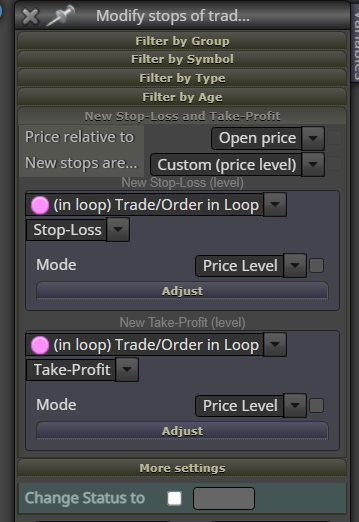
      Those blue blocks, such as "Modify stops of trades" or the trailing stop block - they do the same action on multiple trades, but not exactly at the same time. This block would modify one trade, then after this is done it will go to modify the second trade... and do this while all are modified. But meanwhile the price is moving, which I think is the problem, because "Price relative to" refers to the current market price, which is Ask or Bid.

      So I think the question is how to use more stable price. I think what you can do is to have some "double" variable, in which you can store the value of the price above the blue block, and then use that variable in the block.

      Also, try this. I'm not exactly sure that it's working, but...
      0_1652093749683_0db33e10-816d-4740-a340-250bbc0d7915-image.png

      posted in Questions & Answers
      fxDreema
      fxDreema
    • RE: are experiencing the same?

      I think the server was out of RAM or something. On the server I'm running Chrome for some scripts, and after some days of working it tends to eat the memory. I closed them (plus some other old processes) and I think it works better now.

      Maybe there is also someone working on a big project, because I notice some spikes that could be related to this.

      posted in Questions & Answers
      fxDreema
      fxDreema
    • RE: Would it be a bug??? Sum in Loop for 2 or more orders not working!

      Now that's an example that contains a good amount of blocks and is easily testable, I like it 🙂

      The problem is that you are not incrementing the variables.

      Let's get twobuys for example. Block 9 would run block 8 twice for the two last positions, first the last position and then the previous.

      • On the first run twobuys is set to the profit of the last position, which is -4.06. The value of twobuys was 0 and became -4.06.
      • On the second run twobuys is set to the profit of the previous position, which is -4.00. The value was -4.06 and became -4.00.

      If you want to sum both values, you should add the value of twobuys to itself on every run. But also, you must reset the variable every time before such incrementations, otherwise the value will grow and grow without limits.

      image.png

      Instead of the side Variables panel, you can also use "Modify Variables" before blocks 9 and 11 to set the variables to 0.

      posted in Questions & Answers
      fxDreema
      fxDreema
    • RE: Forum update

      Hackers are not sleeping these days. The website is currently being attacked from 2 different hackers.

      One is loading bunch of forum pages, similar to search bots, but more aggressive. It doesn't seem dangerouns, but it's rude and I wonder why. It's interesting that this guy has few accounts here, one of which is ancient, from the very beginning.

      The other one is trying to brute force user emails and passwords from 1000+ different IP addresses at the same time. I know one account that used one of these IPs, and it was paid just before this attack started. It could be his account, or it could be hacked, I don't know. Anyway, I'm blocking almost all of his attempts now, he is just generating traffic. But in any case, my advice is to have strong passwords and as usual - keep the important projects locally as .mq4 or .mq5 files.

      posted in Questions & Answers
      fxDreema
      fxDreema
    • RE: Lock expert to account / broker

      When you have the expert as .ex4 file, this file is secured. So you can have everything in this file. For example, you can check under "on Init" for that account and terminate the EA. In "Condition" there is Account option with some account and broker data that can be checked. If the check fails you can use that "Terminate" block to stop the EA.

      posted in Questions & Answers
      fxDreema
      fxDreema
    • Multiple trades are created one after another?

      This is a very common problem and people often ask me why their EAs produce multiple trades non stop. Here is my answer...

      Variant 1
      The current count of trades is not checked before creating a new trade. Remember that blocks such as "Buy now" and "Sell now" are designed to create a new trade every time they run. If "Buy now" block runs 10 times, 10 trades should be created as a result. So, the idea is to not allow these blocks to run too often. The very first examples here show you exactly that - https://fxdreema.com/examples As you can see, the easiest way to be sure that you only have 1 trade at a time is to connect "No trade" block somewhere above "Buy now" and/or "Sell now".

      Variant 2
      You use "Close trades" somewhere and what really happens is that every time a new trade is created, it is closed immediately after that.

      It's important to remember that every time you run "Close trades" block, it does its job - if there are trades to be closed, they will be closed. So it's important to run "Close trades" only when trades needs to be closed. Look at Variant 1 and you will see that this is also true for blocks "Buy now" and "Sell now" - you only need to run these blocks when a new trade needs to be created.

      Again, you need to use some conditions or filters above blocks "Buy now", "Sell now" and "Close trades". But the conditions above "Buy/Sell now" and the conditions above "Close trades" MUST NOT be true at the same time.

      What people often do is that they connect their "Buy now" and "Sell now" blocks with certain conditions and then they use the same conditions above "Close trades" block. And the result is that trades are created and immediately after that they are closed, because the conditions to create trades and close trades are the same.

      How to fix the problem? It depends on the situation. For example, look at this project - https://fxdreema.com/demo/mt4-buy-sell-buy-sell-opposite-conditions You can see that "Close trades" blocks are used under exactly the same conditions to Buy and Sell. You may say "But fxDreema, you just said that this is wrong...". And again, it is wrong to close trades right after they are created, but if you try this particular expert advisor you will see that such thing does not happen and everything works fine.

      Let me repeat that again - do not allow "Close trades" to run shortly after a trade creation.

      posted in Questions & Answers
      fxDreema
      fxDreema
    • RE: Why MT5 EA correct logic but is not working

      It doesn't work in both for me, but because of an error coming from Buy and Sell blocks. It's about the chosen money management, which requires some Stop Loss to be set

      posted in Questions & Answers
      fxDreema
      fxDreema
    • RE: Can't load projects after fxDreema server update

      This was ugly. It's working now. I expected problems, maybe not so many, but at the end it will be better. I already see that everything loads almost 2 times faster.

      posted in Bug Reports
      fxDreema
      fxDreema
    • 1
    • 2
    • 3
    • 4
    • 5
    • 12
    • 13
    • 2 / 13