fxDreema

    • Register
    • Login
    • Search
    • Back to the main page
    • Categories
    • Recent
    • Tags
    • Popular
    • Search
    1. Home
    2. GeoFX
    G
    • Profile
    • Following 0
    • Followers 1
    • Topics 11
    • Posts 71
    • Best 11
    • Controversial 1
    • Groups 0

    GeoFX

    @GeoFX

    12
    Reputation
    971
    Profile views
    71
    Posts
    1
    Followers
    0
    Following
    Joined Last Online
    Location Russia

    GeoFX Unfollow Follow

    Best posts made by GeoFX

    • RE: We need to have an in-built News Filter...It is high time we have this MT4 and MT5

      @GeoFX said in We need to have an in-built News Filter...It is high time we have this MT4 and MT5:

      UPD: After the recent MFF scam exposure event, I believe, my post above deservers an additional input for the community sake.

      • From this point and onwards, none of the companies in the list above is trustworthy, no matter the claimings on win-win business model and the conflict of interest absence. Same doubt applies to the Live accounts provided to the qualified challenge participants, prop firm's direct liquidity provider cooperation, and STP/NDD order execution infrastructure claimings.
      • I will tend to consider their statements may be equally fault, until the regulation will step in the proprietary trading field.
      posted in General Discussions
      G
      GeoFX
    • RE: Finally, News Filter for MT5 in 1 easy to use Block !!
      • Hey mates! Thank you for doing this! πŸ™Œ Since this topic is so popular, could anyone shot a step-by-step video tutorial on how a News filter is built w/ FXStudio and post it in this thread
      • I believe it would be much appreciated by the community, especially by those having less experience w/ FXStudio and Custom Block building. Thank you! πŸ™
      posted in Tutorials by Users
      G
      GeoFX
    • RE: builder doesn`t respond
      • @biztet I can confirm i experience same problem sometimes as i have many blocks on my project FYI same as many other users here. It seems like it is FXDreema performance-related bug. It fails to process too many blocks at once, so user must keep the backup mq4 file at all times to make sure not to lose the track of the project progress.

      • The suggested block quantity per tab is no more than 1000 pieces, based on my experience with the platform so far. Severe lags and other functional failures start to appear if this threshold exceeded. I guess that is the platform code capacity or maybe infrastructural limit when if exceeded, the performance drops significantly, so the errors start to occur

      • Also, the Load project option isn't reliable as it just keeps the last 1 project instead of let's say last 5, which is pretty much useless if the last one exhibits the problem in this topic for example, then it is useless as that last project is not recoverable

      • I bet, admin knows about these issues, but not doing much about it, so i always keep the last MQ4 saved aside and do backups as frequently as possible, especially after any major project change

      • Given the conditions, admin is not too active on improving on such fundamental bugs, I suggest a quick workaround : -> if users want to keep many blocks on the SAME project, ON DEINIT tab may be used as a storage buffer, where user can keep temp. unused, disabled blocks/chains of blocks for a future use. This setup allows to keep the block quantity on the ON TICK tab relatively low thus not compromising the performance too much. Hope, that suggestion will help all who struggle here with data loss and will save many working hours of rebuilding similar block-chains over and over again either after a project loss, or in the multiple EA programming scenario where the block-chains can be shared between the different EAs staying within the same project framework

      • In the past I've proposed to create something like a vault/buffer where the blocks could be temp. kept and shared between the projects, for the users to have under their finger tips and save their time and efforts, but admin not moving on that evident refinement. No argue, it can be challenging though for him, but i believe he should love challenges because he is a true dreamer same as we are all here..))

      cc @FXDREEMA @l-andorrΓ 

      posted in Bug Reports
      G
      GeoFX
    • RE: BackTesting different from live trading
      • @ZakTrading also you can review to protect your SL with what I call "Conditional SL"

      • In the nutshell, you may want to set an additional rule for SL based on the candle close rather than just a price reaching a fixed SL price level

      • Example: your SL is 30 pips (or relative ATR %) and you operate on the 5 min TF. You can set a rule that your SL is triggered only in case if price CLOSE on M5 behind your SL price level.

      • This can make your SL more rigid to broker's spread-widening (during high impact news, holidays or Asian session) and MM Stop-hunt manipulations. You can see this as a reliable spike protection

      • However, this approach to an SL has its pros and cons. In case of a high volatility, this may incur relatively bigger loses if price eventually close behind your SL comparison to a fixed SL

      posted in General Discussions
      G
      GeoFX
    • 4108 Error: Invalid ticket/order close error

      Hey folks, just wanted to contribute on the 4108 MT4 order close / invalid ticket error. After literally 100+ tests and a couple of sleepless nights couldnt find any solution on this forum but after googling the issue I finally grasped the general impression on whats causing this fault.

      0_1587588855676_4108.jpg

      Heres a FF coder explanation on the issue : https://www.forexfactory.com/showthread.php?t=511029

      Without goin deep in details, heres, HOW YOU SHOULD NEVER DO, when putting "For each trade"/"For each pending order" and the rest of the pink extention blocks :

      0_1587588575791_UNCORRECT.jpg

      and heres, THE CORRECT ORDER:
      0_1587588842123_CORRECT.jpg

      During my FXDreema learning curve, Ive found, that if you not getting the behaviour you expect from your EA, check if the sequence of the logic blocks is correct first. Always make sure, those pinky extention blocks are DIRECTLY connected to the Parental "For each trade"/"For each pending order" block and no other block part them inbetween.

      Hope, this will save time and effort for new guys over here

      posted in Tutorials by Users
      G
      GeoFX
    • RE: Custom Indicator Recognition

      Mates, you've all made my day! What a lovely community!! Thank you!

      HINT: how I personally use Class A Divergence best :

      • Set the TMF period to 48 (tested on different TS's) with no smoothing applied to price close (screenshot)
      1. For trend trades: accept all the divergences as an entry signal

      2. For counter-trend trades: - use TMF 0 level as a filter for divergences

      0_1572662482793_Screenshot_1.jpg

      posted in Questions & Answers
      G
      GeoFX
    • RE: Experiencing considerable lag

      Hey there! Check out my 1000+ blocks on the same project-related issue post here : -> https://fxdreema.com/forum/topic/14841/builder-doesn-t-respond/14

      posted in Bug Reports
      G
      GeoFX
    • RE: EX4 custom indicator with licence key conversion

      Roar, you r magician! It worked, man! I've just edited int datatype to string .mq4 file fields manually via MT4 editor, and it compiled it with no errors and warnings!

      0_1592086283752_Screenshot_2.jpg
      Roar rules! Thank you!

      Maybe it was a temporary bug or something, but the day before I already had the correct string datatype and correct value entered in fxdreema prior to compilation, yet it kept failing to compile correctly, putting int instead of string, as you've noticed. Now fxdreema compiles it correctly, though.

      posted in Questions & Answers
      G
      GeoFX
    • RE: Experiencing considerable lag
      • Hi folks! To update this thread on bulky Project Saving/Syncing failures that may appear from time to time.

      • This typically happens to the extended Projects with more than 500+ connected Condition Blocks.

      • Not sure if the solution I've found was already described on this Forum or in any of the platform Manuals, but just for the Community contribution sake:

      • There is no need to store all the Condition blocks you've already built once in the same Project if those planned to be used for the future use on new Projects, as that entails that your Project will eventually become more bulky and unexportable.

      • In case anyone needs to use any of the older Condition blocks or some parts of the previous Projects you've already built, FXDreema actually supports Copy/Paste operations through the OS Default Clipboard BETWEEN THE DIFFERENT PROJECTS

      • Example: one can store his older Condition Blocks in a single "Archive project", occupying any of the Project tabs: OnInit/OnTick/OnDeinit etc for a later use on a new Project, and copy a certain Condition Blocks from the "Archive project" to any new project through the clipboard, when required

      • The only requirement would be the "Archive Project" must remain exportable, to make sure you always keep a local recovery backup copy.

      • This allows keeping the new Project lightweight, while retaining access to the older Condition blocks through an "Archive Project", thus the building and syncing operations on a new Project will be performed much more efficiently and quickly

      • Additionally, by organizing a personal FXDreema workflow according to the scheme described above, user can significantly optimize the time spent on EA testing and building operations, as he can always use parts of his previous Projects to start with or enhance on the new Projects WITHOUT REBUILDING SAME BLOCKS FROM THE GROUND UP each time

      • Hope that will help many of the aspiring FXDreema users moving forward

      posted in Bug Reports
      G
      GeoFX
    • RE: EX4 custom indicator with licence key conversion

      Folks, if fxdreema builder fails to build the .MQ4 EA file, try to rebuild the block IDs first.
      Go to: Options -> Project Options -> Project Blocks: Normalize IDs

      Another bug i've noticed along my fxdreema experience and I suppose the problem lies within the MT4 platform itself and how it keeps its logs and history, is when you save your .MQ4 file, sometimes it is saved with an old modifications from your previous fxdreema edits. You can notice such bugs when you check your latest version EA modifiable parameters over the EA Input Settigs tab which just arent there. All you can observe is an old parameters from your EA previous version, only.

      I cure it with EA name modification BEFORE of each save + Block IDs rebuilding, so everytime I save my project to the MT4 experts directory, Im confident my EA been saved with the latest parameters I've put.

      Those tricks can really help, when it seems you have already done everything right, but for the unknown reason your EA doesnt work as expected

      posted in Questions & Answers
      G
      GeoFX

    Latest posts made by GeoFX

    • RE: Top up request

      @jstap Thank u mate!

      posted in General Discussions
      G
      GeoFX
    • Top up request

      Greetings, mates! Not sure where to land it:

      • I want to send a request to the support team. I typically wouldn't ask this in the past, but i'd like to request you if it is possible to extend my subscription for +90 days without extra charge?

      • The reason is: - I haven't used FxDreema once I've made a purchase on - 2024 june 11th that was valid until 2024 sept 11th.

      • I din't really used the platform after that day.

      • You can check internally. I barely had a chance to log in at all, because I had some private life emergencies for a couple of months right after I've made a payment.

      • I'm a typical occasional private retail FxDreema user. I'm not using platform for commercial development on MQL. So I'm not running 30+ Projects to earn money, or anything of that sort.

      • I've been an FXDreema fan for a couple of years already, and I typically prone to contribute on the FXDreema Forum, if I bump on anything valuable, at times.

      What I expect:

      Top up my current subscription with 90 days plan without additional payment.

      Thank you very much in advance, mates!!

      Transaction details:

      Reference Code - PO24163001706888

      Amount -36.00€

      Transaction description - CAETARA SOFIA BG

      Transaction type- CARD PURCHASE

      Instrument details - PREPAID CARD MC *4004

      Transaction date : 2024 June 13th


      For the record: my FxDreema acc email - pushd123@mail.ru

      I typically not using that email a lot, so it is best to reach out to this contact email addr: - geokiss777@gmail.com

      _

      posted in General Discussions
      G
      GeoFX
    • Easy scrolling and navigation multiple Areas w/ 100+ blocks

      Hey folks, happy to drop a message here!

      I'd like to share some Chrome browser extensions I've found recently, that allow for much easier FXDreema platform navigation, especially, if your Project has 100+ blocks and 4+ Areas that doesn't fit in a typical screen setup.

      1. ReScroller

      ReScroller is a simple solution allows for a scrollbar scaling on the FXDreema Platform. What is remarkable, many competitors (Modern Scroll, Scrollbar Customizer, etc) are fail to gain control over FXDreema platform framework, comparison to a ReScroller extension

      Chrome Marketplace Link : https://chromewebstore.google.com/detail/rescroller/ddehdnnhjimbggeeenghijehnpakijod

      2. ScrollAnywhere

      ScrollAnywhere is an interesting web-page navigation solution, allows for initiating scrolling regardless of the current pointer screen position, by employing right-click button or any other mouse button assigned for a scrolling purpose, according a user's choice

      Chrome Marketplace Link :
      https://chromewebstore.google.com/detail/scrollanywhere/jehmdpemhgfgjblpkilmeoafmkhbckhi

      posted in Tutorials by Users
      G
      GeoFX
    • RE: How to break or next an object loop?

      @fxpim hey mate, I'm into SMC object-based project as well right now:)
      Do you mind sharing the logic you've mentioned on the breaking Objects in the loop via sharing a project link? Thank you in advanceπŸ™Œ

      posted in Questions & Answers
      G
      GeoFX
    • RE: We need to have an in-built News Filter...It is high time we have this MT4 and MT5

      @GeoFX said in We need to have an in-built News Filter...It is high time we have this MT4 and MT5:

      UPD: After the recent MFF scam exposure event, I believe, my post above deservers an additional input for the community sake.

      • From this point and onwards, none of the companies in the list above is trustworthy, no matter the claimings on win-win business model and the conflict of interest absence. Same doubt applies to the Live accounts provided to the qualified challenge participants, prop firm's direct liquidity provider cooperation, and STP/NDD order execution infrastructure claimings.
      • I will tend to consider their statements may be equally fault, until the regulation will step in the proprietary trading field.
      posted in General Discussions
      G
      GeoFX
    • RE: Finally, News Filter for MT5 in 1 easy to use Block !!
      • Hey mates! Thank you for doing this! πŸ™Œ Since this topic is so popular, could anyone shot a step-by-step video tutorial on how a News filter is built w/ FXStudio and post it in this thread
      • I believe it would be much appreciated by the community, especially by those having less experience w/ FXStudio and Custom Block building. Thank you! πŸ™
      posted in Tutorials by Users
      G
      GeoFX
    • RE: Is object at Candle ID?
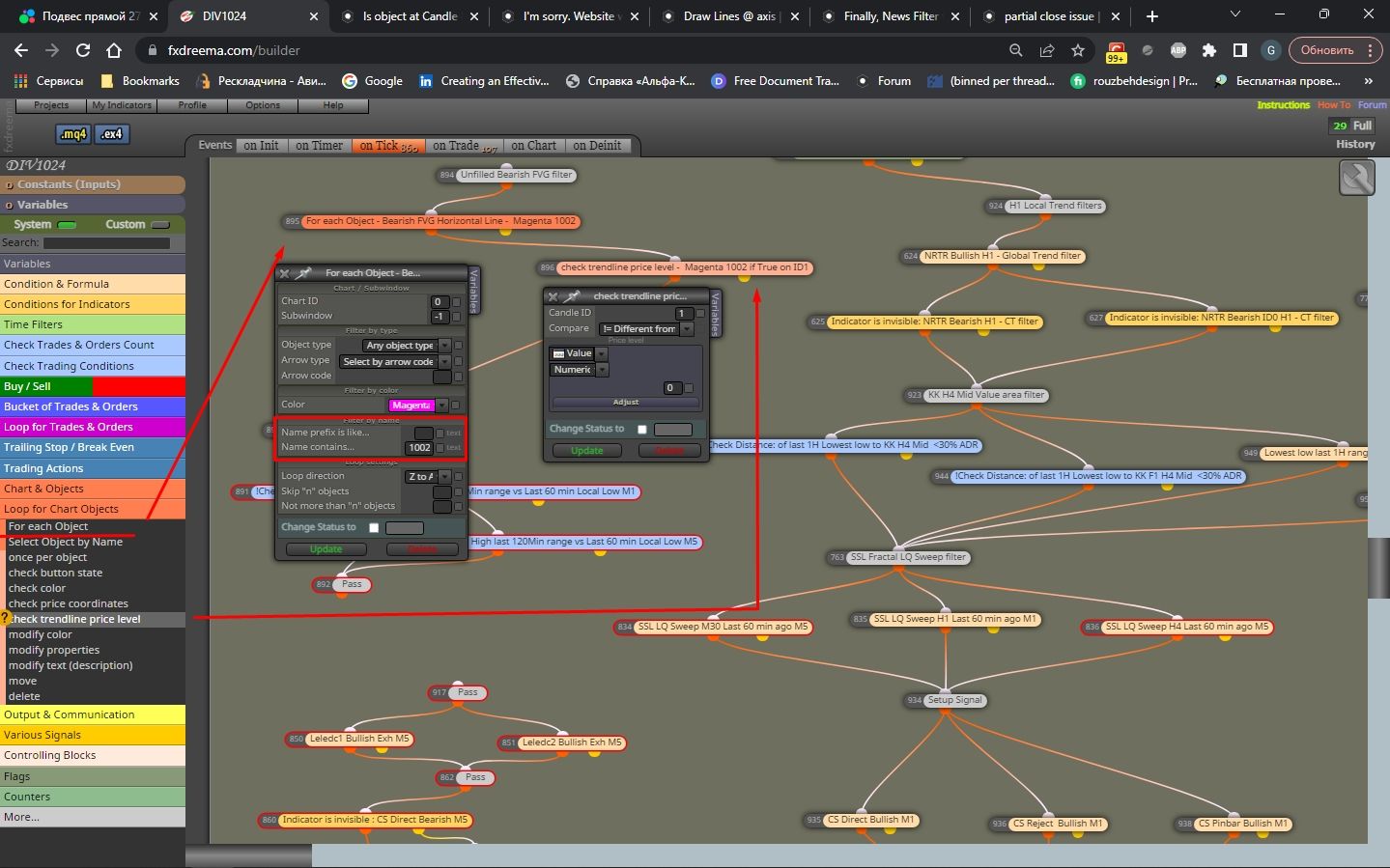
      • @TipsyWisdom Hey mate! If i understood correctly, check out the screenshot to see how I spot if an Object is True at a certain Candle ID.
      • Feel free to use any variety of the Object's attributes fitting your case. In my case I used Object's Color+Object's Partial Name. πŸ™Œ
        Screenshot_1.jpg
      posted in Questions & Answers
      G
      GeoFX
    • RE: I'm sorry. Website was hacked. It's my fault.
      • @mehrdad-zaiemi Hey mate! What @jstap meant to express, is it is in your best interest to start a new thread for your question to make it easier for the community to help with your request
      • This current thread has entirely different subject, so in order to keep communication effectively for a future reference, kindly follow this link and hit New topic button to create a new user request πŸ™
      posted in Questions & Answers
      G
      GeoFX
    • RE: EA robot and multiple charts
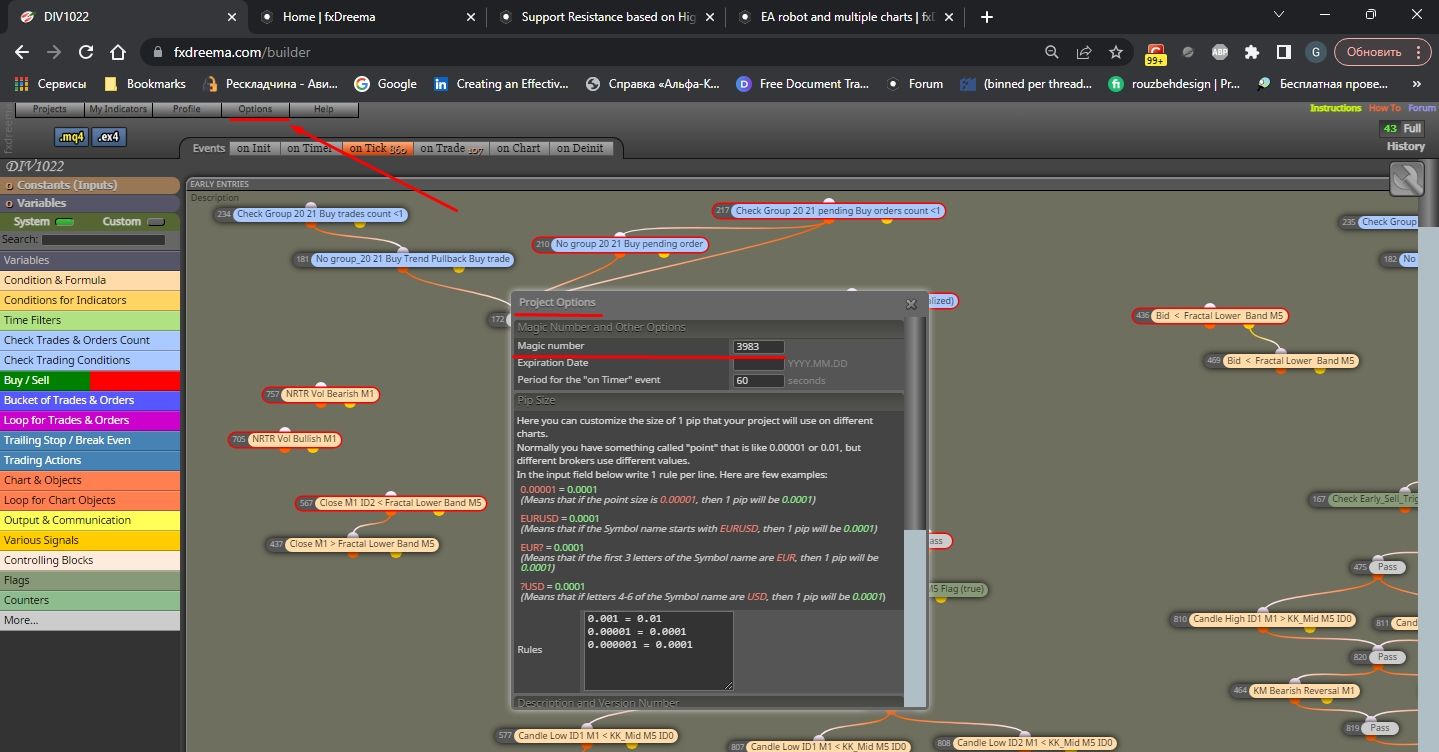
      • @HDPaul Hey mate. It's likely you will need a different Magic number assigned for each EA you attach to each chart. That entails the MT platform will treat each EA separately.
      • You can find the Magic Number setting in the Options->Project Options. Try it out to see if that works for you πŸ™

      Screenshot_1.jpg

      posted in Questions & Answers
      G
      GeoFX
    • RE: Updating code
      • @traderthomas Hey mate, that used to happen to me as well a couple of times in the past.
      • Just rename your current bot version and save it as a separate mq4/.mq5 and recompile it. The old settings must be updated if you do this.
      • Nonetheless it is still a bug worth fixing I believe cc @fxDreema
      posted in Questions & Answers
      G
      GeoFX