fxDreema

    • Register
    • Login
    • Search
    • Back to the main page
    • Categories
    • Recent
    • Tags
    • Popular
    • Search
    1. Home
    2. isp00rt
    3. Posts
    • Profile
    • Following 0
    • Followers 5
    • Topics 65
    • Posts 445
    • Best 9
    • Controversial 2
    • Groups 0

    Posts made by isp00rt

    • RE: Could someone please tale a look on my EA?

      I made a substantial modification following your suggestions and this is the new structure now:

      https://fxdreema.com/shared/n5Mvu48b7

      All issues have been solved except one and I would appreciate some help to fix it, please. Some Stop Loss levels are not correctly executed, but weirdly not all of them.

      This is an image of what happens all the time:
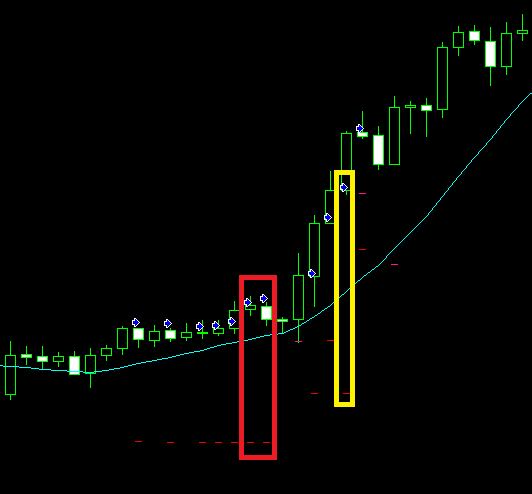
      0_1531476481063_01.png

      Here you can see two sequences of trades correctly executed: the first one is comprising the first 7 trades, then it touched SL and a second one of 4 additional ones was opened. So far so good.

      Let's begin with the first one. Trades 1 to 5 have their SL correctly positioned. As trades 2 to 5 have an open price below the first one, block 46 is correctly executed and the SL level is the one of that trade. The problem comes when trades 6 and 7 are opened (highlighted in red at the image). As you can see there, the same SL level of the first trade is positioned when their open prices are above the original one. In this case, for a reason I don't understand block 33 does not works properly, block 28 is ignored and block 46 is wrongly applied again.

      This same situation is found again on the second sequence. Trades 8, 9 and 11 are correctly executed, whereas at trade 10 (highlighted in yellow) is applied the same SL as trade 8. 😞

      Could you please tell me what I am missing?

      Thank you very much in advance

      posted in Questions & Answers
      isp00rt
      isp00rt
    • RE: Heiken Ashi EA buys and closes trades but wont sell and close trades?

      I see both 'Buy now' blocks have 'How much...' and 'in pips' checkboxes selected. Deselect all of them and try again.

      posted in Questions & Answers
      isp00rt
      isp00rt
    • RE: Heiken Ashi EA buys and closes trades but wont sell and close trades?

      I recommend you try to optimize block's use. Fox emaple use just one 'Once per bar' and not two (blocks 2 and 14 on the left, blocks 15 and 27 on the right). Same with 'Close trades' (blocks 6 and 12). In this last case, both are configured to close buy AND sell, no matter what. If you don't want to do that, you shoud specify that block 5 should close buy trades only and block 11 sell trades.

      Hope it helps.

      posted in Questions & Answers
      isp00rt
      isp00rt
    • RE: Can I use close trade and close partially in the same ea

      And what's your exact problem? Does it close your trades partially or not?

      posted in Questions & Answers
      isp00rt
      isp00rt
    • RE: Could someone please tale a look on my EA?

      Good points. I will check all of them. Thank you very much. 🙂

      posted in Questions & Answers
      isp00rt
      isp00rt
    • RE: Unannounced change by fxDerema?

      Ok. Thanks.

      posted in Questions & Answers
      isp00rt
      isp00rt
    • Unannounced change by fxDerema?

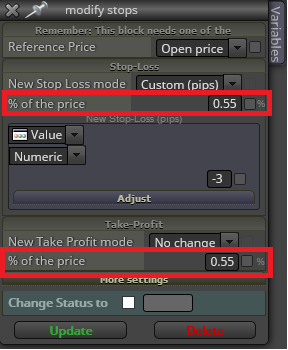
      This week an unexpected change has been made on the 'modify stops' block at its 'New Stop Loss/Take Profit mode' display when 'Custom pips' option is selected:

      0_1531048730820_00.png

      What does it mean and how does it work now?

      posted in Questions & Answers
      isp00rt
      isp00rt
    • RE: Problem getting pending order's Stop Loss price

      Hi josecortesllobat,

      Just curious. Why did you change that Group mode? I don't see the difference between your fisrt and second reply.

      posted in Questions & Answers
      isp00rt
      isp00rt
    • RE: Add a Position to a Current Winning Position

      How are you defining which trade is the first one?

      posted in Questions & Answers
      isp00rt
      isp00rt
    • Could someone please tale a look on my EA?

      This is my most complex EA designed so far and it doesn't work as well as it should. This is why any help would be much appreciated. In general it works correctly but for reasons that I don't understand, weird things happen. Here it is:

      https://fxdreema.com/shared/GKZsBDGArc

      This is what it is intended to do:

      1. An initiating bull/bear trend is identified by using a MA and MACD indicators.

      2. Once identified a trade is open at every candle following that trend.

      3. Stop loss level is programmed to do the following: a) Move to break even when some profit level has been reached, b) Move as trailing stop once above the break even price, c) Use the MA as a trailing stop from the following candle after the trade was open. All three option are active simultaneously so that whatever happens first the stop loss level is immediately moved.

      4. Trade rules: a) The first one after the new trend is identified is opened at the custom stop loss level manually inserted at the initial EA's configuration. That stop loss level will be the one all following trades will be using. b) If the second or any subsequent trade is opened at a lower (bull trend) / higher (bear trend) price than the first one then the stop loss level used will be the existent right now as per point 3 above. c) If the second or any subsequent trade is opened at a higher (bull trend) / lower (bear trend) price than the first one then the stop loss level used will be the one manually inserted if breakeven or trailing stop have not been activated yet, otherwise the one existing right now.

      5. All open trades are immediately closed at the end of the day.

      And this is what doesn't do correctly:

      1. Subsequent trades at a higher (bull trend) / lower (bear trend) price than the first one before the break even or trailing stop rules have been activated are opened at the wrong stop loss level of the first one. It is intended that they are applied its custom stop loss level.

      2. When a trend has been finished and all open trades have been closed by the common stop loss, apparently that SL level is memorized somewhere an when a new trend in that same direction is identified later all new trades are opened using that same SL level no matter what.

      3. Another weird thing is that from time to time when a trade is opened its SL level is modified during that same candle when that should never happen. All trades must have their SL level when opened and then it will be modified from the following candle onwards, never before that.

      As in previous threads in this forum, thank you very much in advance.

      posted in Questions & Answers
      isp00rt
      isp00rt
    • RE: Questions about the 'Bucket of close trades' block.

      Ok. Thank you.

      posted in Questions & Answers
      isp00rt
      isp00rt
    • Questions about the 'Bucket of close trades' block.

      I'm going to use the 'Bucket of close trades' block for the first time and I want to confirm I understand it correctly. This is want I want:

      1. I need to sum up all pips closed (positive and negative) today (only today).
      2. The overall result of that sum will be put into a variable that will be used for additional calculation for trades open today (only today).
      3. This bucket will be automatically emptied at the end of today so that there wil not be any closed trade tomorrow.

      Now let's take a close look to how I think this can be done:

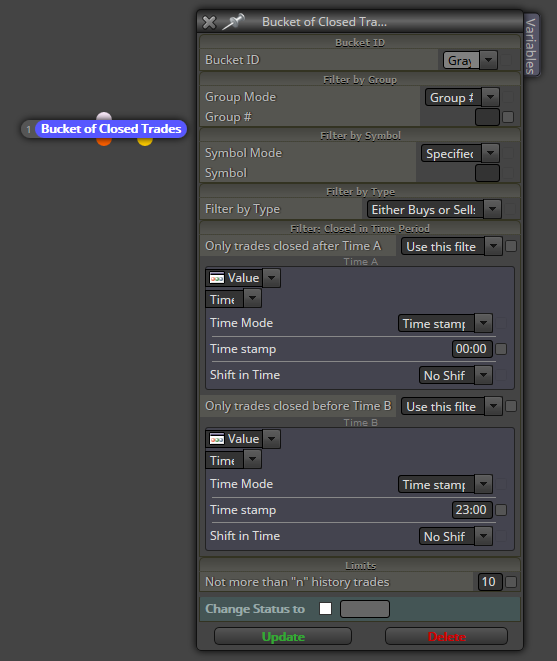
      0_1530093234073_01.png

      And my questions are:

      1. Are filters correct? I want that all closed trades from 00:00 to 23:00 today are being considered.
      2. What does the 'Shift in time' option do?
      3. About the last parameter 'Limits', according to the additional info available it's the minimum number of closed trades to be put into the bucket. I guess I need it to be 1 because I want all closed trades today. Am I right?
      4. Will this configuration be automatically 'emptied' today at 24:00 so that not a single past closed trade will be put into the bucket tomorrow?
      posted in Questions & Answers
      isp00rt
      isp00rt
    • RE: help please

      Maybe you should share more info about what you want exactly 😉

      posted in Questions & Answers
      isp00rt
      isp00rt
    • RE: Possible bug at modifying variables

      Ok. Thanks.

      posted in Bug Reports
      isp00rt
      isp00rt
    • Possible bug at modifying variables

      I am testing these two blocks in order to show the value of a custom indicator at my chart:

      https://fxdreema.com/shared/VSISg3V3e

      Basically I want to see the value of that indicator at candle 1. Initially it runs smoothly, but after a few candles have passed it shows a weird number that has nothing to do with the indicator. The weirdest thing is that this number is exactly the numer of bars allowed at my MT4 platform! It's exactly that number.

      Could you please take a look at it?

      posted in Bug Reports
      isp00rt
      isp00rt
    • RE: Trader

      Put that result into a variable and then show it up through the block 'Comments (ugly)'.

      posted in Questions & Answers
      isp00rt
      isp00rt
    • RE: Silly question. Please don't laugh at me...

      Many interesting ideas to explore. Thank you all for them. I'll try them ;).

      posted in Questions & Answers
      isp00rt
      isp00rt
    • RE: Silly question. Please don't laugh at me...

      Interesting. Where can I find that file?

      posted in Questions & Answers
      isp00rt
      isp00rt
    • Silly question. Please don't laugh at me...

      I know it will sound weird, but I promise I need it. I would like to activate/deactivate the 'Autotrading' at the top menu of the MT4 platform. I'm designing an EA that should terminate after its target is reached but I don't want to use the block 'Terminate' because then I must run it again and I have to insert more than 20 manual variables (no kidding) :).

      It would be much easier if the EA is not terminated (so the variables are still active) but it cannot operate because the 'Autotrading' button is not on.

      Any hint? 😉

      posted in Questions & Answers
      isp00rt
      isp00rt
    • RE: Condition Operator as Constant?

      I don't understand what do you want exactly. You can use your 'OrderPct' constant on the right side of the Condition block by choosing the option 'Value' at the upper display.

      posted in Questions & Answers
      isp00rt
      isp00rt
    • 1
    • 2
    • 10
    • 11
    • 12
    • 13
    • 14
    • 22
    • 23
    • 12 / 23