No block does that AFAIK. You can easily do it at the MT4 platform itself by specifying at the History period tab.

No block does that AFAIK. You can easily do it at the MT4 platform itself by specifying at the History period tab.
Updating the problem. For some weird reason, evert time I download the mq5 file, all Envelopes parameters are sistematically changed to Lower line. In my desktop account parameters are visually correct, but even the link included at my previous messages shows them wrong (buys and sells are opened at crossing the lower line only)
Apparently the problem is not at the block itself but at the moment of downloading/creating a copy of it.
I tried this EA on MT5 https://fxdreema.com/shared/v51tJd6Ub but doesn't work correctly.
Buys should be opened when price crosses the upper line and sells when crossing the lower line. When backtesting it all trades are opened when price crosses the lower line only, no matter what. Could you please fix it?
I converted an EA from MT4 to MT5 and more than 180 bugs were reported when it was compiled. I compared both versions and noticed that the block 'For each trade' on MT4 is called 'For each position' on MT5. I substituted them and no more errors were detected. Could you please update it?
Firstly tou need to know the name of that line as created by your indicator. You can find that at the 'Objects list' of your chart. Once you know the name you need to put it here:

Please be aware that this block is only available at the 'on Chart' tab. That way every time that line is created it will be detected by the EA and then you'll be able to send that info where required.
That red line is not included at any buffer. It's an object, so you need to identify when does that object appear on chart. Buffers are not relevant in this case, you can ignore them.
Not sure if this may be helpful. https://fxdreema.com/forum/topic/6412/aaaaand-the-zigzag-indicator-again
Supetrend is superlame. Simply don't use it. It repaints up to the last three candles.
I forgot to say that Variable A is reset at a different place in my EA, not shown at my example. That point is already fixed.
On the other hand, trading model is exactly what I need according to its definition. I want the SL to move only when the price is ABOVE open price in a buy and BELOW open price in a sell. Additionally, I don't understand why a button is required for it to work. Your additional blocks are really necessary? Why should I add a button?
This is a part of my latest EA and it doesn't work:
https://fxdreema.com/shared/SBX9d9xib
What is intended to do is easy. Once price reaches 50 pip move SL to 3 pips beyond breakeven. Once it reaches 100 pips close the order. Well, I don't know why but it doesn't do any of them.
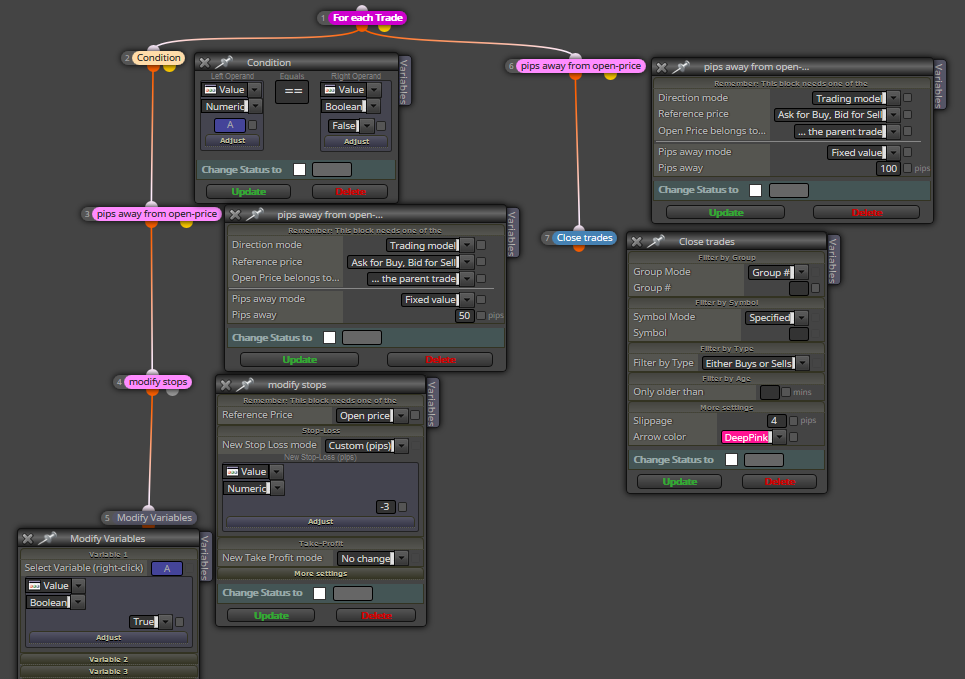
Could someone please tell me what am I missing?
When you try to change that variable select this option:
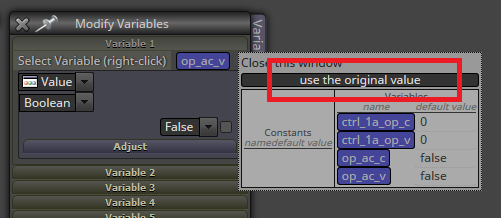
That will erase the selected variable.
You cannou use candle ID 0. That is the current forming bar. Until it's not completed, you will not know how big is (size). You should compare bars 1 and 2, never 0 and 1. On the other hand you can use 'Bull/Bear candle' blocks.
I use that same structure of blocks at the on tick tab and it works smoothly for several EAs ;).
Are you useing the correct 'Buy/Sell now' blocks?
You ned to create a variable to save it there. Then insert the variable into a 'Modify Variable' block. Then you have to select 'Value' at the first display and 'Pips' in the second. Finally at the 'I mean...' display you need to select 'this value, as is' option.
Did you read the help section of this site? I strongly recommend it you to do it.
 I will try it. Thanks